

Think it would be a good idea to start collating various manufacturers APIs into one thread so we can start building out a matrix of kit we can interface with. For my input in this is mostly EV Charger related APIs:
A while back I did a fair amount of reverse engineering of EV Chargers & Octopus API which I currently use to interact with my inverter without resorting to CT clamps everywhere.
They are a mix of Windows Powershell Scripts & Postman Collections that should hopefully help people with an easier start to further automations with the Givenergy API.
Current Example Usage: Is Car charging? - set battery discharge to 0 (effectively pausing the battery to save wasting it)
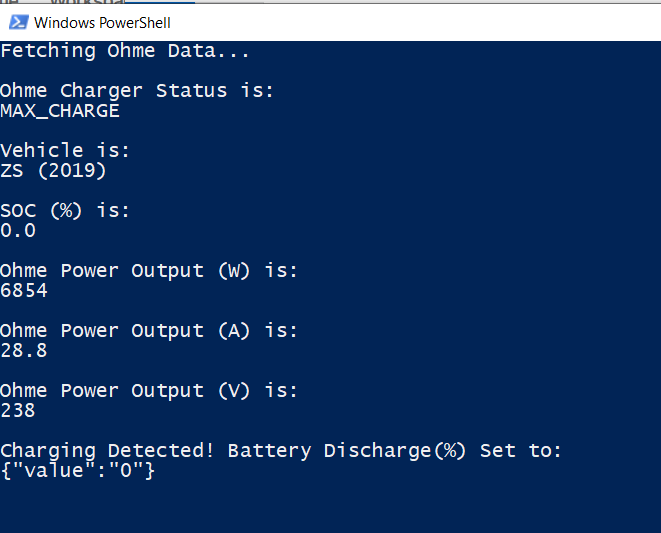
Powershell Scripts (Ohme & Indra/Kaluza/Smart Pro Chargers):
These run on windows via Powershell. (You can start them from windows scheduler to hide the CLI window should you use the PC for other things and find the window annoying.)
Note: As always my words mean nothing as an internet stranger but these do not relay your details to me or mine crypto etc.... however given they are very simple scripts you can open with notepad I encourage you to poke around or even bend/improve as you see fit.
There are 2 versions of each:
Basic - Just spits out the status of the charger as both text & JSON allowing you to use this in something else such as NodeRed.
You just need to edit the powershell (.ps1 Script) in notepad and change the below parts in "quotes"
_# Account Details
$Email = "email@email.com"
$Password = "Password"_
You are now set to run. Right click > Run with Powershell
Battery Manager - As above but interfaces to Givenergy Inverter (via new Battery API) and sets battery discharge to 0% when car is charging.
Still allows charging though if PV is available!
Also sets battery discharge back to 100% (or whatever value you pick) when charger stops charging.
This one is more complicated as you need to setup the Givenergy API keys to the new style API with the OLD PORTAL API KEY.
The old API Key can be found in: old portal > Account details > "Toggle" button in top right > "Auth Key"
If you have never used the new style API, there is a folder of Scripts to help link this key to the new API:
Bind New Key (Edit this file with your Portal API Key from the OLD portal& run to generate new style API Key)
Delete Key (Deletes previous keys but you need to edit the file to tell it which one)
Find Bound Keys (Edit this file with your Portal API key from the old Portal & it will return previously bound keys)
You then just need to edit the powershell (.ps1 Script) in notepad and change the below parts in "quotes"
_#Givenergy Portal API Keys (This is your OLD Portal API Key here)
$GivEnergyPortalAPI = "489f53d218f3916058ebcf101a0086e12345678909876543234567890987654"

##Battery Discharge % Setpoints
$PowerDown = 0 			(% Discharge battery will drop to if car is charging)
$ReturnPower = 100		(% Discharge battery will return to once charging stops)
$Power_Threshold = 1		(the power level the charger needs to be above to trigger)_
Downloads
Ohme: Powershell
Basic + Battery Manager: Download
Indra/Kaluza/SmartPro: Powershell
Basic + Battery Manager: Download
Postman EV Charger Collection Section:
All these came about from reverse engineering the apps. I have the Ohme & Indra Charger so these Postman collections are far more featured than the rest (as i don't have those chargers there is only so much I can do)
Note: Calls Available in DETAILS Section of each one.
In each case, you will need to import the collection to your own Postman Account & change the collections variables to your own login details:
click the collection heading > find the variables tab > change "initial values" > CLICK SAVE ICON!
Intelligent Octopus GraphQl API: Link
A reverse engineered Octopus API to give you planned charge times on Octopus Intelligent (so you can schedule either battery charges or battery pause)
1: Login to Kraken
2: Get User Details
Registered Devices (Car or Chargers)
Vehicle Charge Preferences
Planned Charge Sessions
Completed Charge Sessions.
*Note - You will need to run the first two calls (1 then 2) to allow Postman to fetch your details and populate variables correctly.
After that you will just need to run the login one (1) & then whatever call you need. Login token has a long expiry so don't need to run it every time.
*Note 2: Kraken runs with GraphQL for queries - which is more efficient but less simple to guess queries to give extra info. !<
Ohme: Link
Login
Charge Sessions
Devices
Account
Account Settings
Car Brands
Charge Rules
Start Charge
Pause Charge
Resume Charge
Charge History
!<
Kaluza/Indra/Smart Pro : Link
Login
Get Device ID
Current Status
Device Info
Customer Info
Car Info
Tariff Info
Charge Preferences
Solar Match Status
Charger Stats
Energy Stats
Boost On
Boost Off
Solar Match On
Solar Match Off
!<
EO: Link
Login
User
List Device
Country Codes
Vehicle
Session
Session History
Update Charge Options
!<
PodPoint: Link
Login
Sessions
Get User Info
Favourites
Get User Details
Get All Vehicles
List Home Pod Units
!<
SyncEV: Link
Login
General Status
Charge Points
Subscription Plans
Custom Menu Items
Invoice Details
Filters
Reservations
Device Status (Needs Device ID)
Billing Settings
Pins
Topup Status
Active Session
Session Stats
Session History
Balance History
RFIDs
!<
Walbox: Link
Login
Assigned Chargers V3
Assigned Chargers V2
Charger Info
User Data
*Note Wallbox Login requires your to convert your username & password into Base64. This is easy to do & noted in the postman variables - you just need to be aware of it.
!<
Hope all this lot helps people. Any others to add feel free to share below.
Hoggy