J
BT has provided me with a new router, updated model of the old one which was all set up by the Installer.
Where do I change the router ID as obviously I can't read anything now.
Go gentle with me, PC numpty.

BT has provided me with a new router, updated model of the old one which was all set up by the Installer.
Where do I change the router ID as obviously I can't read anything now.
Go gentle with me, PC numpty.
Open a web browser
Type 192.168.1.254 to see the router information.
You may need a password but this should be on the back of the router
Go to the wireless tab and change network name and password
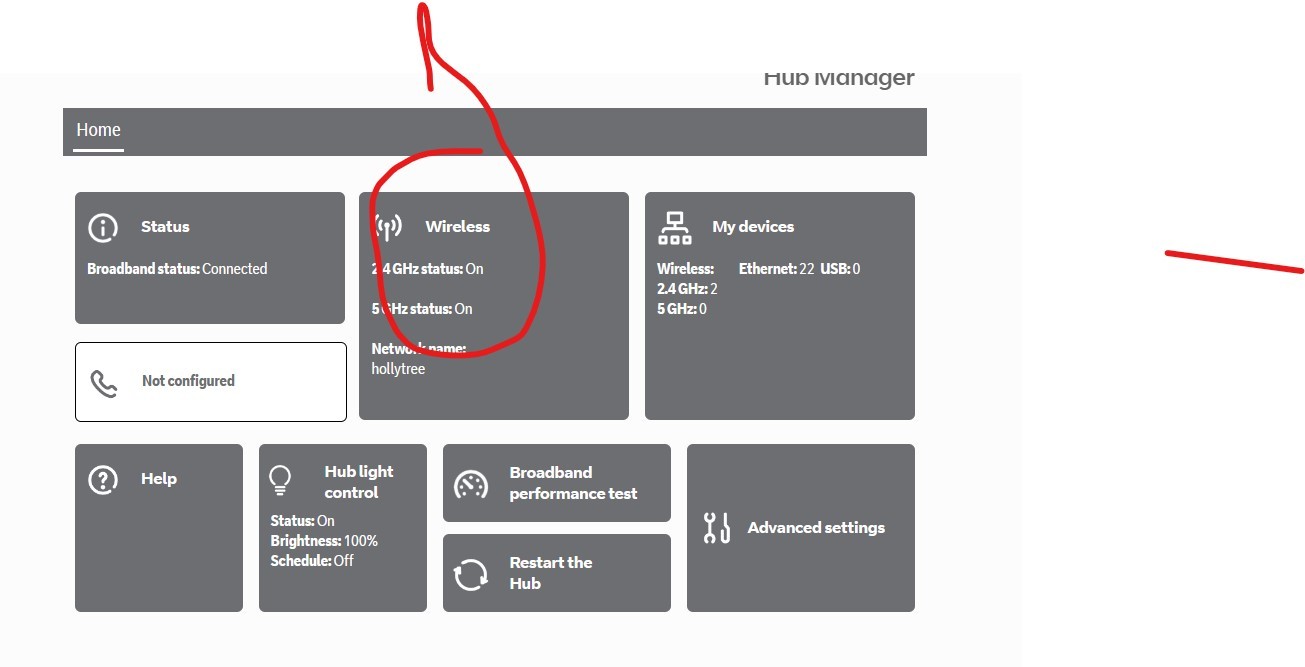
Thanks, I have that information already. I may have badly worded my question. I have the new hub ID and password, but the GivEnergy app is not connecting through to the new router. I want to put (or change) the new details on the GivEnergy page.
The easiest way to do this is to rename the WiFi SSID and password to the details that you used in the old router. Doing this means that all existing devices will just connect, otherwise you will have to input new details on every device in your house.
Haven't got those details anymore. Changed over the TV's etc. and the phones but not the GivEnergy thingy. Didn't even think about it until some 6 days afterwards. But thanks for your reply.
Login to your router
Get the IP address of the wifi dongle. The device name will be something like HF-100 (that was mine)
Open a web browser page and type in the IP address, it will be 192.168.1.XX. The XX will be the numbers assigned by your router.
A dialogue box will pop up and the user name and password willbe admin and admin.
The settings page will pop up. Mine was in Chinese, but right click and hit translate to Engilsh
The 3rd tab down is where it shows you network name and password
The bottom (5th tab) is the dongle login/password page), you will see admin and admin.
NOTE you or your installer and you may to do a dongle reset somehow
Change them to what you want and don't forget and hit save (or it may say are you sure)
Close the browser and go back to same IP and use your new settings and you should be into the dongle network settings page
Regards
Steve
This may help?
Did you get this sorted ?
As SteveCook has said that's the best way to do this, but can i add a few things to help
When your on the M2M Web Server page 192.168.1.XX
On the left you will see the second option AP Interface Setting
Network Name(SSID) Make sure this is selected HIDDEN then click Apply
Next
On the left third option STA Interface Setting here you can add the wifi info
AP's SSID = your wifi name
Pass Phrase = your wifi password and click Apply
Now the last thing, go to the last option on the left Device Management
Adminstrator Settings change both Account and Password and then click Apply
Hope this helps mate
I'd like to thank you all for the time you've put into replying to this. I hoped it would be nothing more than just change the router no. and password. It seems it's anything but, at least it is to a digital dyslexic like me.
I struggle with most things electronic and do have a genuine form of dyslexia. I can read anything & everything but I'm not often able to make use of the information I read.
I'm going to phone our Installer to see if thier commisioning electrician is in the area at some time and can do this. I'm sure it's taken me longer to read the replies than it took him to set it.
Once again, thanks.
Unless anyone lives near HP14 3QF and is able to help?
This can be done remote with any program like teamviewer etc, no need for anyone to come to your home
But you need to trust the person helping you and, i'm unsure if even allowed, not sure on rules on Givenergy
Do you want some screenshots to help you get this sorted ? did you get to login to the BT router and find the M2M Web Server page 192.168.1.XX

I had the same issue when changing internet service provider. You need to connect via wifi direct to the givenergy dongle and login (installer should have told you the password) username is admin (default) and password could be admin, or the inverter number.
Once logged in, go to the STA Interface Setting page and there you can enter your new SSID and password.
Make sure you click apply!