
Erratic SoC on 3013, “Frozen BMS”

11 comments started 2023-09-07 last 2023-09-13
GivEnergy ProductsBattery
G
#1 geoffreycoan

I have two Gen 1 5kW hybrid inverters, one with an attached 9.5kW battery, the other with a 5.2kW. I upgraded the BMS on the 5.2 to 3013 about 3 weeks ago. Since then I’ve had about a dozen BMS Over Voltage and Battery Voltage High errors on the upgraded 5.2, but and none on the 9.5.
The battery appeared to be working fine so I didn’t worry too much about it.

Yesterday I noticed that the SoC on that battery (purple line) was oscillating all over the place, trending in the same direction as the 9.5 (blue line), but fluttering up and down all the time
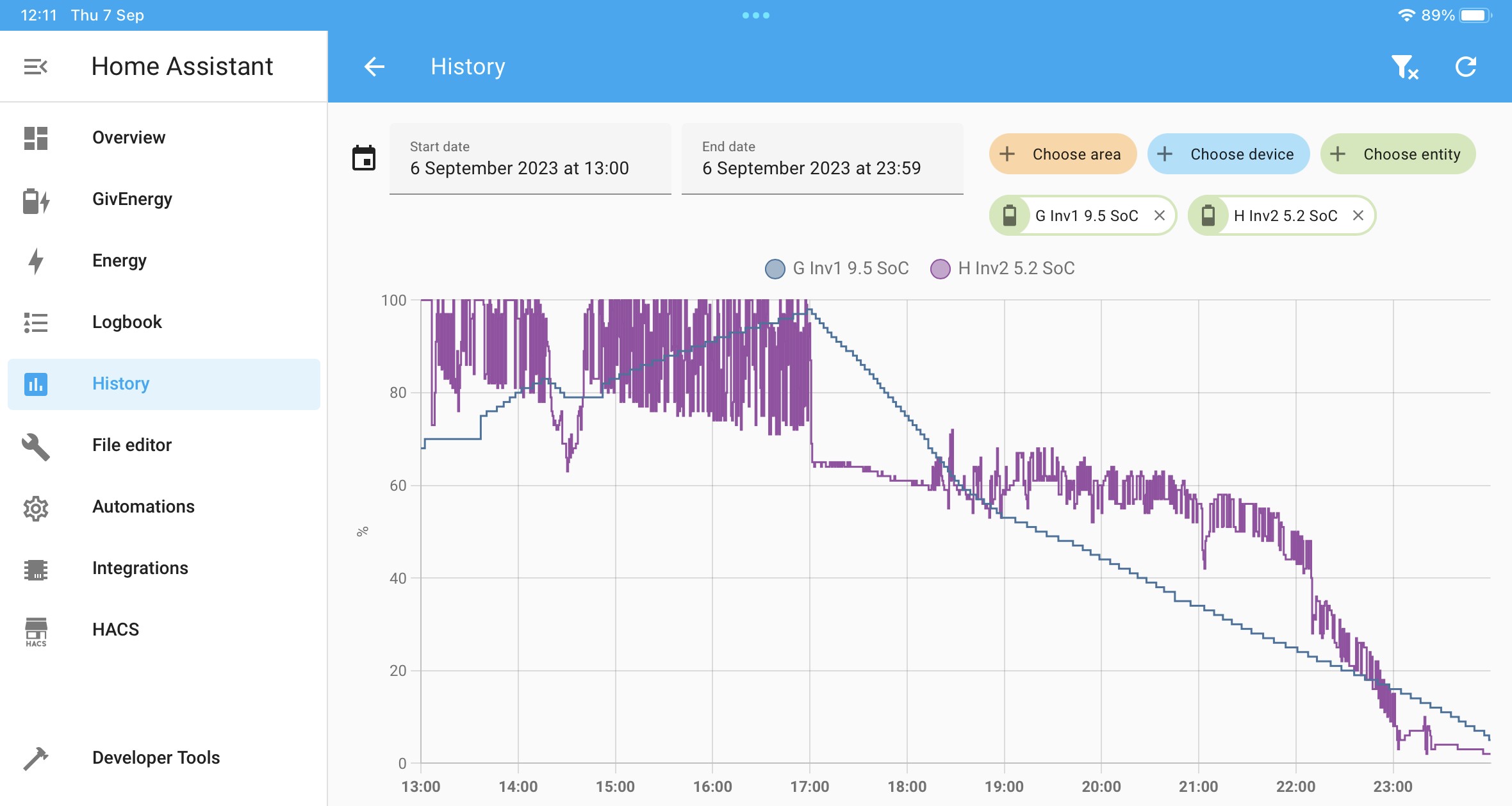
This morning found that the SoC was stuck on 0% and had been most of the night. Tried a force charge, restarting the inverter, resetting the inverter to defaults, but still wouldn’t charge.
Looking at the battery I could see there was a red flashing light on it and the leftmost battery charge level light was also flashing. I powered off the battery with the black button and the power breakers and the SoC started climbing up, but at an unbelievable level, 25% in 5 minutes.

Also noticed in Home Assistant that GivTCP has failed to obtain the battery details since about 1pm yesterday (about when the SoC oscillations starter), and the battery temperature in the GE portal has been reported as -19.1 degrees C for most of yesterday afternoon, evening and since I powered the battery on and off.
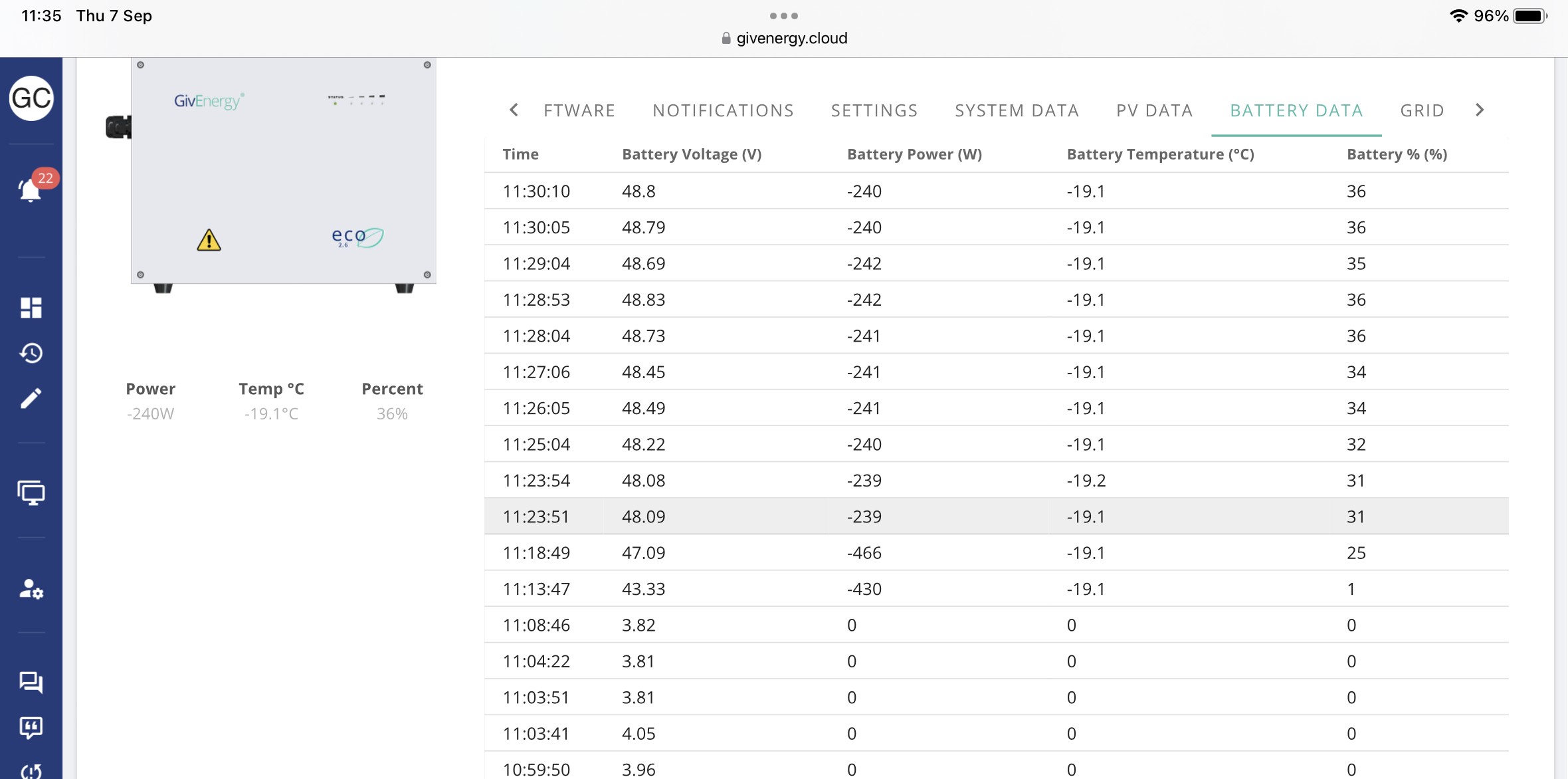
I’ve spoken to GivEnergy support, they say it is likely to be a “stuck BMS” and that it will require the installer engineer to come on site and resolve the issue. Didn’t suggest that its a major problem but it required eyes-on to fix it. Waiting to hear when an engineer can come.

I see other people are reporting stories of SoC on 3013 jumping from 100% to 0% rapidly. 3013 had been quite stable for me (other than the occasional high voltage errors) up until now.

#2 Cdent

geoffreycoan I think from other commenters on here the negative or extreme temperatures are an issue with the BMS comms cable, definitely need the installer to take a look and maybe tighten it

G
#3 geoffreycoan

Cdent

Thanks. I’ve looked back at other recent reports of SoC’s jumping rapidly, didn’t get the sense that a loose comms cable was the issue. Some reports of a bricked BMS needing a GivEnergy engineer to visit (= long delay), others of the battery having to be left to discharge itself as it got over-full, and others where they’ve had the BMS downgraded to 3012.
🤷‍♂️

Waiting to hear back from my installers. The battery seems to be charging from PV but not discharging. I’ll turn the battery charge rate off so any PV gets exported tomorrow

B
#4 BrianHere

Cdent most of these comms probs started with bms 3013 firmware.

G
#5 geoffreycoan

geoffreycoan Update on my “stuck BMS” issue.

An engineer from my installers came out today to resolve the issue. For the last couple of days the inverter hasn’t been able to charge or discharge the battery, the SoC has jumped up and down and I’ve just left it with the battery charge rate set to zero so any solar gets exported to the grid.

The guy tried the things he knew to reset the battery, but it wasn’t having it so he called the GivEnergy installers line to talk to them about the fault. 45 minutes he waited on hold for someone from GE support and when he did get through the GE engineer confirmed that they couldn’t communicate with the battery either and emailed my installer a new battery firmware to install, something he said he’d never done before.
Whilst he was looking at it he unscrewed the BMS cable cover off the bottom of the inverter and said that the cable had dropped out of the socket in the bottom of the inverter. Plugged the cable back in and it the inverter and home assistant could both see the battery OK. Turned on some house load and then did a force discharge; SoC dropped as expected and we could see the battery temperature being reported consistently in the portal all the time.

So that was my issue, the battery BMS plug had come loose from the bottom of the inverter. Poor design on the gen 1 hybrids that it doesn’t lock into position. If GivEnergy support had suggested that this might be the problem then I could have looked at and probably fixed this myself last week.
I’ve got the BMS firmware should it be needed and the engineer is going to keep an eye on it, but since the inverter and battery both now seem to be working OK we didn’t see there’s any benefit in loading a new BMS.

#6 Cdent

geoffreycoan yep, that's what I thought it might be as I mentioned in my previous comment, but absolutely correct that QC should have picked this up before it left the factory

T
#7 TX200

Cdent could have come loose in transit, so not sure why checking it at the factory would help 😁

But yes, would be better if it was a secured connection, rather than just loose.

#8 Cdent

TX200 when I've seen this type of thing before it's usually not tight enough when it's put together, which then loosens further over time (including in transit) so catching this in the factory could have prevented this. But also using something more substantial to secure it would be even better

P
#9 Pete UK

geoffreycoan

That’s very interesting. Do you have a picture of the location of the BMS cable that was loose? Is the connection accessible externally, or does the cover have to be removed? If it’s a connection that a customer or installer can re-sit it’d be much better than waiting weeks and weeks for resolution.

I’m wondering if this could be a contributing factor to my system faults (Gen3 5.0 Hybrids and 9.5 batteries)

Thanks.

G
#10 geoffreycoan

Pete UK Hi Pete, yes I shared this because I thought it might be something that others are suffering from.

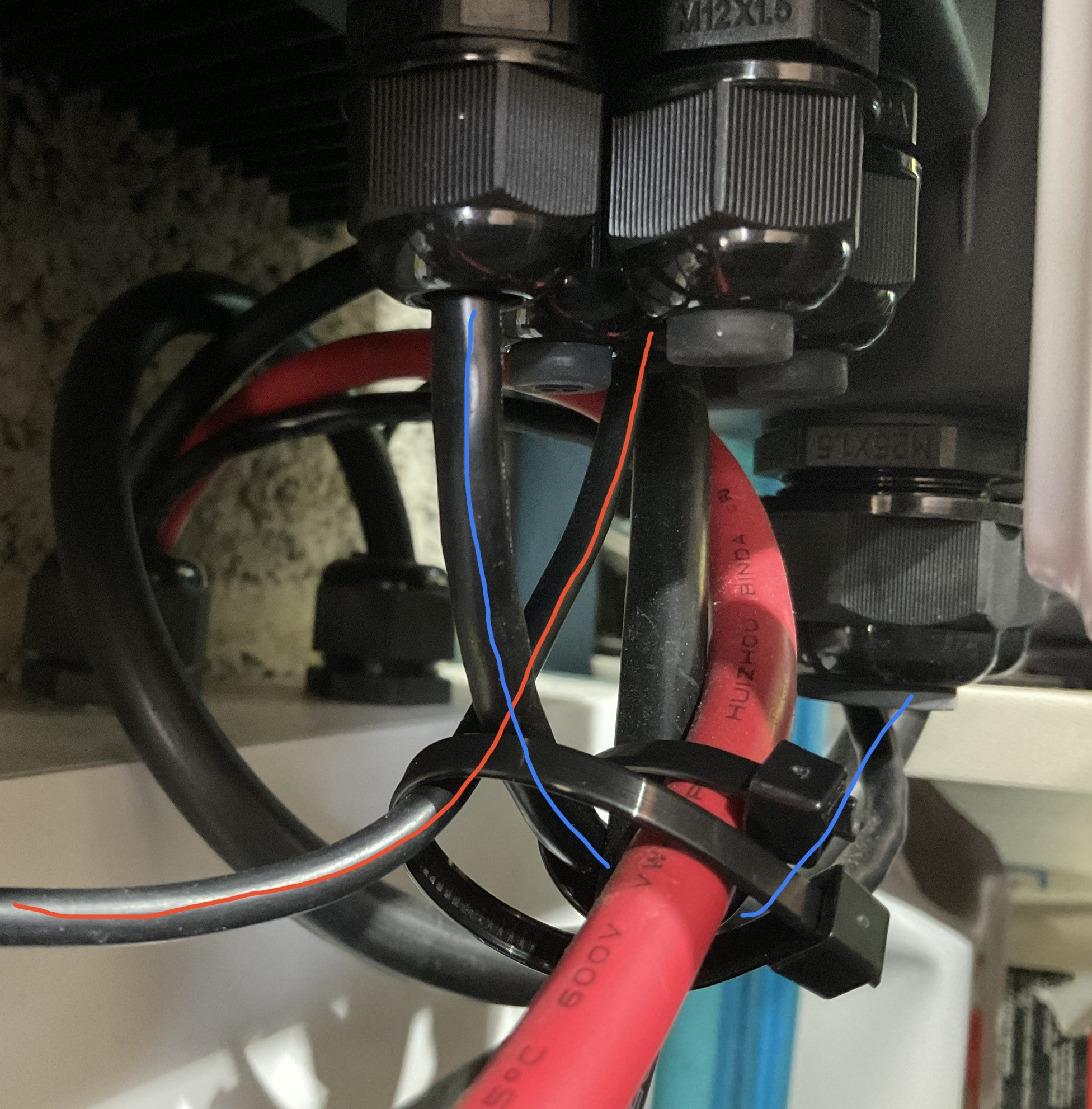
I’ve a gen 1 hybrid and the Battery Management System cable and the EM115 energy clamp cable go into a cover thats behind the wifi dongle. Its obvious which set of cables they are as they are the thinnest ones compared to the cables connecting to the battery and the house.

The red marked cable goes to the EM115 and if that isn’t plugged in properly you’ll get comms errors reported in the portal. The blue marked cable goes to the battery, and this was the cause of my problem.

The cover is secured with 4 small cross-head screws, one in each corner so is easy to take off yourself.

From looking at the installer manual this may be particularly a problem with Gen 1 hybrids and AC coupled inverters as the plugs used don’t have latches on them. Looks like the Gen 2 have latched plugs which would be less likely to drop out.