D
Hi All,
Been a customer for about 3 years, I’ve recently noticed that my Battery is staying at 100% and has not discharged for a while.
Any help on how to remedy this would be a great help.

Hi All,
Been a customer for about 3 years, I’ve recently noticed that my Battery is staying at 100% and has not discharged for a while.
Any help on how to remedy this would be a great help.
dallimerpo13 Hi, welcome to the forum.
What sort of system do you have? And do you run any system of automation (home assistant, etc.)
There are various things that might have gone wrong. Most likely is perhaps that 'eco' mode has got turned off. It's possible that the web portal shows it on, since it reports the value it last sent, rather than actually reading the inverter. My first suggestion would be to turn eco mode 'off' (if it is showing as 'on'), and then back on again.
If you use the 'quick settings' button on the app, that's another way it might have gone wrong.
dallimerpo13 depending on where you are in the country, right now might not be a good time to try to fix this - if the sun is shining, there's probably no reason for the battery to discharge, and it can't charge if it's already full.
Perhaps investigate in the evening?
Now night time, my house is now drawing from the grid and not using the battery??
dallimerpo13 I was in the same boat last week. Two years flawless service and suddenly at midnight stopped discharging. Charged OK for the set period (00:30 -0 04:30) and then didn't discharge. Nothing I did would get it to discharge. Reset to defaults, etc. No luck. I Called GE who spotted that I was on my original firmware for both inverter and battery. I'm a retired techie and of the firm opinion that you NEVER fix what isn't broken so ignored the updated firmware button. GE declined further assistance unless I upgraded so I did. That did fix the problem, though. I suspect that it was the forced recalibration that fixed the issue, but I could be wrong. If you are not on the latest firmware try updating it and it may do the same for you. I have AC3 Inverter & 9.5 battery for completeness. You'll need to update if you want GE help in any case. Time your upgrade for minimum waste of energy as a result of the recalibration.

I’d try rebooting the inverter as a first step. You can do it via the web portal.
dallimerpo13 If you use the quick settings button on the app, does a forced discharge work ? (press the big play button, and then on the popup, there's options to pause, charge or discharge, or something along those lines, IIRC)
Have you tried a reset-to-defaults on the portal ? That sometimes resolves issues, but you'd need to go back and reconfigure any timers and things you use.
Hi All,
Thanks for all the recommendations, done a full software update and system is now working correctly.
I have seemingly been having this issue for a few days without realising; two inverter reboots did nothing. There was a firmware install pending (3015). I let that install, it went into calibration (was already at 91%) but then finished calibrating within a minute (no discharge cycle). But now the battery is feeding the house as it should do. Weird....
Would love some comment from Giv on what might have gone on here, as obviously a firmware upgrade isn't going to fix things next time (unless there happens to be one!).
It happened to my AIO also about a week ago. The battery stopped discharging and remained on full.
Just before that I had a power cut, the lights and TV went off for a few seconds. I thought that was odd because I was running on battery at the time, but didn't think anything more about it. A while later I noticed the battery was not discharging and I was on grid power, the battery was 100%.
The only thing that fixed it was a full reset and I had to re-enter all my settings.
It's been OK since, very odd.
Happened again today. Would love to know why this is suddenly happening.
A couple of things to check:
Sorry if I'm just stating the obvious.
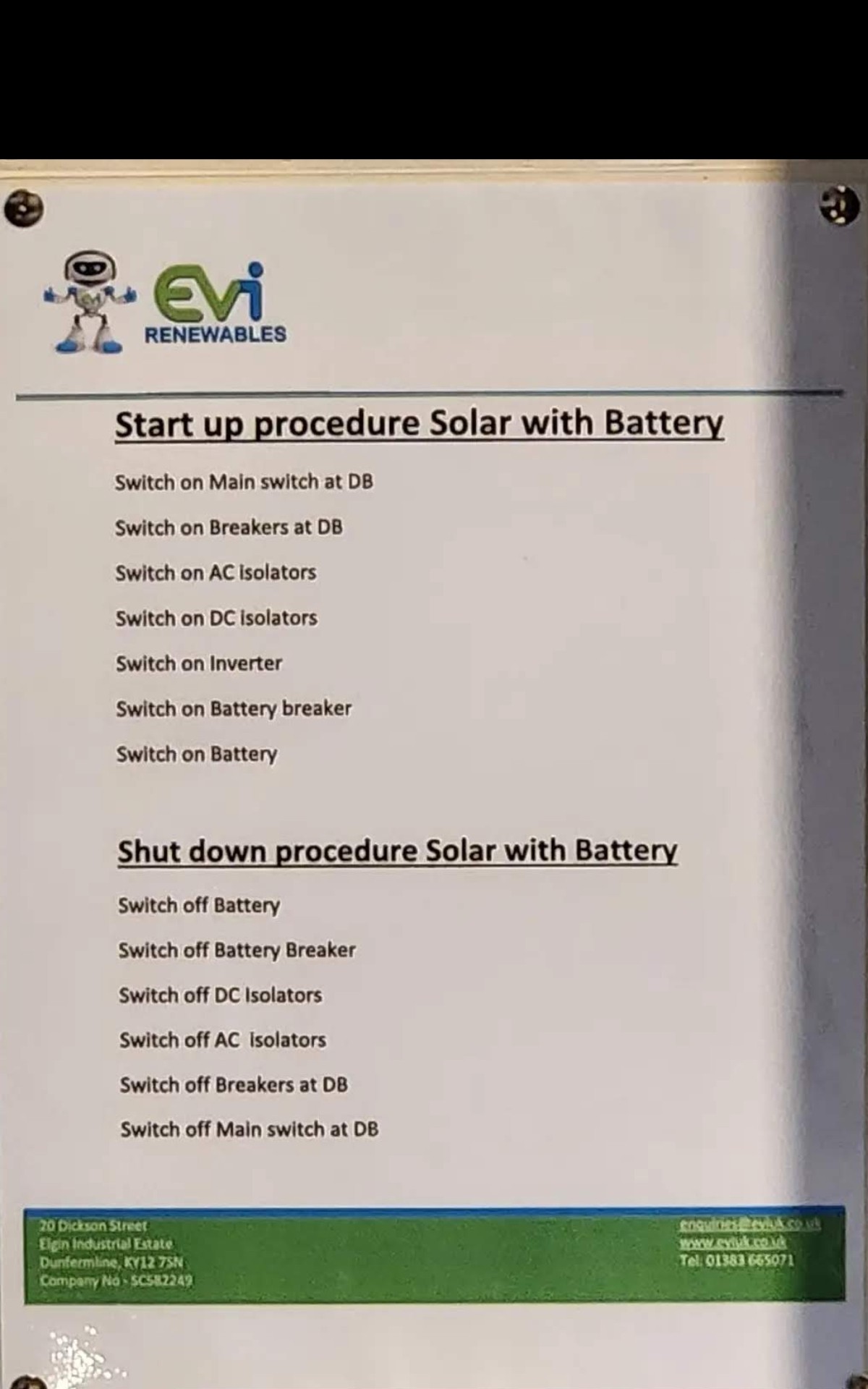
melodiouscode If you have tried a 'reset to defaults' in the inverter section in the portal, and that hasn't worked, then it might be worth a complete shutdown of your system following the correct procedure, leave for a few minutes, then fire everything back up again. That should clear out any gremlins, and hopefully get things working again properly. If not, it's back onto support again or your installer.
TimHutchings I did try the reset to defaults but it didn’t seem to fix it. Although it did the second time around.
Have you got a link/etc to the “correct procedure” that I can have a read over!?
melodiouscode Depends on your system and what you have. Sometimes installers will leave you a printed routine as in the pic below, but here's a general one I found from terravolt on google.
https://wiki.terravolt.co.uk/docs/inverter-shutdown-procedure/
Starting up again would just be a reversal
There may well be something in the GE archives too.
Here's a screenshot I found when I was looking, from someone on Facebook, to someone else on Facebook, I think who was kind enough to post it.