AC3 Inverter firmware update

23 comments started 2024-07-08 last 2024-07-12
GivEnergy ProductsAC Coupled
A
#1 andydsmith

A couple of days ago I noticed that a firmware update was available for my AC3 Inverter. I've not seen much on here about this but I've not checked thoroughly. My current firmware is 535 and I think the new one is 205.
I tried to update earlier today but the update failed. Immediately after trying the update the web portal started showing error 503 and the app became unavailable. The system was still working and I could access it via Home Assistant.
The web portal is now back up. I have a notification that the update started but I'm still on the original firmware and the update button has gone.
Am I missing anything by not getting this update?

R
#2 Roberto

My update didn't work a few weeks ago too. Support emailed me the files and I updated manually. Easy to do.

A
#3 andydsmith

Roberto Thanks for the reply - I'll send them an email. What difference does the new firmware make?

A
#5 andydsmith

Phil_H Thanks for that - it definitely looks like a significant and necessary upgrade. Customer support have done a remote update for me so I'm now on the new firmware and have to say that givenergy have given me great service on this as it's all be sorted within a few minutes of my email.

A
#6 andydsmith

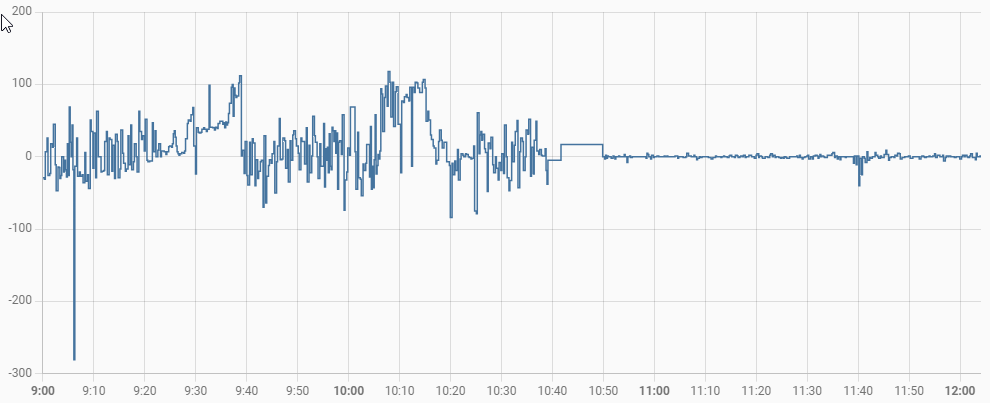
Looks like the new firmware has had a big impact. This is grid power from Home Assistant - the firmware was updated at 10:50.

M
#7 MrChaz

Dang, that's a heck of a difference. I'm envious

M
#8 M_J

Hmmm I might need to undertake the upgrade on a Monday... Or Tuesday...

#9 Windy Miller

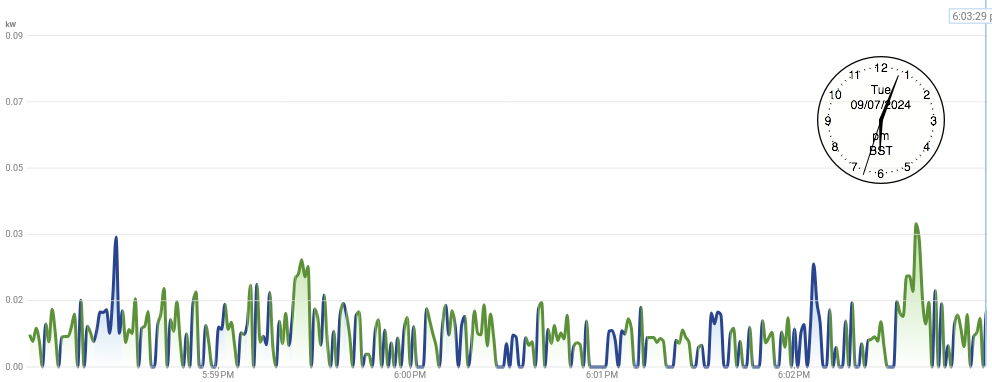
andydsmith I have the 204 firmware which is the one before 205 but I think has the same fast response firmware. Generally whilst in ECO mode with the battery not full or empty the inverter balances the charge/discharge to achieve an export of below 20W in each hour. Firstly it always manages a small export so it is erring on the side that generates a small export income (fixed) rather than an import cost (variable). Secondly 20W is pretty well balanced in my book. The slowest response rate I saw on my emporia system was 3 seconds with most load changes being responded to in under a second. I'm amazed at how fast the control loop is from measuring the grid load, to adjusting the charge demand to the inverter changing its current to compensate. This is with both small load changes of 10's of watts right though to putting the kettle on (3KW).

Green is export...Blue is import

A
#10 andydsmith

There are a few more changes that I have seen with the new firmware:

  • When the battery is charging from the grid and the required SOC has been reached the battery will continue to charge at a constant 74W and will occasionally discharge to keep the SOC constant. This is an improvement on what used to happen.

  • If the battery discharge rate is set to 0 (which I do regularly to stop the battery discharging to my car) it will actually set the discharge rate to 298W. I'll need to find a way of changing my car charging automation to allow for this.

  • If the battery charge rate is set to 0 (which I do to divert solar power to my hot water) then it will actually set the charge rate to 280W.

P
#11 Phil_H

andydsmith You may now have access to the pause feature, if you do (timed or otherwise) then I find this to be much better at getting the rate close to 0, it hits 28W in my case on either paused charge or discharge

A
#12 andydsmith

Phil_H Thanks for this. I have found the pause charge and pause discharge settings on the web portal. I have tested pause charge and it does stop the charge completely (unlike setting max charge rate to 0). I haven't found a way of doing this in GivTCP, but it's probably there somewhere.

P
#13 Phil_H

andydsmith The control you want is 'Battery pause mode' it has value options of Disabled, PauseCharge, PauseDischarge, PauseBoth. It may require you changing the givTCP config to not use the old firmware ('is it on old firmware' flag to false) before this is visible but I don't remember.

A
#14 andydsmith

Phil_H Thanks. I still had the old firmware setting on - I can see "battery pause mode" now I've turned this off and it will stop the charge completely.

G
#15 geoffreycoan

andydsmith yep, turn ‘use old firmware’ off and you get a few extra controls in GivTCP for pausing battery and setting the inverter priority (which I don’t quite understand what it does, people have said it seems to have no impact)

R
#16 Rogerbu

I was on 535/3012 and updated to 205 & 3015 a couple of weeks ago.

On 535/3012 my two 9.5 batteries regularly tracked at about 2 or 3% difference.
On 205 they are 15 - 20% apart most of the time.
No calibration happened immediatly after the update, but an unexpected calibration occurred a week later.

Is there anything I can do to get the baterie's SOC tracking % back to about 2 or 3%?

R
#17 Rbor

geoffreycoan my AC3.0 is now on 205 and I have just tried switching old firmware off.
My 535 firmware needed the 'old firmware' switch on.
I now see the extra controls on the GE portal, including pause.
I will be interested to see if I now experience faster response times and also whether my 2 daisy-chained batteries stay closer together. With the old firmware, the SOCs were usually 10-15% different with primary always ahead of secondary.

Rob

N
#18 Newman

Rogerbu others have said 3017 is available but no feedback on dual batteries yet. I had similar problems with 3015 and was moved back to 3012 (via 3065) and have resisted the update button.

R
#19 Roberto

andydsmith Just seen this, but see below for all the improvements. Noticeable are faster response times and less "issues" as the charge gets towards 100%. But, it does mean the last 10% or so do take longer. So if you are on an E7 tariff, one to watch

R
#20 Roberto

Rbor My two 9.5s are often 15% apart.

R
#21 Rbor

Roberto I'm on Agile. I notice that the gap between my batteries closes towards 100% and at then bottom end, approaching 4%, I want to see how the new firmware performs now that I have turned off the 'old firmware' switch in the givtcp add-on configuration.

Rob

G
#22 geoffreycoan

Rbor geoffreycoan my AC3.0 is now on 205 and I have just tried switching old firmware off.
My 535 firmware needed the 'old firmware' switch on.
I now see the extra controls on the GE portal, including pause.

By the way Rob, Predbat should automatically spot that you have battery pause controls and use them when managing the battery for hold charge/freeze charge/freeze discharge etc.
You might want to configure the non-REST controls in apps.yaml as a backup in case REST fails (copy from the latest apps.yaml template), but not essential to do this.

R
#23 Rbor

geoffreycoan Great advice as always.
I compared my apps.yaml against the latest apps.yaml template.
I had commented out the pause entries. Now uncommented and my predbat. log records:
2024-07-12 22:42:40.339341: Inverter 0 has timed pause support enabled
Previously I received a line informing me that pause support was unenabled.

Just need to get rid of my historical day warnings ......

Rob