
Passing on something I discovered about Tasmota devices following a lot of head scratching.
I have a template sensor called 'calc_extension_load_today' which calculates the 'untracked' consumption in my extension. It does this by subtracting the kWh today for the known energy sources from the kWh of the CT clamp that's on the extension supply:
{{ (states('sensor.extension_energy_today')|float(0)
  - states('sensor.cooker_energy_today')|float(0)
  - states('sensor.kettle_energy_today')|float(0)
  - states('sensor.dishwasher_energy_today')|float(0)
  - states('sensor.tumble_dryer_energy_today')|float(0)
  - states('sensor.washing_machine_energy_today')|float(0)
  - states('sensor.fridge_energy_today')|float(0)
  - ... etc
| round(1)
}}
But I noticed in the energy dashboard that this sensor sometimes shows some really weird consumption values around midnight:
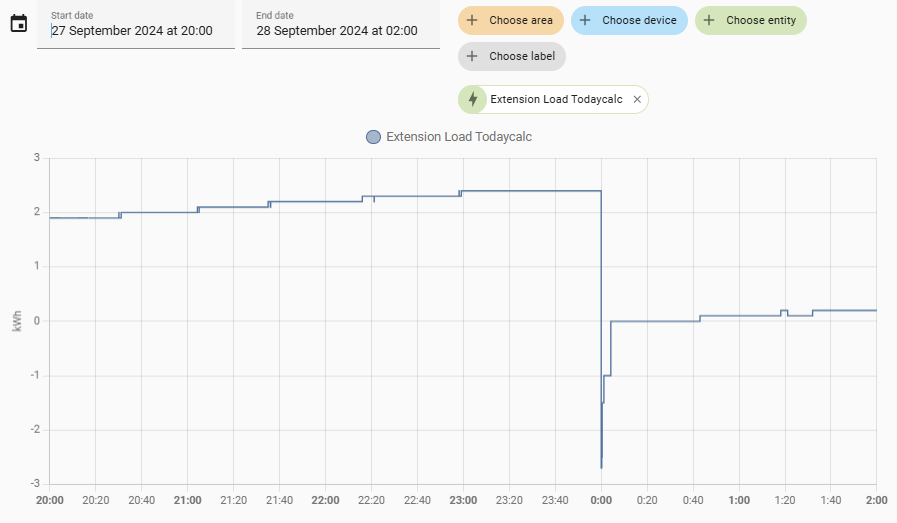
and sometimes big jumps in the sensor value:
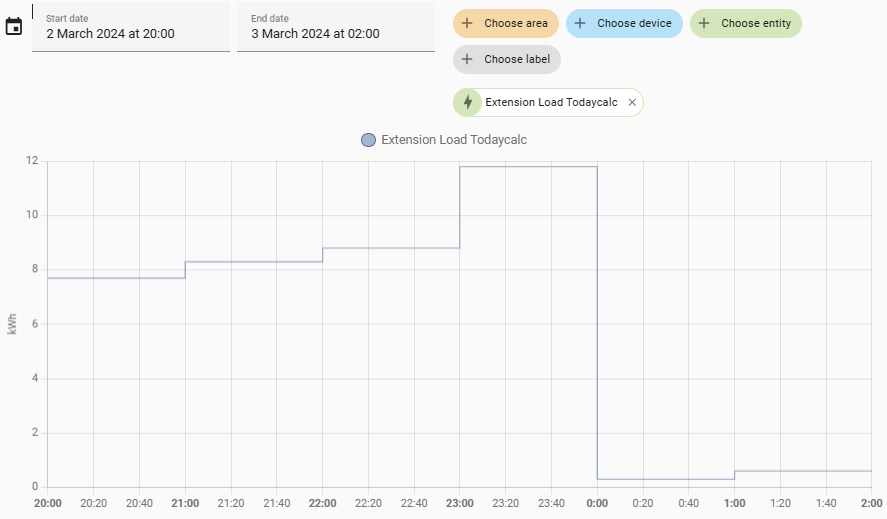
After much head scratching I found that the problem is caused by the time zone not being correctly set on the Tasmota smart plugs I use on several devices so as a result they were incorrectly resetting the 'today kwh' to zero at the wrong time and this was screwing up the calculation. Best seen by drilling into the individual device energy data:
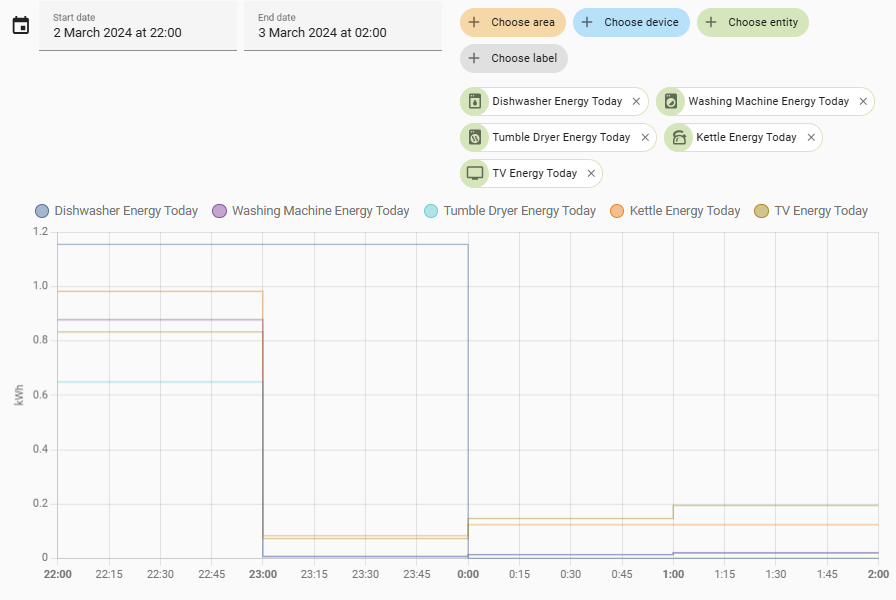
The dishwasher smart plug was the only one I had corrected at this point in time so it resets correctly at midnight, the other smart plugs reset at 11pm.
If you have Tasmota devices such as smart plugs as I do, worth checking your config by connecting to the IP address of the device, click on Console, then enter the command 'status 7'
In the resultant time status information if you see "Timezone":99 then daylight saving times will be used, if you see any other Timezone setting then DST (even if displayed) will not be used. Bizarre.
This article explains the issue https://www.reddit.com/r/homeassistant/comments/ojwuhg/tasmota_total_energy_todayyesterday_rollover_time/
This manual explains how to manually set the time zone https://cheat.readthedocs.io/en/latest/tasmota.html#time-zone
This manual is the full set of Tasmota command line commands https://tasmota.github.io/docs/Commands/
But to shortcut, this website https://tasmotatimezone.com/ works out the correct time zone and latitude and longitude settings (for sunrise and sunset) for your location. Simply search for your location, select the time zone (Europe/London for me), then copy paste the commands it gives you onto your Tasmota console.
Rinse and repeat for all devices
