EV Charging Screws up the maintain overnight charge

18 comments started 2022-08-11 last 2022-08-18
GivEnergy Products
R
#1 RPA335

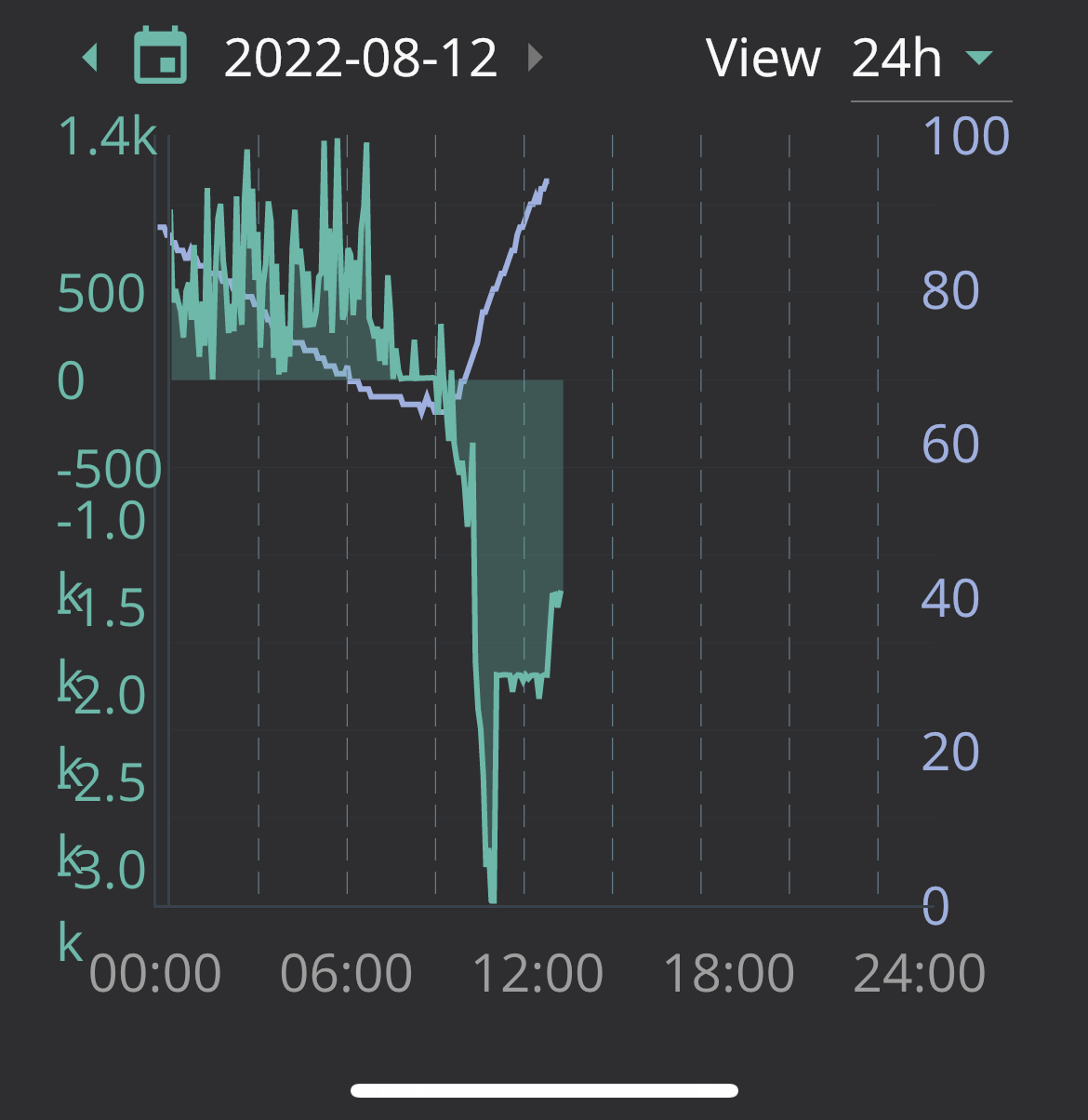
Overnight charge is set to maintain at 20% and works fine……. until I charge the EV overnight too.

At which point the GE battery charges itself to 100% and I wake up on a blue sky day with our GE batteries at 100% and nowhere to store the solar.

Am I unique?!

https://ibb.co/JK0TLwL
https://ibb.co/Bj83rfN
https://ibb.co/wWRvdXc

R
#2 RPA335

RPA335

I guess if our SoC was accurate then the system might work.

Maybe because the SoC flat lines on full charge/discharge and then catches up once complete (either way) the Inverter/BMS can’t fathom the SoC and so charges based on the last known SoC, only stopping when the SoC catches up when it hits 100%

If the SoC can be sorted maybe it’ll work fine with an EV charge.

Whatever is going on it’s v frustrating paying for unwanted juice overnight and then splurging Solar back to the grid when we should be using it.

C
#3 c_squared

I’m not sure why an EV charge would affect the perceived SOC on the GE battery. From what you say, the charge setting to 20% works when not charging the car. I’m sure others with more knowledge than me may comment but I wouldn’t have thought this was a SOC issue. What settings have you gone for on the portal?

R
#4 RPA335

c_squared

Maybe it’s an issue unique to me then.

My SoC stops updating when the battery is either charging flat out on solar/grid-to-battery or discharging flat out to the house/car.

I can maybe see how this would stop the system from keeping the SoC at 20% for me overnight when the EV is drawing.

It’s a fault either way.

Z
#5 Zakalwe

Set the Timed Charge in the Web portal, NOT the app. Make the length of the timed charge equal to the off-peak hours and set the SoC at the level you want to exit the timed charging period at.

R
#6 RPA335

Zakalwe

Thanks. That’s how it’s set and it works fine until I charge the EV overnight at which point the above happens (see pics).

W
#7 wilfleek

I can see the SOC incrementing all the time on charge or discharge. No EV to complicate things though.

R
#8 RPA335

…. and again.

Tried to be clever last night.

Set the car to charge from 23:30 to 04:30 and set the GE battery to charge from 04:30 to 05:30 in the hope that no overlap would mean I could avoid this.

https://ibb.co/mF5bX56

#9 Yorkie71

RPA335 Looking at that screenshot, something is clearly not right. According to that, your battery charges from 0% to 100% in an instant. I'm assuming you have already done this but this is one to get the installer back in for. Hopefully you get it sorted.

R
#10 RPA335

Yorkie71

Yes. Installer has been back after a long wait.

Apparently nothing wrong. GE are meant to be looking into it but I’ve heard nothing.

T
#11 Tim

RPA335 I agree with @Yorkie71 that it doesn't look right.

Maybe your BMS isn't reporting battery voltage correctly so when the EV starts charging, it is part-fed from battery. Battery voltage suddenly drops to zero and the inverter charges back to 4% which is the design. Because the battery voltage isn't changing even while it is being charged, until it is fully charged when it shoots up to 100% charge.

I suspect the BMS. The inverter looks (at least to me) to be responding as designed. I think the EV dropping the SoC to 0% might be the trigger.
![](https://)
This screenshot of my battery SoC shows lots of small changes with every five minute log.

R
#12 RPA335

Exactly. Completely Agree.

Everything appears to be working fine other than the reporting of the SoC which I can well imagine would send the inverter off on a wild goose chase causing all of my problems.

R
#13 RPA335

Tried something last night.

So on full (3000W) charge rate the SoC flatlines meaning the battery ends up at 100% every morning.

I reduced the charge rate to 1000W before going to bed last night. No flatline and the battery charged steadily to the set SoC of 50%.

So it’s definitely a problem with the system unable to monitor the SoC when it’s charging flat out.

I shouldn’t have to change the charge rate twice a day to avoid a fault.

Two emails to GE over the last 3 weeks and no response.

The system is 3 months old.

What next?

S
#14 stevelewis

It looks like you've been changing multiple parameters over a period of time. Reset everything to default settings, check that you don't have Octopus automations enabled (this overrides the settings) and set an AC timed charge for your full off-pesk period. You should not need to do anything else for it to work. And do all of this on the portal, not the app!

R
#15 RPA335

Believe me. It’s not that. No settings should make the SoC graphs flat line as they do in full charge (see images in first post). It’s the flat lining that’s causing the problem.

stevelewis

R
#16 RPA335

stevelewis the same flat line at full charge happens when solar is full on but that’s less of an issues because I want the solar to fully charge the batteries.

#17 TheDragon (GivEnergy)

Has your installer checked the battery DC connections? As this is only happening at full charge/discharge. There could be a poor connection causing voltage rise/drop across the bad connection.

If this has already been checked, it could be a bad connection inside the battery, have seen one instance of this on the facebook group, required a GE engineer to repair

R
#18 RPA335

TheDragon (GivEnergy)

Thanks for replying.

Installer visited. Checked everything with GE on the phone and left.

From what I was told, GE are happy the install is good and have accepted that there’s a fault.

My biggest issue now is silence from GE.

Having accepted the fault there is absolutely no word on how or when it’s going to be rectified.