Beta Portal ( General )

183 comments started 2021-11-05 last 2022-11-26
Beta PortalCloud Portal
#1 simon_swinburne

The beta portal is taking shape, its now broadly equivalent of the old portal with a few exception ( like reporting )

Please use this thread to provide any general feedback for the site.

Separate threads will be created for each card, so that conversations can be focussed

Its taken a lot of effort and is containing to evolve. Keep and eye on the "what's new" to see what's coming

#2 simon_swinburne
#5 simon_swinburne
W
#6 wrefordj

On the My Inverter (screen symbol) button (on vertical blue bar on left of screen) I have a red 1 indicator which seems to tell me that I have a new message. I checked all notifications and can't find any way to turn this off.

#7 Sam D (GivEnergy)

wrefordj

Hi,

Thanks for the report!

This was a bug which has now been fixed! Keep an eye out for today's what's new post which will include more information.

L
#8 Lingard

On the invertor remote control settings how do you apply mode 2 save until latter?

#9 simon_swinburne

Lingard

"Inverter card" -> "Setting tab" -> "Timed Discharge"

Just set the start time to the time you want the discharge to start. The old Mode 2 and mode 3 were actually identical under the covers. Mode 2 just set the time to a default. Now you have complete flexibility

#10 simon_swinburne
D
#11 dunklezhan

Beta portal not getting on with my battery at all. When first exploring the settings I noticed I now had the option to set a power reserve. As soon as i did that, my battery/inverter is showing zero charge (from 80 odd%, like it's just switched off - the battery itself shows four charge lights). Trying to restore factory defaults, or change any of the remote control settings just results in a 'timeout' response. Been several hours now: just drawing power direct from the grid, but the power flow diagram shows it going from grid to battery.

Not a great start really. Is there a user manual I've missed?

B
#12 browellm

Some sort of manual is a good shout. There's a few things buried away like 'Winter Mode' for the inverter.

I feel like Dougal next to the big red button with "Do Not Press" written on it.

D
#13 dunklezhan

Winter mode is in fact the thing that the log shows was switched on. But I have no idea what this means. I eventually found it in the 'remote control' settings (which I definitely had not been playing with) but trying to shut it off again (by changing the number from 1 to zero, since that's what the log shows it was set to before) just results in a timeout.

Most vexing. Think I'm just going to have to wait till midnight and hope the timed charge kicks in and brings it to life. Tell you what else all of this is missing, and that's a big red 'restart system' button! 🙂

#14 simon_swinburne

dunklezhan

Remote control settings should not be needed by any customers now. That is there mainly for support staff and installers now. Access will be removed in the near future unless you have those roles.
All the functions a customer needs should be avaialble in the main site. Charging / discharging etc are all on the inverter card
"inverter card"->"settings tab"-> "Charge Options" etc
That card has logic in it to help adjust all the required settings required to deliver the required outcome. If you can't then thats exactly the kind of input we need to fix the shortcomings. It had new features and bug fixes release this morning. There is still more to so but I think its about there now.

The charge and discharge options replace the modes in the legecy portal as they were causing confusion. The simple timers deliver all the capbilty of before but with more flexibility.

If the wrong settings were changed the battery could 'freeze'. We saw that a number of times so have taken action to design out that a possiblity provided you use the inverter card to coinfigure your system. It is still possible to use the remote control screen but that has no such safeguards.

Power reserve was the main option that caused that freeze. The same capability is still availble, but is not delivered in such a way as that freezing never arises.
Restore to defaults resets all the timers to empty and puts the system in "ECO" ( old mode 1). It doesnt actually reset the inverter as a whole. The tech support team need to do that if there is an issue with it

Contact support@givenergy.co.uk and they will get you up and running again.

D
#15 dunklezhan

simon_swinburne

I raised a bug report through the portal before mentioning it here Simon - looks like you might even have been the one who picked it up and passed it on (thanks!). NB I didn't mention it here to try to get direct support as such, more than I can see the new portal basically launched today, so if it had been something to do with that I figured better to say than not in case there were others with a similar difficulty. Perfectly happy using the report a bug form (especially if there's going to be a response within a couple of hours during the evening - I mean I would prefer not to have to report a bug, but I do appreciate there being an evening shift 🙂 )

As far as I recall although I'd seen the remote control screen, I didn't touch it until I spotted the winter mode = 1 successful send in the logs. I'd seen the remote control screen but it looked more jargony than I was comfortable with without a manual so resolved not to touch it - however I couldn't find "winter mode" referenced anywhere except the remote control panel. Then I had a go at changing that field. So I don't think it was me wot done it, as the timeline doesn't add up, but I'm not going to sit here and pretend I didn't touch that engineer screen!

I had a similar weird-but-different 'outage' earlier in the week where it looked like there was some kind of failure in the connection between battery/inverter and portal because after a morning of the console and mobile app insisting the battery was at zero and no connection I hit the internet/giv energy support area to learn how to talk to the wifi dongle and went and redetected the wifi network, which seemed to kick it all into touch about 30 mins later, when everything magically started being reported again. All the data in between was lost though (no peaks or troughs, it had clearly just drawn a straight line from the last data point to current).

I hope this isn't an indication that my specific battery is a bit dodgy - but given it's only been in about a week and these things tend to be a bit 'break soon or last forever' I admit its a bit heart in mouth right now, I already had to wait 2 months for this one, I don't want to have to wait for a replacement! 🙁

Can't be helped for now, i'm sure technical side will pick up in the morning. Still, thanks for being responsive here / on the report a bug form!

#16 simon_swinburne

dunklezhan
no problem, and yes it was me. Tech support will have a look
We did have a system wide comms issue early Sunday ( maybe ). That impacted mobile app and web service and gave the symtons you refer to . That was fixed quite quickly. I think that issue is differnt to what you are experiencing.

I can only deal with tech stuff ( web, app, apis etc ) so need to pass hardware things on, like I did with your call.

I only reference the engineers screen as I am keen to make sure all features are easily avaialble. If they are not I need to fix that. I am not finger pointing ;-) and if a machine lets you do somethng, then why wouldnt you?

If you need a manual is probably too hard. So we won't be writing one, we will be making the system simpler so you dont need one, hopefully. A little way to go, but it is getting there. This forum is also now avaialble for community based support. If I see trends in issues that just help me prioritise developments.

So you know, winter mode confuses just about everybody. Its a way of keeping the battery topped up to the level you desire. The reason its not in the main portal is that you dont really need it. If the battery is set to charge it will not discharge. So if charging for a cheep slot overnight and a discharge timer is also present, it will not discharge. Charging take priority, even if limits have been reached. It a red herring for your problem

D
#17 dunklezhan

simon_swinburne

Understood, and good to know.

Understood especially the utopian goal of good systems not needing manuals. Aspirational!

...I might work in an IT department specifically on delivering end user skills so do please believe me when I say: I wish you all the heartfelt luck in the world with that one Simon! 😃 😃

S
#18 Sykes

dunklezhan
You're probably aware, but just in case you're not...
I find the GE live status site really useful, for checking if there are any system outages (planned or unplanned).
It's my first port-of-call if anything's looking a bit dodgy.
You can also subscribe, to get outage info.

Site is here.

HTH

N
#19 nigel

How do I access the Octopus Energy Smart Control from the Beta Portal?

#20 simon_swinburne

nigel
edit your dashboard, select "smart tariff" card, save
You will then be asked for the API details that Octopus provide you.
Once set up it pulls through your data for you automatically

M
#22 Martyn

I can't see the battery smart charge option anywhere on the inverter settings section, I assume it is there somewhere but haven't managed to find it yet. Hopefully someone can point me in the right direction

Thanks

M
#23 Martyn

Martyn Apologies, found it in timed charge

D
#24 Damien

Is there a way to tell the inverter to not export unless it has no choice (battery full, insufficient demand)?

#25 simon_swinburne

Damien
Thats the "ECO" mode, formally Mode 1.
PV supplies the home first, charges battery next, exports only if the battery full
it also uses the battery to meet demand of the house. That will not export as the output of theinverter will wind down if demand reduces ( maybe just a little ovwerun, but very little).

"Timed discharge" does the same but only in the window set for discagrge. The difference is that f the battery get full from PV and discharg is not active, export will result.

The only mode that would result in export is the "timed export" option. That has fixed output rate regardlessof home load, which will result in export if demand is lower than that set figure

M
#26 Martyn

simon_swinburne
Hi Simon
Looking at the beta portal I can't see the "last updated" time anywhere. Hopefully this is something that can be added?

#27 simon_swinburne

Martyn
I think thats a good thing to have too as data refresh is every 5 mins. Knowing when the data was sunmitted would help manage expectation, and also identify if there is an issue with comms.

I am very mindful of screen space. In the furure we will be making some of the components toggleable so you can choose to see them or not. That will create more space, but as it stands we need to work out the best place to put that timestamp without that feature.

The obvious place is the ribbon bar, but that is already quite busy and thick. Adding another row may make that hard to use on phones, tablets etc

Straw poll..... If we add the "last updated" time, where would you like to see it?

Note: You can find the last updated time, but you have to dig. Its in the inverter card, just look at system data. No great, but it is there

M
#28 Martyn

simon_swinburne I think it really has to be in the ribbon bar as it is the data that is in the bar that was updated. Not sure where in that bar it could go though.

J
#29 JJB

simon_swinburne
I like the "last updated" timer from the iOS app and am more interetested to see the time to the next refresh or since the last. Would it be an option to include a small timer as another "bubble" beneath the username in the left hand menu strip. Possibly as a timer under the current time and date pull-out?

G
#30 Griff

Martyn I can't find any Octopus Agile / 30min slot options? With 'Timed Charge' - I only just have the start and finish times & 'charge to' setting. I have checked a few times but maybe I am not smart myself!!??

#31 simon_swinburne

Griff
not you. We havn't ported the smart tariff optimisation to the beta site yet. Its on the backlog.

If you have set that up in the legecy portal it will continue to work. Thats why its important for us to port the capability to the beta portal as until the new site is feature compatible I can't shut legecy down :-(

We still have a few users on Agile ( but far fewer than months ago ), so we will will definatley port it.

For those on GO, Go Faster the basic charge scheduler can provide the capability you need

S
#32 singh

hi any one can help to know .how to change AM TO PM on the battery discharge mode on inverter setting ?

#33 simon_swinburne

on the timer clock that pops up when you click in the time field, there is AM at bottom keft, PM bottom right. Select the one you require

S
#35 singh

hi Simon , what is the useable battery from 2.6KWH battery storage . ?when battery charging from the grid .battery won't show the home load POWER FLOW CARD . And when battery charge from solar then its show .

S
#36 singh

Thanks Simon , I have tested this today .The best from new Beta .givenergy.cloud is to control use of power up the battery when battery automatically start charging from the grid . And control of discharge power watts to get maximum use of the battery storage at Home use not for export .

C
#37 chris_p

There appears to be a 1 hour time discrepancy between the time in the top left (which is correct for me) and the graph on the power graph: https://imgur.com/a/ozrX9ro

Also would be great if the power graph remembered which measures you had chosen (I like to add the cumulative PV and Grid import to the graph)

#38 simon_swinburne

chris_p
We will be adding 'personalisation' in the future. That will remember your config

C
#39 chris_p

simon_swinburne Great! Also noticed the power graph doesn't have a measure for total consumption - that would be extremely useful.

#40 simon_swinburne

chris_p
It doesn't, as its power so plots during the day

Total consuption is power flow card, when its in the main window
Totals for the day for PV,Demand, Battery, Grid

C
#41 chris_p

simon_swinburne Ok, just thought with it having other running cumulative totals as options on the graph such as Grid import/export and PV generation that it would be nice to have.

A
#42 AlanDenison

Sykes

Thanks for this. I was unaware. Apprecaite the call out.
Strikes me that the 'Live Status site" would be a good idea to either integrate, replicate or into/on the Beta Dashboard.
Alan

S
#43 Sykes

AlanDenison
Pleasure Alan.
I'm finding this a great site for like-minded GE users to help each other out, and learn from each others' experiences. Just what was needed.

#44 simon_swinburne

For information..... I offically leave GivEnergy today, which is also why I have not been around in this forum for a while as I have been going through the exit process. I am letting you know as I will obviously not be responding further to ongoing threads and/or mentions. ( so don't think I am just ignoring you )

I am very confident the rest of the GivEnergy team will continue to support the community and answer any specific questions you may have about the products and services.

I am really happy to see that this forum is starting to deliver on my original intent of community users helping each other. I thank all contributers to the conversations. Collective knowledge and insight helps everyone.

The future is a very bright one, with lots of news features and functions in the pipeline. As a customer I look forward to using those too

Simon

B
#45 browellm

Thanks Simon, good luck in your new endeavours.

S
#46 Sykes

simon_swinburne
Simon
I assume you're still a member of the forum, so despite my not seeing yesterday's post until now, I'm hoping you'll still see this reply - in whatever your new guise happens to be.

Thanks for all your efforts in getting things up-and-running.
You've left the community on a good footing, and no doubt it will grow as time goes on, and become a better & better knowledge base.

All the best for the future.

Sykes.

W
#47 wrefordj

simon_swinburne That's a real shame you have left Simon, but no doubt it will be to someone else's advantage. Good luck!

D
#48 Damien

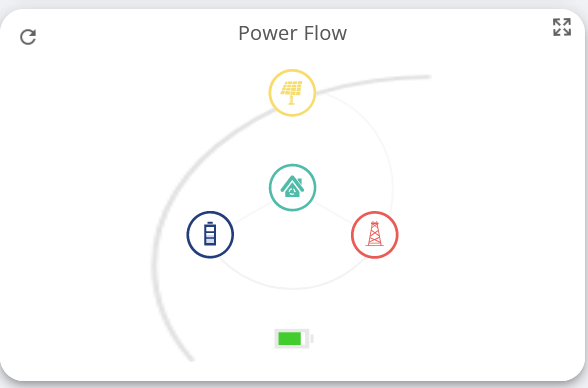
My Dashboard reset back to default this morning and after I've put things mostly back how they were, the Power Flow card seems intermittently broken:
Power Flow

Doesn't happen all the time, and it also keeps changing to the loading spinner without me doing anything to it.

#49 hoggy

Ah so it's not just me. Mine did the same yesterday (and has seemingly completely broken the Smart Tariff Card so it's mostly blank now)

#50 Sam D (GivEnergy)

hoggy Hi Hoggy,

We've identified the cause of the smart tariff card not loading the graph properly and will be applying a fix this afternoon.

#51 Sam D (GivEnergy)

Damien Hi Damien,

We can't seem to replicate the weirdness with the solar to battery arm looking like that, but we have fixed the issue with the spinner loading forever. We will be applying a patch this afternoon to this effect.

D
#52 Damien

Sam D (GivEnergy) Could it be browser dependent? I'm using Firefox for what it's worth.

#53 Sam D (GivEnergy)

Damien Yep, that's it. I've just managed to replicate this immediately using firefox. We'll look into this one.

G
#54 GrahamRead

Damien Ah, though it was something I'd done - yes min did the same this morning,

S
#55 Seye

I like the new small version of the power graphs as I can see most of what I need without having to maximise the card. It would be even more useful if there were axes so that I can see when events happen, and the scale of them

e.g. when did PV start to generate, when did my battery run out

P
#56 Phil-C

Hi, Chaps, my first post on here. The last two days has seen an absence of the left hand pane, where the selected cards are displayed and selectable. I just get all the cards one above the other, full width, like the old portal. Is this permanent?

Phil

P
#57 Phil-C

I also find this morning that though I am generating (248W) my battery is neither charging nor discharging.
Should this be a support issue or here? Anybody else getting this?
Phil

#58 hoggy

The cards all got reset for some people. You will have to go to edit Dashboard to add them back again.

Regarding battery, it has a lower limit which it needs to be above before it starts charging (presumably due to losses in the charge system)
Not tested for a while but this was over 100W ages ago.
If your in one of the more normal modes, then the PV will first cover your house loads before it goes to the battery as well.

S
#59 Seye

Phil-C
If its not your cards being reset are you using a different device or zoom? On smaller screens it does just what you describe. All cards are in a single scrollable column. The way to tell if it is that featue is 'where is the toolbar'? If on the left then you should see multiple car. If its at the bottom its in small screen mode

I get that on a PC if I display the portal on my portrait screen with reasonable zoom, rather than my lanscape screen

D
#60 Damien

Phil-C I'm sure someone more knowledgable than I can confirm, but as I understand it, it takes the inverter a little time to adjust to demand, but the difference between supply and demand is instantly met by the grid, either as an import or an export.

Since the portal just reports a snapshot in time, it's likely that at the moment the snapshot was taken, the inverter hadn't adjusted to demand and routed the excess solar to battery, leaving it to be exported to the grid until the inverter caught up.

What's your daily export to the grid? Mine tends to be in the 0.1-0.2kwh region.

I'm not sure if GivEnergy can make the inverter respond to changes in demand faster, but that would likely be the only way to avoid these unwated exports to the grid.

P
#61 Phil-C

Morning folks.

I found the problem regarding vanishing cards. I had somehow managed to enlarge th screen (two fingers on the thouch pad and move outwards. I did the reverse and the cards reappeared!

Phil

P
#62 Phil-C

Damien Hi, Damien. Yes, I follow that now. The leakage is small. As you say, a sudden demand is met by the grid initially.

M
#63 Martyn

Is it possible to set the ribbon to default to the second page (the one with values instead of graphs)?

Also as it is possible to have changing values for the second row of the ribbon, would that be a good place to put the last updated time?

C
#64 chris_p

Have to say the new top card with the daily totals is fantastic! Great job Givenergy!

#65 Woodstock

Martyn Are you viewing on a small screen or laptop/PC monitor?

The second row on the ribbon (the one with values instead of graphs) already has changing values for "Charge/Discharge Today" and "Import/Export Today" when viewed on my PC. Until it changed today the ribbon with graphs was the default with the changing values appearing on page 2. Now the situation has reversed and the ribbon with changing values is the default and the graphs are on the second page. I think it's great that all the information is available but find the constantly changing values very distracting (bloody annoying) when I do not wish to view them. I hope we can revert to the situation where the default screens are static and any screens involving continual updates are available to select if you want to view them.

K
#66 kwmc

So how do I get to this famous Beta Portal. Everyone is talking about it but I donlt actually see it anywhere ?
Thanks, Ken

D
#67 Damien

kwmc There's a big blue button on the bottom of the login screen that takes you there 😀
GivEnergy Login

K
#68 kwmc

Thanks Damien, I see it was hiding in plain sight 😅 Seems to be much more fully featured and reliable than current version.

C
#69 c_squared

The new update when viewing the beta portal on a mobile device is great, well I find it much better anyway. Good work GE!

#70 judgepd

After the last update, when I try to maximize the power flow card my browser (Chrome) just hangs and I have to force close it. Anyone else have the same problem?

A
#71 andrew_bond

judgepd It seems fine here (Chrome 96.0.4664.110)

#72 judgepd

Tried Chrome, tried Firefox, both not working. I removed the card and added it again and it's working now.

T
#73 TimBishop

Hi folks
I’m new in here so forgive any daft questions please!
I’m on new portal, and have entered my octopus tariff details, now it’s loaded in the correct two tariff names (import and export) but the price graphs both show the export tariff prices. Any ideas folks?

#74 THALL

TimBishop I believe I had this too, but it corrects itself. I did not ask anyone at GE to sort it.

T
#75 TimBishop

THALL fingers crossed :-)

C
#76 ChrisRowe

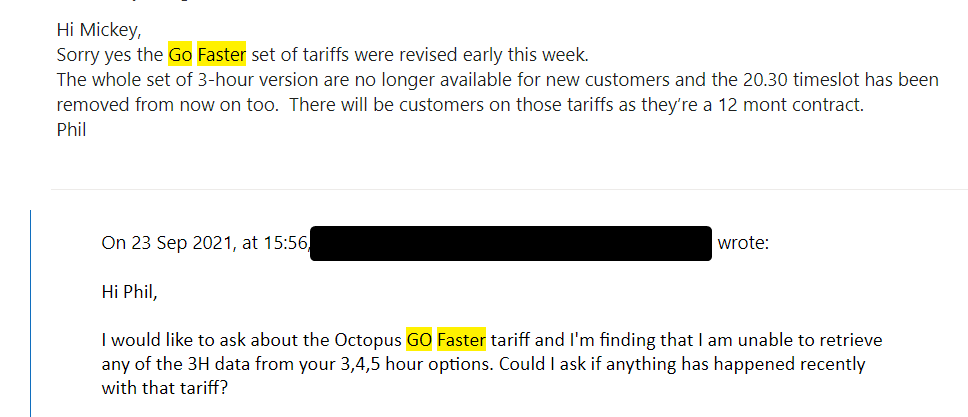
simon_swinburne I’m on Octopus Go Faster but when I input my API I get the message “ Could not find specific tariff GO-5H-2030-H”

#78 Mickey (GivEnergy)

ChrisRowe

Hi Chris,

I've been in contact with the product manager at Octopus before stating they've removed the 3 hours versions along with the 20:30 hour. I'm unable to retrieve anything from the database so lookout in the future for updates with new tariff features on the card

S
#79 Seye

Mickey (GivEnergy) legecy tariffs should still be accessible.
@ChrisRowe have you installed "octopus watch" or something simular on your phone? If that works it proves the data is available

#80 Mickey (GivEnergy)

Seye, ChrisRowe

Hi there,

I've looked into this issue and it seems that you have duplicate tariff records for your Go Faster. I won't go into the specifics for data protection, but I do recommend contacting octopus take a look at your records or API into your account details to get this amended

edit: I've hotfixed this issue for you ChrisRowe You should be able to view your tariff data now

C
#81 ChrisRowe

Mickey (GivEnergy) Thanks I can see it now. I know Octopus have withdrawn the 20.30 start time , for new applicants, but have just renewed mine for another 12 months, for which I am very greatful!!

S
#82 Seye

ChrisRowe how did that renewal process work? There are lots of mixed messages on the Octopus forums. Interested as mines is up for renewal soon

C
#83 ChrisRowe

Seye I think the renewal process for Go has changed in the last few days. Some people were saying that if you ignored the renewal E.mail that the tariff would renew on existing terms. There’s a member of Octopus staff on one of the Facebook groups who advised yesterday, that they send a renewal E.mail 45 days before your contract end. If you don’t respond to it then you automatically get put on the standard variable tariff.
My contract ends in less than 30 days, so I contacted Octopus and told them I hadn’t had a renewal E,mail. . I got a reply to say that my tariff would continue at current rates for the next year.
I’m not going to query it, or ask why!!

S
#84 Seye

ChrisRowe did you have to evidence an EV for the renewal?

C
#85 ChrisRowe

Seye No, they didn’t ask, although I do have an EV.

C
#86 chris_p

Another thing I'd like to see on the portal is the ability to down the inverter data from a date range, for example this week, last week, this month etc and the option to specify an exact range too, please.

D
#87 Damien

chris_p I think the Energy Graph card already does that -- if you expand it it gives options to change the date range and download data as an XLSX file.

C
#88 chris_p

Damien Thanks Damien, it does but that is only the data for the displayed graph. I want the inverter data that is recorded as part of the 5 minute updates.

B
#89 browellm

chris_p This is available on the old portal for a day range under System > View > Meter Data

C
#90 chris_p

browellm Thanks, ideally it needs to be in the new portal too.

D
#91 Damien

chris_p Okay, in which case if you go to My Inverter in the side menu, then click Meter Data in the tabs across the top of the resulting page, there's a download button at the top-right which looks like it should be what you want.

C
#92 chris_p

Damien Yeah, my issue is that you can only download that data one day at a time. I would like a date range selector for that data like the Energy Graph does.

#94 hoggy

[unknown] / [unknown]
Yeah sorry i've kind of let that page fall by the wayside with the various API changes along the way.
Unfortunately just setting the rows to >300 doesn't force it to return more days. (Also i think the KB is wrong as that call for me atleast doesn't work unless you feed it a specific day.) There appears to be no obvious official way to do this.
You can however take advantage of an API quirk which is: Dates are for the humans benefit not the machines.
example - https://www.givenergy.cloud/GivManage/invData/{{InvSN}}/**2021-01-50**?page=1&rows=301 returns data for 19-02-2021

This makes it rather easy to automate mass calls by simply incrementing the date by 1 for X number of days until you get your target date. Merge each day into one file and away you go.
So here is a Powershell Script to do so. (Right Click > Save as)
You can edit this in Powershell or even Notepad to add your details.
All you need is your OLDPortal API Key and your serial number.
Fill in the dates & how many days you want it to run through (365 for full year obviously)
Then Right click > Run in Powershell.

It'll spit out each day in JSON Format and then one massive file for all the days combined you can import into excel.
Import into blank spreadsheet as follows: Data Tab > From Text/CSV > Semicolon Delimiter > Load
Make cols useful: Data Tab > Text to Col > Delimiter > Other "=" > Do Not Import Col > Finish
(Note this removes what would be the col headings, leaving just the data. It may pay to copy the top row first so you know what they are.) This could probably be automated in Powershell but GE have a habit of implementing something in the portal 5 mins after I've done my own so I'm not sure it's worth the time.

Final note: 4 Days of data is 2MB - This is probably why GE don't currently offer this function. Adjust the refresh rate accordingly so as not to cause undue stress on their servers. if your doing a full year I'd say 60sec for each day atleast

#95 hoggy

[unknown] / [unknown]
Yeah sorry i've kind of let that page fall by the wayside with the various API changes along the way.
Unfortunately just setting the rows to >300 doesn't force it to return more days. (Also i think the KB is wrong as that call for me atleast doesn't work unless you feed it a specific day.) There appears to be no obvious official way to do this.
You can however take advantage of an API quirk which is: Dates are for the humans benefit not the machines.
example - https://www.givenergy.cloud/GivManage/invData/{{InvSN}}/**2021-01-50**?page=1&rows=301 returns data for 19-02-2021

This makes it rather easy to automate mass calls by simply incrementing the date by 1 for X number of days until you get your target date. Merge each day into one file and away you go.
So here is a Powershell Script to do so. (Right Click > Save as)
You can edit this in Powershell or even Notepad to add your details.
All you need is your OLDPortal API Key and your serial number.
Fill in the dates & how many days you want it to run through (365 for full year obviously)
Then Right click > Run in Powershell.

It'll spit out each day in JSON Format and then one massive file for all the days combined you can import into excel.
Import into blank spreadsheet as follows: Data Tab > From Text/CSV > Semicolon Delimiter > Load
Make cols useful: Data Tab > Text to Col > Delimiter > Other "=" > Do Not Import Col > Finish
(Note this removes what would be the col headings, leaving just the data. It may pay to copy the top row first so you know what they are.) This could probably be automated in Powershell but GE have a habit of implementing something in the portal 5 mins after I've done my own so I'm not sure it's worth the time.

Final note: 4 Days of data is 2MB - This is probably why GE don't currently offer this function. Adjust the refresh rate accordingly so as not to cause undue stress on their servers. if your doing a full year I'd say 60sec for each day atleast

#96 hoggy

Seye / chris_p
Yeah sorry i've kind of let that page fall by the wayside with the various API changes along the way.
Unfortunately just setting the rows to >300 doesn't force it to return more days. (Also i think the KB is wrong as that call for me atleast doesn't work unless you feed it a specific day.) There appears to be no obvious official way to do this.
You can however take advantage of an API quirk which is: Dates are for the humans benefit not the machines.
example - https://www.givenergy.cloud/GivManage/invData/{{InvSN}}/**2021-01-50**?page=1&rows=301 returns data for 19-02-2021 Not the 50th Jan 2021 which isn't real.

This makes it rather easy to automate mass calls by simply incrementing the date by 1 for X number of days until you get your target date. Merge each day into one file and away you go.
So here is a Powershell Script to do so. (Right Click > Save as)
You can edit this in Powershell or even Notepad to add your details.
All you need is your OLDPortal API Key and your serial number.
Fill in the dates & how many days you want it to run through (365 for full year obviously)
Then Right click > Run in Powershell.

It'll spit out each day in JSON Format and then one massive file for all the days combined you can import into excel.
Import into blank spreadsheet as follows: Data Tab > From Text/CSV > Semicolon Delimiter > Load

Make cols useful: Data Tab > Text to Col > Delimiter > Other "=" > Do Not Import Col > Finish
(Note this removes what would be the col headings, leaving just the data. It may pay to copy the top row first so you know what they are.) This could probably be automated in Powershell but GE have a habit of implementing something in the portal 5 mins after I've done my own so I'm not sure it's worth the time.

Final note: 4 Days of data is 2MB - This is probably why GE don't currently offer this function. Adjust the refresh rate accordingly so as not to cause undue stress on their servers. if your doing a full year I'd say 60sec for each day atleast

#97 hoggy

Sorry for double post. This forums timeout periods are pretty brutal & i also don't have permission to delete my own post for some weird reason...

N
#98 NiallKilleen

Am interested in learning more - have just got into HA and have GE invertor & batteries installed since September

D
#99 DavidPowell2021

Had my system installed in September (3 x 3kW Inverters and 6 x 8.2 kW batteries) to support my 8.75 kW PV installation and all seems to be working well, except ...
Some of the GivEnergy dashboard gives me correct data and other parts of it give some spectacularly imaginitive data ...
I have tried reporting this as a bug, but I got a reply that it had been sorted when in fact nothing hs changed.
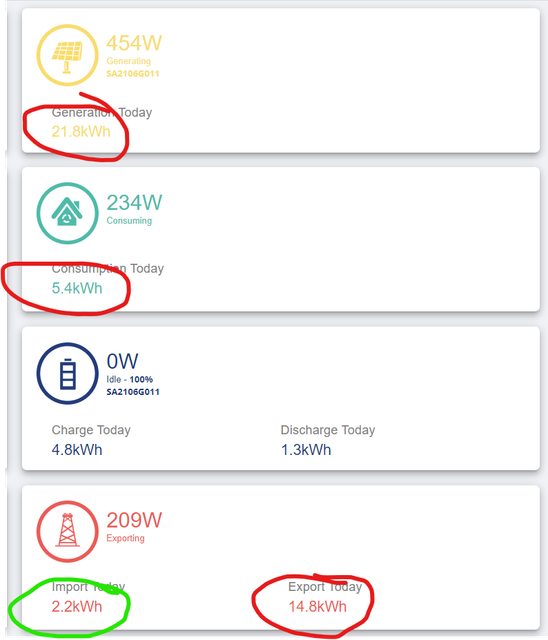
At this very moment, I am generating around 1kW as the sun has gone behind a cloud, but I am at 22kWh for the day .. the dashboard agrees (approximately) with the instantaneous reading, but says I have generated 1,401.06 kWh today.
Because the sun has gone in, I am consuming 8.4 kW, importing 5.5 kW with the batteries making up the difference but the dashboard says I have consumed 5,194.8 kWh today. My maximum ever consumption with my large all electric house, underfloor heating and charging the EV is 220kWh.
Anyway, according to the dashboard I have also exported 124 kWh today.
The main power graph is great, not least because it is fairly accurate, but the rest is an unmitigated disaster.
Can someone please fix it?

S
#100 steve

DavidPowell2021 welcome. I can't help with the strange stats being reported. I just wanted to say that looks like a great setup. Hope you get the reporting working.

#101 judgepd

DavidPowell2021 Quite the setup you've got there. Something else doesn't look right to me...you say "consuming 8.4kW and importing 5.5kW" but with 3 x 3kW inverters you shouldn't be importing anything at that point??

A
#102 anglefire

DavidPowell2021 are you using the original dashboard or the beta one? If it’s the original then try the beta version. (Which is going to be the default fairly soon)

K
#103 kwmc

Sois there anywhere someone has documented the various remote control registers and their meanings.
For instance I expect that the Battery Reserve % Limit would be the lowest tha the inverter would use in normal operation, and that perhaps the EPS circuit would be allowed to go below that - however my inverter seems to ignore that and go all the way down to the Battery Cutoff % Limit.
also the AC Charge Start 1 Time and AC Charge Start 2 Time seem to be ignored. I suspect they are somehow linked into whether Winter Mode is enabled. I have of course enabled AC Charge Enable.
What does Enable DC Discharge do ? Surely that's what the battery does to power the inverter. It's 'off' for me but the battery still powers the inverter.
I'm confused and would like a list of settings, meanings and their interactions if anyone has such a list.

A
#104 anglefire

I don’t have a list but I can tell you how the battery reserve works in my experience
Mine is set to 10%. And if there is any solar generation happening the battery doesn’t go below this figure. Once the solar has dropped to zero then the battery will discharge to 4%.
Most of the other registers are self explanatory except the winter mode ones which seem to be misnamed and not well understood.

W
#105 wrefordj

I don't think the battery reserves is currently working. Mine used to be set to 20% but following the firmware upgrade I am unable to stop discharge down to 4% level. I will be a very happy bunny when I am able to set a reserve of 20-30% again! (2x8.2Kwh and AC3.0)

A
#106 AJSki2fly

DavidPowell2021

I can confirm that this is the case with both portals (old and beta), they can be accurate on minute and then display random figures, also reports are completely unreliable especially if you have more that one inverter. I have raised several bug reports on all accounts. Some have just been closed with no real explanation or just noted 'we are going to look into this' or some such similar comment. Not great IMO.

P
#107 pjb904

kwmc I'm glad I'm not the only one who is mystified by these undocumented settings! Just a list saying 'ignore this - or advise to set to 'x' would help. I've got screen grabs in case (like I did recently) when mysterious changes happen, and my battery doesn't limit overnight charging, and I have to try to alter things. The App settings must alter things somewhere here, but not sure what has priority, or if any Remote changes get reflected back to the App?

@Giv - please please give us a list for Remote settings meanings!

P
#108 pjb904

wrefordj yes, the dreaded 4% value, that the system insists on? This discussion is so useful to learn of shared mystifications!

K
#109 kwmc

With AC3.0 and 8.2kwh I have been told the reserve % does not work and that this will be implemented in a future firmware update. In the meantime one can set the battery cut-off and I have increased mine from 4% to 16% and that seems to work. I did this to implement my own small reserve in case of loss of power in recent storms. However I'm not sure how, if I lost power, I would than be able to set the cut-off down to 4%. If there's no power and the battery is cut-off there would be no power with which to change the setting :-(

A
#110 anabanet

kwmc If you have set a reserve( I set 16% ) and you then loose power from the grid, it will use that percentage to power the island mode down to 4% ( I tested this in August 2022 ). Only the island mode works, and only uses the reserve when the mains is off ( tested by tripping the switch in the consumer unit. )

A
#111 anabanet

kwmc Reserve is just that - reserved for EPS mode.

I have 3.0 and 8.2 and this has worked since I had the installation.

If you dont have a seperate board, you can get an electrician to add an earth rod and wire up a plug into the existing EPS port, and you can have a source of electricity at low cost ( installation cost ) with your existing system.

It was the reason why I went Givenergy and not TESLA.

Tesla was overly complicated and expensive. Givenergy was simple and 'always on' ( except for the 3 second delay )

K
#112 kwmc

anabanet GE inform me that the reserve is not currently implemented for the AC3 inverter. When by battery is discharging in normal use it just continues on past the reserve % to the cut-off%. Can I ask what inverter you are using ?

#113 Woodstock

kwmc That's news to me! I have an AC-3.0 inverter and 8.2kWh battery which in normal use discharge have been adhering to the reserve capacity I have set. The only times it has dropped below this is when it gets its calibration knickers in a twist and goes all the way down to zero before a forced recharge back up to 4%.

A
#114 anabanet

kwmc 3.0 AC coupled.
Complies to my requests for reserve energy.

K
#115 kwmc

I'm glad it's working for you...
RE: Beta Portal #00000658 | Ken Cochran | Ken Cochran | Battery reserve ignored
Adam Reynolds from GE informed me on 16/2/22 that
"This setting is currently unavailable on AC coupled models due to some issues relating to the setting. We do hope to have this resolved through firmware in the near future."
I'm running firmware versions
Inverter: D0.534-A0.534
Battery: 3001

I'll check it again as it discharges overnight

A
#116 anabanet

kwmc D0.534-A0.534
: 3005

K
#117 kwmc

anabanet Well I tried the reserve this evening with a reserve at 40% and it worked. So forget my comments above about reserve not working - it seems it does. now.

A
#118 anabanet

kwmc Not the first time it has been odd. Will not be the last I am sure. Glad it is working for you!

K
#119 kwmc

kwmc Spoke too soon. OVernight the AC3 discharge the battery to its cut-off (not reserve) limit. :-(

C
#120 c_squared

Anyone struggling to get any system settings to save on the inverter card tonight? With a good PV forecast tomorrow, I'm trying to turn off the overnight charge but it won't take any changes. I tried the legacy portal as well but thats not accepting them also.

#121 Deej

c_squared yep mines not saving however it’s set itself to off for charge the battery..but I hope they sort quickly.

C
#122 c_squared

Deej glad it’s not just me but also not glad because others are in the same boat! Hoping that it’s fixed this evening!

T
#123 TX200

Could you just turn off the inverter overnight to stop it charging?

Maybe not ideal, but if need be… ?

C
#124 c_squared

TX200 The thought had crossed my mind!!!

#125 Deej

I reported as a bug and received this response from support…

“Hi, We've identified the cause of this problem and have applied an update to fix it. Remote control should now work as expected.”

Everything appears to be working again.

#126 Deej

TX200 the idea was that I wanted it to charge but was unable to set it to do so as the bug had turn the option off and not able to edited. Great support from GE who resolved the problem so charging could commence 😀

T
#127 TX200

Deej I think my reply was to the person who didn’t want it to be charged overnight due to good solar forecast next day 😄

#128 Deej

TX200 😆 good point…!

A
#129 AJSki2fly

DavidPowell2021

After a lot of issues raised with GivEnergy and time and effort on my part, they have made changes to the Beta Portal with respect to the figures being reported.

I believe they now take into account the number of Inverters implemented at a site and use this to get an average for Grid Imported Power, it certainly works for us, we have 2 Hybrid Inverters at present.

The Power Flow view at present displays correct PV, Inverter and Grid Power, but Battery usage is wrong (I was told this would be fixed. One thing to note is that the Power Flow figures can be out of sync with the top Panel power figures, as I believe the Top Panel refreshes automatically.

The Top Panel Power figures for PV Generating, House Consumption, Battery Discharge/Charge and Grid Import/Export I believe accurately reflect the last data feeds for Each Inverter and Battery in multi-inverter installations, however due to time delays and possible differences between inverters sending data then I think the reported grid usage or export can be somewhat odd. (I have suggested a possible method to alleviate this, if feasible)

On another note, I have raised issue with the Daily, Weekly, Monthly PDF reports being completely inaccurate, and also that if they are to keep them then the Beta Portal has nowhere to select them of request them automatically. I am led to believe that this will also be looked into.

I am hoping that the issues I and many others have been suffering from are to be addressed.

On another note I see others are experiencing Issues with settings being lost or corrupted settings on inverters with respect to ECO and Battery times for discharge etc, I have experienced this and have raised this with GivEnergy, I hope to hear if this has been fixed. In our case one of our inverters failed to discharge from full, however the other was stable so I am yet to be convinced it is not an Inverter issue.


M
#130 Mal-Givenergy

The portal looks terrible on my iMac, doesn't seem to be set out well as though it needs a bigger screen to view it on.
I think the layout needs work.

#131 TheDragon (GivEnergy)

Im on a Mac Book and a big iMac, as well as various windoz machies. Looks ok. Not the best layed out, but does the job

S
#132 Seye

Mal-Givenergy What browser are you using? What is your screen resolution?

The site is HTML standard complient I beleive so it should work. That was discussed in the forum a long time ago with many browsers being tried. The site is also responsive. Not great on a smaller screen but it does adjust to make it reasonably usable. I use it on my phone without too many issues

Maybe add some screen shots to show what issues you are seeing?

L
#133 LaurenceMatthews

Hi

I wonder if anyone can help with two problems we’ve encountered recently. I’m aware it might be simple stuff and if there’s a FAQ about this which people can point me to then that’d be fine (but I can’t find one!). We have a simple domestic PV installation with 12 x 375W cells, a 3.6kW Hybrid inverter and and 8.2 kWh battery. The problems:

[1] The battery seems to have isolated itself somehow so it’s not charging or discharging. It appears to be on and reading 3/4 full (3 green lights) - although the app on the phone has it at 0%. In the day the PV cells are feeding our usage and then pushing to the grid (so not topping up the battery); overnight our usage is coming solely from the grid (ie not from the battery). On the inverter the blue arrow to and from the battery is steadfastly unlit.

[2] Coincidentally (or not?) the website portal (ie givenergy.cloud) has totally stopped working when the new beta version was introduced. I get a message to ‘click on the image’ and just get an endless loading spinner symbol; I’ve tried multiple time; there’s no option to use the previous version instead (which appears to be there hiding behind the image). I have a Macbook Pro, 2015 era using OS Mojave 10.14.6, which ought to be modern enough.

Many thanks

Laurence

#134 hoggy

LaurenceMatthews I know this is a cliche' but have you tried turning the whole lot off and on again.
Isolate AC, PV and Battery. Switch battery off on the button on the side. Give it a few mins then turn it all back on again.

If i recall, my battery did similar to this when I ran an update without the USB stick inside the battery. It ran fine for months after the update had seemingly worked (it hadn't) until I switched the system off. On reboot the battery then wouldn't charge or discharge until the USB was put in and the update run again (but did have all the lights & green status showing!)

T
#135 Tim

LaurenceMatthews I suspect that the battery DC isolator has tripped for some reason. The inverter would still be talking to the BMS over Modbus but there doesn't appear to be any inverter monitoring of DC input from the battery terminals. I've asked if this can be made available and an event logged if it disconnects. I've also asked if the event log could trigger emails to the owner for certain events.

Whatever the cause, a quick call to Givenergy Tech Support should get you a resolution.

#136 Woodstock

I have found that the order in which you turn things on again after a full shutdown can have an effect on subsequent system operation (or non operation). The most reliable order found through trail and error for an AC coupled inverter is ...

  1. Battery
  2. Battery to Inverter DC isolation switch
  3. Inverter to grid AC isolation switch

It is best to allow a minute or so between each step for things to stabilise. This routine is successful more often than not and for the odd times that it doesn't work I just turn everything off, wait a few minutes, and start again.

T
#137 Tim

Woodstock My installer gave me a handover pack which has a startup sequence and shutdown procedure in:
Startup - switch on all PV DC isolators; switch on battery DC isolator; switch on AC isolator to the inverter, wait 200 seconds.
Shutdown - Switch off AC isolator to the inverter; switch all DC isolators to off, wait at least 5 minutes before doing anything.
I think these are generic instructions because the Givenergy pack states for shutdown, to isolate the battery by pressing the On/Off switch on the side for 5 seconds, turn off the battery DC isolator, turn off the PV with the external isolators first, then the built-in isolator at the bottom of the inverter; turn off the AC. I'm presuming startup is the opposite sequence.

L
#138 LaurenceMatthews

Dear hoggy, Tim and Woodstock,
Many thanks for replying and for your help.
Finally got through to GivEnergy on the chat (couldn't get through earlier) and they said essentially the same - the isolator between the battery and inverter had tripped. We've now reset it and it seems to be working (yay) - but no idea why it tripped in the first place and so hoping it doesn't do that again. Now to try and sort the portal out ...
Cheers, Laurence

G
#139 garycatt

Hi. Thanks for adding the legacy dashboard to the new beta - I like seeing something I'm familiar with, but the figures are not adding up in the lower graph (unless I'm reading it wrong). See screenshots below.


J
#140 JRidout

Hi all,

I'm very new to Givenergy (Battery commissioned last week). Does anyone know where I can find a manual or instructions for the Givenergy App? I'm trying to understand the settings?

J
#142 JRidout

Mickey (GivEnergy) Thanks Mickey thats great. Another quick question on the GE App, we have a 2.6kwh Battery installed but on the App the maximum it charges up to is 1.3kwh? Is that correct??

H
#143 hamilton

Hi there, if possible, could you work with the solcast prediction data to give an actual KWH prediction figure?
I've found it a really good guide to how much I'm going to generate but as the graphs autoscale etc it could be misleading. all we are interested in is the amount of area under the chart rather than how high it peaks etc.

C
#144 Chanced

LaurenceMatthews Hi. I had a similar problem - the battery would trip when the panels reached a certain power output. After a number of calls with the installer, it was identified that one of the cables connecting the inverter to the battery had a bit of its insulation on when clamped in the breaker. Refitting this cable correctly in the breaker solved the problem (fingers crossed!) and the battery has not tripped out since.

#145 Mickey (GivEnergy)

garycatt

Hi there, the figures accurately represent the state of your system at time. The Energy bars update at a much less infrequent time. I believe it was 2-4 times per day but I don't recall.

hamilton

I don't directly work on the solcast side but if solcast provide a figure for us of their overall kWh generation figure, we'd be able to include it

#146 dbt85

Am I being particularly blind or is there no temperature information anywhere for the inverter in the new portal?

C
#147 Chanced

Yes, pull up the inverter panel and then select the inverter data tab, shows temperature there

#148 dbt85

I literally just found it 😂 Maybe I need new contacts.

Maybe I was looking for it in Meter data as I think the old portal put it there.

Never mind.

#149 ivell

HI everyone - new installation this week. Today i see an 'outage' on the portal reporting our usage
![https://ibb.co/wzxdkVf](https://) - we were at home, so this is a data issue. Same happened yesterday. How do i resolve?

#150 THALL

ivell Welcome

Have you made GE aware of this? It is odd the solar data is there but the load data is not. Is that outage exactly 1 til 5?

A
#151 andrew_bond

ivell It looks like it might coincide (at least today) with the time when the battery filled up (not sure why that might be - my battery filled up today also, but continued to measure the load correctly).

#152 ivell

THALL I have following your prompt 🙂

For context i have two inverter/batteries
i spoke to the installer who thinks: "because one inverter is generating power and satisfying that load, the other inverter is therefore showing no load, and that’s taking priority over the display on the graphs" - in other words the portal is showing the data incorrectly

#153 THALL

Interesting. I do not have multiple inverters and going by some of the issues people are reporting I am not sure I want multiple. BUT with a new 3.6kw AC unit coming I am keeping an open mind about adding a AC3.6 and 9.5 battery later on once I have more data.

C
#155 c_squared

Just spotted the reports function following todays update and had to jump on to say great work GE! That’s a really nice feature and the information it provides is great, for me anyway. The whole reason I installed PV and the GE inverter/battery was to reduce my reliance on the grid and to be more energy independent. I know we aren’t at the end of March yet but it’s great to see that I have been 91% self sufficient so far this month. At a glance, the reports will be a nice feature to access to track weekly/monthly/annual information.

P
#156 pauldavies

c_squared Likewise - the reports in the "new" portal look great - well done dev team!. I would love more info on the data though as with a 2xAC3.0/2x8.2kW battery system and 5kW of PV inverter capacity the numbers dont quite look right..but in the right ballparks...unlike the earlier dashboard reporting numbers which could be 100x out sometimes! All good progress and seeing the benefit of the GE investment!. Thanks again

W
#157 wilfleek

Yes, another +1 for the reports - they do look good, and were the one thing I liked about the legacy portal (RIP).

When will we stop calling this one the "beta" protal?

B
#158 browellm

I'd be interested to understand if the reporting is working correctly at the moment. I'm getting some "interesting" values.

For example, I ran a custom date range in my Energy Graph card to cover whole life solar generation (18/3/21-date)

Now 4.1MWh sounds about right to me given the size of my array.

In the new reports section, I ran the same date range and the value doesn't match, or sound in any way plausible. Just 50% or so over reported. Are they supposed to be measuring the same thing?

S
#159 Seye

wilfleek I think beta became officially live today. The main/original url takes you to the new portal now

#160 hoggy

I need to do some digging but my reports don't seem to tally 3 ways - I run my own "reports" from the API and even the basics don't seem to agree with the portal data card, the API or the new Reports (has my PV generated 6035 or 5636 or 5863kWh?)
Would have thought it's all the same database so not entirely sure what's the matter!

#161 DeveloperDavid (GivEnergy)

hoggy Hi Hoggy, on the reports we are using some updated logic to get more accurate numbers. we will be updating the energy flows card shortly to show this too.

#163 DeveloperDavid (GivEnergy)

browellm Looking at your data, it seems that you have had an issue with the meter that seems to have resolved itself. Because of this, it has generated some incorrect information. We are currently working on a fix for this issue.

A
#164 andrew_bond

Is the portal being worked on?
The legacy dashboard works, but the new one (and My Inverter) is just spinning wheels...

M
#165 Mal-Givenergy

JRidout Yes it’s half the battery so 5.2kWh only charges/discharges at 2.6kW

P
#167 pauldavies

With the improved reports in the new portal, the total consumption figure on my reports is confusing... For yesterday - 5th April my report shows:

Grid to Home - 22.73 kWh - this is mainly grid to battery charge..a bit of EV charge on Octopus Go..
Battery to Home - 13.41KWh - this is the stored energy from grid being used in the home. ( the same energy as the grid to home)
Solar to home - 9.7kWh - this is part of a total 16kWh of PV generation - the rest went to battery..

The total consumption is not 45.91kWh... If its grid consumption its 22.73kWh. If its home consumption its ?. ~ nearer 22kWh? (no grid import in the day) From the Myenergi dashboard for the same day - it shows 29kWh from grid, plus 18kWh from solar..where a lot of that 29kWh went to the batteries.. Is my understanding correct and can the reports reflect this double usage of the same electrons!!?? Paul

T
#168 Tim

pauldavies I'll second that.

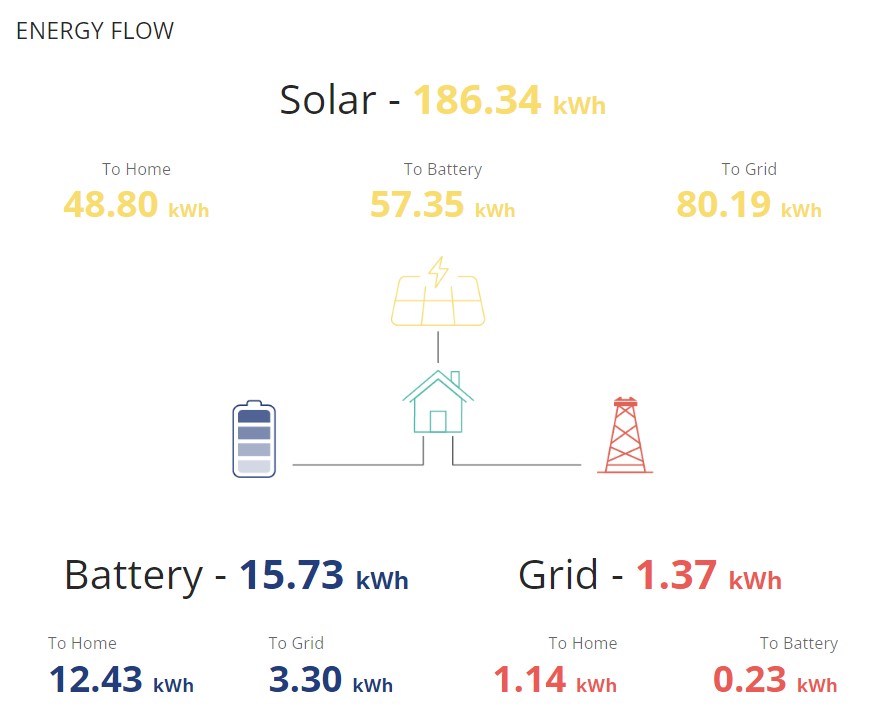
Seems daft that my import from the grid is 1.14kWh and my self-consumption is 55.19%. My consumption was 48.8kWh direct from solar and 12.43kWh from battery, charged by solar, so my actual solar consumption was 61.23kWh and self consumption is 98%.

A
#169 anabanet

DeveloperDavid (GivEnergy) You do seem to have an issue with the meter readings. As your support guys tell me from time to time when I complain about inaccurate readings that the inaccurate readings I am getting are 'accurate' because the meter says so. We are talking about 5 minute spikes of 45000kw. ( yes KW )

C
#170 c_squared

Tim plus 1 for this issue. I really like the idea of seeing self sufficiency but it needs to be accurate. It can’t be difficult to have the grid input represent one figure and solar/battery the other. Hopefully this will be fixed.

#171 Woodstock

Tim My interpretation of self consumption is the percentage of total generation that has been used by me, as opposed to exported to the grid. Does this fit your figures?

T
#172 Tim

Woodstock This is the data for the same week, just further down the report.

The figures just don't seem to make sense to me at all. I know my consumption for the week would have been about 100-140kWh, which could be the 48.8 (To Home) + 57.35 (To Battery) but I have no idea why the consumption figure would be 62.37kWh.

However, I am just very happy that my import from grid has dropped to about 1kWh/day since the system was installed. I've also noticed that my import goes well over 1kWh on Thursdays which is ironing day!

#173 Woodstock

Tim Yes it does fit your figures. ((186.34 - (80.19 + 3.3))/186.34) x 100 = 55.19%

Z
#174 Zakalwe

Tim

48.8 (Solar to Home) + 12.43 (Battery to Home) + 1.14 (Grid to Home) =62.37 consumed in total.

T
#175 Tim

Zakalwe Thanks but ...

Solar: 48.8 to home; 57.35 to battery and 80.19 to grid ...

48.8 to home makes sense. 80.19 to grid - should get an SEG tariff - but if 57.35 was to battery and battery was 12.43 to home and 3.3 to grid, where did the (57.35-12.43-3.3=) 41.62 go? If that is inverter losses, it seems quite inefficient.

#176 Woodstock

Tim Have you tried generating the report again recently for that week? Does it show the same figures? There were a few anomalies when the reports first went live, which have since been fixed.

T
#177 Tim

Woodstock Thanks for the tip. I've looked at the week again (27/3 to 2/4) and the report shows the same data. There is a similar difference for other weeks too.

#178 Woodstock

Tim Interesting. I had some very odd figures when the reports first came out but they have sorted themselves out. My battery to house/grid figure is now typically around 86% of the solar to battery figure across a whole week.

P
#179 pauldavies

Hi to the GE team... Something up with the Solcast card?.. I note that the Solcast estimates seem realistic but the actual solar generation data coming in seems to be a factor of 10 out?? !
/Users/pauldavies/Desktop/Screenshot 2022-05-30 at 17.45.29.png

Got a feeling the image may not display... Why cant I drag and drop?!! Paul

A
#180 anglefire

pauldavies because the software doesn’t support it. You have to use bbcode. There is one linked on here somewhere where you can drag and drop onto it.

P
#181 pauldavies

anglefire thanks! Homework for tonight!!🙂

N
#185 NOLBwithaD

Not sure if this is the correct place for this but… On the new portal, which I really like, I have one small gripe:

On the x: (time) axis, especially on the 6, 12 and 24 hour scales, the vertical lines bear no relation to the hours and it is INCREDIBLY difficult to tie a electricity use peak to a particular time/incident (kettle/toaster/microwave/car) event using those scales. Is there any way they can be auto scaled to be tied into the hours, rather than at arbitrary places across the x axis, please? It would just make reading the events a little easier - for me at least.

Thanks, in anticipation

D
#186 DavidPowell2021

Wouldn't it be great if the data shown on the portal was even remotely accurate?

Mine has a few items that are accurate and shows that the things that are measured in some places are accurate, but the rest of the portal might as well be something out of an early star trek movie, complete with astronomical figures, such as
Generation Today - 8,080.80kWh
Consumption Today - 2,599.40kWh
Export Today - 895.60kWh
Solar generation (on the energy graph) shows about half of that being generated, one bank of PV rather than the total, shown on the main dashboard, which is reasonably accurate.
The installer swears it is set up correctly and Giv Energy doesn't seem to Giv a Sh*t.
Spent around £25000 on a system to complement my 8.75 kW PV array and am quite disappointed that the basics aren't right. The promised 'monitoring' by GivEnergy seems to happen, but no-one gets notified if there is an issue.

#187 hoggy

DavidPowell2021 take it youve a multi inverter setup (well you should for 25k!)
The monitoring on those has been utter BS since forever but again no fix in sight...
All i can suggest is to get familiar with home assistant although you really shouldnt have to for what (at the time) was an approved install method.

S
#188 stevelewis

DavidPowell2021 daily and total values scroll on the beta portal... maybe you're seeing Generation Total, not Generation Today?

T
#189 ToothyChris

DavidPowell2021

Hi David, it is not just you. Mine says Generation Today = 951.60kWh, which is clearly rubbish. And like you, I am becoming increasingly frustrated at the lack of action, and the lack of communication from GivEnergy.

There are suggestions that GE is working on a hardware modification, to enable the portal to correctly display data for customers with multiple inverters, but they may be asking customers to pay for this! - not something which I feel would be consistent with the Sale of Goods Act - although it gets complicated because we have not bought equipment directly from GE (so it's a bit like issues with new cars, where it is the dealer who customers have contracts with, not the manufacturer).

GE has the potential to be great company, with a great future, but their current behaviour does not give me much confidence that they are going in the right direction.

W
#191 Wally

simon_swinburne If this tread relates to the now current portal and is the portal I use as the owner of a battery, could you please label all the currently unlabeled elements on it so that as a blind user, my text to speech software will tell me what they do for me and generally make the portal accessible for users like myself. I don't want to have to rely on someone else to make changes to my system for me, it takes too long to get a response doing it that way.

Currently, all I hear when highlighting a button is "unlabeled 0 button", "unlabeled 1 button", "unlabeled 32 button" and so on. then when I activate one of them, using either the spacebar or the enter key -blind users don't use the mouse - I get no indication that anything has happened on the screen leading me to believe that activation of the button did not take place.

the app works much better for me on my iPhone than the portal does in Safari or Firefox but doesn't let me see all the settings I may want to change, such as turning on and off, charging from the grid.

Are there any additional admin options that can be assigned to the user that will then allow me to administer my system from the app and if so, how do they get assigned to my user account on the app?

#193 Mickey (GivEnergy)