F
Are there any plans to support an ethernet adapter instead of the Wifi dongle? I don't have any issues with the Wifi dongle, I just prefer to hardwire things as much as possible.

Are there any plans to support an ethernet adapter instead of the Wifi dongle? I don't have any issues with the Wifi dongle, I just prefer to hardwire things as much as possible.

swap / suppliment even if there was a potential significant cost? The dongles are surprisingly expensive
simon_swinburne
Well, ideally I’d like to part-ex it, considering both my dongles are only a month old and I need two, apparently. But supplement could work, since this is not exactly a cost-saving exercise.
The dongle is actually the cheapest, nastiest looking part of an otherwise sleek slab of tech. It surprised me that a simple RJ45 socket wasn’t included in the bottom of the unit, presumably the dongle is mainly an antenna? Also, the horrible WiFi interface that my installer battled with during setup doesn’t inspire any confidence at all. A GivEnergy LAN UI, similar to the beta dashboard would be much more appealing and “on brand”.
@"JJB" dongle must be a bit more complex than that as when I logged into it for initial setup I forgot to change my WiFI connection back on my laptop and was using the dongle as an internet Gateway!
I'd be interested - even at cost. In the meantime, is there a way to safely disable the additional access point the dongle creates? Having yet another signal on 2.4g around a fairly heavily congested smart home isn't causing any problems right now, but I'd sooner close it down if possible.

LAN over Wifi for me any day. We have enough smart devices with their own mini hotspots already. The 2.4ghz band is really congested. I'm rural so don't have neighbors Wifi bothering me.
Would be happy to retro fit a LAN dongle
The current (not even gen 2) hybrid inverters do have an RJ45 socket already. But there's no one at home behind it.
I prefer connection over cable rather WiFi as well.
Any one try unofficial usb to RJ45 adapter as USB communication should be standard. It cost £15 so worth to try.

THALL Just a hypothetical question on that, and I know it's not recommended to fit anything else bar the dongle into the port.
But, the dongle can be put into a PC before the inverter to be setup, so this power requirement would have to be compliant with the USB standard, but if you were to plug in a USB separate powered hub with a USB and ethernet port surely that would 'work' as its keeping its USB standards for power and data. Plus at least your dongle would be still powered if the inverter ever goes off
Obviously this would have to be an indoor situation.
Once again though i'm been hypothetical here and not suggesting you compromise the GE inverter by doing something outside the manufacturers specifications/recommendations.
I'm not an expert in IT side of things so even the ethernet to USB may not even work anyway.
THALL I know all companies will say that just to enhance buying their own product for premium price.
As DeanoC75 say GE dongle must using standard max 500ma 5v power output from USB as you can plug it in to your laptop as well. Problem can be with communication protocol.
We all know that congestion on 2.4GHz is high. Adding another device to any channels will reduce bandwidth. In my area 2.4GHz all channels are occupy by at least 3 routers.
DeanoC75 HipHopAst While you are both right given the cost of this kit if you attach something not approved and it did break it, there is not another usb port, there is no rj45 available so basically a brand new unit will be required as you can kiss the warranty goodbye.
I do work in IT, as a Network Manager at a secondary school and as IT Consultant. The data requirement from the GE kit is tiny, modern routers will also change channel to the quietest in range to help with congestion. Yes the 2.4ghz is slower anyway, but works at greater range etc and as mentioned the data usage is tiny.
The option for a full wired port would be my preference on future units.

The dongles not just a straight WiFi stick though, so connecting via rj45 wouldn't achieve anything and it wouldn't update the portal either.
Its the part the pulls all the data from modbus for things like the app and portal.
Yeah, It seems like the wifi dongle is actually a Modbus to IP gateway.
Given that everything needs an app/smart badge to get sold these days, it seems madness not to include the gateway onboard and use a very inexpensive wifi usb dongle. Ethernet mac's are so cheap at the electronic level that not including one on board feels like a cost saving too far.

Are all these comments about wanting a LAN connection specific to the Gen1 inverters?
The datasheet for the Gen2 hybrid inverters describes a LAN connection being available.
It does seem inconsistent between page 1 and page 2 though.
Page 1 - Connectivity - WiFi, LAN or 4G
Page 2 - Communication
BMS: RS485
Meter - Meter: RS485
Portal - WiFi(USB) or LAN
I presume the RS485 connections are Modbus, and that 4G missing from page 2 is an oversight.
I was referring to gen1 inverter as for gen2 it is option to plug lan connection.
i have just had my battery and Gen1 inverter installed 2 days ago.
I did not know about this community and bought a LAN/USB adapter for a £fiver
Do you think I can/should use this
Steve
Thanks.
I am a little puzzled as the manual firmware process involves removing this dongle, deleting all the files on it and using as a USB stick.
Has anyone actually tried a LAN/USB adapter
Tim
Thanks
Thats a £fiver in the bin then
Steve
Wouldn't it be possible to make a DIY version?
Looking at the LoRa connector guide shows that it uses Pins A & B, uses a standard UART communication and requires a Baud Rate of 9600.
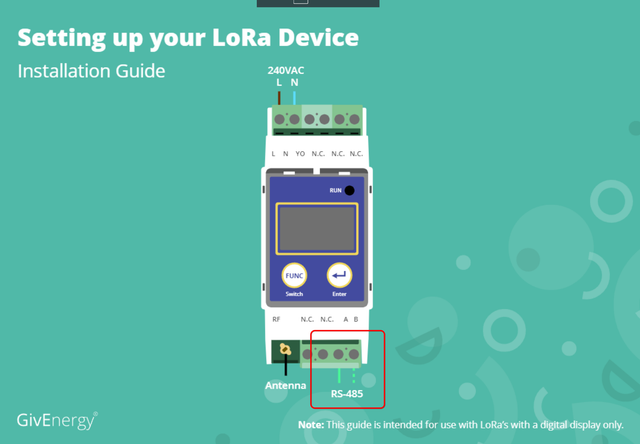
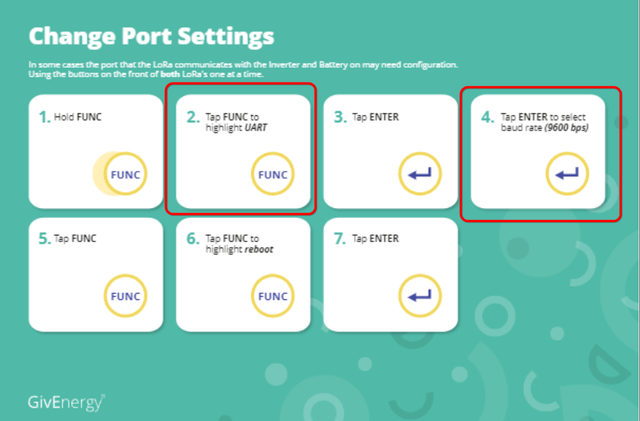
Combined with something like https://www.waveshare.com/rs485-to-eth.htm should work no?
If you google that product you can find a UK seller
magician2905 Exactly what are you trying to achieve? The modbus master is the inverter - adding that will not give you anything, unless you are wanting to wirelessly connect to the EM115 meter?
anglefire the discussion was about connecting via ethernet.
Gen 1 do not have an ethernet connection, Gen 2 apparently do already have an ethernet connection.
simon_swinburne @ GE
Nov 8, 2021
swap / suppliment even if there was a potential significant cost? The dongles are surprisingly expensive
I was wondering if it was possible to achieve the same outcome but without considerable expense? The adapter is about £23 in the UK once back in stock.
Personally ethernet connection isn't practical for me but I could set up a second router as a Media Bridge in the garage which would then give me a 3x3 - 2.4ghz or 4x4 5ghz antenna (ie significantly stronger WiFi connection) than is possible from the Dongle which will be low Tx/Rx power by design and either a 1x1 (or at best 2x2) antenna.
magician2905 I'm still not sure what you are intending to use the Lora for? They are designed to take a RS485 wired connection to a wireless link and back again.
Adding a bridged AP in the garage should work - but if it's just for the dongle, then the 5Ghz channel is pointless.
And yes you are correct, according to my network software manager, the dongle is indeed a 1x1 MIMO (My iPhone is only a 2x2 - in fact all the phone/ipads are the same and all the IOT devices look to be 1x1
Ahh ok I understand what you are asking.
I'm not suggesting using the LoRa - I was pointing out that the Gen 1 has the option to use the LoRa, INSTEAD of a WiFi Dongle, which is wired using the A & B terminals to provide the same data.
Ergo it should be possible, using the suggested adapter, connecting through the same A & B terminals allowing you to use either an Ethernet connection (which was originally suggested as more secure than over a WiFi connection).
Or as in my case, has apparently, started experiencing WiFi connection issues, I would likely use a 2nd hand router repurposed as a Media Bridge (I have a couple spare routers already) to provide the same function as the dongle but for £20ish. Using a router and NOT the WiFi Dongle would supply a significantly stronger WiFi connection (more aerials and better radios) and be more secure, in as much as a WiFi signal is ever secure.
magician2905 ah ok. Though I wasn’t aware that the Lora did that - only to allow the em155 meter to be remote.
magician2905 Gen 1 has the option to use the LoRa, INSTEAD of a WiFi Dongle
Where does this come from? I've not heard to the Gen 1 being able to communicate with the cloud servers other than Wifi dongle or 3g. There are Modbus RTU to Ethernet converters but if it was as simple as plugging one in, surely someone with Modbus expertise on this forum would have suggested/tried it?
Tim it's entirely possible you are correct here.
There's no mention of it on GE's website so I read this on midsummerwholesale;
The GivEnergy Long Range Wireless Transceiver allows you to connect GivEnergy devices over distances where it is impractical or impossible to run cables, or for wifi to reach.
and completely missed that the LoRa's intended use case with GE is solely to Tx/Rx in place of a wired CT Clamp.
My sincere apologies for causing any confusion, it wasn't intended.
As someone already mentioned GE are using a "Module" that converts the data from those internal components (Modbus/RS485/Whatever) into WiFi transmittable data.
Using the Dongle MAC Address leads to Shanghai High-Flying Electronics Technology Co., Ltd
It's possible the product is this one (but there are a few different potential options):
http://www.hi-flying.com/2-4-5g-dual-band/2-4g-5g-smt-package
I wonder if DIY Solar Power With Will Prowse in the US of Youtube can get hold of a GE Inverter to take it apart.......... 😆
Bringing everything somewhat back to the main topic that of hardwired or, perhaps at least, better security.
Since I have been experiencing weird connection issues I spoke to GE today.
Apparently, despite working flawlessly for 2+months and nothing having changed at all - no hardware changes, no new neighbours, no new local networks - the fault apparently lies with my WiFi setup and it was suggested that I should purchase a WiFi Extender to resolve the issue.
So I setup a spare router as an AP as close as is practical/possible to the Dongle - about 3metres away - and decided to carry out a reset of my Dongle.
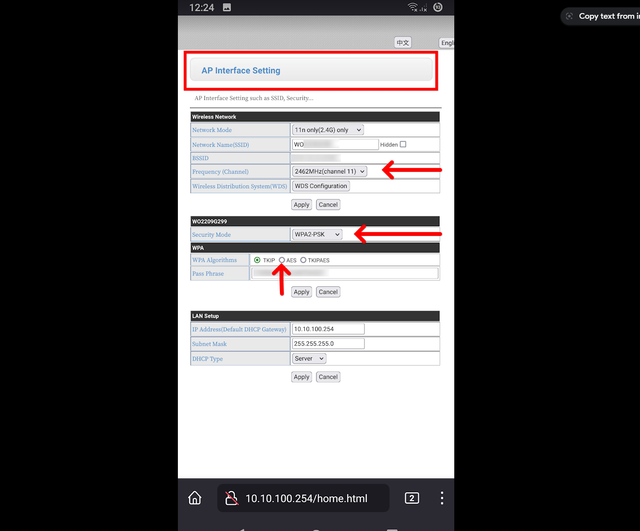
I took the opportunity to mess around with it and found that you can change the AP Settings making it more secure before finally setting it to connect to your home network. It's definitely a faff though.
So it's as secure as it can be using WiFi and WPA2-PSK.
Can also confirm that, along with WE & WF, WO series dongles are 2.4ghz a/b/g/n only. With an option to at least set to 2.4ghz n only.
Simon_C I've also seen this in the documentation but can't find anything on my inverter - there's certainly no LAN port so I had assumed it meant that a LAN option (via USB perhaps) is available but not installed.
Firstly, I'm assuming mine is a Gen2 inverter because the documentation I was left with contains this reference - does anyone have any instructions to help me establish whether that is true?
Secondly, does anyone know how this LAN connectivity option can be taken? I'd be interested in a wired LAN connection as I sometimes lose data when I'm not around to unplug and re-insert the USB dongle to restart it. It disconnects sometimes and the only way to get it back on the network is to unplug/replug.
The dongle is usb shaped with LEDs. The antenna is just a plain black aerial. The Gen 2 inverter has a LAN socket.
anthonypar Thanks! In that case mine is a Gen1 - which seems strange as the documentation is, therefore, not the right set.
Also, it seems surprising that this is only 6 weeks old and yet is an 'old' version. Or is it that it's not 'old' but 'an alternative option' (that wasn't explained to me at the time?