
Off-peak tariff time offset

6 comments started 2022-10-25 last 2024-10-01
Cloud PortalGivEnergy ProductsAC Coupled
B
#1 BrettDavis

Hi all. I've just had my AC3 system installed with a 9.5kWh battery and I'm trying to understand what I think may be a time offset issue.

I currently have the timezone set to GMT +1 in my account settings (if it matters) and I'm on Octopus Go. My off-peak time is the standard Go period of 00:30 - 04:30. I have reset my inverter to the defaults, enabled Eco mode, and I have set the timed charge from 00:35 - 04:25. However, my battery is starting a full charge from 23:35, one hour ahead of schedule. Also, the charts under Grid Data, Battery Data etc all seem to also be one hour ahead.

Finally, when I expand the smart tariff card and look at my Octopus tariff details, it's showing my cheap rate starting at 01:30 and lasting until 05:30:
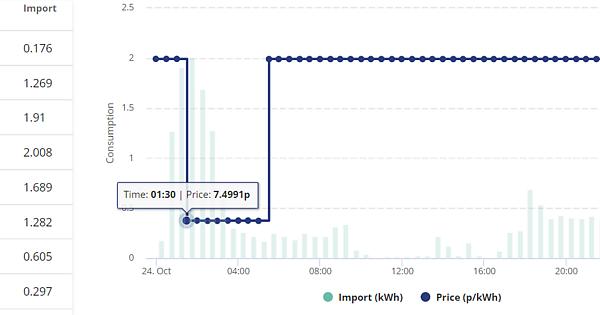
One other curiosity is that the energy graph does seem to show the correct times - I'm not sure how that is the case, but it seems this part of the system is respecting the local time, unlike the others.

I've had a poke around and I can't really see anything I can change to modify this behavior; I can change the timed charge to be from 01:30 - 05:30, but that doesn't really fix the issue.

Any thoughts?

T
#2 TX200

The back end of the system is usually in GMT although the display time should be in local time e.g. BST for now.

Wondering if the installers haven't set it right, but it's too early to do the time maths in my head.

Each clock change GE will update all online inverters automatically from their end. Although it went a little wrong this Spring, it didn't happen for some people, fixed the next day I think.

You could try disabling the tariff automation temporarily and instead set a timed charge from the settings instead, via "My Inverter" page, settings, timed charge. You can also control the percentage to charge to there, whereas if tariff automation or any octopus side automation is in place, you won't have any control over that.

A
#3 andydsmith

BrettDavis I have the same system as you do. My time zone is set to GMT and it all works perfectly so I think you just need to change the time zone. (We'll be back on GMT in a few days anyway).

T
#4 Tim

andydsmith My time zone is set to GMT

@BrettDavis The inverter time should be synchronised with Givenergy's preferred time server. I believe all of their inverters are synchronised to UTC (AKA Zulu) time, which happens to be the same as GMT. The timezone in the Portal profile helps to determine when the portal display changes from summer time to winter time (the exact dates and times can vary between different countries even if they are in the same time zone). Data logged to the cloud servers should be logged in UTC as per standard practice because UTC is simple to understand and consistent across all timezones; the time displayed in the portal or app takes account of the current timezone.

That said, different energy suppliers have different approaches to their Time of Use tariffs. Some set the tariff to x-y hours all year round, so the apparent times are the same irrespective of time of year (ie if ToU off-peak starts at 00:30, that's 00:30 GMT in the winter and 00:30 BST in the summer). Other suppliers (EDF for example) keep their ToU tariff as x-y hrs GTM (read UTC) and the user has to change their charge window when the clocks change for BST thus ToU off-peak start is 00:00GMT and 01:00BST.

Take-aways from this are that the actual inverter timestamp (check with Givtcp) are UTC; portal and app displayed time is UTC adjusted by the timezone in your account profile; and your supplier's ToU tariff may change with the season, or not, read the small print.

J
#5 Jimmy mac

BrettDavis

Hi Brett did you resolve this issue as I’m having same problem, first 3 days ran perfectly on time now 1h advanced.

Thx james

R
#6 Roy124

I have just posted a similar query as the posts above still leave me confused! Easily done.