commisioning without a wifi dongle using hard wire LAN

14 comments started 2022-11-12 last 2023-07-25
Commisioning
T
#1 tommo1973

Hi there its my first install, im trying to commission my Gen 1.5 inverter and 9.5kw battery last december when i did the training a hard-wired network connection was not a option, The gen 1.5 invertor has a rg45 so ive hooked up a cat6 to a network switch . The problem is when i go to add a inverter in the Giv energy software it asks me for details of a dongle ? which i dont have , can the inveter be commisoned by a hard wired connection? and if so how is it done . ?


S
#2 sparky77

good question, hate it when wifi drops, never beat a lan connection.

C
#3 cluelesscris

The dongle is not just a wifi port. It also has a ton of software on it to handle the inverter comms, etc.

#4 TheDragon (GivEnergy)

Have you change the DIP switches to select LAN vs Wifi connection? So the Inverter then is actively on the network. You should then be able to find it in the portal by serial number with no owner

T
#5 tommo1973

thank you where can i find a manual to with the dip switch settings ?

#6 Simon_C

I have not seen anything documented for public consumption, however there is some info in the installers training guide for the Gen2(1.5) inverter.

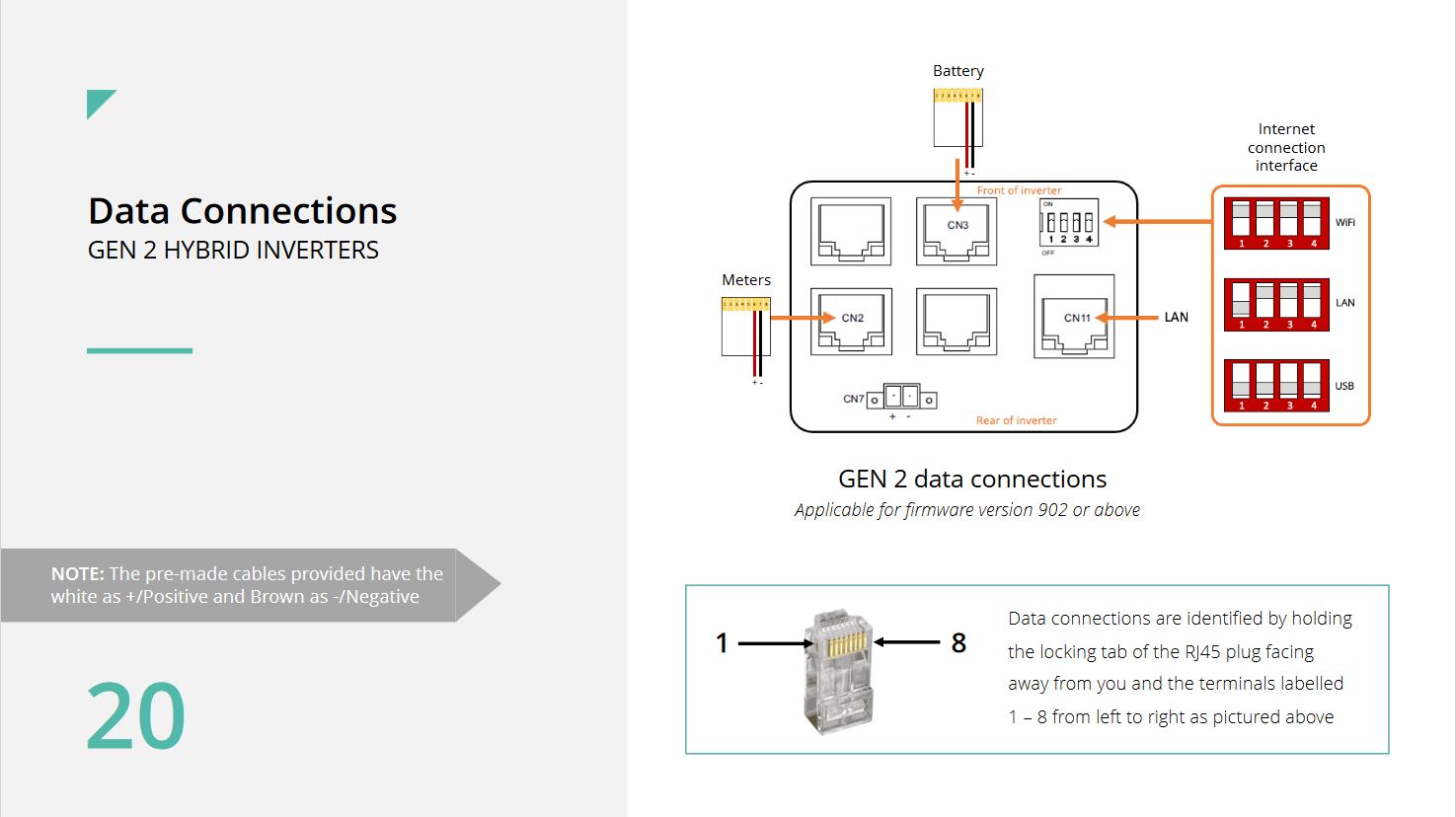
Within the data connections cut-out, there are 5 x RJ45 sockets, 1 x 4 way DIP switch and 1 x 2 way screw terminals.

Top row - left to right = RJ45-Unlabelled, RJ45-CN3-BMS Comms, 1 x 4 way DIP switch.
Middle row - left to right = RJ45-CN2-Meter comms, RJ45-Unlabelled, RJ45-CN11-LAN connection.
Bottom row = 1 x 2 way screw terminals-CN7-CT connection(+ve/-ve).

1 x 4 way DIP switches.
WiFi = All Up/On
LAN = 1 Down/Off, 2,3,4 Up/On
USB = All Down/Off

The guide does not mention if the inverter needs a full power down and restart after making changes to the DIP switch settings, but it is commonplace for equipment to require it.

A
#7 anglefire

Simon_C The guide does not mention if the inverter needs a full power down and restart after making changes to the DIP switch settings, but it is commonplace for equipment to require it.

It is. Often the software only reads the dip switches on initialisation.

K
#8 keyword-literal-shingle-oriole

Hi All, we're having issues getting the WiFi dongle, I have two batteries and two inverters fully installed which are currently useless as they can't be commissioned. I can supply a wired connection to the inverters. Can the system be commissioned using the RJ45 port?
tommo1973 did you get this working in the end?
Cheers

B
#10 BarryForde

Simon_C I've found my LoRa links a bit flakey and they interfere with my garage opener so I've bitten the bullet and laid a cable to my garage. As far as I can see I should be able to just connect a pair in the cable to the EM115 at one end and the CN2 connector at the other and it should work fine. But I notice that when commissioning the installation there is a question of whether there is a LoRa in the link or not, that makes me wonder if there is something else that needs changing rather than just bypassing the radios. Anyone any idea?
I've laid a cat6 ethernet cable and am using 1,2,3 and 6 to carry the ethernet and then 4, 5 for the link to one EM115 and 7,8 for the second EM115 link. I've got a small 5 port switch in the garage and the link is working fine, still need to wire the drops to the inverters. My wifi link was fine but as I've laid a cable might as well shift the inverters to wired lan and avoid any wifi issues.

T
#11 Tim

BarryForde In retrospect laying a couple of Cat6 cables would have given some redundancy, but nevertheless, you've got ethernet with plenty of bandwidth, even though you'll be limited to 100Mbps. If it's a gen2 inverter then you'll be good to go with the ethernet cable connected to the 5 port switch. If it is a gen1 inverter, you can install an old router as an Access Point to provide 2.4GHz wifi to the inverter. The two pairs given over for Modbus service should be fine too. 👍

B
#12 BarryForde

Tim Thanks Tim. Yes the inverters are Gen2 with a LAN port built in so should be ok. One thing thats irritating is that the cable entry looks to be too small to put an RJ45 connector through. If thats right then it means having to make up the cable rather than being able to just use a ready made on. But I guess its the weather proofing that causes that? I'll find out tomorrow when I do the next bit.
Actually I've been getting odd off line incidents which may be down to a flakey wifi link, if so this should fix that.

B
#13 BarryForde

Simon_C Just an update. I changed my links over from wifi to ethernet LAN and set the DIP switches as you suggested. It did need a reboot to action the changes but not a power down/up so that all went fine. Many thanks for your input.

J
#14 JW

Simon_C Thankyou - Having had months of sketchy connection, put a LAN cable in. I thought it would have defaulted to the LAN but nope!! - Change the dip switch settings and still no result - my power down and back up was too quick!! A second power down, with a 30second wait then power up and hey presto!!

#15 Simon_C

JW, glad it helped you out. At the time of my post it was more difficult to post images on this forum, hence the verbatim description.

However more recently the installation guide has been published in the knowledge base, and images can be pasted here, which is much more informative.

https://kb.givenergy.cloud/article.php?id=76

Still no guidance on the requirement to restart, or your tip of waiting at least 30 seconds with all power off (thank you).
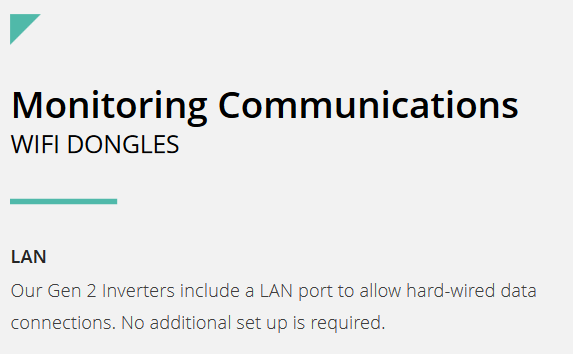
In fact this extract from page 50 indicates no setup required for the LAN port, which somewhat contradicts the actual requirement for DIP switch settings and restart.