
Help! Inverter offline

14 comments started 2022-12-21 last 2023-01-04
GivEnergy ProductsAC Coupled
K
#1 Karen

I have just noticed that my last Powergraph reading was for 12.56. Nothing has been updated since then on either the dashboard or the App. The App says the inverter is offline. I've tried going to the inverter card and clicking the reset button, but it just comes up with a red banner saying "Failed restart - inverter offline". My internet and Wifi seem to be working for everything else. What should I do?
C
#2 chris_p

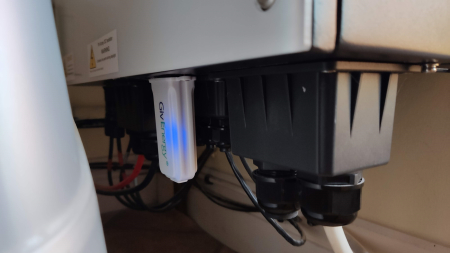
Karen Is your dongle showing a solid blue light or is it flashing?

K
#3 Karen

The blue lights on the inverter are on and the green circle in the middle is flashing. The dongle is the thing stuck up underneath the inverter? I can't see any ights on it - or even where they would be! Where should I be looking?

K
#4 Karen

On my inverter card settings it says my wifi is WO2209G552. I've looked on my available networks on my lap top and can't see it there. Is this a problem?

K
#5 Karen

Ok - just found WO2209G552 and tried to connect. it says the network is open and when I try to connect is says "no internet"

C
#6 chris_p

Karen The dongle is located underneath, mine flashes when it has lost internet connection. It should be a solid blue light when successfully connected.

https://wiredspace.co.uk/publicimages/wifidongle.jpg

K
#7 Karen

Panic over! For no reason that I can figure it has suddenly come back on! Is this normal? Any advice for what to do if it happens again? It seems a little naive to presume it will always spontaneously restart!

K
#8 Karen

OK I see what you mean about the light - I couldn't see it until I cupped my hands around the dongle thing - the light wasn't visible in the daylight.

C
#9 chris_p

Not a great deal you can do from what I've experienced, sometimes (like a lot of devices) the connection drops and then will reconnect. In the past I have rebooted my router and that has got the inverter to re-connect. There isn't much to worry about if it drops for a brief period, all you lose is the data for that period and the ability to change inverter settings. The system should continue to function in the state it was before the wifi drop.

K
#10 Karen

That's a relief ! I thought it was just my system! Still at least I know about the flashing dongle light now. First step will be restarting with the iverter card, and if the dongle flashes I'll try rebooting the router.If neither of those works it will be a stiff drink and a long wait!

T
#11 TX200

An open WiFi network on the dongle isn't ideal. Someone could browse the internet using it (thus via your home broadband!)

You might want to have a look at the documentation on the website or get your installer back to finish the job properly!

Google search for: givenergy kB dongle
That should find the pdf.

M
#12 MichaelJackson1

I have just had the same problem of the invertor being offline. The system has been in for less than a month and I am struggling with all the different settings. The dongle is flashing blue, I have restarted the router but nothing has changed. Any help would be gratefully received.

A
#14 alan_johnston

Being offline doesn't necessarily mean a problem with the dongle.
It just means the dongle can't connect to the Givenergy server and there are a number of reasons for this.

My inverter goes offline from time to time but it still has full internet connection and is sending and receiving internet data. I can monitor this on my router. It is currently 24 hours into its latest 'offline' session but it will eventually reconnect with the Givenergy server.

M
#15 MichaelJackson1

I have just picked up your reply thanks.
I still have no data from the system, I have just checked in the loft and the dongle is still flashing blue.

I emailed Givenergy and they sent a guide for reconnecting the dongle to the WiFi.
I find it rather confusing and don't really know where to start. I have the dongle wifi address but this appears in my wifi
list along with my house wifi and if I click on it it asks for a password and I have tried the dongle address but it isn't recognised. I think I need an idiots guide. I will contact the installer and ask them for help.
Thanks for your help.