Inverter Battery Timed Charge % being ignored

89 comments started 2023-01-18 last 2024-01-18
Mobile AppHome AutomationGivEnergy ProductsAC CoupledBatteryHome Assistant
M
#1 MrWobling

When the forecast is sunny for the next day, I manually reduce the Battery Timed Charge % in Inverter > Settings > Timed Charge (which is switched on), depending on forecast production and foreseen energy requirements at home.

This was working well, however now this % setting is now being ignored, and the battery always charges to 100% over night during my off-peak Octopus Go window.

I also have Home Assistant setup, which is mostly used for monitoring.

System Modes > Charge Mode is set to Solar + Grid

What I've tried so far to resolve this:

  1. Removed Tariff automations via the GivEnergy iOS app (Automations show as "None")
  2. Setting the target percentage through the app
  3. Setting the target percentage through web portal in Safari & Chrome
  4. Setting target percentage through Home Assistant using the number.givtcp_ce2231g046_target_soc entity ID
  5. Restarting my inverter & setting the target percentage again.

After setting the target % in either the app or the web browser, I'm able to see the change has "stuck" - I can view it on other platforms and after force closing and restarting the app. However, I still wake up every day to find the battery full and no "headroom" available for solar generation.

Has anyone else experienced this and how did you resolve if so please?
C
#2 chris_p

MrWobling I reported the same issue to GE support this morning, their response initially was:

I just had a look into this and it appears the percentage limiter was disabled and therefore although you are changing the percentage you are not actually enabling the setting to make the inverter adhere to that percentage.

I have now enabled that % limiter and turned your max charge % down to 85

I replied saying why doesn't show in the log along with a screen shot showing I turned on 'AC Charge Upper % limit' on 1st Jan and not touched it since, their reply:

It can sometimes be possible that it reads as being switched on your end but if there is a slight issue with the data transfer speed at that time of your internet and our servers, or if our servers are having issues it will read on at your end but not be enabled on the back end.

Sounds like a bug to me which I suggested but was told to email back if it still doesn't work tonight.

S
#3 stevelewis

chris_p I've previously raised why there's a radio button to enable the slider. Makes no sense.

M
#4 MrWobling

Thanks Chris & Steve. I also contacted support and they said that when they checked, the percentage limit was somehow disabled. It's been re-enabled and the inverter rebooted. Ideally, I'd like to set it lower than the 66%, in view of the weather forecast for tomorrow. But I'll leave it be to aid troubleshooting.

#5 Riscy

I'm considering using the Charge Rate Power limiter as a way to achieve this instead.

E.g. if I know that 2kWh is needed for next day, and it's a 4hr timed charge, then setting the charge power to 500W at midnight. And changing it back before sunrise. All using Home Assistant and GivTCP I think.

I thought this would be a neater way to achieve a charge limit while being easier on the battery temps and the I2C losses...

S
#6 stevelewis

Riscy Limiting the charge rate assumes you know the initial state of charge. I use some Python to set the SoC every night by writing to the SoC register in the GivEnergy API. Works a dream.

#7 Riscy

stevelewis Yes, absolutely. Simplistically:

Charge Rate Limit kW = (Predicted Demand kWh) - (Predicted PV kWh) - (SoC when charge period begins kWh) / (Charge Period hrs)

Reality is more complex than this because PV and Demand will vary by differing functions. Using an average kW/total kWh for each will effectively only "average out" over the whole day, meaning your battery would mathematically have to to be "negative" at some points in the day. (in practice this is moot because the demand curve tends to peak in the evening, which is after the generation peak has happened.)

The pedantic solution requires Integrating those generation and demand functions over the day, and then if the total ends up below-zero that that's the SoC you need to begin the day with. The smaller the time-step you integrate over; the more accurate it will be. Or, fit your arbitrary prediction datapoints to a polynomial and Integrate them properly... And factor in the battery capacity cap too.

(This is true regardless of whether you use charge-rate limit or SoC target limit. It's the same problem.)

Or at least, I think.

I'm excited to get cracking on some algorithms, and I know many people (including you stevelewis by the sounds of it) have done excellent work already. Currently the many firmware issues (passim) are hindering progress somewhat.

C
#8 chris_p

Mine charged fully to 100% again despite me setting it to 85% and GE setting it to 85%. Add it to the long list of stuff broken with these very expensive consumer items.

B
#9 BobB

MrWobling I too had this issue. Through a combination of experimentation and helpdesk calls I might be onto something.

It appears that "quite often" (sorry, can't do better than this) when you change the Battery Timed Charge % in Inverter > Settings > Timed Charge, the related setting of Enable AC Charge Upper % Limit is silently switched from Enabled to Disabled!

The Portal doesn't change. Everything looks okay, but because the Enable AC Charge Upper % Limit is set to off, the battery keeps on charging. You can prove this yourself by force re-reading this setting (using the little circular arrow thingy) when you make a change to the charge %.

I agree with chris_p and stevelewis, it's a bit pants that it works this way, but if you understand the foibles you can work round them.

C
#10 chris_p

BobB The Portal doesn't change. Everything looks okay, but because the Enable AC Charge Upper % Limit is set to off, the battery keeps on charging. You can prove this yourself by force re-reading this setting (using the little circular arrow thingy) when you make a change to the charge %.

Spot on. Just tried it and it is reading "off".

GE support have replied: "I checked it first thing this morning and saw the setting had once again been reverted and your battery had charged up to 100%, I have since passed your inverter serial number over to my line manager and asked him to have a look into it for you. I will let you know what he says/does once he has a look into it and lets me know."

B
#11 BobB

chris_p I have since passed your inverter serial number over to my line manager

Let us know how you get on, Chris, but I'm not convinced this is a one off inverter issue 😆. Feels too repeatable to me. I'm calling it a feature.

What do you mean, "bug"? It's working as coded...

C
#12 chris_p

BobB I'm calling it a feature

In my many years of involvement with software development, it is amazing how many 'features' are still rocking along 🤣

C
#13 chris_p

GE have confirmed this is a firmware bug and have downgraded me to D0.499-A0.499. I will report back tomorrow if this has fixed my issue.

M
#14 MrWobling

Similarly, support have downgraded my inverter to FW D0.534-A0.534. I will also report back whether this has fixed the issue - I hope so, as the forecast is good for generation and I don't want to be finding constructive ways to use excess energy at 5am, as I have been for the past few days.

M
#15 MrWobling

Quick question - is anyone else here using Home Assistant? Keen to exclude that as a reproduction factor with this issue.

R
#16 Rob_Quads

I've also got the same problem. GE moved me back to "D0.449-A0.449" but it has not resolved the issue and now being told to wait for the next firmware update 🙁

C
#17 chris_p

Rob_Quads Friday evening it didn't make a difference having the firmware downgrade. So on Saturday I switched the values to something else (anything) and switched them back to what I wanted. Saturday night's timed charge worked great although it didn't stay at 80% like it was doing with 100%, it bobbled along at 78%, 80%, 79%, 80% etc. Then I changed it on Sunday to 90% and same thing has happened with it bobbling along but it was 90%ish. I reported back to GE support and they have passed it onto the devs, but for now it seems I can at least set my % charge which is vitally important for Economy 7 users like me.

#18 Woodlands

When the % is set to less than 100% it is quite normal to "bob along" at the % set.
I understand it varies 1 or 2% because of temperature changes, etc.

#19 Woodstock

Might another possibility be that the timed charge % is not being ignored but is not being set in the first place? The system would then continue to operate on the default setting of 100%.

I have had so many instances of changing values (not just timed charge %) in the portal which show in the remote control log as having changed (and display the new value) but have not in fact been changed. It got so bad that I habitually restarted the inverter after every change, which somehow seemed to force the change to actually take place. Just recently, however, I have been experiencing the exact opposite problem. I make a change and it takes effect as desired, but when I restart the inverter it reverts to the previous value!!!!!!!!

It used to be the case that the app was unreliable when making changes but the portal was pretty good. Now the portal also cannot be trusted to do what I have requested, or to have done what it says it has done, or to not do something that has not been requested.

The trick of changing a value to something different and back again is one that I have employed with limited success in the past, but I no longer trust displayed settings. I always monitor the system VERY closely after changing ANY setting to ensure it is behaving as it should. Pretty sad state of affairs really. ☹️

T
#20 Tim

chris_p To prevent the bobbling, I do a back of fag packet calc each evening and work out what the SoC will be at the start of the off-peak window, then work out how much of the energy needs to go in to get to the Charge to % by the end of the window. Divide energy input by window hours and adjust the charge power to match

Of course, I need to automate this with Home Assistant when I get round to it and also ensure that battery charge power is reset to max every morning.

C
#21 chris_p

Tim Yeah was thinking the same, but before the downgrade of the firmware I was seeing it charge to 100% and sit there at 100% until the end of the charge window.

F
#22 Flamer

I had a similar problem with Octopus Go. Was setting a lower battery charge percentage on the app but the battery was fully charged in the morning. I contacted GE and I was told that Octopus was resetting the charging percentage to maximize the charge percentage during the allocated hours. The technician removed the ability for octopus to adjust the settings and this morning, the battery was charged to the level I specified. Didn’t have to downgrade the firmware

#23 Cdent

Flamer interesting, I wonder if it's the same with mine as I've tried to change it a few times and it resets to 100%. Will try and get in touch with GE to sort! Thanks

D
#24 Dpe

I use node red / home assistant to set the charge each night according to the solar forecast. In general it works OK. I have seen the same behaviour of charging to 100% irrespective of the set point.
What I have noticed is that if you set the 100% charge using the 'portal settings timed charge' if you look in the remote control logs you see the charge set to 100 % and the 'enable upper charge limit' set to false.
If you then use an automation to set the timed charge to less than 100 %, the enable upper charge limit is not reset to true. If you use the portal to set it to the same value then the enable upper charge limit is reset to true.
I only noticed this last night so it may just be my system or something related to my automations. AC3 inverter 0.535 software

C
#25 chris_p

So I set my charge limit to 95% yesterday but overnight it went to 100% and didn't do any bobbling along. Why do I feel that GE are a 2 steps forward, 3 back kind of company?!

Oh and I had an SoC crash too yesterday evening too just to add to the woes.

T
#26 Tim

Dpe Thanks for pointing out the upper charge limit issue. I've been manually calculating the charge rate to get to my target SoC each night and am currently writing a flow to automate this in Node-RED via Home Assistant. I've really taken my time to get round to this as I wasn't sure how I preferred to control the amount of off-peak charge.

I had observed that during the Timed Charge period, once the target SoC has been reached, the inverter cycles between charging the battery and allowing the battery to discharge to the house before charging again (aka "bobbling along"). The cycles are continuous albeit small, until the end of the timed charge period. I resolved that if the charge rate was limited such that it just reached the Charge to % at the end of the charge window, there would be no cycling. Doing it this way means that the upper charge limit won't be an issue, but it could have been had I decided to do it another way.

D
#27 Dpe

Like you, I have been running a node red charge automation based upon the various ones to be found on the internet. I also reduce the charge rate to a fixed number to try and reduce the "bobbling along" this only really works for me when charging to 100%. I have started to look at changing the charge rate or start time depending on the amount of charge the automation determines is required. This is a bit more complicated if you are charging a car/running a dishwasher etc during the night and want to avoid discharging the battery to do this (which sems to be a bit of a waste of time).
I have an automation that checks whether the car is charging (by looking at the house load) and then reduces the battery output to the typical needed to run the house, and also an automation to check if the battery is at a higher state of charge the the "charge to" level set by the automation to prevent the battery discharging to the house when I do not want it to (only really occurs in the summer). Happy to discuss further probably in separate thread?

4
#28 4monks

Same issue - several nights of setting a limit in the evening only to find it being reset to 100% by the morning. When I look in the morning, the logs do not show any change and it only appears when re-red via the portal.

D
#29 Dpe

4monks When you look back thru the logs on the portal is the " enable upper charge limit" set to true or false.

C
#30 chris_p

Here are my logs, explain that 😆

https://www.wiredspace.co.uk/publicimages/gelogs.jpg

D
#31 Dpe

chris_p As far as I can make out there are two settings at work here. The first as per your post is the "AC charge upper % limit" and the number you set it to, the second is "enable upper charge % limit". Unless the "enable upper charge % limit" is set to "true" the battery always charges to 100% if "AC charge is enabled"
I only found this when having the same problem using an automation and the web portal. When I used the web portal to change the value to 100% it also switched the enable upper charge limit to disable. my automation did not switch it back on when it reduced the setpoint from 100%. I have no idea what the purpose of this setting is!
Do not know if any of this helps you .

C
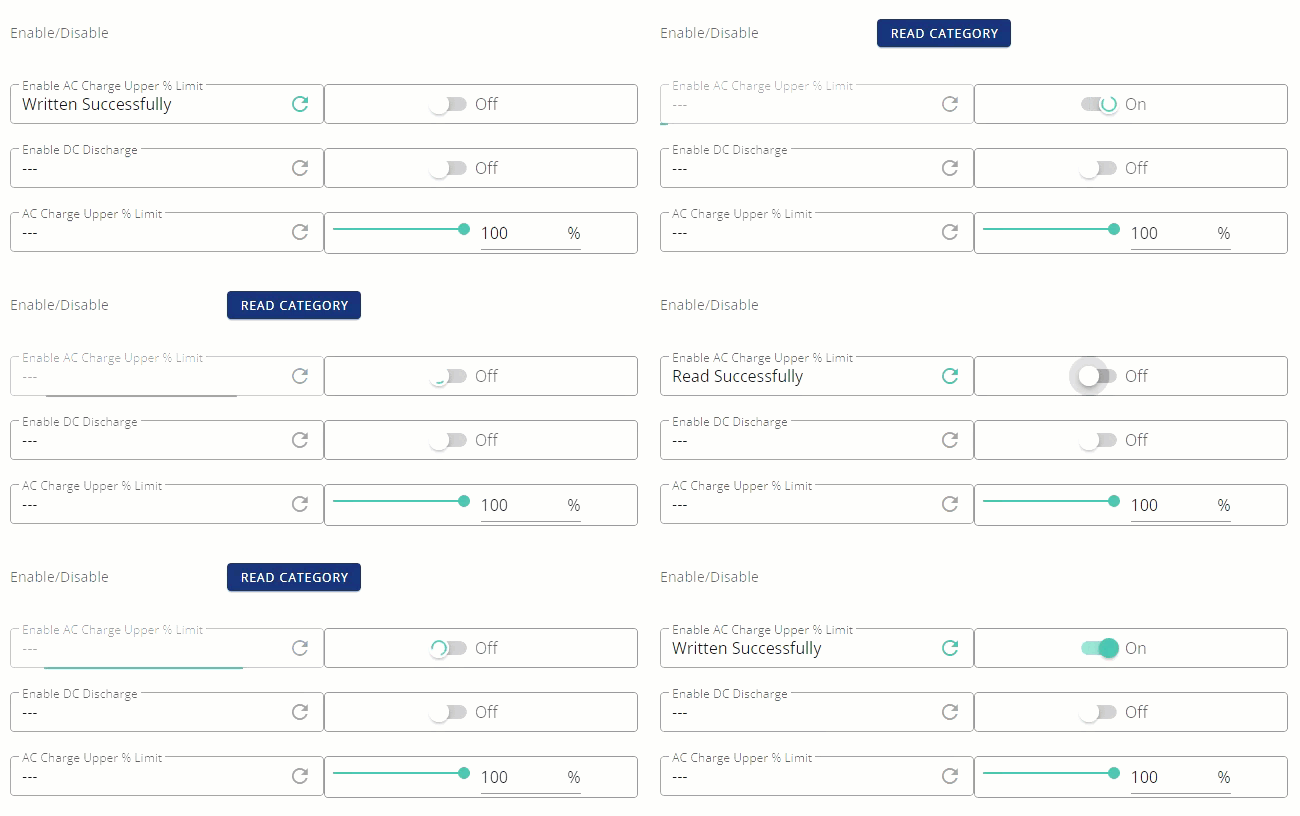
#32 chris_p

Dpe You are correct and I've just "read" that value to which it responded "Written Successfully"! More garbage software from GE. Honestly I can code better in my sleep than this lot.

4
#33 4monks

Dpe
When it works, it's true in the evening and true in the morning. When it doesn't, it was true in the evening, but shows false, normally the next day when I read it. There are no entries in the log to explain the "phantom transition" from true to false. The phantom transitions to false appear when read, per the log example below at 23:25:57, 07:21:27 and 06:12:51. The previous last write was from false to true. I manually set them to true again shortly afterwards.

Remote Control History
Search: Enable AC Charge Upper % Limit

Time | User | Register | Message | Previous Value | Value Sent | Response | Via
2023-02-02 23:26:14 | You Enable AC Charge Upper % Limit | Written Successfully | false | true | true | Portal - Remote Control
2023-02-02 23:25:57 | You | Enable AC Charge Upper % Limit | Read Successfully |true | | false | Portal - Remote Control
2023-02-02 07:23:30 | You | Enable AC Charge Upper % Limit | Written Successfully | false | true | true | Portal | Remote Control
2023-02-02 07:21:27 | You | Enable AC Charge Upper % Limit | Read Successfully | true | | false | Portal - Remote Control
2023-02-01 11:46:58 | You | Enable AC Charge Upper % Limit | Written Successfully | false | true | true | Portal - Inverter Settings Tab - Timed charge
2023-02-01 06:12:51 | You | Enable AC Charge Upper % Limit | Read Successfully | true | false | Portal - Remote Control
2023-01-31 11:23:36 | You | Enable AC Charge Upper % Limit | Written Successfully | false | true | true | Portal - Inverter Settings Tab - Timed charge

C
#34 chris_p

I mean what on earth is going on here?!

https://www.wiredspace.co.uk/publicimages/inverter.gif

M
#35 MrWobling

chris_p How do you access the logs like this please - I can't find them in my portal. Do they have to be enabled by support or something?

C
#36 chris_p

MrWobling They are at the bottom of the inverter settings page, if you click the inverter card and click the 'cog' icon titled 'Remote Control' when you hover over it, then scroll to the bottom of that page, you will see the logs. There is a button on the top left of that page titled "Jump to logs" too.

D
#37 Dpe

chris_p Doe sit do the same if you set the AC charge upper limit to less that 100% first, then try enable ac upper charge limit. I think ther is a software link where if the upper % limit is 100, the enable AC charge upper limit % is always off (maybe)

M
#38 MrWobling

As a software developer myself, this has the definite whiff of race conditions and data duplication about it.

The app is still displaying what I last set these values to within the app, not what the portal currently shows. Even if I force close and reload the app, it still shows stale data.

I get it that stuff breaks and that regressions are unfortunately a normal part of software development, but I don't really feel like GE have got a handle on this, or that I'm in the loop on investigations and a fix. Have chased support after 11 days waiting for an update.

Confidence and willingness to recommend is falling at this point. Anyone know if the SolarEdge EV charger is any good? 🤣

C
#39 chris_p

Dpe Dropped it to 80%, written, then read every other register in that group, all came back as I thought they should be. Refreshed my browser, read them all again and all looks as they should. Going to look back later to see if I can do the same, try some off/on and see what happens.

M
#40 MrWobling

When I read back "Enable AC Charge Upper % Limit", I unexpectedly saw it change from On to Off.

Under what circumstances does this occur?

What is the "source of truth" here - the GE backend or my inverter?

M
#41 MrWobling

The plot thickens - when I set up some Home Assistant dashboard cards to monitor the corresponding GivTCP entities:

  • switch.givtcp_cexxxxxxx_enable_charge_schedule
  • number.givtcp_cexxxxxx_target_soc

...the a change to the target SOC seems to write through almost immediately, but the value of "enable charge schedule" does not.

Is anyone else experiencing this problem using Home Assistant?

D
#42 Dpe

MrWobling I disabled the timed charge in the web portal and it was reflected in the home assistant dashboard card in about two minutes. My Givtcp refresh is set to 45 secs

#43 hoggy

Haven't read all this thread as don't have time but from a brief speed read if it's to do with settings being weird when you set the AC Charge percent to 100% then have a look back in the forum about a setting called "Winter Mode"
It's no longer shown in the portal but it (for whatever reason) enables when you set the charge up to 100%.
My memory of it was when you set it to 100% the battery stays there whereas any other value below that you get the weird "bobbing/oscitations" around whatever value you chose...

Conversely having it set when the charge rate was anything less than 100% meant that the system completely ignored what you intended it to charge to and just charges until 100% anyway.

C
#44 chris_p

hoggy Sounds like you've nailed it... where were you 16 days ago!? 🤣

M
#45 MrWobling

Is there a way to check whether my system has somehow ended up in "winter mode" via Home Assistant/GivTCP?

The closest sound entity I've managed to find is "select.givtcp_cexxxxxxxxxx_mode" but the available values for this are:

  1. Eco
  2. Timed Demand
  3. Timed Export
  4. Unknown
  5. Eco (Paused)

So sounds close, but not quite right. The current value of mine is just "Unknown".

#46 hoggy

MrWobling If you bring up the JSON output from GivTCP (i.e homeassistantIP:6345/runAll)
I think there is a section called Raw Data? (or you may have to enable Raw Output in Givtcp config? I'm at work so can't check)
Perhaps it only shows if you have the config set as "PRINT_RAW True" anyway....

In there is all sorts of data NOT parsed into Home Assistant. Winter Mode might be one of them/

It's a wall of text so copying the output into somethign like JSONPathFinder does give you less of a headache.

@chris_p yeah sorry, I probably read it and thought something Home Assistant is screwing up & as I don't use it left it for someone who does to sort!

#47 hoggy

As a side note, if it is stuck it's no longer a usable accessible register so I'm not entirely sure how you unstick it beyond the usual "Restore to Defaults" from the portal (i'm still unsure as to how far that goes - does it just reset the user accessible ones or does it clean slate the inverter? Who knows)
I'm sure you've tried forcing a 100% value via the portal (not GivTCP) and then to what you want to try and trigger it. It could be a bug in GivTCP not changing that register.

It can however still be none of the above and something else non Winter Mode issue however....

T
#48 Tim

MrWobling I think the "truth" is whatever the inverter has in its registers as that is what it will use to control the operation. However, when refreshing the app and the portal from cloud data, in my experience, both seem to accurately reflect what is held there. When committing changes from the app and portal, I sometimes get a red failed banner and have to re-submit but if they display a green saved/successful banner, then the changes seem to take OK.

Working with the Givenergy API from HA or Node-RED should be the same as using the app or portal, as the cloud is receiving the required updated setting and then passes that onto the inverter, either succeeding, or not, same as the app and portal.

With GivTCP/MQTT from HA or Node-RED it's a different kettle of fish. My flows write out the value, but I have a loop in to check that the value has actually changed by the next polled update and re-send if not. The length of time for this type of change to be reflected in the cloud (and therefore the app and portal) does seem to be inconsistent. You would think that the app in local mode would update the cloud if it receives data from the inverter that is different from the data held in the cloud, but I'm not sure of how the logic behind the scenes is supposed to work. I don't think the inverter posts out updated values to the cloud for each change (irrespective of where it came from), but suspect that the cloud update relies on a 2xx response to the original REST call (hence generating the failed/successful message).

M
#49 MrWobling

Tim Thanks Tim - I had previously misunderstood that GivTCP/MQTT in HA was hitting my inverter directly, hence why I believed it was "closer to the metal". Is there a way to get HA to speak to the inverter directly?

Certainly the "Energy Flow" diagram in HA is an order of magnitude more reliable than the app or the portal.

T
#50 Tim

MrWobling GivTCP/MQTT wherever it originates (HA/Node RED/Python) is using the local Modbus over TCP/IP protocol and is direct to the inverter. Using the REST API makes calls to the Givenergy cloud server which then communicates with the inverter as usual.

Local control which doesn't rely on the internet/cloud can only be done over Modbus over TCP/IP and GivTCP is the best supported option for this. The upside is local control if Givenergy's cloud or t'internet goes incommunicado. The downside is that any changes done locally may take time to be reflected in the cloud (and may never?).

REST API to Givenergy's server relies on the internet and local wifi working OK but does ensure that the portal, app and you system are all displaying the same settings (although app and portal may need to be refreshed).

C
#51 chris_p

Charged to 100% again last night, getting really fed up with this junk software.

M
#52 MrWobling

Same here - I was hoping force reading/writing the registers would clear it. Interestingly, the HA Entity for target SOC is back to 100% this morning too, when it was set to 91% overnight, which supports the hypothesis something is sneaking in and changing it behind our backs.

I wondering about setting it again tonight and powering down the wifi the inverter is connected to overnight.

I've offered my time/effort as a SW dev of over 20 years experience to try and dig into this and work towards a resolution. So far that's falling on deaf ears and I'm just told there's no timeline available for a fix.

C
#53 chris_p

Such a fundamental part of the system at this time of the year, I don't need 100% charge most days now. I'm going to have to fudge it be changing the length of the charge window based on what I expect to be left vs what I think will be needed. Coupled with the SoC issues, this is just another example of junk software development and poor end user support.

M
#54 MrWobling

Similarly, managed to avoid a full charge overnight once last week by setting the max charge power very low. But given I also have the SoC issue (battery voltage suddenly and unexpectedly collapsing to zero from anywhere below 30%), I'm concerned this may exacerbate it if the SoC tracking is especially poor at low charge rates.

C
#55 chris_p

MrWobling I have the same SoC issue, crashes to 0 about once every fortnight. Delicate balancing act of not too much and not too little. The savings I'll get if I can't get it right might not be worth the hassle with such an inaccurate way of setting the desired charge level.

S
#56 stevelewis

Tim Another strangeness with the API to be aware of. Sometimes a write to the API will return a 201 success code, but the register won't change and the command won't be listed in the history section of the portal. Looks like there's a disconnect between the API server and the underlying database which may be hosted elsewhere.

C
#57 chrisinuk

Hello, I have trouble with that. I raised a ticket but maybe one of you can help? First of all setting in the web interface the battery charge level from 100% down to 80% didn't seem to have worked... It still charges battery to 100% every night. I also use #homeassistant to set the battery percentage to what is expected on solar the next day. It sets it to eg. 51% or else but then at some point it gets reset to 100% too. That is a local connection! Any way for inverter to accept the set value number.givtcp[inverterid]target_soc ?

4
#58 4monks

chrisinuk Make sure you have "Timed Discharge" disabled in settings, "ECO" enabled, "Timed Charge" enabled with an appropriate night time window and target SOC. It's not obvious in the interface (as it doesn't prevent it), but "Timed Discharge" does not work with "ECO" and "Timed Charge" all enabled, so make sure "Time Discharge" remains disabled.

#59 Cdent

chrisinuk are you using GivTCP? If so, check is Smart Target is enabled. I was having the same issue and another member on here advised to turn it off. Once I did that my changes to charge level worked.

M
#60 MrWobling

Cdent I tried disabling SMARTTARGET in GivTCP and it made no difference - the battery still charges to 100% every night. I even set the value and read the corresponding register back again in the GivEnergy web portal, to check the write had "stuck".

4
#61 4monks

MrWobling I'm sure you did, but just double checking that you did a full GivTCP restart after changing SMARTTARGET (as it's an environment variable that is picked up at start-up time).

M
#62 MrWobling

4monks thanks - I think it offered that when I changed the setting, but have now manually restarted.

Interestingly, I just went back and read back the target SOC register in the GivEnergy web portal and it read back as 75%, which was the value I set it to yesterday evening. Even so, the battery still charged to 100%.

I wonder if we are dealing with multiple layered issues here?

#63 Cdent

MrWobling mine was the same, I could see it changing the value in the portal and in Home Assistant, but it wouldn't stick. Once I disabled it and restarted it worked well.

If it still doesn't work get in touch with GE support

M
#64 MrWobling

Update: I just read back the "Enable AC Charge Upper % Limit" register. It initially showed as enabled, but charged to disabled when I read it back. I've now written it back as enabled, so we'll see if that makes any difference.

C
#65 chris_p

MrWobling I'd be surprised if it does work. I've had this issue for weeks now, I have even shut down my HA/GivTCP instance for two weeks now and no matter what I do, it charges to 100%.

M
#66 MrWobling

It actually worked last night! Disabling SMARTTARGET in GivTCP in Home Assistant, restarting GivTCP AND ensuring "Enable AC Charge Upper % Limit" was enabled after reading the register back seems to have done it. This morning, "Enable AC Charge Upper % Limit" has stayed switched on after the charge - this is something I've not seen before.

I've set the target % SOC to a different value overnight tonight and will double check all settings in the portal before going to bed.

S
#67 simondoyle

I've just found this bug recently - my settings are as follows:-

  • Timed Charge: 4-8am / Charge to 50%
  • Eco: Enabled
  • Timed Discharge: Disabled
    This is charging to 100% each night, as discussed above.

I'm using the web interface, and not GivTCP - is there a way to get it working from this side? Or should I look at GivTCP?

C
#68 cluelesscris

simondoyle This should work - as it's the way th majority of us hav our systems set up. However, most of us at one time or another will experiencee oddities such as this. We simply:

Reset to defaults
Enable ECO
Set timed charge period

And all is well again.

The above assumes you have NO tariff automations set up (which will override everything above and often not resume them).

T
#69 TX200

simondoyle have you got any automation enabled, like on a tariff card on the web portal homepage? That defaults it to 100% if so.

Or have you linked the device to your supplier e.g. octopus r&d automation?

M
#70 MrWobling

I don't think you'll need GivTCP running to work around this issue - we are more trying to rule that out as one of potentially a number of layered issues which are causing the battery to always charge to 100%.

I believe the relevant steps for you are:

  1. go to your Interver page in the GivEnergy portal
  2. Click the gear icon in the top right (unintuitively named "Remote Control")
    3 Find "Enable AC Charge Upper % Limit", note the current On/Off value
  3. Press the reload button on this setting
  4. Observe whether the On/Off status changes to Off (if it does, this partially explains why the battery is always charging to 100% in your case).
  5. If the setting changes to Off, switch it back to On.
  6. Reload the setting to check the change has stuck
  7. Check that Eco Mode, AC Charge Enable are On and Enable DC Discharge is set to Off
  8. Reload the "AC Charge Upper % Limit" and check whether it is set to the correct value.
  9. If not, set the correct value and press the Send button
  10. Reload the "AC Charge Upper % Limit" and check the change has stuck.
  11. Wait overnight and see if it worked.

Hope that helps!

S
#71 simondoyle

Thanks - no automation set up - I'll try a combination of the above suggestions and check back in tomorrow - many thanks.

S
#72 simondoyle

MrWobling I followed your steps. I was surprised to find that "Enable AC Charge Upper % Limit" defaulted to Off on refresh, despite being On, so that may have been the issue - all looks good now - will wait and see!

C
#73 chris_p

MrWobling Just gone through this, will report back tomorrow, thanks.

B
#74 BarryForde

MrWobling I've been having the same problem with batteries charging to 100% irrespective of any charge too % I was setting. I raised it with Givenergy this morning. They came back to me today saying that its a known bug which they are working to fix. So I guess next release of firmware should fix it.

S
#75 simondoyle

Unfortunately the % is still being ignored despite making those advised changes. So I guess it's a bug to be fixed via firmware.

C
#76 chris_p

MrWobling Previous two nights have seen my battery charge to the specified 80%!

M
#77 MrWobling

chris_p that’s great to hear! It’s continuing to work well here as well - I’m adjusting the target SOC daily, based on generation forecast and home energy requirements.

M
#78 MrWobling

This feature has been working well for me ever since. One thing I have noticed, though, is that if I try and set the target SOC via Home Assistant, the "Enable AC Charge Upper % Limit" register in Remote Control in the GivEnergy portal gets reset to off again. This also means that subsequent attempts to set the target SOC via the GivEnergy app also fail, until it has been re-enabled via the portal.

S
#79 simondoyle

I'm still seeing this bug, with following setup:
Inverter Firmware Version: D0.450-A0.451
Battery Firmware Version: 3009

Will the new battery firmware update fix this?
I have not experienced the SOC problem, so was holding off on update.

S
#80 simondoyle

Just to give this a bump - is this bug fixed with new firmware? Thanks!

M
#81 M_J

Bump again - with the better weather I have tried several times to set the charge % to less than 100% and each time it just goes back to 100%. 1st two attempts via the App and last night via the Web portal. - Just looked at logs and it shows my % changes on the log but it did not apply in practice!!!

I am on 3007 Firmware.

B
#82 BobB

M_J I don't think the new SW addresses this, but there is a generally accepted fix. MrWobling had this issue at the top of the thread. Try the fix here: BobB You might want to restart and reset your inverter before applying the fix.
There appear to be many triggers that cause the problem. Among them: Manually setting your % to 100 silently turns off Enable AC Charge Upper % Limit. It looks like it's on, until you force re-read it then it shows off! Automation also seems to disable it under some circumstances.

M
#83 M_J

BobB Thanks I had a crack yesterday and it still went back to 100%.

I will re-read what has been written and see if I can work out what to do. Really this should be sorted by GE....

M
#84 M_J

cluelesscris Reset to defaults
Enable ECO
Set timed charge period

OK trying this approach and will see if it works tonight / Wednesday morning.

M
#85 M_J

Well I reset the inverter to defaults yesterday and changed it to 30% and then after seeing the weather forecast changed it to 90% re-charge during the cheap rate between 00:30 and 04:30 but again this morning it has been reset to 100% charge..

Back to drawing board...

THIS REALLY SHOULD BE SORTED BY GE!!!! -

#86 Cdent

M_J have you rang them to see if they can see what might be causing it? If you're on Go, try removing the details from the smart tariff section for now, see if that has an effect. Do you use Home Assistant and GivTCP? If so, turn off SmartTarget, this caused mine to always charge to 100% regardless of what I had tried to set

M
#87 M_J

Hi Thanks for the response, no not phoned them (yet) Still trying to sort it myself but will raise a fault if I can't.

No I just use the Web Portal and the App on my phone - not sure what Home Assistant and GivTCP is I will have to google it and find out if it is worth using.

As it happens another cloudy day so not changed anything - but will have a play when I get time.

I don't have a Smart Tariff set up as I just manually created the time window for Octopus Go (the 4 hour cheap tariff if that is the name).

In reality I will only be saving maybe 30p a day by not charging to full but I thought I would see how it worked out. Perhaps just too much paff really which is why GE have not had pressure from many people to fix it!!!

R
#88 RetSparky

stevelewis what is the difference between setting % charge limit and % SOC

S
#89 stevelewis

RetSparky the discussion was about limiting the charge rate for a slow charge across the off-peak period vs. setting the % target charge direct and allowing the system to get there as quickly as possible.