incorrect import/export/demand values in cloud

16 comments started 2022-01-21 last 2022-03-05
Commisioning
M
#1 mrand31

My system was installed on Monday last week and currently comprises 4.68kW of panels on my almost flat workshop rood, a 3.68kW inverter in the workshop, an EM115 meter on the mains incomer to the house communication to the inverter via a pair of LoRa units. An 8.2kWh battery is due to be installed when stocks become avaialable again.
There were a few hiccoughs in the system as left by the installers:- the Lora units couldn't see each other due to being shielded until I re-sited the house antenna outside. The meter and inverter were both connected channel1-A and channel1-A instead of channel1 A+B. The inverter Lora was connected to the BMS terminal of the inverter instead of the meter one. Oh and they got my email address wrong when creating the cloud account.

I've sorted out all the wiring issues and got the supplier to correct the cloud account email address but I've still got a bit of a weird issue with monitoring the system. The cloud interface shows no export power even when the system is exporting consistently, The import figure seems to have a fixed value that changes once per day and the demanded power is obviously weong, since it's a sum of the import and generation values.

Do the clever folk on the forum think that there is further configuration required with the supplier's/installer's engineer access account or might there be further errors that I can put right?

S
#2 Seye

sounds to me like something the installer needs to rectify. As a customer you should not be having to fix these things yourself anyway, you pay a lot of money for the product & service. Record how many hours it takes you to fix it and multiply by an hourly rate and deduct from the bill, or dont pay until it all works.
They will soon come and fix it for you

GE first question will be "have you contacted your installer"

BTW, that screenshot is from the old portal use https://beta.givenergy.cloud/login
Far more features in that site. The old one is effectivley deprecirated and gets no updates

C
#3 chris_p

My installer had to switch round the CT clamps (is that the correct term?) as the grid readings weren't initially correct - not sure if that is what you need but I agree with Seye, your installer should ensure you have a fully working system. Mine didn't ask for the remainder of the payment until two weeks after the install to ensure I was happy and everything was working as it should be.

M
#4 mrand31

As far as I can see all of the wiring and communications are now set up correctly. I was somewhat less than impressed by the installers, but once I'd realised, they had left! I managed to get through to the suppliers this morning and they're going to try to have a look at in using the engineer login on the cloud, If they can't work it out they're going to speak to GE for assistance, which is what they should have done to start with.

To be honest, the manuals and installation training guides that are visible to the general public are extremely limited, so I hope that installers get more thorough training/documentation than I've been able to find.

I've held back from giving them a review on Trustpilot as they requested, because I might say unkind things in it at present :-)

A
#5 anglefire

To be fair I’ve looked at the manuals and they are extremely clear as to what you have to do to physical install the hardware. But I am an electrical engineer so anything that is “missing” is something that is standard practice etc.
what isn’t necessarily obvious is the commissioning process. But even that is not difficult and is essentially proving the system operates correctly and has been installed correctly.

M
#6 mrand31

I didn't mean the physical installation. That's simple and clear. Obviously not idiot proof depending on the quality of the idiots one gets for the installation! I meant a lack of information about commisioning, configuring the inverter, telling it what meters are where in the plant, calibrating batteries etc. Ok, maybe the firmware is so well written that it detects everything on its own, I don't know. I do know that all the inverters I run in the workshop apart from this one come with 150 or more pages of manual :-).

I studied electrical engineering/electronics and went from large electrical machines to instrumentation to programming to server and then network support over my life, so I've got most bases covered. I feel somewhat helpless having to rely on people who don't seem to be completely on the ball.

A
#7 anglefire

Thought I’d replied but seems not!

I guess as the inverter is specific for the job in hand there are no real options, just ct inputs And power outputs, number of batteries etc. it’s not like it needs programming to do something unique.
So the manual is probably a useful page, plus a thousand pages of indemnification 🤣

M
#8 mrand31

Finally got to the root of the problem! Managed to get through to the 'engineer' at the suppliers, the lass on the phone went to his office directly instead of just accepting that he was busy after she saw that a ticket had been open for a month and that I'd been phoning weekly without response...

After he talked to GE, they confirmed that there was no more configuring needed and that there must still be a communication problem between the inverter and the meter. It was agreed that the problem would have to be sorted out when the installers came back to install the 8.2kWh battery and a couple more panels(March? April????).

I put an RS485 interface on the LoRa radio unit at the inverter and confirmed that I could communicate with the meter in the house. After connecting everything back together and turning it on, it seemed that the inverter was getting one good reading from the meter and then failing therafter. Possibly a combination of the non-line of site between the two radio units, and quite a bit of metal between them, plus just enough interference from the inverter to corrupt the data.

So, armed with this assumption, I re-routed one of the Cat5 cables that run between the house and the workshop, This is supposed to be the landline phone extension, but it hasn't been used for a while. With a direct connection between inverter and meter I'm suddenly getting sensible numbers on the cloud sites.

Just got to tidy up the wiring now.

I think that if/when I get an AC5 (when they come out) and batteries or some more pannels and another Hybrid, that I'll go with a different supplier. The experience with this one has not filled me with joy. :-)

D
#9 DavidPowell2021

Sounds like a familiar tale of woe. I was convinced by the advertising the the 'British' manufacturer was the way to go when I invested £25,000 in my battery and inverter setup (3 x 3kW inverters and 6 x 8.2 kW batteries). This is linked to my 8.75kW solar array which has worked well since it was installed in 2012.
Unfortunately, GivEnergy and its installers have failed to live up to their promises. This is very unfortunate because they have the makings of a brilliant system, but don't seem to be able to make it work and just seem to be messing around with the dashboard as some kind of smoke screen.
Some readings on the dashboard, mostly the power graph are excellent. However, others are ridiculously inflated and not just an incorrect multiplier or decimal point.
Nobody at GE seems interested in sorting this out ... it cannot be just the installer, because of the data that IS correct. The source of the dashboard readings must be from the same initial sensors (CTs), so what is happening in the software?
Message to GE - stop fiddling with the dashboard and fix the problems or you will lose business. I am currently considering what to do about the failure to deliver on the promises made.

J
#10 JJB

DavidPowell2021 We have the same problem and I agree that GE are not prioritising this for plant systems. When I've questioned this in the past, I'm told that the inverters and batteries are still doing their job as they should, there's just no way to verify this. While there's plenty of messing about with dashboard cards and a new API I wouldn't even know how to use, goodness knows when we'll be able to get reliable data - preferably more than once every five minutes, but one step at a time!

M
#11 mrand31

In my case, the issue wasn't with GivEnergy or the cloud. It was specifically that the installed LoRa radio links between the inverter and the meter weren't working from day one. The supplier (name witheld to protect the guilty) used installers (ditto) who did not do the installation correctly and did not verify that the system was operating before leaving. The supplier was almost as much use as a chocolate teapot in resolving the issue, as noted above.

The real irony is that I made the temporary CAT5 RS485 cable permanent by re-routing the workshop end through trunking and tidying it up, then re routing the meter end of the cable through a gland into the meter box. When I did, I screwed up and accidentally shorted the cable at the meter end. The inverter was powered up at the time.

Note to the wise, the GE inverters do not have short circuit proof RS485 interfaces...

I'm in contact with GivenEnergy about this and will be perfectly happy to pay for repair (it can't be covered by the warantee since I'm not GE certified).

T
#12 Tim

Hi, has anyone else got two inverters? My beta dashboard is currently showing 10.4kW generation, 4.8kW consumption 0W battery discharge and 210W export. I suspect that the dashboard is only picking up consumption from one inverter because our EV is currently charging at 7.2kW. The App shows figures that look more sensible, (10.4kW, 10kW house load - the washing machine is also on, and 0.4kW export) or at least are in the same ballpark as the myEnergi Zappi app.

A
#13 AJSki2fly

Tim

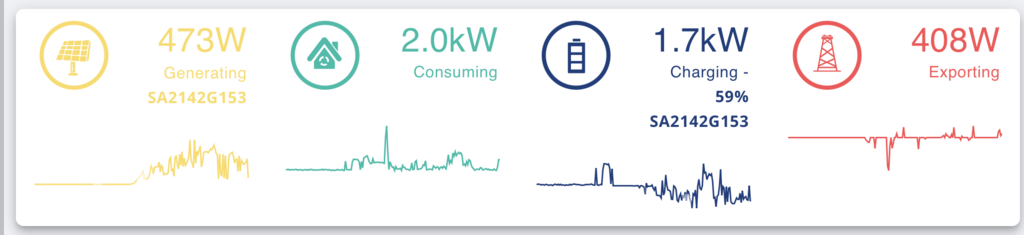
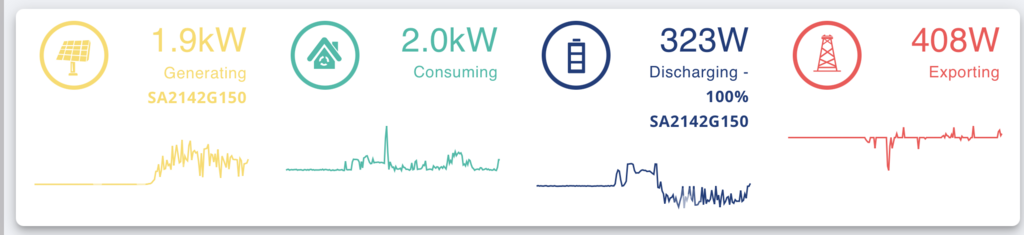
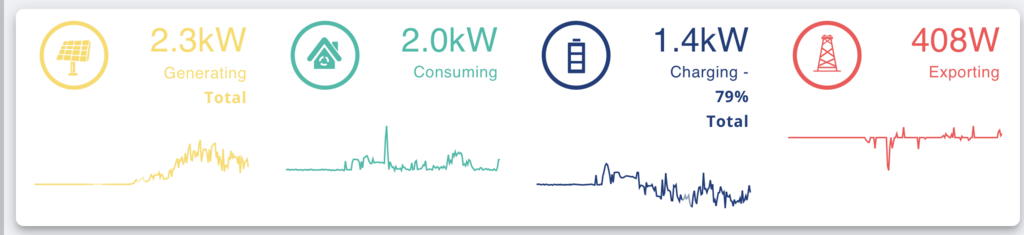
Yes we have 2 Hydrids with 2 8.2Kwh batteries. On the beta dashboard at the top panel you should see something like below.

The Total seen should reflect that sum of the two inverters and similarly battery charging should reflect the sum of them whether charging or discharging.

The Power Flow view I believe still has an issue where more than one inverter with batteries on each does not show the total for the batteries only the first inverter/battery it sees.

One thing to be aware of with a multi-inverter installation is that the inverters are unlikely to be synchronised in terms of the timing that data packets are sent to the GivEnergy servers, by default this is set to every 5 minutes although they can change that to be much less for detailed(real time testing), but do not due to data volumes I suspect. I think this is why some geeky user have resorted to building their own solutions on Raspbery Pi peaking data locally of the inverter(s) and at shorter time intervals to get accurate readings. If you consider that a bit you will realise that only a few seconds difference or less can result in big variances in what is reported between inverters and what is really happening. In other words a large load could be seen by one and not the other at the last instance data was taken from inverters, similarly charge/discharge, and grid/meter readings could be greatly different. It only takes simple maths to realise that the snap shot shown in this scenario may be wildly inaccurate due to data variances.

Another aspect is that if you view the Power Flow and compare the values shown on the top panel(as below) then this will not necessarily be the same and will in fact get out of sync with time, this is because the top panel auto-refreshes but the Power Flow does not. To try and keep it in sync then you have to force a refresh on the Power Flow.

So some quite fundamental design and testing issue here which GivEnergy seem to be unable to understand fully or cannot find a way to address them and test properly.

When I last looked at the Daily, Weekly and Monthly pdf reports the are all over the place.

I hope this helps some understand that issues you are seeing, as it is and can be very confusing.

Total seen

First Inverter seen (selected by clicking on the arrows for Generating and Charging)

Second Inverter

T
#14 Tim

AJSki2fly Yes, I'm seeing something similar to what you describe. I'm OK with the inverters being out of sync, or at least I can understand why they are and I said in another thread that the dashboard is fine for an indication of what happened this morning or yesterday but it doesn't give you a clear picture of what's happening right now.

I had noticed that the Power card doesn't sum the inverter outputs and I suspect that root cause of both is the same for the power card and the summary: it's only seeing one inverter. To be fair, the summary showing the sum of current (reported) generation with an arrow to scroll round to the individual inverters works well. The same is true for the charging summary; it's just the consumption summary that would benefit from the same treatment. Obviously, export should be the same however many inverters you have because it's an attribute of the DNO connection rather than the solar installation. I've already asked if it would be possible to have some sort of indicator which suggests how old the data is, but I guess that's less important than actually getting the data to add up!

BTW how do you add screenshots to this forum? I've seen Mickey's suggestion of uploading to a web site and linking from there, but you're the second person who has been able to embed an actual image which speaks a thousand words as they say. 😄

A
#15 AJSki2fly

Tim

Hi Tim,

I use [https://postimages.org] which is free, you create an account then do the following

  1. upload the pictures/screenshots you want to use, I would suggest limiting the size for a 17" monitor

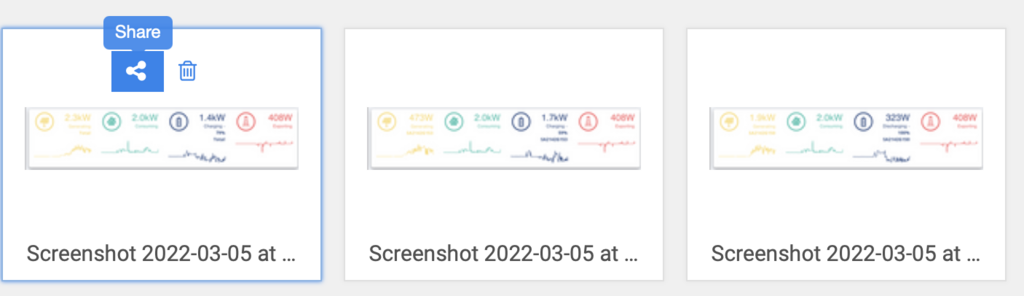
  2. click on the share icon of the photo you want to use in postimages (this will open a box with the link options) as the sequence below


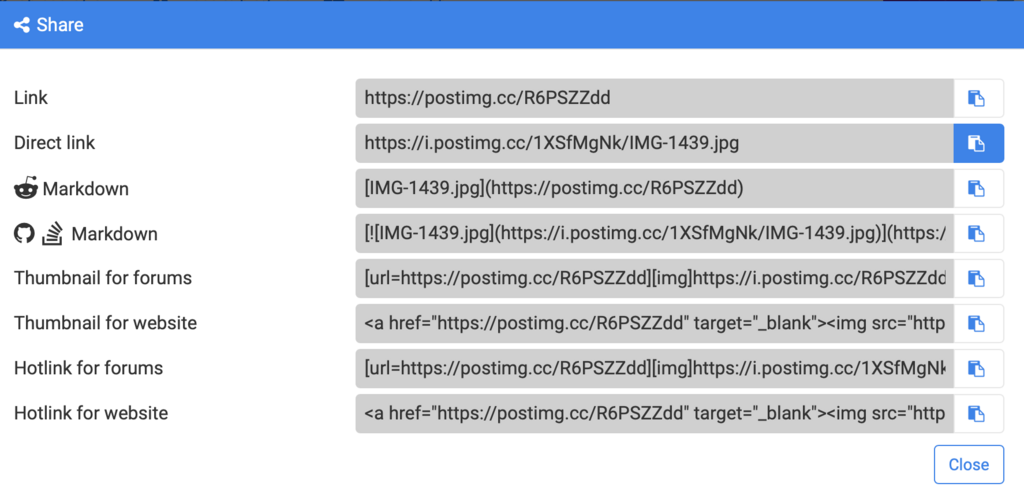
this will give the box below, you want direct link, click on the button which is shown as blue after clicked on, this will copy the link text into the clipboard

  1. Now go to your GivEnergy community tab in your web browser, then in the post box that you are writing click on the add image icon (5th icon from the left below where you can write text), this will put this in the text [](https://) into your intended post

  2. Next hilghlight the 'https://' as in the above and then paste the link from the clipboard to replace it, this is simply done using CMD+V on a Mac or CTRL+V on a PC. This will give you something like this ![]*(https://i.postimg.cc/2SBkLzbb/Screenshot-2022-03-05-at-16-56-41.png) (ignore the * it is to stop it displaying the image so you can see it)

  3. Before you click on "Post Reply" you can select the Preview icon next to it to check you have it all OK first.

Hope that helps, and yes images of what you are discussing enable others to get a clearer picture(pun intended) 😆

By the way if I raise any bug report/issue , or whatever you want to call them, with GivEnergy or any other supplier or manufacturer a photo or image or series of them of the problem really is a major assist in making the issue clear to the support and/or development teams. Sometimes annotating them to point out the problem area is even more helpful. Unless you are very good at making clear textual descriptions they will often be mis-interpreted or even discounted out of frustration, and will waste time or worse result in a wrong change/fix. Having worked in development, testing and supported user acceptance testing for many years I know very well how important this is.

T
#16 Tim

AJSki2fly Thanks for the explanation. I guess the key is to use the direct link rather than link which would take you to the image (as well as display in the message). Anyway, Mickey's solution is the answer.