Battery Charging for 5 minutes every night from the grid when it shouldn't be

88 comments started 2023-02-28 last 2023-10-13
GivEnergy ProductsAC CoupledBattery
G
#1 Graham_Harrison

I started a discussion a few days ago "Missing data / possible restart" but after a lot more investigating the subject has changed a bit so I thought I would be better of starting a new discussion.
The problem I'm having is...
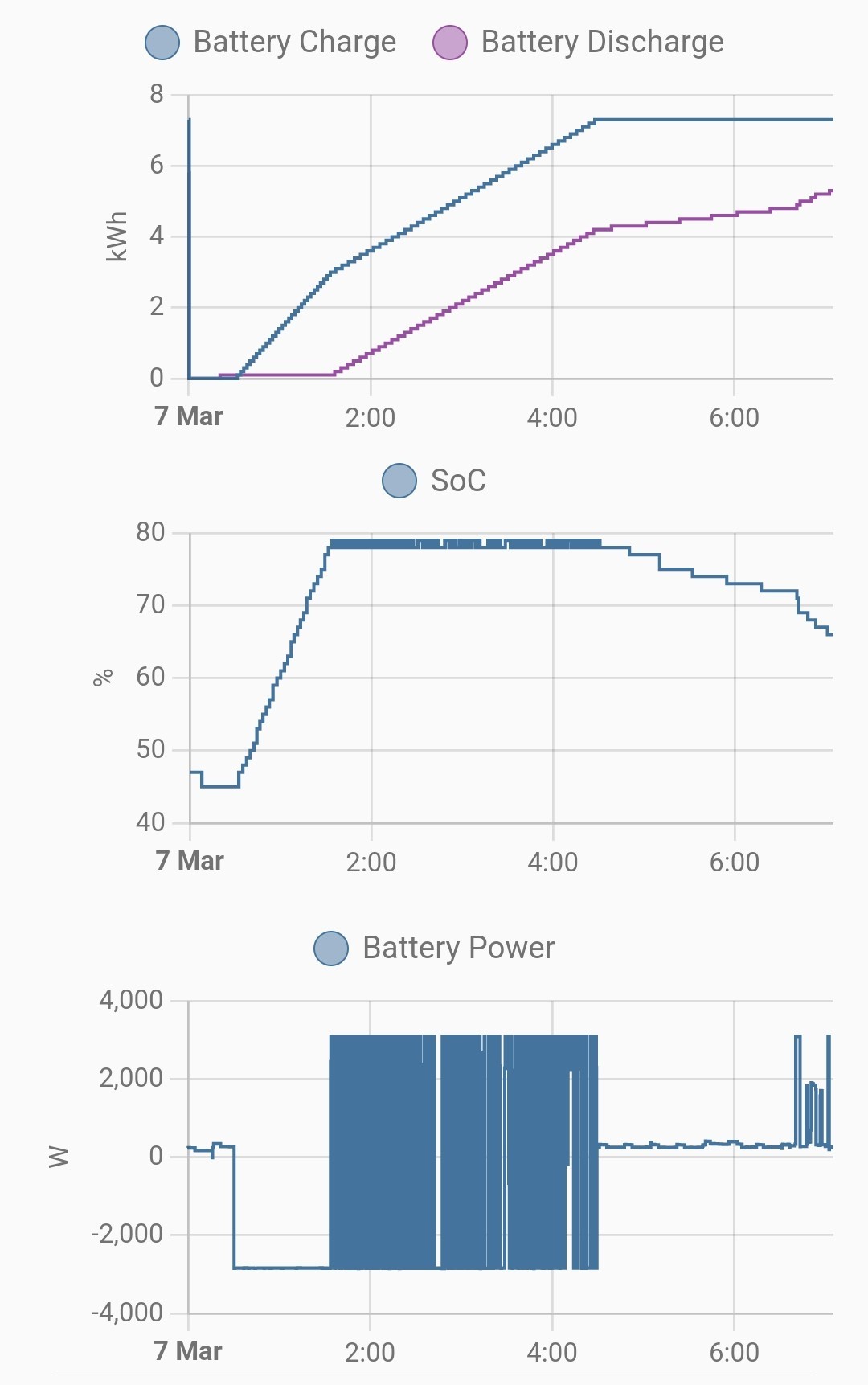
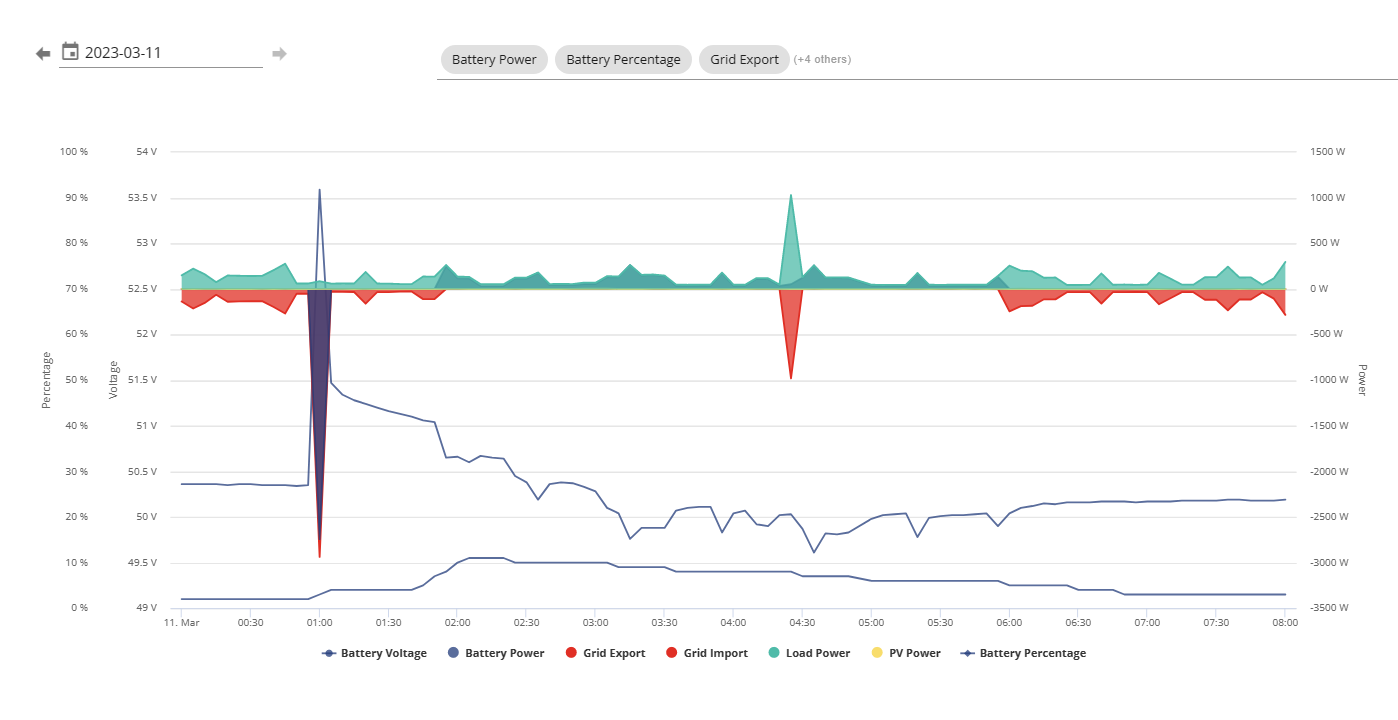
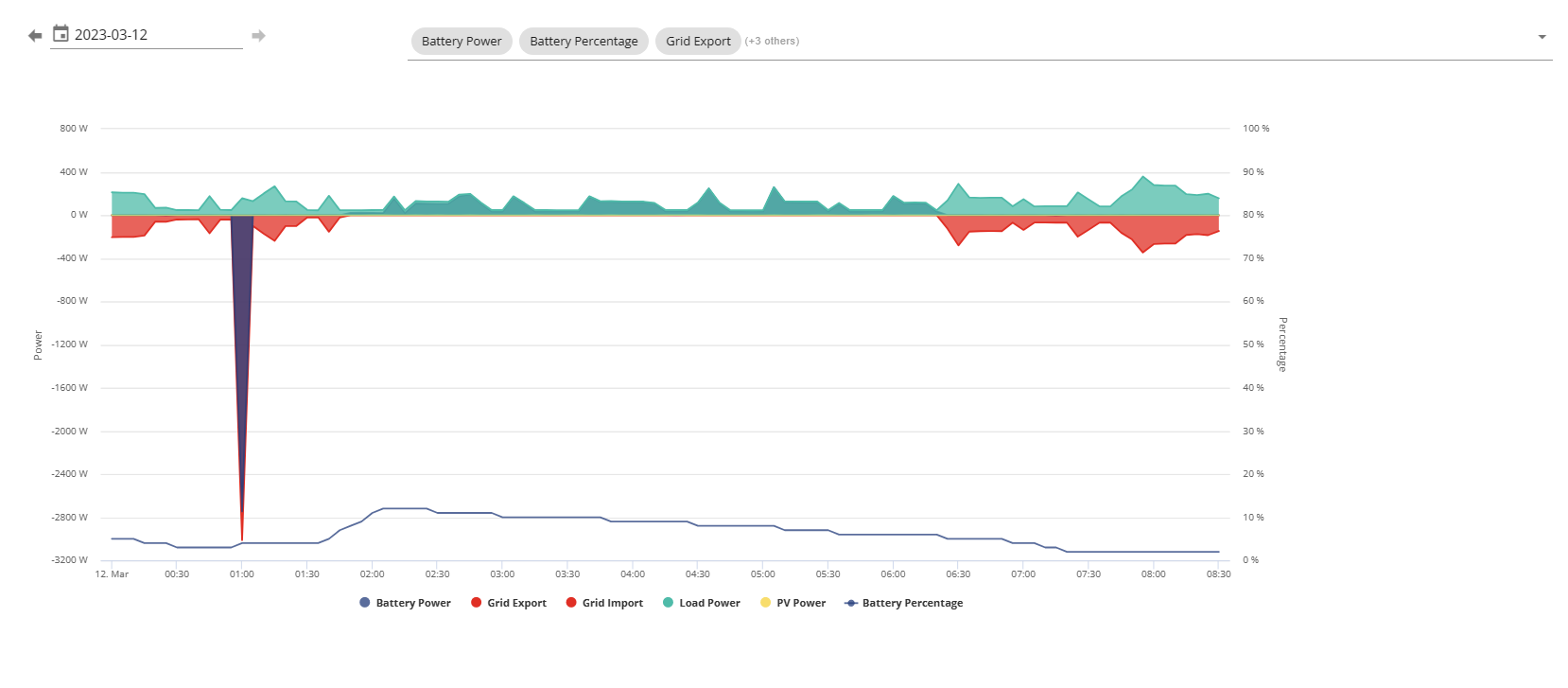
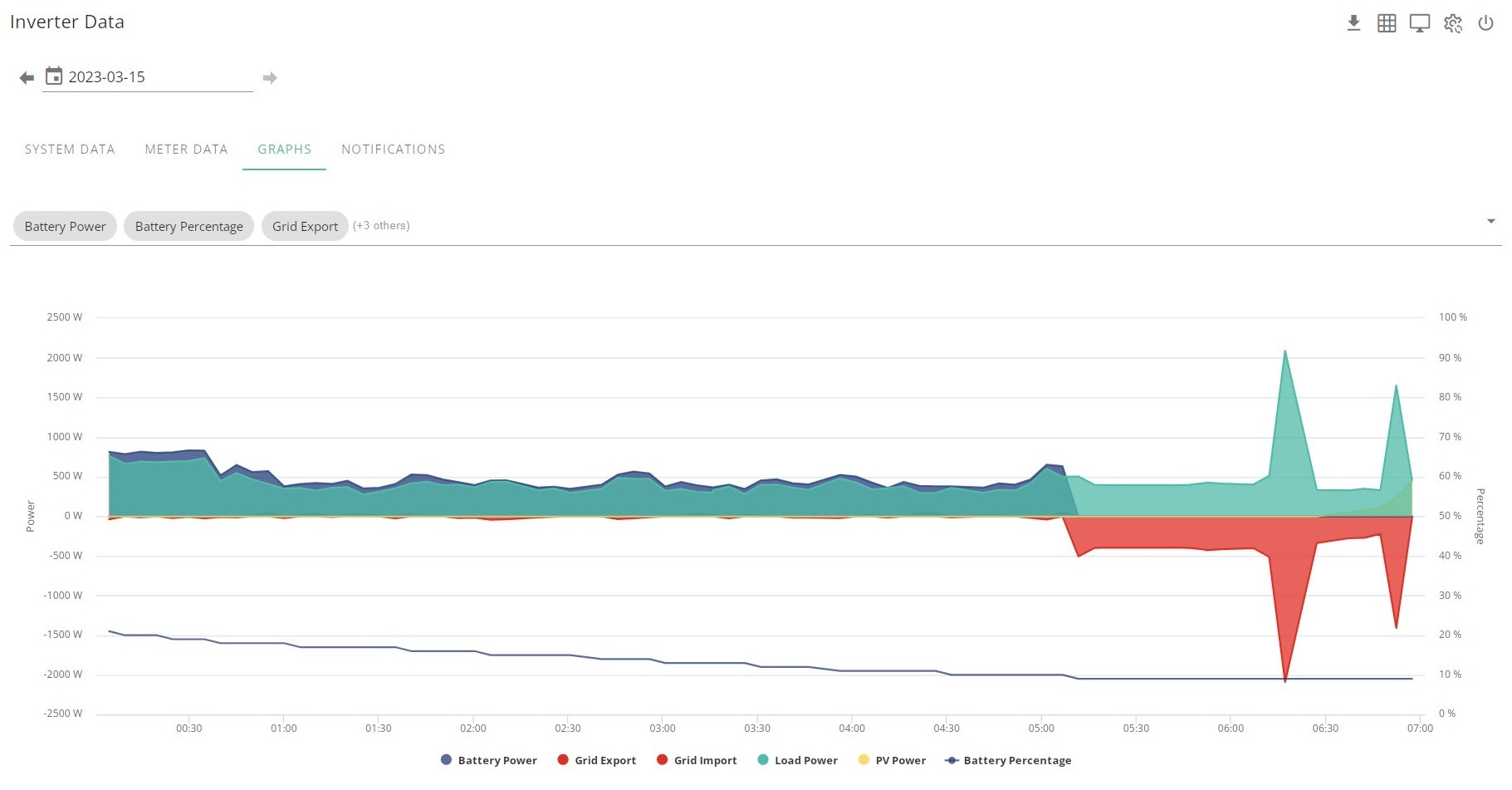
EVERY night @ 01:00 my battery charges for approx. 5 minutes from the grid when it should NOT be.
for a week it was charging @ 3000w which is the set point in "My Inverter / Settings / Battery Options" but I have "Timed Charge" Disabled (with the start & end times set @ 00:00). I tried enabling then disabling this setting and restarting my inverter several times but it still happens each night.
Last night I set the charge rate down to 2000w from 3000w (still with "Timed Charge" DISABLED) and @ 01:00
the battery charged for approx 5 minutes @ 2000w
Another oddity is...
I upload a lot of data to the Australian PV monitoring website PVOutput (Great site!) and every night I'm missing a 12:55 entry (data is uploaded every 5 minutes) for my households electricity usage / solar production BUT the other 9 systems are fine (Seperate solar arrays, Gas etc...)
https://pvoutput.org/intraday.jsp?id=13236&sid=13551&dt=20230228
I'm running the GivTCP addon or Home Assistant and upload a lot of the data to PVOutput from HA (but not all of it) so I can't rule that out as the cause of the problem

T
#2 Tim

Graham_Harrison The inverters have a second Charge Start/End time which don't appear in the Remote Control page of the web portal. There's a known bug where the start time is 00:01:00 and the end time is 00:04:00 and these values don't/can't be changed. I think that's the reason why they aren't visible in the portal. You can see these data in your GivTCP MQTT messages under Timeslots.

This second timed charge period would be useful to have working but it doesn't, for most inverters. Maybe yours does work. If this is the case, then Givenergy should be able to disable the second charge period, or allow you to change the times to suit you.

G
#3 Graham_Harrison

Tim Cheers. Yes I have noticed the 2nd charge period in GivTCP and tried several times to change the times to 00:00 and failed and also tried disabling them, but if it was them they are 1 hour out!

G
#4 Graham_Harrison

Well I feel a bit like I've just been fobbed off by GivEnergy!!
I've just been on the phone to GivEnergy about my issue and the conversation went something like this...
You currently have your battery reserve set @ 30% and during the night it dropped to 29% so it then charges from the grid (something I really don't want it to do) to bring the reserve level back to 30%, which it did. BUT (I pointed out) 30 minutes later it fell back to 29% again but the sequence did not happen a second time. The GivEnergy gentleman I spoke to said that is because there is a known bug which he said he could apply a fix to my system to correct this.
So I checked with him that if I had the firmware fix applied, every time the battery level falls below my reserve (probably quite frequently in the winter months if I have a reasonable reserve set) the system will start charging the battery from the grid and do this EVERY time it falls below my set reserve, YES he said.
I have utilised the facility to maximise the full potential of the EPS from the batteries for the chance I may 1 day have a power outage (which in my part of the UK we are NOT prone too) so have set a healthy sized reserve (currently 30%) but I do not require it to be that exactly. I'm sort off playing around with the set point at present whilst I work out my optimum setting. So if it drifts below through the night it's not a problem to me, But it definitely is if it ends up costing me money every night to achieve it (topping up from the grid)
So I have currently declined the firmware fix, but whenever GivEnergy roll out the next full firmware update EVERYONE will get it regardless.
Whilst this will be of concern to me I do realise that it will not be of concern to many others, I imagine if you don't set a high reserve / do not have the EPS system fully utilised or you are on an overnight tariff then it wont bother you.
I fully understand implementing a system like this that kicks in at the batteries safe minimum level of 4% to protect the batteries but definitely not on whatever your reserve is set too.
I suggested having 2 settings, 1 factory set at 4% and 1 customer configurable (On or Off for the customers set reserve)

I not fully convinced that this is solely the cause of the problem I have as it seems very strange that it happens at exactly the same time every night

I'm very interested in other forum members thoughts on this matter

T
#5 Tim

Graham_Harrison but if it was them they are 1 hour out!

Just a thought; is your timezone set correctly? If it is then that rules out the second timed charge period.

Graham_Harrison I have utilised the facility to maximise the full potential of the EPS from the batteries for the chance I may 1 day have a power outage

Why? If you are not prone to power outages, why hold back reserve? Especially as the days get longer and PV is more plentiful, you could divert all of your surplus to battery if they start the day with a low SoC. I can understand having a high reserve if power cuts are planned but otherwise, let the batteries run free?

I like the idea of the Givenergy 4% below which there is a grid charge and a user preferred higher value, below which the batteries trickle down, not supplying the house, just the inverter.

Weirdly, I thought the AC3 firmware (non-beta) does not honour the user-set reserve (above 4%). The hybrids do, but not the AC3, yet yours seems to. Are you on a later than current which according to the KB is AC coupled (D535-A535) - 12/05/2022?

G
#6 Graham_Harrison

Tim
My timezone is set to GMT which is what the UK is on

I've been slowing reducing the size of my reserve as the daylight hours have got longer and the sun more plentiful, I'm generally getting nowhere near full charges at the moment so not wasting any solar production. I have 19.05 kWh of capacity (2 x Batteries) and not producing anywhere near that each day, even on a good day this month I've only achieved about 13 kWh.

Generally whatever I've set the reserve at has been achieved
Software Version: D0.535-A0.535

G
#7 Graham_Harrison

I had emailed the GivEnergy support team a few days ago and I've just received a reply

Hi Graham,

I've taken a look at the logs for your system and I believe this to be an issue with GivTCP. I can't find any entries in the logs for these charges being set, speaking with the developers they have informed me that GivTCP doesn't write to the logs when it makes system changes. As GivTCP is third party and not supported by GivEnergy, all I can suggest is to get in contact with the GivTCP developers about your issue.
Kind Regards

Sam Eyre
1st Line Service Desk Engineer

I will continue investigating this and focus my attention on GivTCP a bit more and post my findings

T
#8 Tim

Graham_Harrison If you leave MQTT Explorer running overnight, you will be able to see the last 99 messages for each topic. That would help you to see what commands were sent to the inverter from GivTCP and when. If you have Home Assistant, you can see the same history in your entities, but you'd have to work out which ones are (possibly) triggering the behaviour. The HA route would enable you to look back now, without MQTT Explorer.

G
#9 Graham_Harrison

Cheers Tim, I've installed the Add-on in Home Assistant. Not really sure what I'm doing with it but hopefully I'll work it out

T
#10 Tim

Graham_Harrison MQTT Explorer might make things easier to "see". If the add on has been configured with default MQTT settings, the topic that I would be monitoring first would be homeassistant/GivEnergy/control/inverterSerialNo Any changes made by GivTCP should show up here as commands with the changed value appearing under the relevant inverter topic.

G
#11 Graham_Harrison

Tim Thanks Tim, I'm on nights tonight and have limited access whilst at work to my Home Assistant but will monitor it as best I can then have a better look when I get home in the morning

G
#12 Graham_Harrison

Well its done it yet again......
BUT this time I had all battery settings in the Portal set to "OFF" (including Eco Mode)
My Reserve was set to 30% but at the time the charge kicked in it was at 45%.
So
Tomorrow (well actually today) I'm going to start drilling into GivTCP some more and what I might do is disable it just before 01:00 tomorrow to see if it happens again

T
#13 Tim

Graham_Harrison Why not just drill down into the HA entities and see what happened?

G
#14 Graham_Harrison

Tim It sounds like you are a bit more skilled within HA than I am Tim, when you say "Why not just drill down into the HA entities and see what happened?" I'm not quite sure what you mean.
I ended up uninstalling then reinstalling GivTCP in the early hours of this mornig when I ran into a problem with it stopping all the time, I think I was trying to do too much with HA from my phone whilst I was away from my PC.
I'm on nights again tonight so my plan is to stop GivTCP on HA at just before 01:00 then restart it at about 01:10, if it still happens then I can rule out the GiveTCP add-on

G
#15 Graham_Harrison

Well folks, guess what!!
At 00:50 I stopped my Home Assistant GivTCP add-on (thus eliminating it as the cause of the problem)
At 01:05 my batteries started charging @ 3000w,
At 01:10 they stopped charging.
So I'm now 99.99% certain its NOT Home Assistant / GicTCP causing the anomaly
My battery reserve was set @ 50%
At 01:00 battery SOC was at 43% when charging began
At 01:05 battery SOC was at 44% when charging stopped

In tomorrow nights episode of "Graham's GivEnergy Battery Charging Anomaly Investigations" I will be making sure that @ 01:00 my battery reserve setting set significantly lower than the actual SOC

#16 hoggy

I’m too wondering if this has anything to do with the second charge slot registers.
They are default to 00:00 - 00:04 ( I think).
They are known to not be changeable by end users as they never work (just reset back to those times). I am however now suspicious that they do actually work - and with daylight savings + being roughly the same timespan?

I’ve never noticed mine do it but it’s always already charging or full by then so I wouldn’t?

T
#17 Tim

Graham_Harrison In HA, if you navigate to Settings - Devices & Services - MQTT Broker Devices and then the Inverter Control Device, you will see the entities associated with it. If you click on (for example) "Enable Charge Schedule", the Info tab shows the History of what happened over the last 24 hours. If you click on Show more, it takes the entity to the History tab and you can modify the timescale you are looking at. You can also add more entities in this view so you can see what more than one enitity did and when, on the same timescale. To get a better idea of how the data is recorded, looking at something like battery SoC or Grid Current might make more sense than a binary switch history (especially one that never switches).

I'm not saying that it was anything to do with the Charge enable switch, but that this is a way to see history, logged by HA. You can also go to Settings - Add ons - Mosquitto Broker and view the log.

Having said all that, if it is the second charge period, it is hard-coded in firmware unless you can change it, and so looking at MQTT messages for clues will be fruitless, but worth excluding in any case.

G
#18 Graham_Harrison

Gents, thanks for you're input
Cheers Tim for the advise on navigating through HA, I was already aware of some of that but not all.
Hoggy I have tried to change the 2nd charge period in GivTCP but like you've said it just always reverts back to its default times.
Tonight I will hopefully disable the GivTCP add-on again in HA (if I'm A) awake & B) remember!!) and ensure that my battery reserve SOC set point is well above to batteries actual SOC at 01:00 and wait with baited breath to see the results (in the morning when I get up)
Do either of you know if I could EASILY configure something like an automation to automatically turn off the GivTCP add-on at a certain time then back on again slightly later

T
#19 Tim

Graham_Harrison I don't think disabling GivTCP will make any difference. What might be worthwhile doing is capturing all relevant MQTT traffic for the period before and after the anomalous charge blip. As I said previously, you can do this by leaving MQTT Explorer running and looking back through the topic history, or looking at the HA entity history (timed charge changes?). You could do this now, looking back for any changes last night from within HA.

But those methods will only be useful if the inverter was responding to a "charge now" command sent to it locally from HA/GivTCP. If the inverter firmware has a coded timed charge, then no amount of HA/MQTT history scanning will uncover it. A way forward might be to call/web chat with Givenergy and ask them to advise?

G
#20 Graham_Harrison

Well surprise surprise, it did it again
I left GivTCP running last night so I could try to interpret log data this morning (which I'm not great at)
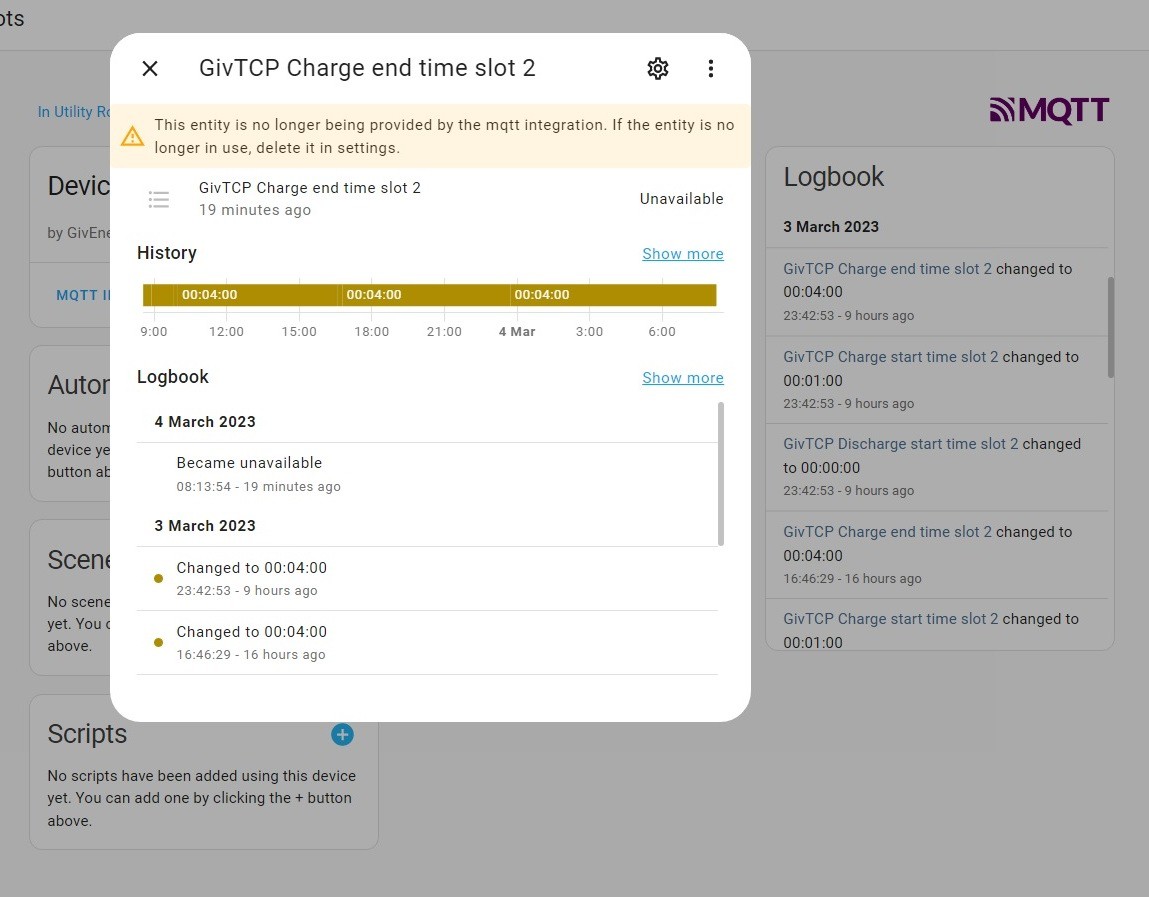
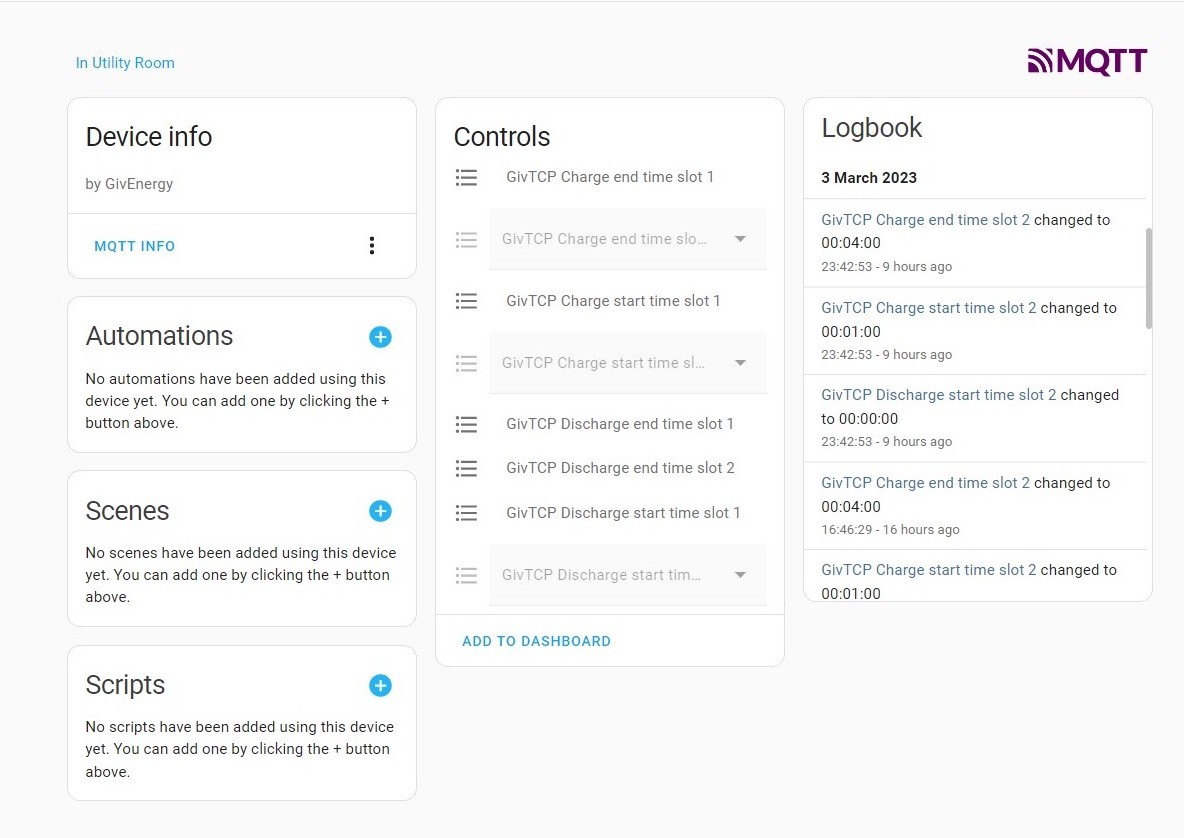
Something happens with Time Slots 2 so I've included some screen shots

So I've written to GivEnergy AGAIN!
I recently wrote to you with regard to my batteries charging every night for 5 minutes at 01:00.
You wrote back and said it was not caused by GivEnergies system and I should investigate further at my end (including the GivTCP Home Assistant add-on which I informed you I'm running).
I have done more investigating over the last few days as the problem has continued.
2 nights ago I disabled the GivTCP addon over that time period and it still happened.
Last night I set my battery reserve level down well below the SOC point my battery would be at at 01:00 and it still happened (battery at 33% at 01:00, reserve set at 20%)
Last night I left GivTCP running so I could read log data this morning and I've found that something happens with Time Slots 2 (which cannot be changed from my end) at around midnight, and it appears to happen every night.
In on time zone GMT but if there is a mix up of 1 hour somewhere in the GivEnergy system then this time slot would align with the problem.
Regards
Graham

G
#21 Graham_Harrison

I've just noticed this too..

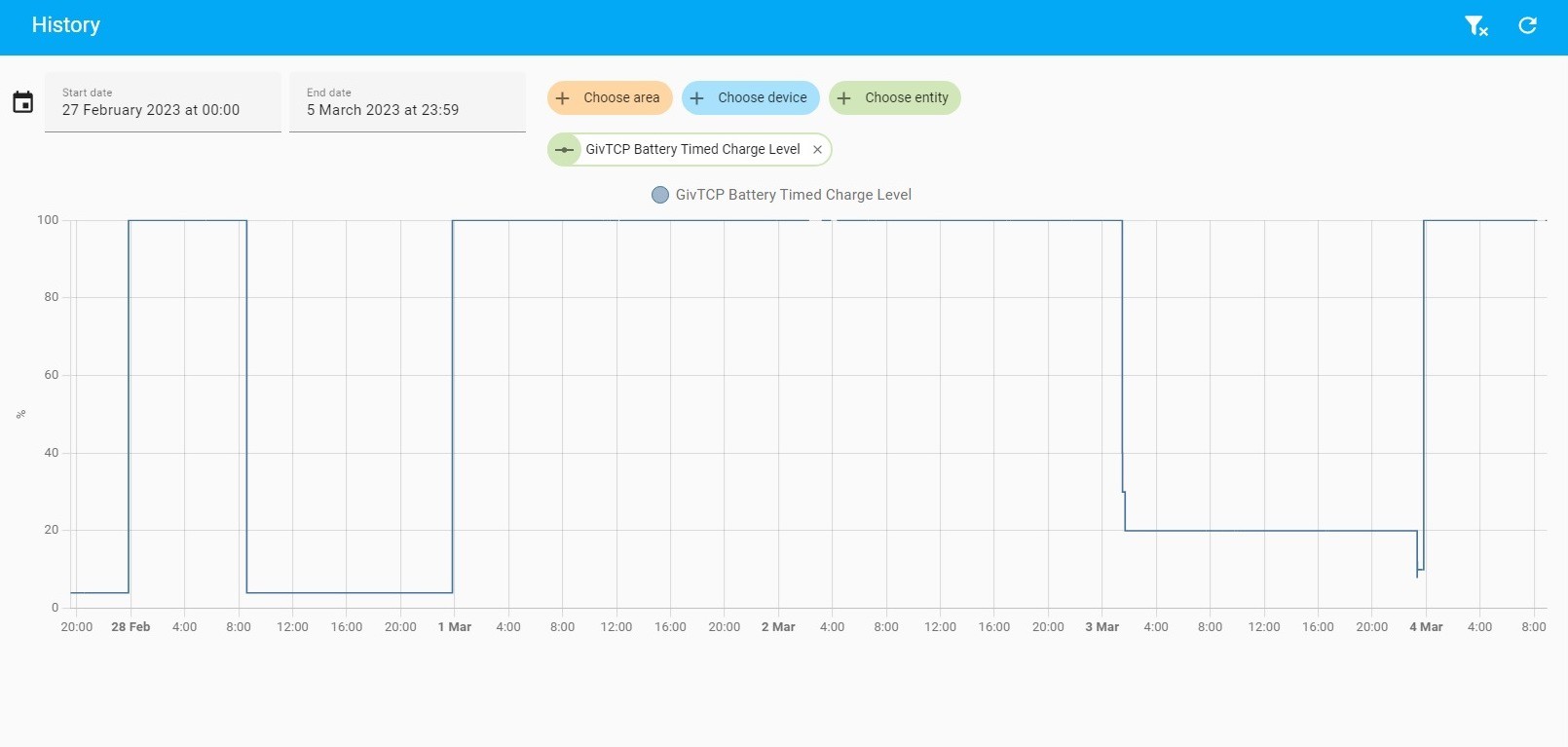
the battery timed charge level setting changes from my set point (which varies as I'm experimenting with things) to 100% at 23:50 each night (unless its already at 100%)

T
#22 Tim

Graham_Harrison Well it looks like you're homing in on the cause of the anomaly. WRT the Charge end time slot 2; mine shows as a dropdown picklist but when I checked the history, it was set to 00:04;00 at 11;02 yesterday and also at 14;52 on 27th February. I have no recollection of doing anything at that time that would change the setting and there's no log to say it been changed to another value during any period. The data in HA are reflecting changes reported by the inverter via MQTT.

I've tried looking for the "Battery Timed Charge Level" entity but don't have one by that name. I do have Target SoC which I can follow the history on. Have you checked the MQTT topic "Givenergy/control/SXxxxxxxxx/..."? Any changes to the Target SoC or otherwise should show there especially /setChargeTarget = xx. If there are messages there that correspond to the history you see, then it's likely to be coming from within HA somehow. If there is nothing in MQTT history to show a local MQTT message changing setting, then I'd suggest it isn't local. Did you ever have Octopus automations set? Could it be a lingering bit of API calling somehow?

G
#23 Graham_Harrison

Just a thought incase my pictures may confuse some people, I have renamed a few entities.
Ive never been on an overnight tariff but a month or so back I was trying to setup and automation to check / set something on GivTCP at a specific time.
This is my post on the HA Community forum on Jan 31st
"I wish to create an automation to change / check that my GivEnergy Battery SOC (GivTCP) is set at a particular level every day because on several occasions I’ve found it appears to randomly change.
I’ve tried several automation configurations but without success. I want to set the entity “number.givtcp_target_soc” to 55% every 24 hours"
BUT I cant remember how for I went with it as I got no input from the forum members
I've checked my automations including the yaml file and there is nothing

T
#24 Tim

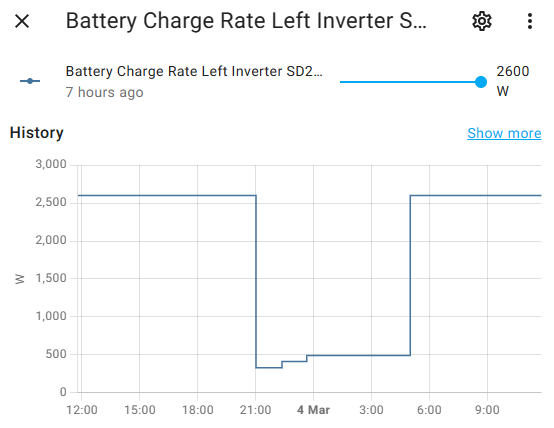
Graham_Harrison I've got a Node-RED automation running within HA that leaves the Target SoC at whatever I set it to manually, but varies the battery charge power so that it reaches the target SoC at the end of the timed charge period. The MQTT topic mentioned above (Givenergy/control/SXxxxxxxxx/...) shows the history of my automation, also shown in the entity history here. The automation does a calculation starting 3 hours before the timed charge window starts (00:00) and updates it as the battery SoC reduces. At the end of the timed charge period (05:00), the battery charge rate is increased to maximum again.

G
#25 Graham_Harrison

Tim any chance you could share that Node-Red automation with me please, it would give me a starting block to customise it to my requirements
Node-Red is something I havn't used much for a while

T
#26 Tim

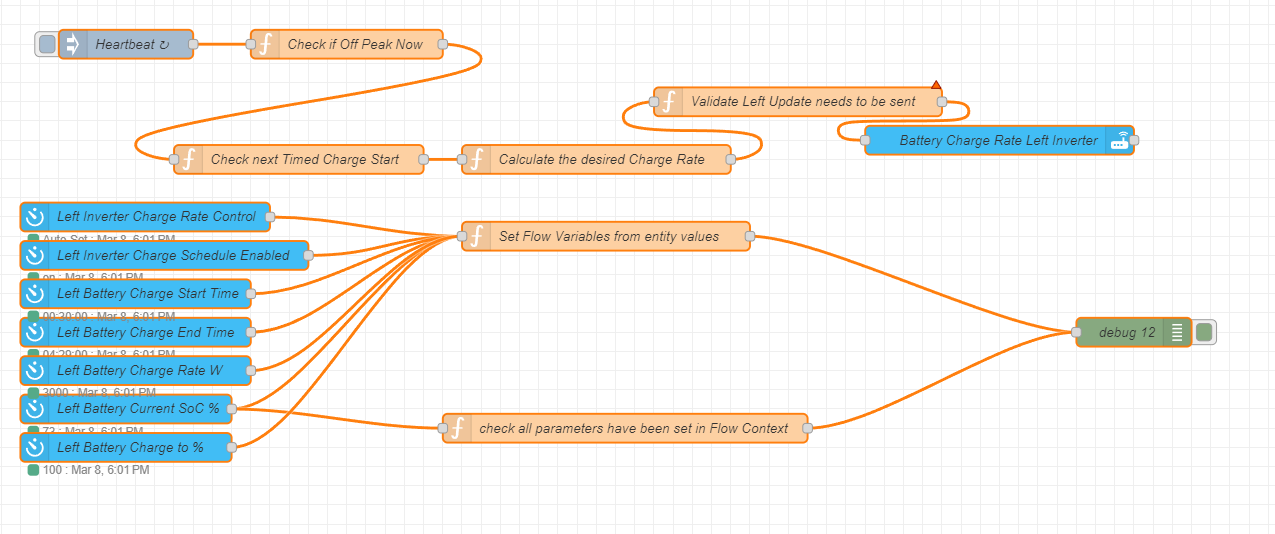
Graham_Harrison I am happy to share the JSON with you. Note that this is a modified version of what I actually have because:

  • we have two inverters and the code is double the size of what I've cut it down to
  • the bit between the heartbeat node and the Check next Timed Charge Start is from two different flows connected by Link out - link in because I use the Off Peak now (true/false) flag in other flows. I'll eventually create a helper entity to be able to call it from anywhere but I've just joined it on this flow
  • the heartbeat node sends opStart and opEnd which are the off peak start and end times in milliSeconds (ie 0 for midnight and 18,000,000 for 5am). Obviously if you have times of say 00:30 to 04:30, the values would be (30 x 60 x 1000) 1,800,000 and (4.5 x 60 x 60 x 1000) 16,200,000.
  • I created Off-Peak Start and End helper entities to display in the HA overview - I want to see if this code deals with the GMT/BST transition properly as our (EDF) off peak stays the same time (GMT) all year round, but others' may not. If yours doesn't you'd need to use some code to change from GMT to BST at the appropriate time.
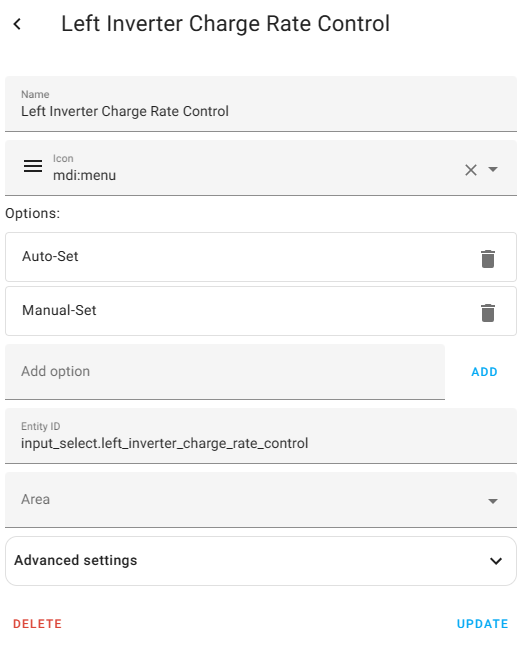
  • I also created a Charge Rate Control helper entity which is set to either Auto-Set or Manual-Set. This code only runs if I set the charge rate control to auto set.
  • the entity poll nodes at the bottom all set flow variables for use in the function nodes higher up. When deployed, it takes a minute or so for entity polling to connect to HA, so expect an initial error but after a short while you'll be able to see the flow variables in context data
    I've replaced our Left Inverter serial number with a generic string sxnnnngnnn, which you obviously just need to change for your entity name.
  • the Battery Charge Rate Left Inverter node just needs the entity name of your battery charge rate inverter sxnnnngnnn to be put into the entity name field.
  • if your server isn't called "Home Assistant", you'll need to change the server name in all the entities
[{"id":"8929171e5c9cdee0","type":"poll-state","z":"6d5c8023388483a2","name":"Left Battery Charge Start Time","server":"855788efea844644","version":2,"exposeToHomeAssistant":false,"haConfig":[{"property":"name","value":""},{"property":"icon","value":""}],"updateinterval":"60","updateIntervalType":"num","updateIntervalUnits":"seconds","outputinitially":true,"outputonchanged":true,"entity_id":"select.givtcp_sxnnnngnnn_charge_start_time_slot_1","state_type":"str","halt_if":"","halt_if_type":"str","halt_if_compare":"is","outputs":1,"x":180,"y":420,"wires":[["9467550ea692ed6f"]]},{"id":"855788efea844644","type":"server","name":"Home Assistant","version":5,"addon":true,"rejectUnauthorizedCerts":true,"ha_boolean":"y|yes|true|on|home|open","connectionDelay":true,"cacheJson":true,"heartbeat":true,"heartbeatInterval":"30","areaSelector":"friendlyName","deviceSelector":"friendlyName","entitySelector":"friendlyName","statusSeparator":": ","statusYear":"hidden","statusMonth":"short","statusDay":"numeric","statusHourCycle":"default","statusTimeFormat":"h:m","enableGlobalContextStore":true}]


Just realised. In order to copy the JSON, you need to place your cursor before the first [, use the mouse to get to the end of the window, then press shift and click after the last ] to select all the text, then CTRL-C to copy to clipboard.

G
#27 Graham_Harrison

Tim Cheers, I'll give it a try

R
#28 rwbarrett

Is GivTCP running as an addon or in docker? Do you have smarttarget set to "False" in givtcp? If not and you haven't set up a solcast api, it will set the soc target to 100% every night.

G
#29 Graham_Harrison

I have GivTCP running as an Add-on.
Smarttarget was set to its default i.e. ENABLED.
No I haven't setup a Solcast api.
I have now DISABLED Smarttarget.
Cheers for the advise

G
#30 Graham_Harrison

Well it did it again last night so my investigatios continue
Please be patient folks if youre finding this / me painful!!

I've eventually managed to work out how to change set points using "Automations" within Home Assistant so tonight will be the 1st time I have them running

A few questions with regards to the GivTCP add-on if any members can help
I’m running the latest version 2.1.6

When I enable / disable “ECO mode” from within HA / GivTCP it rarely if ever actually changes the set point in the GivEnergy Portal (My Inverter / Remote Control)
I appear to be missing at least 1 setting in the add-on that appears in the GivEnergy Portal (My Inverter / Remote Control) “Enable AC Charge Upper % Limit” do anyone else see this.

G
#31 Graham_Harrison

Well at last, NO huge spike in import energy at 01:00!!!!!
I haven't fixed it BUT I've fudged it
I eventually worked out how to change GivTCP settings using a Home Assistant Automation and so I've created 2

  1. GivTCP Reduce Battery Charge Rate Automation
  2. GivTCP Normal Settings Automation

Automation 1. (Timed for 00:50)
Turn on ECO Mode / Set Mode Option to ECO (Paused) / Set Battery Reserve to 10% / Set Battery Cutoff to 4% / Set Battery Charge Rate to 0w / Set Battery Discharge Rate to 0w / Set AC Charge Upper Limit to 4% / Turn Off Enable AC Charge / Turn Off Enable DC Charge
Automation 2. (Timed for 01:10)
Turn on ECO Mode / Set Mode Option to ECO / Set Battery Reserve to 30% / Set Battery Cutoff to 100% / Set Battery Charge Rate to 3000w / Set Battery Discharge Rate to 3000w / Set AC Charge Upper Limit to 4% / Turn Off Enable AC Charge / Turn Off Enable DC Charge

I'm sure there are several settings in Automation 2 I don't need but I'm just experimenting at the moment.
As the sunny days (in the UK) increase I'll NEED to chance them as hopefully I'll be able to discharge from my batteries all night but at present I'm nowhere near that position

S
#32 SilverArt

Graham_Harrison Well done for sticking with it!

G
#33 Graham_Harrison

SilverArt Cheers, I was feeling so proud of myself then.......
Whilst playing around in Home Assistant I noticed I was exporting so I checked the GivEnergy Portal as well.
My battery charge level in 3 steps went from 32% - 65% - 100%
It's by far the sunniest day we have had in March (UK) and I'm now exporting 3306w to the grid
I'm pretty certain my 19kWh battery capacity is NOT at 100%
I restarted my inverter but no different
So I called GivEnergy
Long story short (after discussing a few other issues inc. the charging at 01:00 issue and him carrying out a HARD RESET)
"Mr Harrison, it looks like the battery SOC bug"

T
#34 Tim

Graham_Harrison “Enable AC Charge Upper % Limit”

I don't think you need that for a correctly working inverter. When the Charge to % is set to 100, that switch appears to be disabled by the inverter. When the Charge to % is set to a value other than 100, it appears to be enabled by the inverter. It doesn't seem to matter whether you use HA, Node-RED, app or portal, the enable/disable happens if the Charge to % is <100 or 100.

G
#35 Graham_Harrison

Tim Cheers, I experimenting with different settings trying to work out what they all do and how to utilise them best.
Its rather confusing that the settings all seem to have different names across the different platforms

  1. Web Portal / My Inverter / Settings
  2. Web Portal / My Inverter / Remote Control
  3. Android App (I rarely use)
  4. GivTCP Add-on (I use a lot)
    I've renamed several in the GivTCP add-on to make it easier for me to remember exactly what they do.
    I'm currently putting a list together to help me remember then I'll post it in the hope it may help others.

I've noticed it appears that most community members seem to be on overnight tariffs and so utilise charging the batteries at night, I'm not and have no intention of moving onto 1. I'm 18 months into a fixed rate deal with EDF
and have just over 8kW of PV pointing in 3 different directions across 3 different roofs (House, Garage & Shed) and so will continue paying very close attention to my solar production and battery storage to utilise it best

G
#36 Graham_Harrison

Tim
I'm not seeing that
"I don't think you need that for a correctly working inverter. When the Charge to % is set to 100, that switch appears to be disabled by the inverter. When the Charge to % is set to a value other than 100, it appears to be enabled by the inverter. It doesn't seem to matter whether you use HA, Node-RED, app or portal, the enable/disable happens if the Charge to % is <100 or 100."

Are you referring to the settings from the Web Portal Settings page or Web Portal Remote Control page or GivTCP

T
#37 Tim

Graham_Harrison From what I can see, however the Charge to % is changed (app, portal, MQTT, Node-RED or HA), when it is set to 100%, “Enable AC Charge Upper % Limit” is disabled and when it is set to less than 100%, it is enabled.

I found that there was sometimes a delay in what was displayed on the web portal remote control page but you can see log entries from just now with a restart to see if that would enable the register values displayed to be updated, but they didn't.

In fact it looks like the Enable/Disable happened ahead of the change to Charge to % both times.

G
#38 Graham_Harrison

Tim Where are those log entries from

M
#39 mpartington

Tim Hi Tim, I was about to try and code something like this to stop the batteries charge/discharging around a soc target (when not 100%).

I tried to import the flow, but it is only importing one node "Left Battery Charge Start Time", is the JASON complete? Thanks

G
#40 Graham_Harrison

mpartington I had that problem too

T
#41 Tim

Graham_Harrison @mpartington Apologies. I Should have checked the code before and after I posted. I selected export nodes rather than flow. Anyways, hopefully sorted here:

[{"id":"61c0b07d953846b7","type":"tab","label":"Flow 1","disabled":false,"info":"","env":[]},{"id":"524af7b7b313a348","type":"debug","z":"61c0b07d953846b7","name":"debug 12","active":false,"tosidebar":true,"console":false,"tostatus":false,"complete":"true","targetType":"full","statusVal":"","statusType":"auto","x":1200,"y":420,"wires":[]},{"id":"429db6ca41ede2d7","type":"api-call-service","z":"61c0b07d953846b7","name":"Battery Charge Rate Left Inverter","server":"855788efea844644","version":5,"debugenabled":true,"domain":"number","service":"set_value","areaId":[],"deviceId":[],"entityId":["number.givtcp_sAnnngnnn_battery_charge_rate"],"data":"{\t    \"value\": payload\t}","dataType":"jsonata","mergeContext":"","mustacheAltTags":false,"outputProperties":[],"queue":"none","x":1060,"y":220,"wires":[[]]},{"id":"518b6ac7c5477adb","type":"poll-state","z":"61c0b07d953846b7","name":"Left Inverter Charge Rate Control","server":"855788efea844644","version":2,"exposeToHomeAssistant":false,"haConfig":[{"property":"name","value":""},{"property":"icon","value":""}],"updateinterval":"60","updateIntervalType":"num","updateIntervalUnits":"seconds","outputinitially":true,"outputonchanged":true,"entity_id":"input_select.left_inverter_charge_rate_control","state_type":"str","halt_if":"","halt_if_type":"str","halt_if_compare":"is","outputs":1,"x":170,"y":300,"wires":[["f29499884d4e5fdb"]],"outputLabels":["AutoCalc"]},{"id":"81018387bcdc7133","type":"poll-state","z":"61c0b07d953846b7","name":"Left Battery Current SoC %","server":"855788efea844644","version":2,"exposeToHomeAssistant":false,"haConfig":[{"property":"name","value":""},{"property":"icon","value":""}],"updateinterval":"60","updateIntervalType":"num","updateIntervalUnits":"seconds","outputinitially":true,"outputonchanged":true,"entity_id":"sensor.givtcp_sAnnngnnn_soc","state_type":"str","halt_if":"","halt_if_type":"str","halt_if_compare":"is","outputs":1,"x":150,"y":500,"wires":[["f29499884d4e5fdb","01eaad711db52c7b"]]},{"id":"f29499884d4e5fdb","type":"function","z":"61c0b07d953846b7","name":"Set Flow Variables from entity values","func":"if (msg.topic == \"input_select.left_inverter_charge_rate_control\") {\n    flow.set(\"invChargeRateModeL\", msg.payload)\n}\nelse if (msg.topic == \"sensor.givtcp_sAnnnngnnn_soc\") {\n    flow.set(\"invCurrentSoCL\",msg.payload)\n}\nelse if (msg.topic == \"number.givtcp_sAnnnngnnn_target_soc\") {\n    flow.set(\"invTargetSOCL\", msg.payload)\n}\nelse if (msg.topic == \"switch.givtcp_sAnnnngnnn_enable_charge_schedule\") {\n    flow.set(\"invChargeScheduleEnabledL\", msg.payload)\n}\nelse if (msg.topic == \"select.givtcp_sAnnnngnnn_charge_end_time_slot_1\") {\n    flow.set(\"invChargeEndTimeL\", msg.payload)\n}\nelse if (msg.topic == \"select.givtcp_sAnnnngnnn_charge_start_time_slot_1\") {\n    flow.set(\"invChargeStartTimeL\", msg.payload)\n}\nelse if (msg.topic == \"number.givtcp_sAnnnngnnn_battery_charge_rate\") {\n    flow.set(\"invChargeRateL\", msg.payload)\n}\nreturn msg;","outputs":1,"noerr":0,"initialize":"","finalize":"","libs":[],"x":650,"y":320,"wires":[["524af7b7b313a348"]]},{"id":"61aa2d0ec5fa93d6","type":"poll-state","z":"61c0b07d953846b7","name":"Left Battery Charge to %","server":"855788efea844644","version":2,"exposeToHomeAssistant":false,"haConfig":[{"property":"name","value":""},{"property":"icon","value":""}],"updateinterval":"60","updateIntervalType":"num","updateIntervalUnits":"seconds","outputinitially":true,"outputonchanged":true,"entity_id":"number.givtcp_sAnnngnnn_target_soc","state_type":"str","halt_if":"","halt_if_type":"str","halt_if_compare":"is","outputs":1,"x":150,"y":540,"wires":[["f29499884d4e5fdb"]]},{"id":"5e1917dfb5b893af","type":"poll-state","z":"61c0b07d953846b7","name":"Left Inverter Charge Schedule Enabled","server":"855788efea844644","version":2,"exposeToHomeAssistant":false,"haConfig":[{"property":"name","value":""},{"property":"icon","value":""}],"updateinterval":"60","updateIntervalType":"num","updateIntervalUnits":"seconds","outputinitially":true,"outputonchanged":true,"entity_id":"switch.givtcp_sAnnngnnn_enable_charge_schedule","state_type":"str","halt_if":"","halt_if_type":"str","halt_if_compare":"is","outputs":1,"x":190,"y":340,"wires":[["f29499884d4e5fdb"]]},{"id":"1441ac71bade4e0c","type":"poll-state","z":"61c0b07d953846b7","name":"Left Battery Charge End Time","server":"855788efea844644","version":2,"exposeToHomeAssistant":false,"haConfig":[{"property":"name","value":""},{"property":"icon","value":""}],"updateinterval":"60","updateIntervalType":"num","updateIntervalUnits":"seconds","outputinitially":true,"outputonchanged":true,"entity_id":"select.givtcp_sAnnngnnn_charge_end_time_slot_1","state_type":"str","halt_if":"","halt_if_type":"str","halt_if_compare":"is","outputs":1,"x":160,"y":420,"wires":[["f29499884d4e5fdb"]]},{"id":"114ad445463b9c8f","type":"poll-state","z":"61c0b07d953846b7","name":"Left Battery Charge Start Time","server":"855788efea844644","version":2,"exposeToHomeAssistant":false,"haConfig":[{"property":"name","value":""},{"property":"icon","value":""}],"updateinterval":"60","updateIntervalType":"num","updateIntervalUnits":"seconds","outputinitially":true,"outputonchanged":true,"entity_id":"select.givtcp_sAnnngnnn_charge_start_time_slot_1","state_type":"str","halt_if":"","halt_if_type":"str","halt_if_compare":"is","outputs":1,"x":160,"y":380,"wires":[["f29499884d4e5fdb"]]},{"id":"70e6fa2a65e67095","type":"poll-state","z":"61c0b07d953846b7","name":"Left Battery Charge Rate W","server":"855788efea844644","version":2,"exposeToHomeAssistant":false,"haConfig":[{"property":"name","value":""},{"property":"icon","value":""}],"updateinterval":"60","updateIntervalType":"num","updateIntervalUnits":"seconds","outputinitially":true,"outputonchanged":true,"entity_id":"number.givtcp_sAnnngnnn_battery_charge_rate","state_type":"str","halt_if":"","halt_if_type":"str","halt_if_compare":"is","outputs":1,"x":160,"y":460,"wires":[["f29499884d4e5fdb"]]},{"id":"01eaad711db52c7b","type":"function","z":"61c0b07d953846b7","name":"check all parameters have been set in Flow Context","func":"//  Check that all the flow context has been set\nif (flow.get(\"invChargeEndTimeL\") == undefined || flow.get(\"invChargeRateL\") == undefined || flow.get(\"invChargeRateModeL\") == undefined || flow.get(\"invChargeScheduleEnabledL\") == undefined || flow.get(\"invChargeStartTimeL\") == undefined || flow.get(\"invCurrentSoCL\") == undefined || flow.get(\"invTargetSOCL\") == undefined)\n{\n    node.warn(\"Not all Left Inverter flow context set\")\n}\nelse \n{\n    node.warn(\"All set\")\n    var parts = flow.get(\"invChargeStartTimeL\").split(\":\");\n    var mSTime = 0\n    mSTime = ((parseInt(parts[0]) * 60 * 60) + (parseInt(parts[1]) * 60) + parseInt(parts[2])) * 1000    //  Convert start time to mS\n    flow.set(\"invChargeStartTimemSL\", mSTime)\n    parts = flow.get(\"invChargeEndTimeL\").split(\":\");\n    mSTime = ((parseInt(parts[0]) * 60 * 60) + (parseInt(parts[1]) * 60) + parseInt(parts[2])) * 1000    //  Convert start time to mS\n    flow.set(\"invChargeEndTimemSL\", mSTime)\n    //  if the charge start time is before midnight, add 60 * 60 * 24 * 1000 mS to the end time to calculate the charge period\n}\nreturn msg;","outputs":1,"noerr":0,"initialize":"","finalize":"","libs":[],"x":670,"y":520,"wires":[["524af7b7b313a348"]]},{"id":"e3886c43cac34628","type":"function","z":"61c0b07d953846b7","name":"Check next Timed Charge Start","func":"var chargeRateUpdateWindow = 3 * 60 * 60 * 1000 //  update window is 3 hours before the start of the charge start\nvar oneDaymS = 24 * 60 * 60 * 1000    //  number of mSeconds in 24 hours\nvar beforeMidnight = 0\nvar invChargeStartTimemSL = flow.get(\"invChargeStartTimemSL\")\nvar invChargeEndTimemSL = flow.get(\"invChargeEndTimemSL\")\nif (invChargeStartTimemSL > invChargeEndTimemSL)    //  Charge Starts before midnight\n{\n    beforeMidnight = oneDaymS\n}\nvar nextChargeStart = msg.startOfToday + invChargeStartTimemSL - beforeMidnight   //  actually the last OP start for the purposes of finding whether the period is current\nvar nextChargeEnd = msg.startOfToday + invChargeEndTimemSL\nvar chargeDurationHrs = (nextChargeEnd - nextChargeStart) / (60 * 60 * 1000)    //  converts to hours for charge duration   \nif ((msg.tstamp < nextChargeEnd) && (msg.tstamp > nextChargeStart)) //  Charge period is active\n{\n    flow.set(\"invChargeActiveNowL\", \"true\")\n}\nelse\n{\n    flow.set(\"invChargeActiveNowL\", \"false\")\n}\nif (msg.tstamp > nextChargeStart) //  today's timed charge Start has passed\n{\n    nextChargeStart = msg.nextStartofDay + invChargeStartTimemSL - beforeMidnight\n}\nif (msg.tstamp > nextChargeEnd) //  today's off-peak end has passed\n{\n    nextChargeEnd = msg.nextStartofDay + invChargeEndTimemSL   //  off-peak end for tomorrow\n}\nif ((msg.tstamp > (nextChargeStart - chargeRateUpdateWindow)) && (msg.tstamp < (nextChargeStart - (5 * 60 * 1000)))) //  Charge Rate Update Window is open\n{   //  Current time is less than three hours and more than 5 minutes before charge start\n    flow.set(\"invChargeRateUpdateWindowL\", \"true\")\n}\nelse\n{\n    flow.set(\"invChargeRateUpdateWindowL\", \"false\")\n}\nflow.set(\"invchargeDurationHrsL\", chargeDurationHrs)\nflow.set(\"nextChargeStartL\", nextChargeStart)\nflow.set(\"nextChargeEndL\", nextChargeEnd)\nmsg.invChargeActiveNowL = flow.get(\"invChargeActiveNowL\")\nreturn msg;","outputs":1,"noerr":0,"initialize":"","finalize":"","libs":[],"x":330,"y":240,"wires":[["429438fc67fdd28c"]]},{"id":"429438fc67fdd28c","type":"function","z":"61c0b07d953846b7","name":"Calculate the desired Charge Rate","func":"var requiredChargePC = flow.get(\"invTargetSOCL\") - flow.get(\"invCurrentSoCL\")\nif (requiredChargePC > 0)   //  Current SoC is below target\n{\n    var requiredChargekWHrs = 8.2 * requiredChargePC / 100  //  8.2kW is battery capacity\n    var requiredChargeRateW = Math.ceil(requiredChargekWHrs * 1000 / flow.get(\"invchargeDurationHrsL\")) + 30    //  Adding 30W to charge rate to ensure it reaches the target SoC\n    var requiredChargeRatePC = (Math.ceil(100 * requiredChargeRateW / 2600)) < 5 ? 5 : Math.ceil(100 * requiredChargeRateW / 2600)//  2.6kW is maximum charge rate\n    flow.set(\"invChargeRateWL\", requiredChargeRateW)\n    flow.set(\"invChargeRatePCL\", requiredChargeRatePC)\n}\nreturn msg;","outputs":1,"noerr":0,"initialize":"","finalize":"","libs":[],"x":640,"y":240,"wires":[["ad2b2478709b7674"]]},{"id":"ad2b2478709b7674","type":"function","z":"61c0b07d953846b7","name":"Validate Left Update needs to be sent","func":"//  This code only runs when the timed charge period is approaching and\n//  only if the scheduled timed charge is set and the charge rate calculation is set to auto\nif (typeof (context.get(\"invChargeActiveNowL\")) === \"undefined\")   //  context variable hasn't been set yet\n{\n    context.set(\"invChargeActiveNowL\", msg.invChargeActiveNowL)\n}\nmsg1 = {}\nmsg1.topic = \"Left Inverter Forecast Charge Rate\"\nmsg1.payload = \"\"\nif (msg.invChargeActiveNowL == \"false\") //  Process the charge rate update, otherwise jump to the end\n{\n    if (flow.get(\"invChargeRateUpdateWindowL\") == \"true\" && flow.get(\"invChargeScheduleEnabledL\") == \"on\" && flow.get(\"invChargeRateModeL\") == \"Auto-Set\")\n    {   //  Within 3 hours of charge start, Charge Schedule is enabled and the Charge Rate Control Mode is set to auto\n        //  Is there a difference between the charge rate held in the inverter and the forecast\n        if (Math.abs(flow.get(\"invChargeRateL\") - flow.get(\"invChargeRateWL\")) > 20)    //  This may need to be changed\n        {\n            //  Section to be used for API call\n            // msg1.payload = {};\n            // msg1.payload['-d'] = \"\";\n            // msg1.payload['value'] = flow.get(\"invChargeRateWL\");\n            msg1.payload = flow.get(\"invChargeRateWL\");    //  Use Watts for HA local update\n            node.send(msg1)\n        }\n    }\n    else\n    {\n        node.warn(\"Forecast inverter charge of \" + flow.get(\"invChargeRateWL\") + \"W not yet required\")\n    }\n}\nif (msg.invChargeActiveNowL == \"false\" && context.get(\"invChargeActiveNowL\") == \"true\" && flow.get(\"invChargeRateL\") != \"2600\") //  Charge period has just ended\n{\n    msg1.payload = 2600;    //  Use Max Watts for HA local update\n    node.send(msg1)\n}\nelse\n{\n    context.set(\"invChargeActiveNowL\", msg.invChargeActiveNowL)\n}\nreturn null;","outputs":1,"noerr":1,"initialize":"","finalize":"","libs":[],"x":850,"y":180,"wires":[["429db6ca41ede2d7"]]},{"id":"fe2d281f6c5cc233","type":"inject","z":"61c0b07d953846b7","name":"Heartbeat","props":[{"p":"opStart","v":"0","vt":"num"},{"p":"opEnd","v":"18000000","vt":"num"},{"p":"tstamp","v":"","vt":"date"}],"repeat":"60","crontab":"","once":true,"onceDelay":0.1,"topic":"","x":150,"y":120,"wires":[["77c95f01a14ca2b0"]],"info":"opStart is midnight today (0mS)\r\nopEnd is 05:00 today (18000000mS)\r\nnextopStart is opStart + 86400000mS (1000mS*60seconds*60minutes*24Hours)\r\nopNow is True or False depending on whether it is off-peak now or not"},{"id":"03a22e39795b9425","type":"debug","z":"61c0b07d953846b7","name":"Off-Peak Electricity Message","active":false,"tosidebar":true,"console":false,"tostatus":false,"complete":"true","targetType":"full","statusVal":"","statusType":"auto","x":720,"y":80,"wires":[]},{"id":"77c95f01a14ca2b0","type":"function","z":"61c0b07d953846b7","name":"Check if Off Peak Now","func":"msg.opNow = \"\"\nvar oneDaymS = 24 * 60 * 60 * 1000    //  number of mSeconds in 24 hours\nvar beforeMidnight = 0\nvar startOfToday = Math.floor(msg.tstamp / oneDaymS) * oneDaymS;\t// Calculate the timestamp of midnight at the *start* of today:\nif (msg.opStart > msg.opEnd)    //  Off-peak starts before midnight\n{\n    beforeMidnight = oneDaymS\n}\nvar nextOPStart = startOfToday + msg.opStart - beforeMidnight   //  actually the last OP start for the purposes of finding whether the period is current\nvar nextOPEnd = startOfToday + msg.opEnd\nvar nextStartofDay = startOfToday + oneDaymS   //  Adds 24 hours in mS to opStart\nif ((msg.tstamp < nextOPEnd) && (msg.tstamp > nextOPStart))    //  Off-Peak Period\n{\n    msg.opNow = true\n}\nelse {\n    msg.opNow = false\n}\nif (msg.tstamp > nextOPStart) //  today's off-peak Start has passed\n{\n    nextOPStart = nextStartofDay + msg.opStart - beforeMidnight\n}\nif (msg.tstamp > nextOPEnd) //  today's off-peak end has passed\n{\n    nextOPEnd = nextStartofDay + msg.opEnd   //  off-peak end for tomorrow\n}\nmsg.startOfToday = startOfToday\nmsg.nextOPStart = nextOPStart   //  Converts the next start time to UTC\nmsg.nextOPEnd = nextOPEnd   //  Converts the next end time to UTC\nmsg.nextStartofDay = nextStartofDay\nreturn msg;","outputs":1,"noerr":0,"initialize":"","finalize":"","libs":[],"x":380,"y":120,"wires":[["03a22e39795b9425","56bd702e39dab43b","634b301b79fe3a65","e3886c43cac34628"]]},{"id":"d5883c7862e9bf81","type":"api-call-service","z":"61c0b07d953846b7","name":"Update Off-Peak Start Time","server":"855788efea844644","version":5,"debugenabled":false,"domain":"input_datetime","service":"set_datetime","areaId":[],"deviceId":[],"entityId":["input_datetime.next_off_peak_electricity_start"],"data":"{\"datetime\": \"{{payload}}\"}","dataType":"json","mergeContext":"","mustacheAltTags":false,"outputProperties":[],"queue":"none","x":960,"y":40,"wires":[[]]},{"id":"244a56188f8c6ca7","type":"api-call-service","z":"61c0b07d953846b7","name":"Update Off-Peak End Time","server":"855788efea844644","version":5,"debugenabled":false,"domain":"input_datetime","service":"set_datetime","areaId":[],"deviceId":[],"entityId":["input_datetime.next_off_peak_electricity_end"],"data":"{\"datetime\": \"{{payload}}\"}","dataType":"json","mergeContext":"","mustacheAltTags":false,"outputProperties":[],"queue":"none","x":960,"y":120,"wires":[[]]},{"id":"56bd702e39dab43b","type":"moment","z":"61c0b07d953846b7","name":"Convert Start Time object to String","topic":"","input":"nextOPStart","inputType":"msg","inTz":"Etc/UCT","adjAmount":0,"adjType":"days","adjDir":"add","format":"YYYY-MM-DD HH:mm:ss","locale":"GB","output":"payload","outputType":"msg","outTz":"Europe/London","x":680,"y":40,"wires":[["d5883c7862e9bf81"]]},{"id":"634b301b79fe3a65","type":"moment","z":"61c0b07d953846b7","name":"Convert End Time object to String","topic":"","input":"nextOPEnd","inputType":"msg","inTz":"Etc/UCT","adjAmount":0,"adjType":"days","adjDir":"add","format":"YYYY-MM-DD HH:mm:ss","locale":"GB","output":"payload","outputType":"msg","outTz":"Europe/London","x":680,"y":120,"wires":[["244a56188f8c6ca7"]]},{"id":"855788efea844644","type":"server","name":"Home Assistant","version":5,"addon":true,"rejectUnauthorizedCerts":true,"ha_boolean":"y|yes|true|on|home|open","connectionDelay":true,"cacheJson":true,"heartbeat":true,"heartbeatInterval":"30","areaSelector":"friendlyName","deviceSelector":"friendlyName","entitySelector":"friendlyName","statusSeparator":": ","statusYear":"hidden","statusMonth":"short","statusDay":"numeric","statusHourCycle":"default","statusTimeFormat":"h:m","enableGlobalContextStore":true}]
T
#42 Tim

Graham_Harrison Log entries are from Portal - Inverter Card - Remote Control (cog near the top right off the card) - Jump to Logs (or just scroll down to the bottom).

G
#43 Graham_Harrison

Tim Cheers, I've been on that page plenty of times but for some reason just didn't recognise it!

M
#44 mpartington

Tim Wow thanks! Puts my flows to shame 🙂 . Can I just confirm (as the wife will kill me if I have another failed charge due to dabbling) that I only need to change the values in the heartbeat node and the entity IDs in the blue nodes? And also in the "Set Flow Variables from entity values" function node.

I'm 00:30 to 04:30, so have used the values you suggested

edit - an issue with "Validate Left Update needs to be sent" on deploy, not set u correctly?

T
#45 Tim

mpartington You need to create new helper entities for the Left Inverter Charge Rate Control.

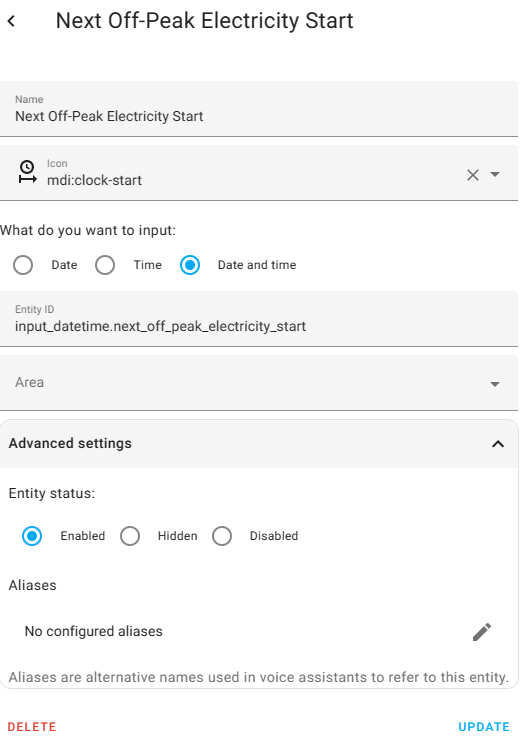
and next off-peak Electricity Start (and End) if you want to use them for display purposes.

Other than that, the changes as you suggest should sort you out.

Oh, you will have to modify the battery size in Calculate the desired Charge Rate function node if yours isn't 8.2kWh, and also the maximum charge rate if yours is different from 2600W

M
#46 mpartington

Tim I deleted the off peak bits as I wouldn't use them, is that what is messing up the Validate left update needs to be sent function? It says its incorrectly configured on deploy (found another couple of charge rates in there to change as well)

Edit, might be because I missed the inverter serial number on the subsequent blue node

T
#47 Tim

mpartington Looking good. Can you copy the JSON from the message? I know it works for me but I think I need more information to help work out why it's not working for you. Maybe a flow context?

M
#48 mpartington

Tim I think it's working now. I just missed adding the serial to 'Battery Charge Rate Left Inverter' or that is a coincidence?

Whats a flow context?

Guess no easy way to check until 00:30

This is from the debug node (seems ok):

"Forecast inverter charge of 854W not yet required"
08/03/2023, 19:58:49node: debug 12input_select.left_inverter_charge_rate_control : msg : Object
{ topic: "input_select.left_inverter_cha…", payload: "Manual-Set", data: object, _msgid: "97831ddc43089c63" }
08/03/2023, 19:58:49node: check all parameters have been set in Flow Contextfunction : (warn)
"All set"
08/03/2023, 19:58:49node: debug 12sensor.givtcp_ce2146g269_soc : msg : Object
{ topic: "sensor.givtcp_ce2146g269_soc", payload: "60", data: object, _msgid: "a3ce1d96b5855cc2" }
08/03/2023, 19:58:49node: debug 12sensor.givtcp_ce2146g269_soc : msg : Object
{ topic: "sensor.givtcp_ce2146g269_soc", payload: "60", data: object, _msgid: "a3ce1d96b5855cc2" }
08/03/2023, 19:58:49node: debug 12number.givtcp_ce2146g269_target_soc : msg : Object
{ topic: "number.givtcp_ce2146g269_targe…", payload: "100", data: object, _msgid: "031a3f4e3601a861" }
08/03/2023, 19:58:49node: debug 12switch.givtcp_ce2146g269_enable_charge_schedule : msg : Object
{ topic: "switch.givtcp_ce2146g269_enabl…", payload: "on", data: object, _msgid: "c3b7b4f7f2e2718e" }
08/03/2023, 19:58:49node: debug 12select.givtcp_ce2146g269_charge_end_time_slot_1 : msg : Object
{ topic: "select.givtcp_ce2146g269_charg…", payload: "04:29:00", data: object, _msgid: "b7a40d1081e5bbd3" }
08/03/2023, 19:58:49node: debug 12select.givtcp_ce2146g269_charge_start_time_slot_1 : msg : Object
{ topic: "select.givtcp_ce2146g269_charg…", payload: "00:30:00", data: object, _msgid: "6ffe91ea030ca11b" }
08/03/2023, 19:58:49node: debug 12number.givtcp_ce2146g269_battery_charge_rate : msg : Object
{ topic: "number.givtcp_ce2146g269_batte…", payload: "3000", data: object, _msgid: "3a9fe4d757d88532" }
08/03/2023, 19:59:44node: Validate Left Update needs to be sentfunction : (warn)

Update
No, error still there (come back) says invalid properties - error in java script code. Although its reporting "All set" and "Forecast inverter charge of 1116W not yet required" which seems correct from what I can understand of the code

Update 2
Now it's 3 hours to charge, it's successfully set the charge rate, so not sure why its flagging issues with the node

T
#49 Tim

mpartington Whats a flow context?

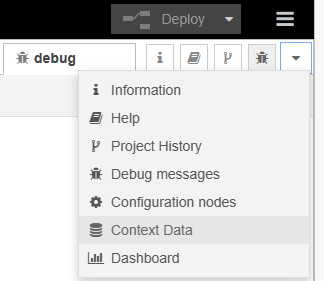
See the docs. It's a means of storing variables inside the node, inside the flow or inside the Node-RED environment which can be used with each message as it comes along. The heartbeat initiates the flow every 60 seconds and the nodes compare current values with previous values by using the context variables. You can view the values at any time by clicking on the down arrow next to the debug tab (you have to refresh each time).

I use the heartbeat for a number of flows, but for your purposes, you could probably reduce the interval to every five or ten minutes. The node.warn messages are simply to give confidence that the flow is working and calculating.

You can insert lines of text as code if you use the Insert Code function on this forum, but there has to be three backticks, not just the one automatically inserted and there needs to be a carriage return after the opening backticks and before the closing backticks. This is a windowed text code whereas the nodes previously posted are objects, so get crushed onto one line.

function : (warn)
"Forecast inverter charge of 506W not yet required"
09/03/2023, 06:51:13node: check all parameters have been set in Flow Context
function : (warn)
"All set"
09/03/2023, 06:52:08node: Validate Left Update needs to be sent
function : (warn)
"Forecast inverter charge of 178W not yet required"
09/03/2023, 06:52:08node: Validate Right Update needs to be sent
function : (warn)
"Forecast inverter charge of 506W not yet required"
09/03/2023, 06:52:13node: check all parameters have been set in Flow Context
function : (warn)
"All set"
09/03/2023, 06:53:08node: Validate Left Update needs to be sent
function : (warn)
"Forecast inverter charge of 178W not yet required"

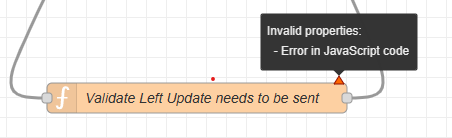
mpartington No, error still there (come back) says invalid properties - error in java script code

I think you're seeing this

I think that is reporting that the Javascript in the node does not comply with the current standard for all browsers. I spent a long time trying to work out how to correct the reported error, but it seems it's outside of the scope for node-RED which handles the code in the function OK. Hopefully, the flow increased the Charge rate to maximum at the end of your charge period?

M
#50 mpartington

Tim thanks for taking the time for such a detailed reply.

It all seems to be running fine, just with that error that you've now explained. I didn't leave it to finish as I wanted the batteries to try to 'calibrate' at 100% for an hour or so

Planning on using this automation to stop this charge discharge behaviour at soc targets under 100% by minimising time at idle. I'm on the beta firmware and unfortunately setting charge and discharge rates to zero doesn't fully stop it (bug fix in work). This example added 4kWh throughput after it hit its target.

Does it always finish bang on time, as it keeps adjusting through the charge cycle?

T
#51 Tim

mpartington The final node "Validate Left Update needs to be sent" has a number of lines in to prevent the Charge rate being changed unless you are within the 3 hour window prior and so shouldn't change during.

If msg.invChargeActiveNowL is false the calculations will take place (you get the node.warn). If invChargeRateUpdateWindowL is true (3 hours before window starts to 5 minutes before), the calculated charge rate will be and sent to the inverter. This means that if the Charge is currently active (ie you are within the timed charge period), the first condition will fail and the message won't be sent. Or that's the logic behind the code.

#52 Woodstock

Graham_Harrison Is this the kind of thing you are seeing?

Happened to me this morning for the first time ever. I have no automations running.

The only thing that has never been been the case before is the Battery Cutoff % Limit was set at 25% rather than the default 4%. Battery Reserve % Limit was at default 4%.

I am beta testing and the Battery Cutoff % Limit is ignored/redundant in firmware 4075. For the moment, however, you can still change the setting. (Just in case you were wondering how I was at 2% SOC with Battery Cutoff % set at 25%. 🙂 )

G
#53 Graham_Harrison

Woodstock Yes that looks very much like what I'm seeing. With the Portal only updating every 5 minutes I guess its easy for the graphs to miss it, it could be happening to more people without hem realising it. Do you monitor data anywhere else other than the portal.
It looks like your battery charge level was actually above the 25% setpoint @ 01:00 when the charge kicked in

#54 Woodstock

Graham_Harrison Battery charge level (SOC) is the lower line on the graph and was 2% as stated. The upper line is battery voltage. Anyway I left the cutoff and reserve % limit settings as they were to repeat the test and this was the result today.

Another charge spike at 01:00!

I have had my system running since November 2021 and had never seen this before yesterday. Twice in two days with the current settings is too much of a coincidence. Going to reset the Battery Cutoff % Limit to 4% and see what happens tomorrow but my guess is the spike will disappear. Maybe we can get a fix for this incorporated in the beta firmware.

#55 Woodstock

Graham_Harrison I believe the reason for your "fudge" working is that the battery cutoff is at 4% around the 01:00 period (or that the battery cutoff % is not greater than the battery reserve %). Out of interest why do you have the battery cutoff set to 100% at other times?

G
#56 Graham_Harrison

Woodstock Out of interest why do you have the battery cutoff set to 100% at other times?

I presumed that was the max level the battery would charge too, so if (BIG if!) we have a full sunny day the battery can charge upto its max capacity. The reason I set it down to 4% is to try and stop the charging from grid @ 01:00

I've had several Emails to & from the GivEnergy support team and a couple of phone calls but they are baffled by it, their most resent suggestion was a full factory reset which I declined as I do not like the idea of loosing historic data if I can possibly help it.
The fact it has now happened to at least 1 other person may help push the inverstigation along.

This was my most recent communication with GivEnergy after I turned down a full factory reset and inquired about the possibility of beta firmware testing or having to wait for the official release firmware update (WHENEVER IT MAY ARRIVE!!)
"Hi Graham,
Yes I'd suggest waiting until its an official release. They know its a priority - it's all theyre working on and its at director level already.
Kind Regards
Adam Reynolds
Service Desk Manager"

#57 Woodstock

Graham_Harrison My question was why are you setting battery cutoff to 100% at other times. Is this giving you some functionality that cannot be achieved through using battery reserve alone?

G
#58 Graham_Harrison

Sorry Woodstock I'm not quite grasping your point. I assumed "battery cutoff" is the level you want your batteries to be charged upto, so I have it set too 100% under normal conditions. I set it down @ 01:00 as part of my trying to stop the forced charge as its appears something is wrong somewhere. Once I can work out (hopefully) what the cause is, or its fixed then I will stop changing the set point @ 01:00 and leave it @ 100% all the time

T
#59 Tim

Graham_Harrison I assumed "battery cutoff" is the level you want your batteries to be charged upt

Battery Cutoff (AFAIAA) is the reserve that you want to keep in the battery should it discharge down to that level. For example, if you wanted to guarantee that you had 20% available should the power go off, to power your EPS circuits, you'd set battery cutoff to 20%.

To do a Timed charge, set the Charge to % to a the target value that you want in your battery at the end of the charge period.

If you set your Battery Cutoff to 100%, it will do a timed charge to your Charge to % if the battery SoC is lower at the start of the timed charge period, then it will top up from any surplus solar during the day. With a battery cutoff of 100%, even in ECO mode, the battery won't supply the house.

#61 Woodstock

Graham_Harrison Confusion all around, although I am not surprised, as battery cutoff is not working as intended. Battery cutoff is supposed to simply set a level at which battery discharge stops (as opposed to battery reserve which is a minimum level, maintained by short recharges as needed). Battery reserve allows discharge down to and maintains only (it does not automatically charge up to the reserve level).

We already know from beta testing that battery cutoff is ignored and the battery will discharge straight past whatever level it is set to. It now appears that the same is true of pre-beta firmware (unless you never discharge your battery, which seems unlikely)!

In the beta firmware, battery cutoff has been replaced by a fixed 4% lower limit. It is proposed to remove all references to battery cutoff (and the ability to reset it) from remote control. Sounds like a good idea to me!

With all that out of the way (phew) back to the spike discharges at 01:00. It appears I jumped the gun with my theory as to the cause. I did a factory reset to defaults yesterday and was greeted with yet another spike discharge at 01:00 this morning! Whatever changed, causing the first spike, was not reset. Battery cutoff % Limit shows as returning to 4% in remote control, so the cause is not this setting directly. I am, however, not yet convinced that changing the value of this setting is unconnected as it seemed to precipitate the problem for me. Need to think about why resetting battery cutoff to 4% appears to work for you but not for me!

G
#62 Graham_Harrison

Woodstock Did you mean another spike CHARGE at 01:00 not DISCHARGE as you wrote

#63 Woodstock

Graham_Harrison Yes, that should have read charge. I set a small battery reserve limit (10%) yesterday and did not have a charge spike this morning so it is looking as though there is an interplay between the battery cutoff and battery reserve settings. Need to run a few more permutations to determine exactly what this is. Have you tried leaving battery cutoff at 4% and battery reserve at the value you want?

G
#64 Graham_Harrison

Woodstock Have you tried leaving battery cutoff at 4% and battery reserve at the value you want?

Sort of, but will give that exact configuration a go tonight

#65 Woodstock

Graham_Harrison If you do, can you perform a "reset to factory defaults" first and then reset the parameters you want (leaving battery cutoff at 4%). That will remove one of the "order of setting cutoff/reserve" variables. Thanks.

G
#66 Graham_Harrison

Woodstock OK
What is this in the settings SUPPOSED to do? !Inverter MAX Output Active Power %"
I presumed it limited the throughput of the inverter but I just tried setting it down to 0% and I was still discharging from my batteries

G
#67 Graham_Harrison

I've have reset to factory defaults (via GivEnergy Portal / My Inverter / Settings)
Then re-setup my preferred settings (via GivEnergy Portal / My Inverter / Remote Control)
These are my settings NOW (I have disabled my Home Assistant GivTCP Automation that has been changing them on a tonight)
Enable AC Charge Upper % Limit – ON
Enable ECO Mode – ON
Enable DC Discharge – OFF
AC Charge Enable – OFF
AC Charge Upper % Limit – 4%
Battery Reserve % Limit – 8%
Battery Charge Power – 3000w
Battery Discharge Power – 3000w
Battery Cutoff % Limit – 4% (I intend to set this @ 10% after tonight)
Inverter MAX Output Active Power % – 100%

T
#68 TX200

Graham_Harrison I think there is a bug. Even if you set it to zero, there is a small amount still going through. Mentioned elsewhere in these forums.

#69 Woodstock

Graham_Harrison I would be disinclined to change the battery cutoff limit setting from its default 4% ever again! Can you achieve what you want just using the battery reserve limit?

Having said that, let's wait and see if you get a charge spike tonight first. 🙂

G
#70 Graham_Harrison

No charging spike last night BUT I'd forgotten that it doesn't do it when discharging from the battery, which I was doing at 01:00 this morning (sunny day yesterday so batteries got a decent charge)
I'll do the test again tonight but pause discharging at just before 01:00
Woodstock what do you think the best way to do that is? do I just pause CO mode?

K
#71 Kathryn88

Hi, I get the 5minute charge every night the battery is not discharging and have done for months.

G
#72 Graham_Harrison

Kathryn88 have you attempted to stop it?
Are you running any additional monitoring hardware / software such as Home Assistant or GivTCP

#73 Woodstock

Graham_Harrison Interesting that yours did not spike when discharging. Was that discharging while in ECO mode?

Mine spiked when the battery was at idle (fully discharged) and when discharging in ECO mode.

Anyway, good news that there was no spike last night. 😀

If I am correct, the critical thing is to set a battery reserve after running the reset to factory defaults.
Reset to factory defaults did not stop the spikes for me until after I set a battery reserve.
Having stopped the spikes, things returned to normal and it now makes no difference whether a battery reserve is set or not.

I am pretty sure that setting a battery cutoff again would cause the spikes to return but I haven't tested this. The battery cutoff setting is redundant in the beta firmware I am currently testing and hopefully it will be removed from remote control.

#75 Woodstock

Tim Issue yes, probable cause yes, possible work around no. Response from @TheDragon (GivEnergy) was that Battery cutoff is no longer used in the beta firmware and its removal from remote control is being considered (hopefully more so after my beta testing findings). If the possible work around I set out above helps people in the interim then good but it is based purely upon the superficial observation of two particular cases.

G
#76 Graham_Harrison

When I checked this morning
No charge spike at 01:00 - GREAT!
ECO Mode Paused in HA / GivTCP as per my Automation - GREAT!
Settings within the GivEnergy Portal
Battery Reserve % was set to 100% ?????
I've now worked out (I know I'm a bit slow) that Pausing ECO Mode from GivTCP causes the Battery Reserve setting to change to 100% (in GivTCP & the GivEnergy Portal) and then re enabling it puts the Battery Reserve setting back to where ever it was originally set.
BUT ECO Mode stays "Enabled" in the GivEnergy Portal but does set the Battery Reserve to 100%
Does any of this make sense because I've now lost myself

T
#77 Tim

Graham_Harrison Pausing ECO Mode from GivTCP causes the Battery Reserve setting to change to 100%

That makes sense as a means of well, pausing. Why did you want to pause ECO mode? It would have the same effect as extending the timed charge period but whereas the timed charge period will end and revert back to ECO, pausing needs another either manual or automated resume.

G
#78 Graham_Harrison

Tim I've never used any timed charges or discharges as I'm not on an overnight tariff so hadnt thought of using 1 and its easy enough to set an automation in HA.
ANYWAY!!
No charge spike again last night

G
#79 Graham_Harrison

If I set the Battery Reserve % Level at a point above the batteries current charge state I hoped / presumed it would stop the battery from discharging until the actual charge level was above that set value BUT still allow the battery to charge when weather permits, but it doesn't??
The reason I wanted to do this is...
Because I'm not on an overnight tariff my batteries are constantly only getting partial charge (please lets not go into if that actually matters or not and battery technology etc)
lets just go with its what I want to do. So a couple of days ago I thought I would let the batteries charge as much as possible each day but stop them discharging until they reach 100% (I started by running them down to minimum level first).
So I thought I would just set the battery reserve to MAX, sounded pretty obvious to me
BUT when I did this it also stopped the batteries from charging!! until I set it to a level back below their current charge level.
so yesterday as the batteries charged I gradually lifted up the reserve set point and I was OK.
When I went to bed last night I had the set point 1% below the actual but by the time I got up this morning that level had dropped slightly thus stopping the batteries charging until I dropped the set point again slightly.
Hope this all makes sense to someone else other than me and they can explain why it happened and hopefully a way I can achieve my goal with less manual intervention

#80 Woodstock

Graham_Harrison Timed charge will prevent battery discharge for the entire period that it is active, whether or not the battery has reached the target "charge to" percentage. This sounds like what you want but you will have to remember to disable it (or set the end time appropriately) before you can discharge. You are lucky that you want to charge to 100% as timed charge will reliably do this. Currently setting a "charge to" less than 100% is a bit hit and miss as it is sometimes ignored and the battery will charge to 100% anyway!

G
#81 Graham_Harrison

Woodstock
Timed Charge causes it to charge from the grid, which is something I NEVER want

T
#82 Tim

Graham_Harrison I get that you want to charge to 100% from PV but not to discharge. Set the battery discharge power to zero.

G
#83 Graham_Harrison

Tim
I think you mis-read my post, Timed Charge causes it to charge from the "GRID" which I NEVER want.
I want to discharge my batteries AFTER they have charged to 100%

#84 Woodstock

Graham_Harrison I think @Tim is referring to your question, not my reply. Don't set a battery reserve just set battery discharge power to 0. This should work but you will have to reset it when you want to start discharging again.

Are you wanting to just keep the battery charging solely from solar PV (with no discharge) for as long as it takes to get to 100%, even if this is longer than 24 hrs?

G
#85 Graham_Harrison

Woodstock Are you wanting to just keep the battery charging solely from solar PV (with no discharge) for as long as it takes to get to 100%, even if this is longer than 24 hrs?

YES, I will possibly do this through the winter months then let them discharge down to minimum level
The idea being it would hopefully help reduce the frequency of EXACTLY what happened late this afternoon when my battery SOC took a huge leap up in 1 go

T
#86 Tim

Graham_Harrison The SoC issue you experienced is being worked on and and AFAIK, it doesn't matter how kindly you treat the battery cycling, either yours does this or it doesn't. With a hybrid inverter and a battery, it is definitely worth looking into time of use tariffs. Even if you're on an old fixed rate that is ridiculously low, it will come to an end at some point and working out which time of use tariff would work best for you is a worthwhile exercise. Lots of people are choosing one of the Octopus tariffs (Go, Agile, E7 etc). The key is about letting the PV charge the battery when it can, and charge from off-peak electricity when it can't, time shifting your grid import to the off-peak. We were fortunate enough to get the EDF EV tariff last April and while our daytime/peak tariff is almost 40p/kWh, the off-peak is 4.5p/kWh. Even so, we charge on off-peak only as much as we have to to guarantee that we can get to the next off-peak window using PV and battery (but no grid import) for the planned usage we have.

R
#87 Ryggwelter

I'm a new user (PV installed in April) and I am seeing this issue.
GIV-HY5.0 Inverter with firmware D0.906-A0.906.
I'm not running HA or any local control, but I am using Octopus R&D to performed a timed discharge at 4pm - 5pm and a timed charge at 2am - 4am.
At 1am each night, the battery charges from the grid for 5 minutes at the set battery charge power (1995W)
I've tried resetting the Inverter settings to default, then set the Battery Charge Power to 1995W and the Battery Reserve % Limit to 5% and back to 4%. All other settings left at default. But the 1am charge still happens.
I have just noticed that Battery Cutoff % Limit is set at 40%. I didn't set this but as part of the Octopus R&D 4pm schedule, a battery discharge limit is set at 40%...so I presume this is also setting the Inverter Battery Cutoff % Limit which, from reading this thread, is no longer properly supported.

R
#88 Ryggwelter

Ryggwelter I have just noticed that Battery Cutoff % Limit is set at 40%. I didn't set this but as part of the Octopus R&D 4pm schedule, a battery discharge limit is set at 40%...so I presume this is also setting the Inverter Battery Cutoff % Limit which, from reading this thread, is no longer properly supported.

After the 4pm schedule I manually set Battery Cutoff % Limit to 4%. Sure enough, no phantom battery charge at 1am :-).
Now I need to sort an Octopus R&D automation to reset the Battery Reserve % Limit to 4%...and hopefully that will also reset the Battery Cutoff % Limit as well. I should probably inform Octopus R&D too as they are setting a deprecated register.

C
#89 Capt_Rich

Mine has started having this spike at 0100 too since I've started charging from the grid overnight. Not using any automations