
My system was commissioned yesterday but the Home mode in the app is not working for me. I've tried on 3 different devices.
My dongle and devices are all on the same network but it says 'You need to be connected to WiFi to enable the home feature'.
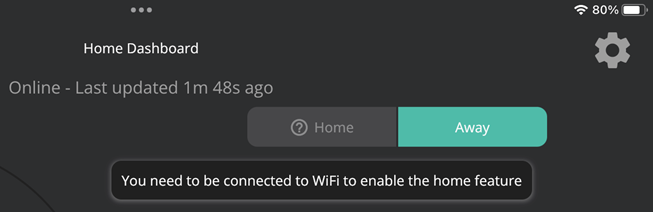
Has anyone else had this and how did you resolve it?
Thanks.
Philip
S
#2SteveCook
Are you Gen1 with wifi dongle or Gen2 with choice of Lan or wifi
If Gen2 how are you setup
Can you see the inverter using a PC and the GE portal
The wifi is notoriously flaky - see other posts on here.
I have BT discs for wifi and made sure I have one within about 10ft of the dongle
J
#3Jon-boy
I had same issue. I have GEN2 inverter LAN connected. When I installed APP I got the message asking for permission to access local network to search for inverter and I said no in haste. After that it then wanted WI-FI access like yours. Culdn’t find way to resolve so I deleted APP and started again, this time giving permission to local network and it found the inverter.
2
#423cr
So far as I know I'm a Gen 1 with just a dongle - nobody said anything to me about LAN connectivity. I've got a Ubiquiti mesh with a disc 6 feet away so there's no problem with signal.
I can see the inverter through the portal so there's no problem there. I can see the device on my network portal and I can hit the dongle through it's web server from my home network.
I guess it could be a problem with the dongle but it seems weird that it's clearly connected to the network but I can't get into Home mode, unless, of course it's a problem with the app which seem unikely.
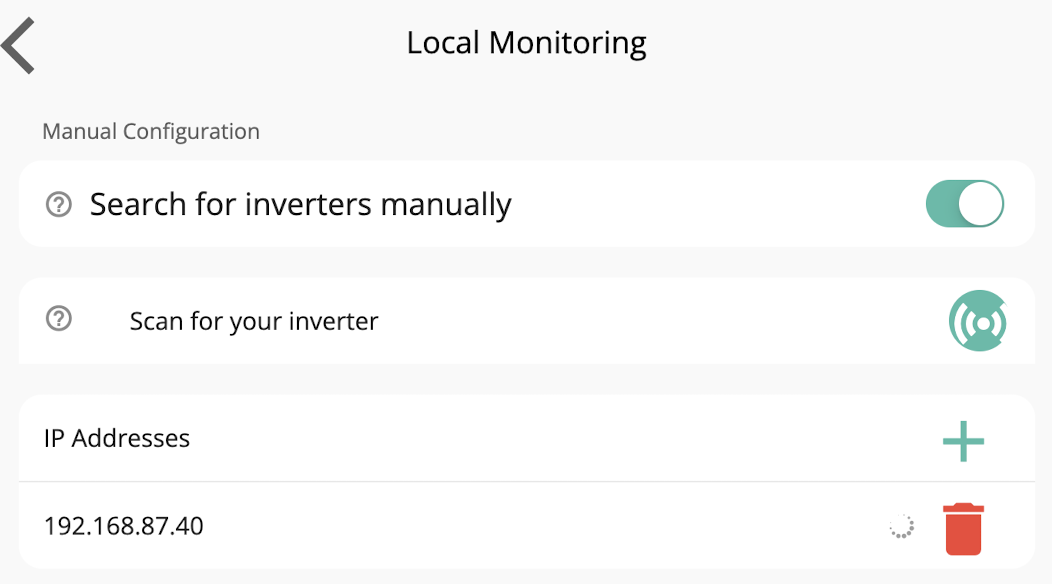
There is settings in the givenergy app where you can set the specific IP address of the inverter for home. Try that:
Called "Local Monitoring Settings" under Settings in the hamburger menu
Set "Search for inverters manually" to ON
Add the IP address
2
#723cr
I already had the inverter IP address listed in Local Monitoring and it has a tick by it.
I don't know if it could be connected with my network having a 255.255.0.0 mask - shouldn't make a difference but who knows!
I'll try setting up a test network and see what happens with that.
Certainly there's nothing that I can see wrong with the current network settings but there you go!
P
#8pacemaker
23cr if it has a tick next to it then that's very odd it isn't working because the app is seeing it (it shows a red cross if it doesn't). I've had trouble where it says there is no wifi available on my device, even though there is. Turning wifi off and on again on the iPhone/iPad/Mac seems to fix that bug though
P
#9pacemaker
I'm sure you are but also hard reboot the app to see if that helps. And/or the device.
T
#10TX200
Hmm, I wonder if it is the network mask/setup. Can you reserve the dongles and your phone/tablet onto IPs that have the same 3rd octet?
2
#1123cr
@pacemaker I tried a hard reboot of my phone and that didn't do anything.
@TX200 The third octet is the same for the dongle and phone as that's reserved for my DHCP range and they're both set to DHCP - I did double-check as I wondered the same 🙂
T
#12TX200
Any privacy features getting in the way? I know iPad (and perhaps some android devices) changes the MAC address randomly unless you tell it not to on a specific WiFi. So it would be hard to keep the device on the same IP address all the time.
Although I'd assume it'd still end up in the same IP range of that's the only address DHCP can give out.
T
#13ToothyChris
It sounds more an issue with your device/App installation. Do you have another device (old phone/tablet) you could try with? Many people on the FB groups have suffered with similar issues, so probably worth searching there.
T
#14TX200
And if you didn't spot it above, someone said check app permissions - is the app allowed to access the WiFi etc?
C
#15cluelesscris
Just to check the two devices can 'see' each other pop into a browser on your phone and use the ip address of the dongle as the http address. If it comes back and asks you for a username and password then the two can communicate. If not then there's something somewhere on your network blocking network between the two. You say you have ubiquiti AP's - if you also have a UB router check there ar no rules which can get in the way.
2
#1623cr
TX200 No, nothing like that, and, yes they'd still end up with the same IP even if the MAC address changes.
I tried a static IP on the dongle just now without any luck. Haven't had time to rig up a test network, probably with a 255.255.255.0 mask, to see if that makes any difference.
2
#1723cr
ToothyChris I've tried three devices so far and they're all the same. Thanks for the FB tip - I'll take a look there.
2
#1823cr
TX200 I did see that, thanks, and I check it out - obvs no joy 🙂
2
#1923cr
cluelesscris The two devices can see each other not problem. I see the dongle on my network monitoring software and I've just changed the IP on it to static but without any improvement.
T
#20TR6
I experienced the same problem today and have tried all the suggested solutions in various post. I have just tried restarting the access point the dongle connects to and this has fixed the problem.
2
#2123cr
I restarted the access points but no joy there either. I didn't power-cycle them, though, so maybe I'll give that a whirl.
I did put the dongle on another network along with my phone and there was no improvement there.
Apart from power-cycling the APs I'm at a loss.
Seems more and more like a call to GE.
#22Hook
23cr if you’re on iOS try this app and see if it connects to your inverter.
Hook Thanks for the tip. I downloaded it and it's connected to the inverter without any problem.
I can only assume that there's something wrong with the GE app, but you'd have thought tons of other folk would have the same problem.
