Data is miles out

13 comments started 2023-03-13 last 2023-03-14
Mobile AppCommisioning
E
#1 elliott_ness

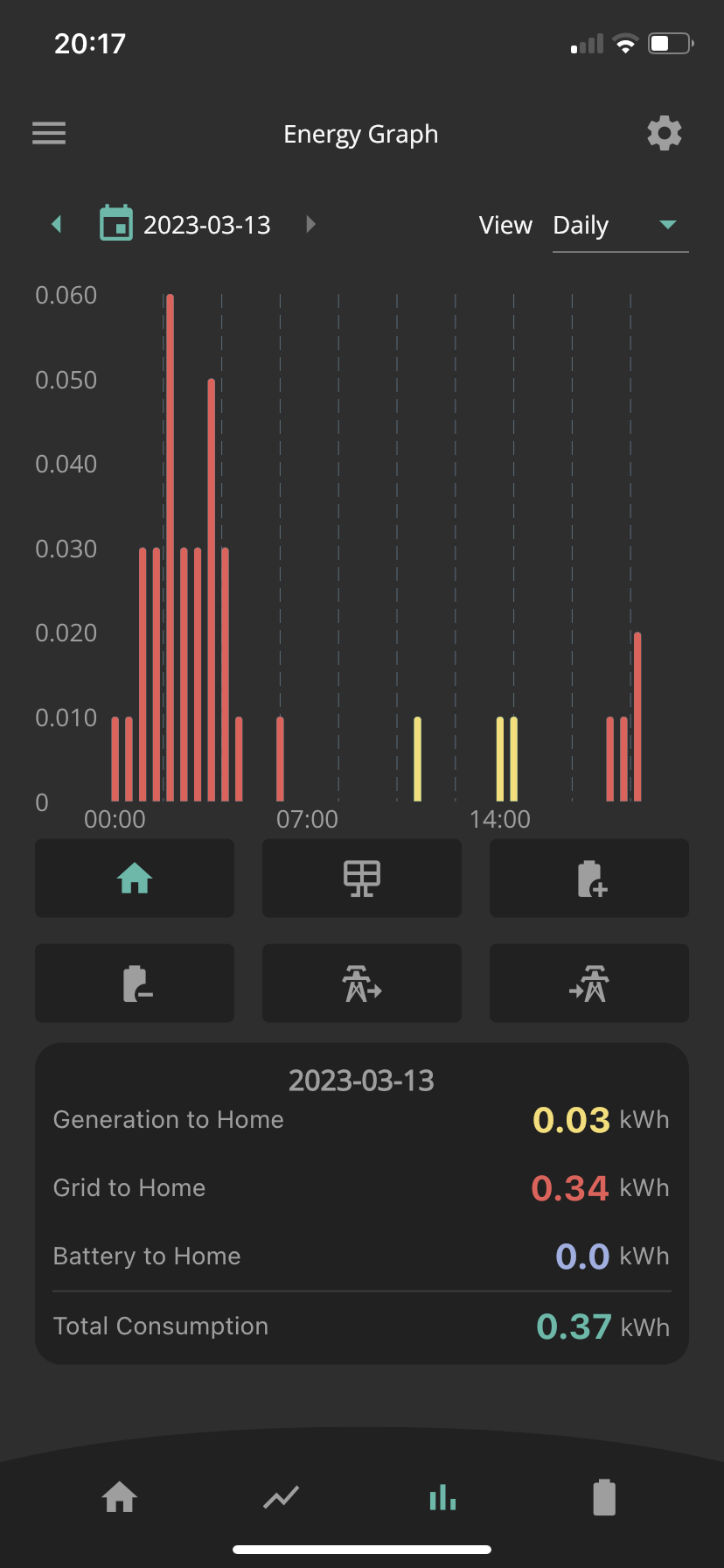
My install was a couple of weeks ago and it still hasn’t worked as I need it to. I’ve followed instructions on a previous post which I’m hoping will work but I can’t understand the readings showing in my app. Our house runs entirely on electric so we are co aiming around 40-50kwh per day.
The app data is showing almost nothing. See below. Any ideas what is going on here?

The web portal isn’t much better.

C
#2 cluelesscris

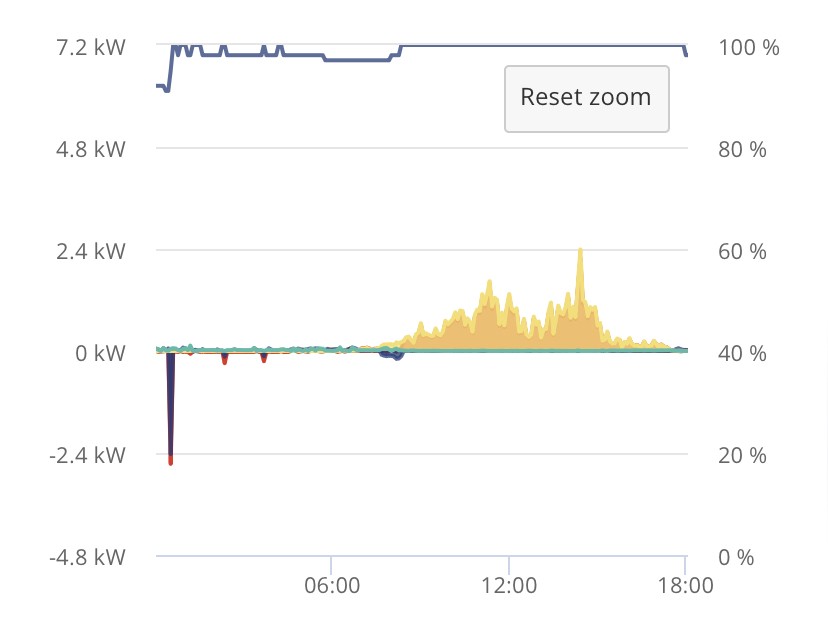
Pop onto the portal and post an image of the power graph panel. Select it first to make it enlarged. Something is not getting measured properly and/or measured wrongly. Seeing all the 'flows' may help us spot something.

P
#4 pacemaker

Is your CT clamp correctly attached?

E
#5 elliott_ness

Talking of readings, my smart meter has stopped reading too. I’m having to send readings in manually. I suppose that could be linked.

T
#6 ToothyChris

That is not right at all. You seem to be pulling solar energy but it is all being exported. Can you post your settings (ideally from the Portal again)?

Is it a hybrid or an AC system?

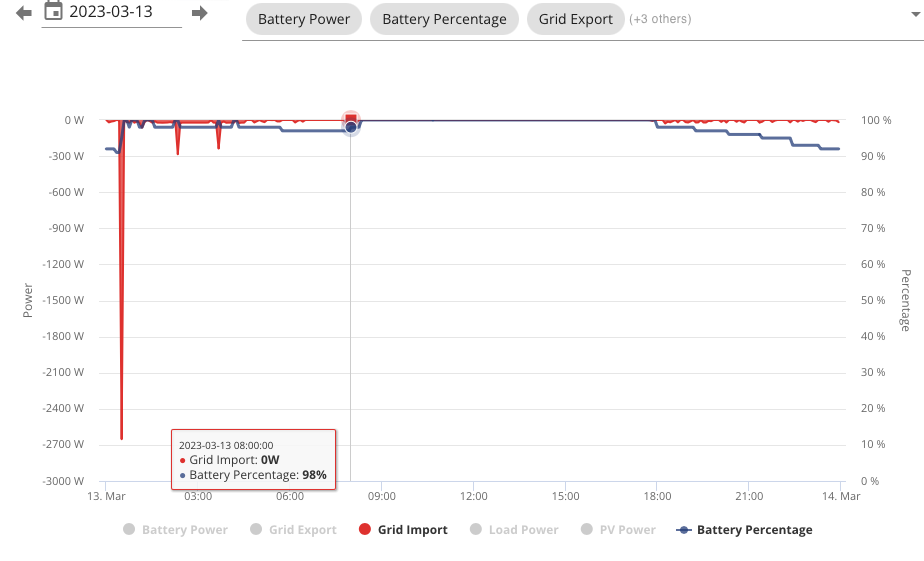
(and is that a spike at 1:00am........)

T
#7 Tim

elliott_ness As @pacemaker suggests, it looks like the EM115 grid CT isn't communicating with the inverter. Have a look at the Web Portal - Inverter Card - Notifications, then the same card check meter data. If it has never worked, call the installer and ask them to come back and sort it. If it used to work, then maybe the CT has become unclipped. It's not difficult or dangerous to reclip the CT if it's outside of the consumer unit.

If you have changed energy supplier recently, the new supplier may not have access to the place where your smart meter sends data. If it's a SMETS2 meter (or a SMETS1 and you haven't changed supplier recently), there's a problem that needs fixing by your energy supplier. If it's a SMETS1 meter and it used to work for youe old energy supplier but not the new one, you just need to check if the meter is enrolled in the DCC and then ask your new supplier to pull the data from there.

T
#8 TX200

And if you've had a smart meter replacement, check the SM engineer didn't move / remove the CT clamp, put it the wrong way around, on the wrong wire etc.

E
#9 elliott_ness

Tim So on the inverter notifications, the last notification was over 2 weeks ago, which was a BMS over voltage notification. That cleared about an hour later.
On the meter data, the import value varies, but it is always very low, The maximum I saw was 5.3
I haven't changed energy supplier. It has been the same one for about 2 years.

E
#10 elliott_ness

ToothyChris Hi Chris. Which data do you want to see?
The spike will be the car charge kicking in at 00:30 on the Go tariff.

E
#11 elliott_ness

pacemaker I can't see the CT clamp anywhere. Would they have installed it inside the consumer unit?

E
#12 elliott_ness

So looking at the data from yesterday, it looks like the PV is exporting to the grid because the battery is fully charged, then the battery is discharging in early evening to late evening, then the battery gets a charge spike at 00:30 which is when it is set to charge (Go tariff)
The data shows the grid import at that point (I've posted below with other stuff switched off for clarity). Once the battery is charged, the PV power is then offloading to the grid because there is nowhere else to go.
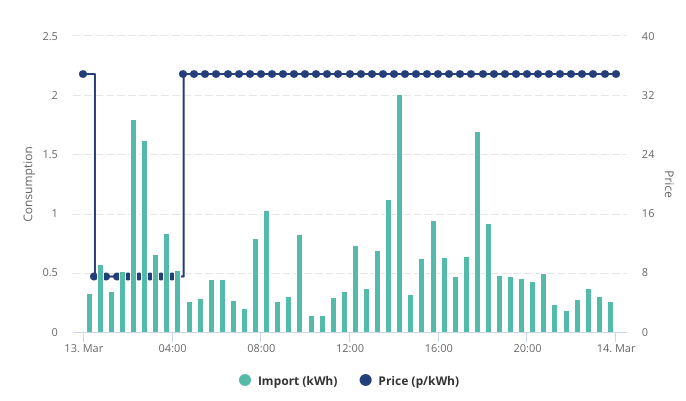
All would seem fine, except the second graph is my actual energy usage which is way higher than what the system thinks it is. What I don't understand is how it can measure seemingly correctly when the battery charges overnight, but then not during the day.

T
#13 Tim

elliott_ness The maximum I saw was 5.3

Is that Import Today? The page doesn't specify the units but will be kWh if it is that. If that number is significantly lower than your smart meter reading for the same period, my guess is that the CT wasn't clipped on securely. If that's the case, then the control of the inverter will be out too, but it doesn't look too far adrift on the graph you posted for @cluelesscris; the battery is fully charged and the surplus solar is exported. However, the later chart showing grid import does suggest that the inverter isn't using battery or PV to supply house demand (2kWh for the 2pm 30 minute slot).

Oh FFS (oops sorry!). Just realised that we don't know what type of inverter and nobody has suggested a reset to defaults. On the web portal, go to Inverter Card - Settings and click on Reset to Defaults - Submit. Give it a few seconds then Restart the inverter (Inverter card upper right power switch symbol). Check that ECO Mode is enabled (Settings) and check that your timed charge is set to whatever period you have. Check that battery charge and discharge power are al at maximum. See how that goes?