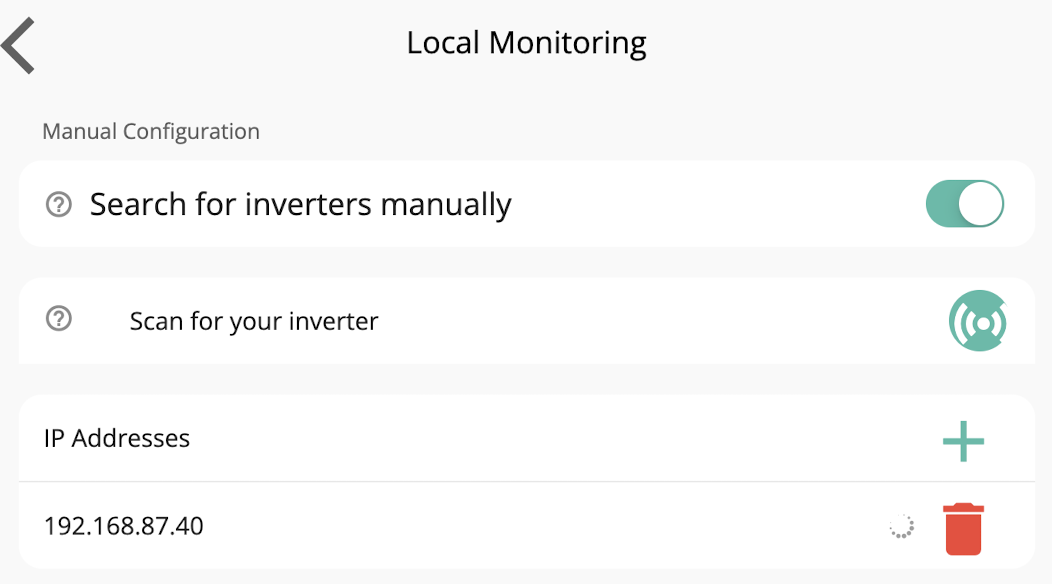
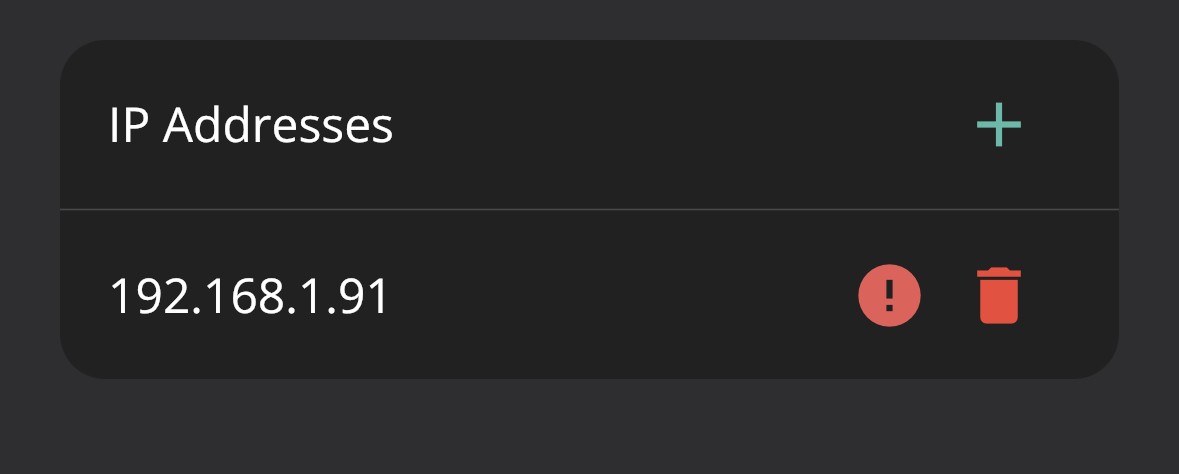
Hi All, just had my battery commissions after some teething troubles and keep losing the local access and then getting this error in the app. Reinstalling the app fixed it, but then the issue started again almost immediately. Even entering the IP of the inverter manually doesn’t work. Does anyone have a good solution?
Home mode intermittently working - “you need to be connected to Wi-Fi”

I had this occur yesterday after being very stable for weeks. I just restarted the app or went into the settings to search for th local dongle. Once it found it I came out of the menu and went back in to see if the IP address was now connected. When it was showing the tick, all was good and I was back.
Of course it could also be your wi-fi playing up.
Annoying, but hopefully just a temporary glitch.

Boffinboy are you using an iOS device? These need to have a location setting enabled for the app if so.
Is the app/portal getting frequent updates on Away mode? i.e. is the dongle connected to WiFi all the time and not dropping out?
If iOS I also get this... things I do to resolve:
1) Restart the app [swipe up from bottom when in the app to see the app tray, then swipe the app up off screen]. This will mean the app is hard shut down and you can restart it.
2) If that doesn't work, turn wifi off then on again.
3) Restart device.
Sometimes none of those work and it just needs a minute or two. But it eventually corrects.
Cdent thank you, the “away” stats update fine, seems only to affect locally. Local network access is enabled in iOS settings
pacemaker been trying these same tricks, still can’t get it to work unless reinstalling! Quite frustrating.
pacemaker thank you. Yep, have tried setting a static IP and directing the app to it but it doesn’t seem to resolve the issue

Boffinboy But have you enable location for the GivEnergy App
Shows a red exclamation mark if I put the IP in. On that page if I click search it sometimes says to connect to Wi-Fi - even though I am connected. 
It is on a different SSID, as it’s a dedicated 2.4 network - but since it sees the inverter sometimes I am assuming it’s not that causing the issue
TheDragon (GivEnergy) sorry missed this. I believe I did when it was installed, but the app isn’t listed in the “Location Services” permissions, so maybe not. Since it’s not listed I can’t turn it on manually. Maybe I’ll try another reinstall. Or is there a way to get the app to prompt it?
Stevef1964 I did accidentally click on the “setup dongle” menu actually, shortly before this happened, so maybe that is what has caused it shrug. It’s doing a calibration cycle so I will maybe try going in to that again once the cycle is complete.
Boffinboy have managed to enable it by clicking on setup Wi-Fi dongle, which then triggers the prompt. Sadly still can’t get it connecting and getting the “you need to be connected to Wi-Fi” error. Really puzzling me!
If you enter the IP of your inverter into a web browser on your phone does it connect and give you a login prompt or does it fail to connect/time out?
Boffinboy It is on a different SSID, as it’s a dedicated 2.4 network - but since it sees the inverter sometimes I am assuming it’s not that causing the issue
Having the inverter on a different SSID from the one you are connected to should make no difference, as long as your router knows about both. I've got my IoT stuff on one SSID and iPhone on the general one and I can see the inverters fine in the app. @Phil_H's suggestion is a good test for the router doing its job effectively.
Boffinboy just had my battery commissions after some teething troubles and keep losing the local access and then getting this error in the app.
If the battery is calibrating, it will be posting data to the Givenergy Cloud every few seconds. It might just be too busy to answer local calls for service. Wait until the calibration is complete then try again?
Tim thanks. yes, i have unifi kit and most of the IoT stuff is on the dedicated 2.4 network and easily accessible. I don’t have any fancy VLAN setup or anything like that.
I just forced another reconnect to the Wi-Fi, had the problem again, turned Wi-Fi on and off on the phone and it’s back connected. Re: the suggestion to go onto the IP, that worked.
Hopefully it stays accessible this time. Thank you everyone for all of the suggestions, I now have plenty of troubleshooting steps if it keep reoccurring!
I had exactly the same over the last 10 days or so, increasingly unable to connect to 'Home' but with 'Away' showing data with quite long and changing update periods. Turns out that my home wifi signal had got worse in the garage. Fixed that and all now OK.
Odd thing was that I had only just got onto the dongle to change the default password. When logged back in this week, using this pw, it displayed neither the pw nor the wifi SSID.
pacemaker Did all that yesterday and couldn't connect to 'Home' once. Unlocked my iPhone this morning and opened the app - connected instantly!! There's no logic to this (that I can see).

Please allow location services to be on.
Its not an App requriement, but IOS or Android to allow the App to see if wifi is present or not
TheDragon (GivEnergy) I've just posted a feature request for users to be able to specify "home" wifi SSID(s) in the app (similar to Home Assistant, so it know whether to use the local or remote port). If the currently connected SSID is in the "home" list, it'll show the Home button. If you're on wifi elsewhere, the Home button is hidden and the app doesn't waste time and packets searching.
Tim might need a VPN option too then, for those who are not on home WiFi but kinda are ... 🤣
TheDragon (GivEnergy) This is my experience of trying to use Home mode on the app...
Does work occasionally but mostly this
https://drive.google.com/file/d/1L2kGrqK6ynZlrR0I5QrEEL91tfsY50_n/view?usp=sharing
I am unfortunately still having the same issues. Forcing a reconnect at the router seems to help, but I can’t figure out if there is any pattern when it stops working. At all times is the inverter showing as connected fine at the router.