
All, as part of the increased security posture. GivEnergy have 2FA options on the account, manage security page.
Please set it up. Just in case you need it.
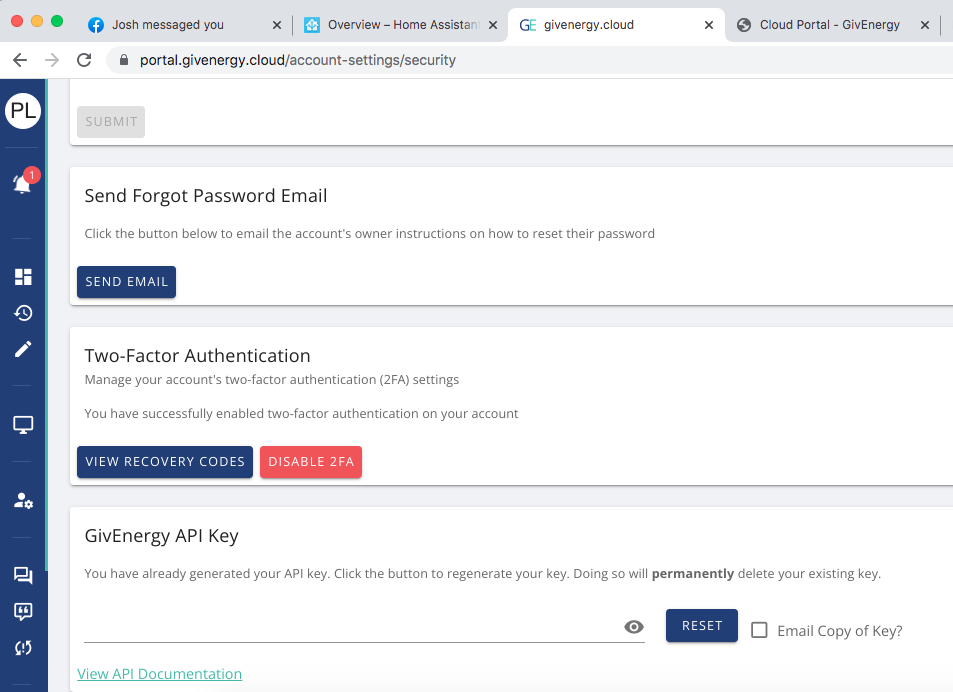

All, as part of the increased security posture. GivEnergy have 2FA options on the account, manage security page.
Please set it up. Just in case you need it.
I can set up the password and get to the portal using my Iphone, but it will not accept the the 2FA verification code generated.
I scan to the QR code and it takes me to my passwords are on my iphone. I put the useranme, passwords details etc in and it starts to generate the 2FS codes.
If I select the website in the password area I am taken straight to the portal and logged in, so I am sure the log in details etc are correct.
But when I try to enter verification code that is being generated via my PC it does not accept it.
Do I need a "Aunthenticater" App?
Maybe a bit more info on how to set this up would be advisable.
Stevef1964 I download Google Authenticator, worked perfectly. Any Authenticator App will do, but the built in Android one didnt work, assume its the same with iOS.
Used Google Auth an set up straight away with no problems.
Thanks Paul
I did use the microsoft auth App when I worked but ditched it when I retired!!
Android V13
Tried a couple of times and failed miserably I'm afraid, I never got a code to enter. It now tells me that I haven't set up 2FA and if I scan the QR code it takes me straight to a mobile version of the dashboard.
Just for ref - Google Authenticator worked first time for me.... zero problems.
Android phone with A.version 11.
Didn't have to logout/restart anything.
Works with the built in authenticator in iOS. Go to Passwords, find the one saved for Givenergy and select Setup verification code and select scan QR code. Once scanned a code will be shown that can be entered in the portal.
TheDragon (GivEnergy) Many thanks, that worked.
Perhaps the instruction to download Google Authenticator needs to be added? I'd never heard of it.
TheDragon (GivEnergy) OK, I'm catching up, however, I'd never heard of an Authenticator App. before this escapade.
As I recall, perhaps I missed it?, there was no mention/explanation/highlight of the need for an "Authenticator App.". My expectation from the initial '2FA' screen in the 'Manage Account Setting' screen was to use the QR code to get the 2FA number. That failed, it did not provide the number I was led to believe I would get by using the QR code..
Hence my suggestion that perhaps a better instruction needs to be included/highlighted so that the correct expectation level is set in the first place, IMHO it will save a lot of support requests.
chris_p If it hasn't changed that may well explain it, not ever having heard of an 'authenticator app' I probably just registered it as 'QR App.' , (or just followed the instruction "Scan the following QR code" without reading the rest) and as I didn't get a code that I was expecting, it was all wrong.
My guess would be that there will be many others like me, hence my suggestion to TheDragon (GivEnergy) that the instruction needs to be improved, Thinking about it, perhaps
1) Open your favourite Authentication App. (Or search in Play Store etc. for 'Authentication App. and install it)
2) Scan the following QR code with the Authentication App.. and enter the returned Authentication Code below.
Always trust the end user to screw things up if they can!
Unfortunately this is yet another example of shocking user documentation.
Throw on a feature onto the portal with zero description on how to set-it up.
GE generate so much overhead for their support team which could be easily reduced if a bit of thought of what was being added and documentation was provided.
athresuk To be fair to them, and they are really not my favourite people at the moment, 2FA has been around for years, and app authentication for a good couple of years. Any authenticator app, be it Google Authenticator, Microsoft Authenticator, Watchguard Authpoint, Authy, LastPass, will allow scanning a QR code to configure an auth profile, and it's been in the mainstream for long enough that we should all be aware of it, especially those of us tech-forward enough to be using solar/battery tech,
To have instructions of "we now support app-based 2FA, click here to generate a QR code, scan it in your app of choice" is about what would be expected..
We shouldn't be having to have our hands held over basic security of our own data..
Atkinstagram I am from a tech and security background
So 2FA and even 3FA is second nature.
Some people however, aren't and itsnthese people that sadly get targeted.
So the easier it's made the better.
Some compromise I'm sure will be struck
Atkinstagram I beg to differ.
It's assumptions like this by techies that cause these problems.
I don't seem to have read anywhere that solar/battery tech is only for techies. Its for everyone whether they are a techie or not!!
One of the biggest issues is techies not explaining what it does, what they've done, or how to set it up properly. They are caught up in the tech and seem to think everyone knows exactly what they do - wrong!!
When releasing a new feature or option you need either need to step back and think "would an idiot be able to do this from what I've written" or get someone not directly associated with it to check it.
I was in telecoms and data for nearly 40 years and it was a never ending bug bear with me. On so many occasions I had to challenge documents, ask the stupid questions etc. And I was also a techie!!!
Rant over, Back in box now!!!

Whenever we release anything I ask the team to explain it as if they were trying to teach their mom. Well my mom anyway.
I wish!
I spent years working in bms (building management systems) and the documentation and graphics for the systems were always last minute.com. So much so one of the software engineers wrote a program to take the code that was written and spit out an English (of sorts) description of operation.
I left after 14 years in 2004 and it wasn’t until I was working for the client that it really dawned on me that the important stuff is the graphics and the documentation ( actually if the graphics are done right the documentation is less important for day to day operations).
Since returning to a different bms company 12 years ago I’ve tried to continue down the line that the graphics and documentation is the important bit.
So yes. It is important to ensure that everyone is catered for - it’s really not hard to have a glossary of terms for example just so that the people with little IT can get an explanation of terms and suggestions.

Works with the Microsoft authenticator app on IOS.
Stevef1964
Communication communication communication the solution to many project management problems. Oh yes it also includes checking that the message is getting through!
TheDragon (GivEnergy) try using Authy instead of google authenticator, google loses all your codes if you reset your device ! its already happened to me.. no such issue with Authy
deepanshus not heard of Authy.
Will give it a look
We're new to the system (week 2). Both me and my wife log into the portal and use the app on our phones. If we enable 2FA that will mean only one of us will be able to login?