
New to this

5 comments started 2023-04-07 last 2023-04-08
GivEnergy ProductsBattery
U
#1 Ubarrow

Hi everyone
Just had a battery commissioned and all seems to be working well.
Just a couple of queries. How do I see my battery capacity as from the initial calibration? I can see the SOC but not what it represents.
I notice discussion as to Gen 2 inverters. How do I see which one I have?
Finally, do Firmware updates happen automatically?
Thanks in advance......
Peter
T
#2 Tim

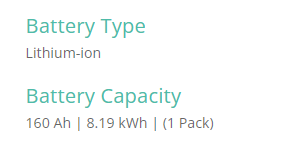
Ubarrow Web portal inverter card should show battery capacity and the number of batteries attached to each inverter.

You don't say whether you have an AC-coupled or hybrid inverter. AC-coupled, there is only one model. Hybrids have a number starting with gen1, a number of gen1.5 variants and now gen2. Simplest way to see whether a hybrid is a gen1 or gen2 is the maximum battery charge/discharge rate on the manufacturer's plate on the left side of the inverter. gen1 is limited to 2500W whereas gen2 is 3600W.

U
#3 Ubarrow

Thanks Tim
The inverter is a GIV-AC3.0 and I think it's an AC coupled in that I have a separate inverter linking the panels with the consumer unit. Charge/Discharge is 3.000.

K
#4 Karen

I think you have to choose to update your firmware - I don't think it happens automatically. On the portal go to the inverter card and select software. It tells you if there are any updates available and you click a button to install them. My system is also AC3.0 and was installed last summer. I'm on battery firmware 3008 (8.2kw battery) and inverter firmware D0.534-A0.534. I know a big new inverter update is pending so I'm not going to update until I know the new stuff is available and working OK as my system has none of the issues others have reported (SOC battery not charging etc) so I'm not tempting fate with the DO.535 version at the moment.

T
#5 Tim

Ubarrow Your web portal should provide you with the details of the battery - the inverter card and general tab. eg