
Which sensor shows SOC bug?

7 comments started 2023-04-10 last 2023-04-10
Home Automation
B
#1 BobB

Hi Folks,

Well, that'll teach me. I tried to be clever last night. Didn't go well...

Can any of my more intelligent chums help out in this forum?

I tried to use Home Automation to help address the SOC bug. My goal is to start dumping my house battery to my EV in time for the collapse to 0% to happen during the Octopus Go cheap period. I'll detect the collapse, stop the car charging, turn on the house battery charge schedule, the battery will fill up during the cheap rate. Simples, right?

Well - no. I was watching the sensor sensor.givtcp_saxxxxxxx_soc to see when it collapsed to a low value (I chose below 7%). Sure enough, at 00:50, the battery % fell immediately from 15% to 0:
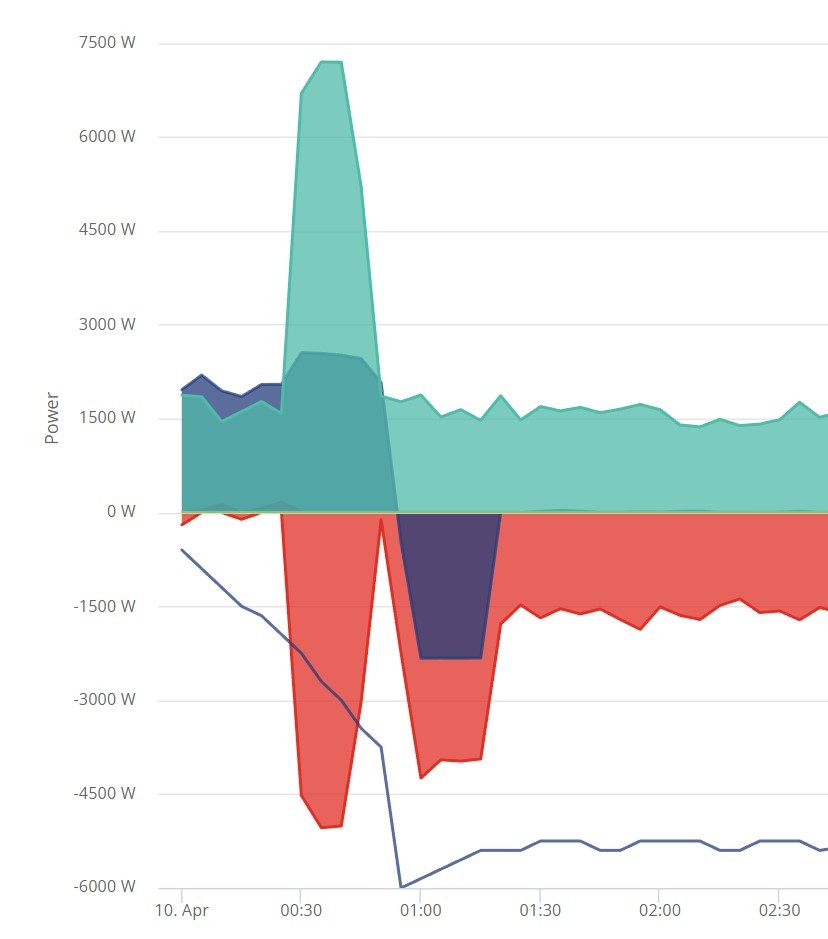
HOWEVER - sensor.givtcp_saxxxxxxx_soc didn't show that. It went to 15% and stayed there!
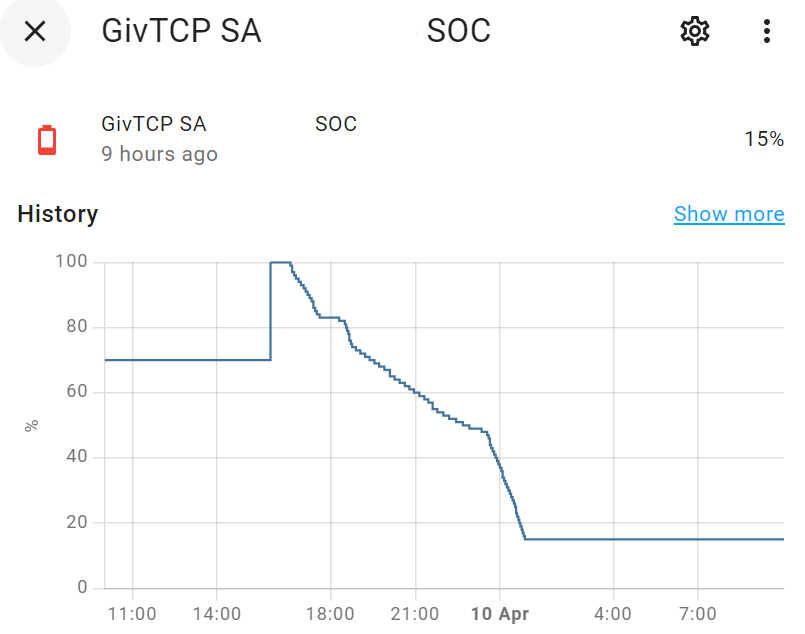
Any of you folks know what sensor will reliably show the crash when it happens?

Thanks in advance, all.
T
#2 Tim

BobB I use the same SoC entity and all I can say is that the value reported aligns with the portal SoC. I've looked back to the lowest value before timed charge started this morning and both the portal value and entity value align at 30%.

B
#3 BobB

Tim Thanks Tim. While the system is "behaving" itself, I agree. The sensor is well aligned with what I see in the portal too. That's what threw me. When I tested it I set the trigger to look for a high value of SOC and as the battery passed that value the trigger fired, the rest of the code behaved itself and I became convinced I was competent.

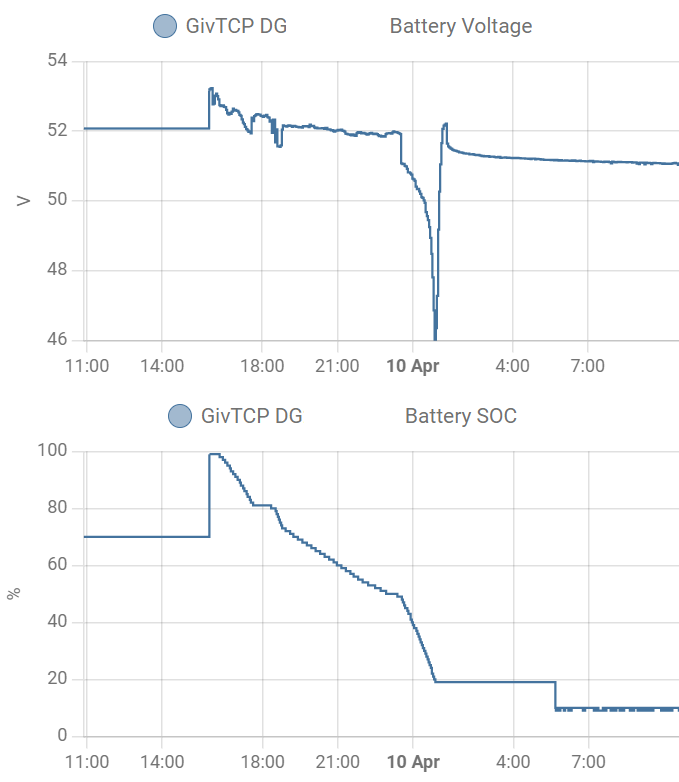
However when the SOC crash happens, the sensor correctly tracks down to the % where the crash happens (15% last night) then stays there as the battery crashes to 0% and emergency charges to 4-5%. It's still showing 15%; the battery is at 4%.

The above sensor is the inverter SOC. Strangely the battery-reported SOC stayed at 19% during the same period:

Having copied this picture, I might have answered my own question. Maybe I need to monitor the battery voltage. This doesn't feel as repeatably slick as watching for a SOC reduction, so I'll just wait and see if anyone else has any smart ideas.

Thanks for replying.

N
#4 Newman

Remember that SoC is a construct, not an absolute value. It can't be measured accurately unlike battery voltage. Batteries are happier at 50% SoC and damage is done at high and low voltages. I use 10% reserve and voltages stay above 51 V except for short periods of high load. You may be better setting a minimum battery voltage than an SoC value. The SoC crashes are when SoC values are wrong and the new FW will make SoC adjustments much smaller.

B
#5 BobB

Hi Newman Yep. I get that. My frustration is that the portal graph shows the SOC collapsing from 15% to 0, there must be a variable somewhere in the inverter that presents that number in order for it to be plotted. I just want that variable!

As things stand, we have to trigger the SOC bug once in a while to reset the limit that drifts. So we have to be cruel to the battery (by hitting the low or high voltage alarm). When the SOC bug is addressed I'll look at increasing the reserve.

R
#6 Rubikcube

Using GivTCP is doing it the hard way. I'm on Go and just set as follows:

Podpoint EV charger 00:30 to 04:15

GivEnergy Inverter Timed Charge 02:30 to 04:30

and the SOC correction happens automatically.

B
#7 BobB

Rubikcube That's cool. I did do that for a while, but I gave up because I needed the full 4h (well, 3'45'') slot to charge the 8.2kWh battery. But now summer's here, and I only need enough power to get me to sunrise, maybe this is the way again. I'll take another look at this and see if I can make it work.

I'd still love to know which variable tracks the SOC as reported in the dashboard though...

Thanks.