
Home Assistant and Inverter Control

6 comments started 2023-04-14 last 2023-04-14
Home Automation
S
#1 SteveCook

Hi
Please excuse my ignorance, I am a 62 year old consulting engineer and have designed buildings of more than 1m ft2 , but this HA stuff is new to me. When I was I went to university a Commodore Pet with a cassette tape drive was a big deal.

I have setup Octo R&D for my import and export but I experience times when either the Octo signal is not issued, does not reach GE and/or does not reach my inverter.

I have set up a Pi with Home Assistant and connected to my GE system, but for now while I teach myself, I want to setup dashboards etc on HA and watch.
I do not want HA to "control" my GE system.

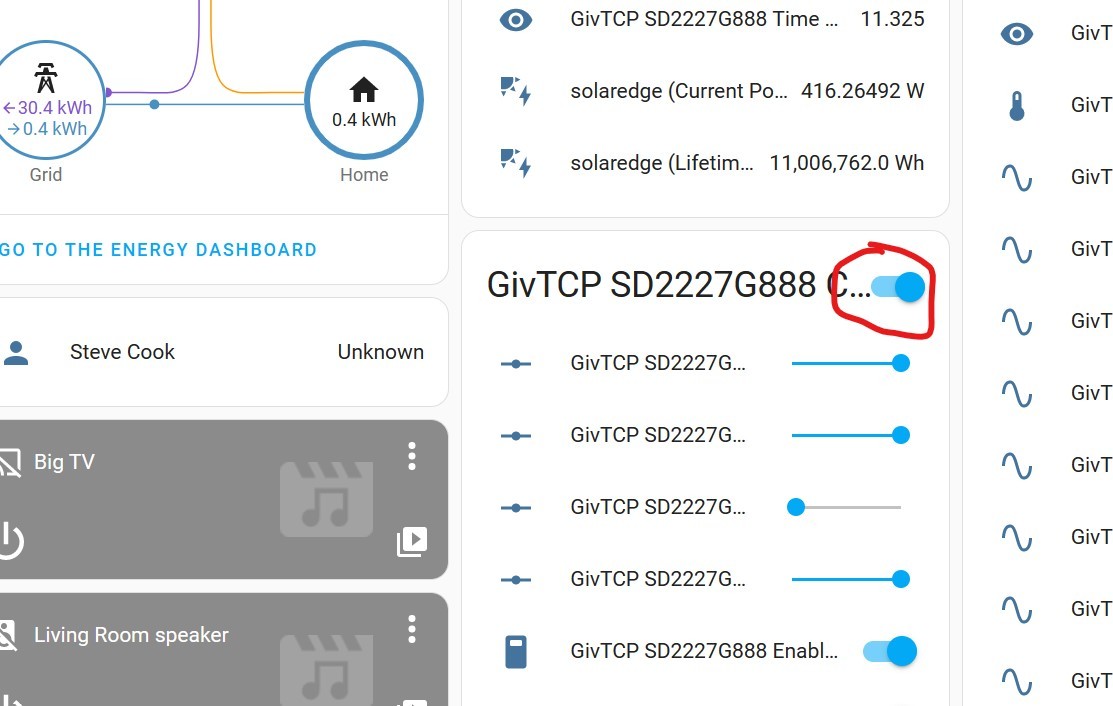
How do I set HA to do this. I pushed the GE slider to the off position, but it just springs back.
Is HA doing any control?
Can I turn HA control off and just monitor?
J
#2 justpassing

I don't think there is any " Read only option", but I wouldn't worry too much about experimenting. Not sur ehow new you are to HA, but it will not do anything until you tell it to do so, either by direct button pushing, slider moving etc, or automations. One option to keep you from pressing buttons is to simply not load the control "panel" on to the home screen.

I am personally using the givenergy-local integration, which has most/all the same features as GivTCP, as they all use the same givenergy-modbus library. The integration has two distinct groups, sensors and controls. Just add the sensors only to the dashboard.

Just had a quick look at GivTCP again, its the same, so just add the sensors, not the controls.

Enjoy :-)

S
#3 SteveCook

Thanks
But how do I "not add controls" and how do I make sure that just because I cant see them they are not controlling

J
#4 justpassing

SteveCook

Ah sorry. I wasn't clear. Are you on the default "overview" Dashboard ? Depending on various settings, the dashboards either pick up any new sensors controls etc that turn up and display them, or allow you to to decide which ones you want to see.

If your dashboard already has all of the sensors, and the controls, you should be able to go to the top right of the dashboard, click the 3 dots, and select edit dashboard. Then find the card that you dont want, again clic the 3 dots, bottom right on the card, and press "delete card". This does nothing to the integration, it merely stops displaying it on that dashboard.

As to whether they are controlling or not, as long as you don't change them or call them in any automation's, then there should be no write actions to the inverter. Conceptually think of the integrations as exposing the controls to you or the automation you design. The buttons just sit there, or the values stay unchanged, until you interact with them.

Once you push the button marked " do not push this again... " you are on your own :-)