

EZ API for Windows / Powershell

5 comments started 2022-02-08 last 2022-03-28
APIsHome Automation
#1 hoggy

Thought i'd post these scripts which allow you to pull data from the API using windows.
You can bend them as you see fit but basically all you need to do is pick a call (it's ALL of the available ones from the Knowledgebase EXCEPT for the new Battery API one - that's a little different) and then edit the top few lines with your API key from THE OLD PORTAL in Notepad/Powershell before running it (which you can do by right clicking & "Run with Powershell")

It will output the data in the same folder as a text file (but it is JSON so you can do other stuff with it)
Example text to change:
$GivEnergyPortalAPI = "489f5bcf101a___OLD_INVERTER_KEY_HERE__3187cbe1"
$SerialNum = "SD123456"
$dateText = "2021-01-10"

Example Output from one of the API calls:
{"total":141,"rows":[{"vpv2":"338.00","vpv1":"349.90","loadPower":"339.00","moduleVoltage":"54.80","importEnergyToday":"14.40","ppv2":"688.00","exportEnergyToday":"0.10","fac":"49.92","invImportEnergyToday":"5.40","invImportEnergyTotal":"1871.20","batPower":"-918.00","ppv1":"673.00","ipv2":"2.00","ipv1":"1.90","pac":"67.00","pacr":"0.00","meter2ActivePower":"67.00","pacs":"0.00","pact":"0.00","invVoltage":"245.10","temperature":"31.90","batCurrent":"-16.73","batPercent":"93.00","meter2PowerFactor":"15910.00","meter1ActivePower":"544.00","runtime":"8363.00","invFrequency":"49.91","vact":"5665.40","eacTotal":"7669.90","vacs":"0.00","eacToday":"3.30","vacr":"247.20","gridExportEnergyTotal":"3450.00","meter2ApparentPower":"336.00","batVoltage":"54.87","iacr":"1.70","ppv":"1361.00","iact":"6221.40","iacs":"0.00","time":"2022-02-08 12:11:21","chgTemperature":"32.00","batTemperature":"13.00","gridImportEnergyTotal":"7010.20","status":"NORMAL"}]}

Download Zip File Here

If your stuck or want to do anything weird let me know and I'll see what I can do.
Thanks
Hoggy/Terravolt

#2 hoggy

@Mickey (GivEnergy) No rush but your docs/API have a few errors i've noticed - Just double check this as i couldn't get a few to work without going back through my old notes when we were messing with it:

plant/getPlantEnergy: Needs plantID as a param but not mentioned in docs?
plant/getPlantEnergy: Needs "Type" as lower case "type" otherwise throws error?

inverter/getInvRuntime: is listed in the KB twice? Not sure if that should be another call or just wants taking out.

invChart/Dayline: Needs lower case "d" for invChart/dayline? else errors.

miscAPI/invData - Requires date param (yyyy-MM-dd) to work but not mentioned in KB? Had go go back through notes to find that, just check that's right as without it no data /404
miscAPI/meterData - Same as above, needs date to work?

Cheers

#3 hoggy

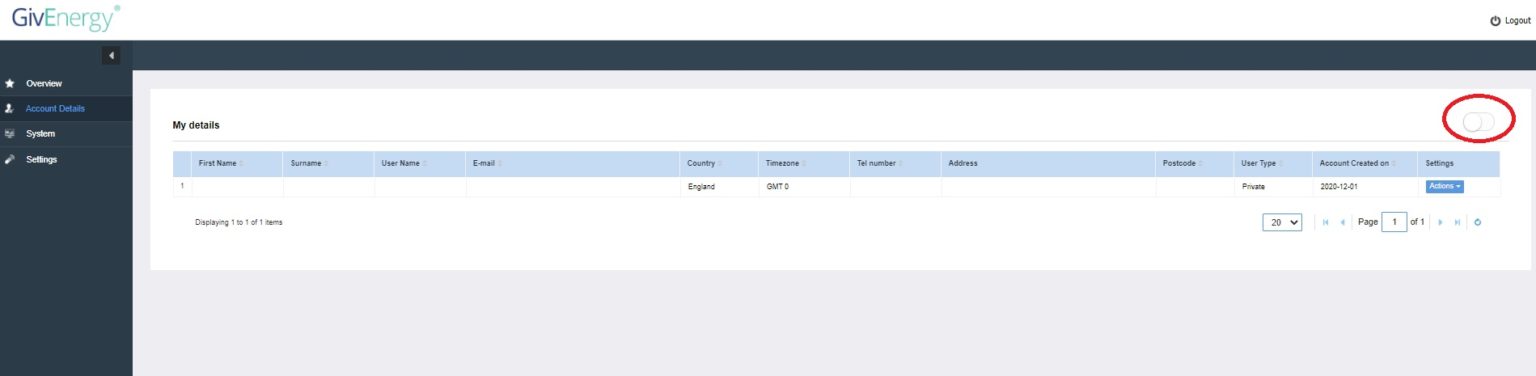
Also for the "How do i find my API key" - Login to Old Portal > Account Details > Toggle in Top Right Corner:

#4 Mickey (GivEnergy)

hoggy

many thanks for this information hoggy, I've gone ahead and amended those changes so they should all be fixed now

#5 hoggy

So given the old API is on the way out i've made a start on transition to the new one via Powershell.
First few are here
Calls are:
Get Latest Inverter Data
Get Latest Meter Data
Pause Battery (Set Discharge to 0 or any other figure you choose)
Resume Battery (Set Discharge to full power or any other figure you choose)

Note: These rely on the new API key which can be found in the new portal > Under Account Settings. (It should email you a copy of the key. It's a very long key!
They also need the Inverter Serial which can be found on the above portal.
As before, you can edit the above powershell scripts in notepad or right click > edit, which should open the powershell editor.