Battery charging from the grid - when it shouldn't!

11 comments started 2023-04-20 last 2023-04-24
GivEnergy ProductsAC Coupled
G
#1 GribinIsaf

(Yesterday I used chat to contact GivEnergy support for the first time and was pleased to get a near-instant response. However, not all the info was clear at that point so I have now emailed them. I am posting the issue here in case anyone has any words of wisdom.)

My setup is as follows:

I am on the Octopus Flux tariff and for the last few weeks the inverter settings have remained at:

Eco - enabled
Timed Charge - 02:00 - 05:00
Timed Discharge - disabled
Timed Export - disabled

No smart tariff settings

So currently the normal pattern for the day is to fill up the battery 2am to 5am, use the battery to power the house until PV generation builds up, PV fills up the battery again and then exports, house draws on battery when PV declines at end of day - maybe having to draw from grid at end of evening if not sufficient in the battery.

Now, on two occasions this week the battery has decided to charge itself from the grid at times not instructed by the settings:

On the first day at was 10:30 pm and the battery was down to 35% when it suddenly decided to start charging. It took 6.6 kWh, getting up to 80% - in an irregular pattern) before the "official" charge slot started at 2am.

The second occasion was during a morning:
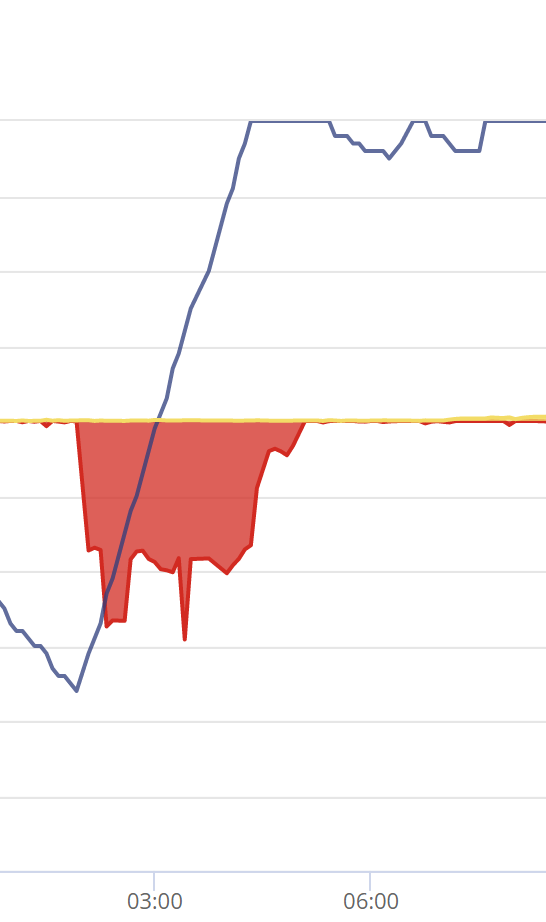
On a couple of occasions between 6am and 8am the inverter decided to "top-up" from the grid, taking over 1.5 kWh (although this did not appear on the inverter grid import data)

I have never seen anything like this before and I am a bit disturbed if the inverter is taking non-trivial amounts from the grid at the "wrong" times on a TOU tariff.

.

P
#2 Paulsimmons

I've just seen similar issue; charging during the overnight cheap rate time window beyond the charge percentage.

I set a 30% limit, visible in battery settings, yet it charged up to nearly 100% . I'll attach screenshots if I can on this forum editor...

T
#3 Tim

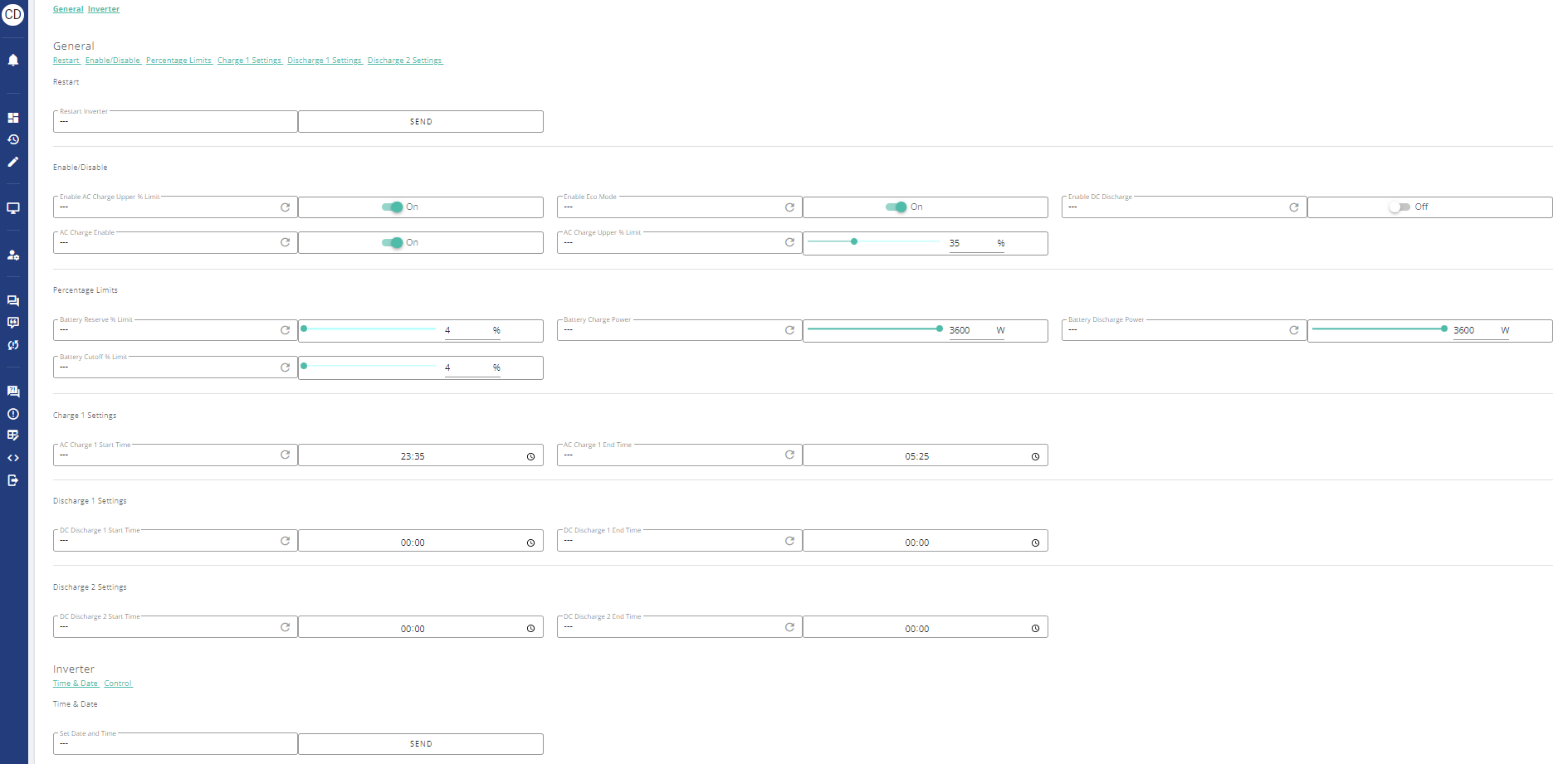
Paulsimmons You don't say what plant you have but check on your remote control page that "Enable AC Charge Upper % Limit" is On, otherwise the inverter will carry on up to 100%. This switch shouldn't need to be changed manually as it should change when timed charge settings are changed, but it has been known to "stick".

That said, I don't think what you're seeing is the same as @GribinIsaf who seems to be suffering the SoC bug although the SoC doesn't appear to collapse before charge starts.

G
#4 GribinIsaf

Tim That said, I don't think what you're seeing is the same as @GribinIsaf who seems to be suffering the SoC bug although the SoC doesn't appear to collapse before charge starts.

I wondered if this was a manifestation of the SoC bug. I have not really followed the extensive discussion of that and thought it was just a cosmetic thing - not something which has the potential to cost me lots of money!

T
#5 Tim

GribinIsaf thought it was just a cosmetic thing

Er no. If only it was just cosmetic. It's about the battery instantaneously changing it's reported SoC (either to zero or 100%), based on flawed battery voltage readings. Changing SoC to zero sees an emergency charge to 4%. Apart from the inconvenience of the SoC randomly rocketing, the issue also manifests a battery capacity loss; much more of a problem.

G
#6 GribinIsaf

Tim Er no. If only it was just cosmetic

Thanks for the potted explanation! I was kind of thinking that if the battery, for example, reported a zero SoC when the truth was it did have charge it would then try to charge itself but since it already had a charge that wouldn't actually import electricity!

T
#7 TX200

GribinIsaf sometimes it causes issues at the top, e.g. you want to charge to 80% (sunny day tomorrow) but it ends up at 100% as it was wrong about what 80% was.

Sometimes you run out before the end of the day, it looks like you've got 30% left, but all of a sudden it's empty.

Anyway the beta seems to have sorted this. Looks like a few more bugs to fix to ensure a good release, but fingers crossed not too much longer!!

G
#8 GribinIsaf

TX200 Anyway the beta seems to have sorted this.

Thanks for this further explanation and hopefully good news about software coming.

One feature of these two blips of mine is that the inverter seems not to have recorded the electricity imported to charge the battery. For example: 7kWh imported between 22:15h and 01:20h (according to Octopus) lifting SOC from 35% to 83% (instead of waiting for timed charge at 2 am) but that import not showing in the "Grid" stats on the inverter report.

P
#9 Paulsimmons

Tim thanks for the quick response. I can't get this discussion forum to upload images ( the upload button is unresponsive on my android 12 Google pixel phone).

My system is an 8gb Givenergy battery and 12 solar panels with Givenergy inverter.
The 'charge up to' rate is set to 75% on the remote page, and I often set this based on my prediction of sunshine for the following day, so I minimise the overnight grid usage. It is set to 'solar+grid' for 12:30 to 04:30, matching Octopus cheap rate window.

According to the battery graph on the app, it ignores 75% and charges to 100%, so it's charging from grid unnecessarily. Typically it might be 50% before the time window, so I expect it to charge a little. It seems to ignore the upper limit threshold.

Am I setting this incorrectly?

#10 Cdent

Paulsimmons have you set up the smart tariff on the GE portal? If so, this can override any of the "charge to" settings to 100%. If so, stop automations on the smart tariff card.

4
#11 4monks

Paulsimmons Paul - just checking... you mentioned 12:30 to 04:30 - do you mean 00:30 to 04:30? If you set 12:30 in the app or portal, it will charge from midday:30 to 04:30 in the morning? Judging by the times, I'm guessing you are on Octopus GO.

Typical reasons for ignoring the threshold:

1) You have set the target but it has not "taken" as Tim mentioned.
Fix: Double check by reading the registers in the portal (not the app). Portal->My Inverter->Settings and double check at Portal->My Inverter->Click Remote Control gear Icon top right. See image example from my portal. You can click on the clockwise arrow to re-read each item. You might sometimes get a timeout error - this is normal and just means the inverter is busy. Try again after a few seconds.

2) You have setup Tariff automation in the portal.
Fix: Disable tariff automation in the portal. Portal->Smart Tariff Panel->Click expand icon top right of panel-> Tariff Automation Tab-> Stop Automations

3) You are running GivTCP and and have not disables SMARTTARGET in the configuration. Fix: toggle the SMARTTARGET switch in the GivTCP config.