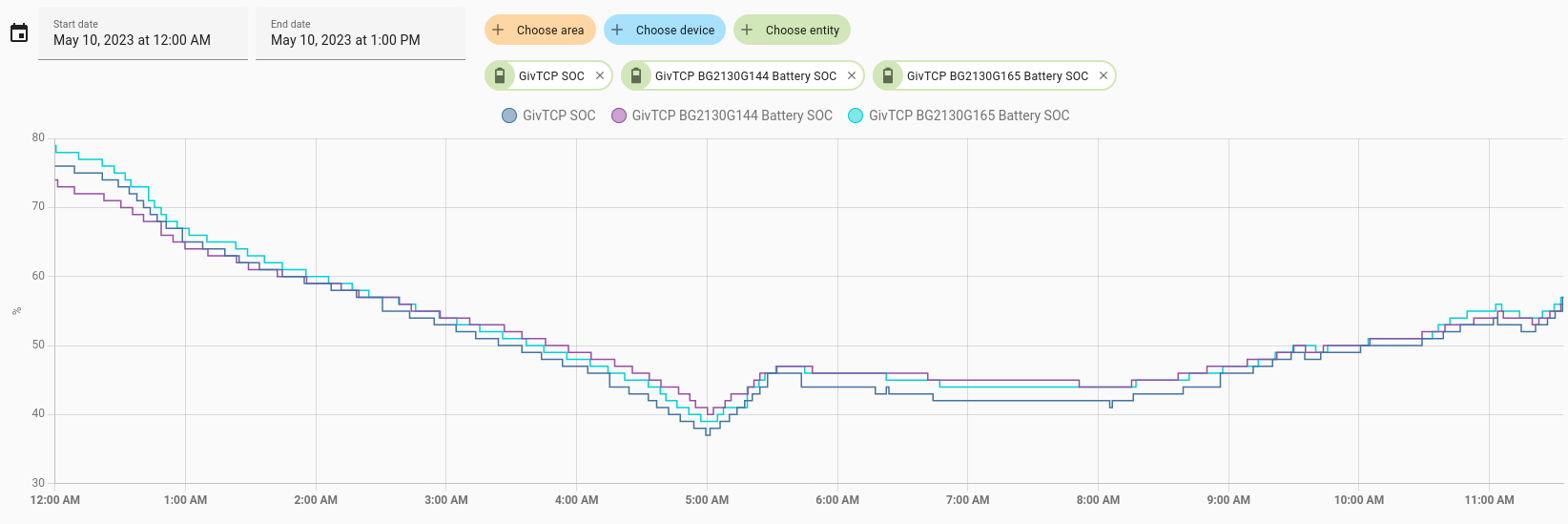
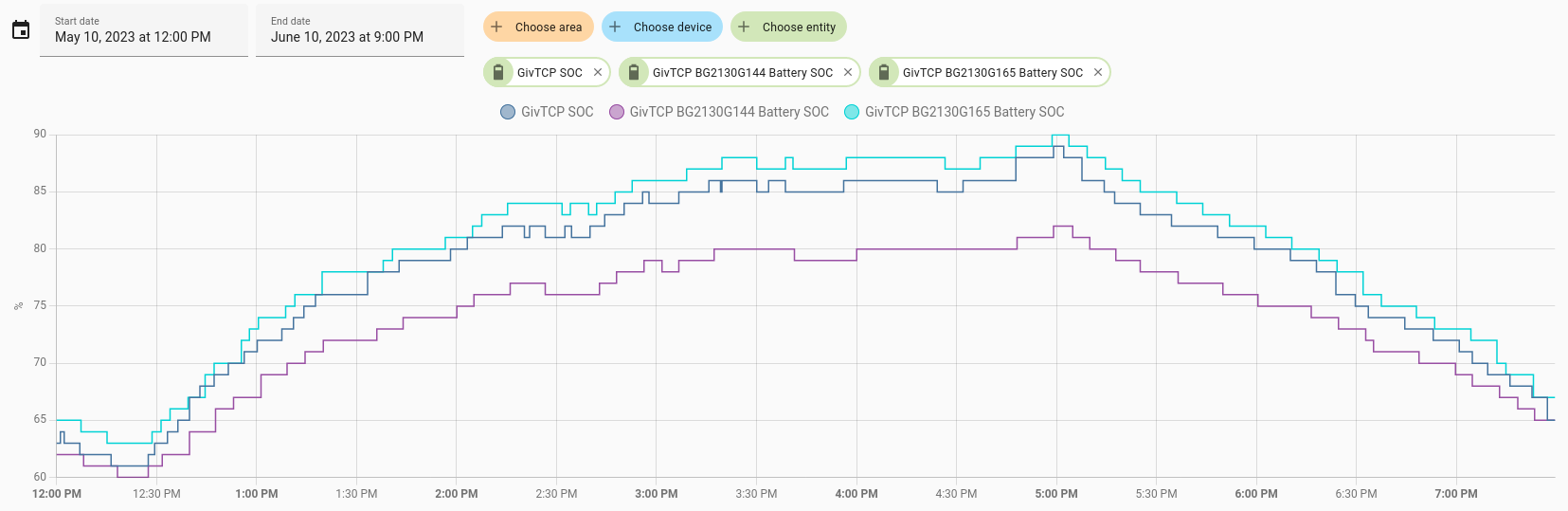
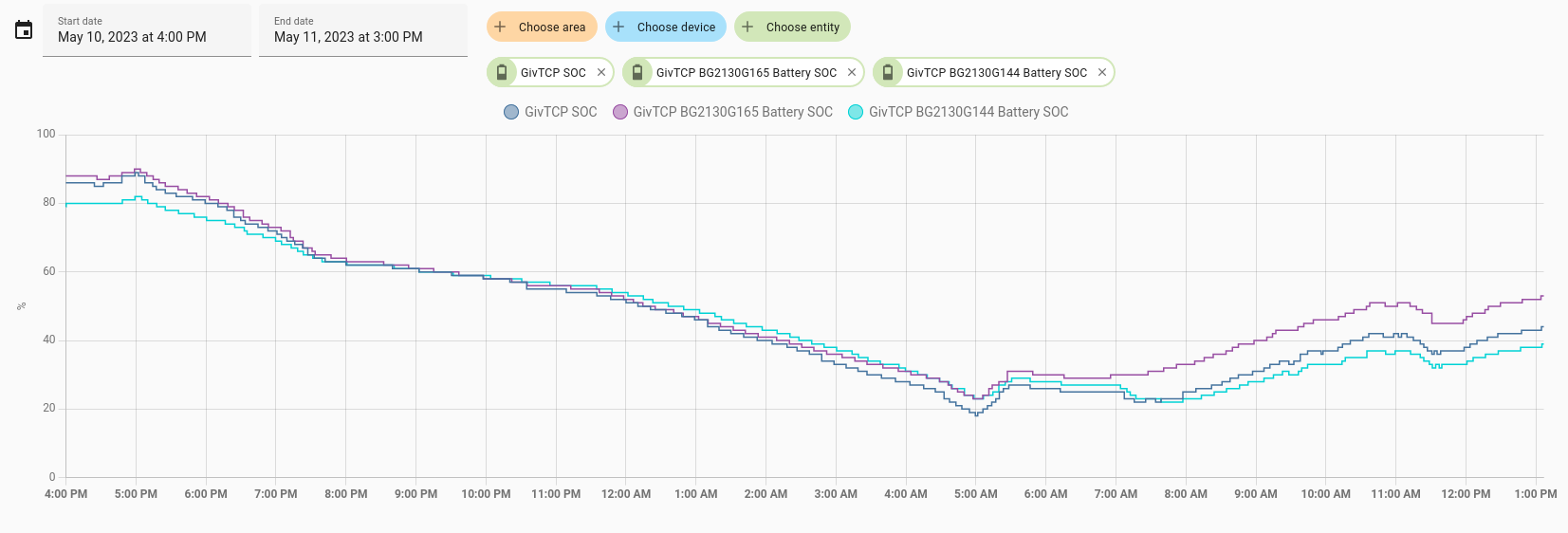
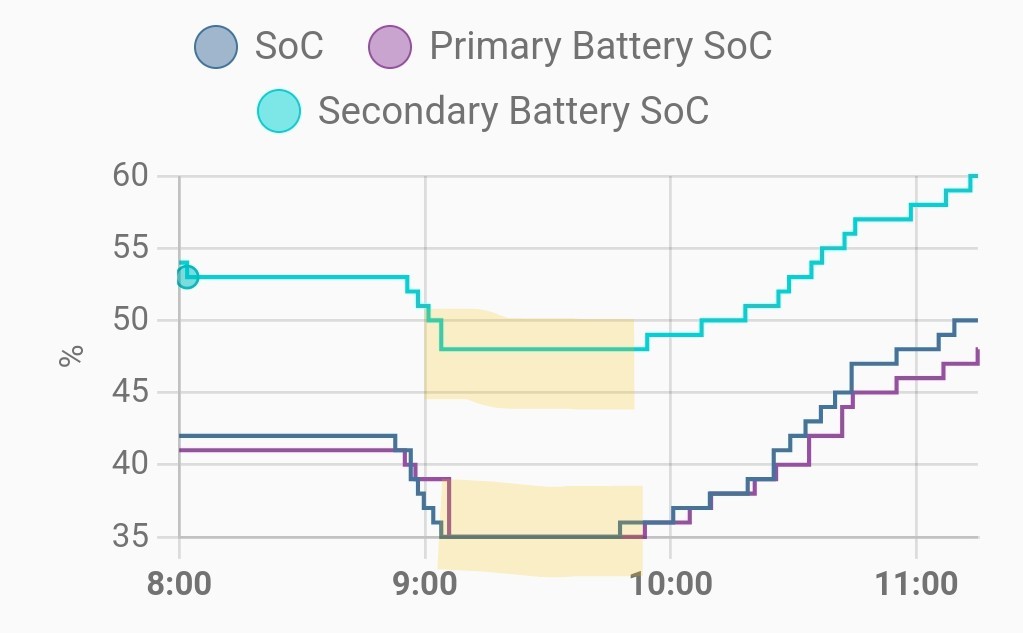
Hi I’m getting tired of hearing the excuse it’s the app that is showing different % between the two batteries and having a recalibration which does not fix the problem it only initially balances them up then day by day they get further apart nearly 23 % difference today.
CAN I TURN OFF ONE BATTERY TO MAKE IT CATCH UP TO SECOND BATTERY THEN TURN IT BACK ON, WILL IT MATTER IF ITS SECONDARY OR PRIMARY BATTERY?
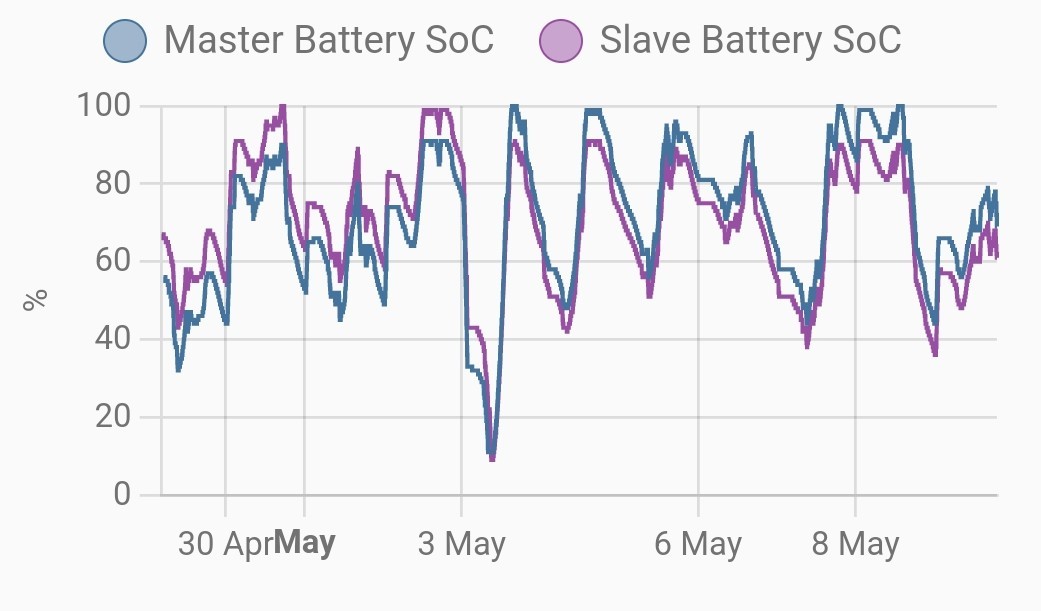
Can I Turn off one battery to balance them up charge wise?
The new version of firmware should do this itself.
It's available now via the web portal if you wish to upgrade. See the My Inverter page on the web portal, then the software tab. Should be an upgrade button showing.
Yes this is what I have been promised but unfortunately there still remains a % difference between them I have contacted GE and they are going to monitor it. After one day after the update the batteries show a difference of 5% but I know this will progressively get worse as it did before the update. It used to go up to over 20% difference and GE would do a recalibration which only started the whole process off again after a day or so gradually getting further apart. Another concern is when one battery hits 100% the other stops charging altogether.
I thought I would not hear those words again “ it’s an app issue “
Bolts it's supposed to get better over several days. Of course maybe one battery has a fault with one of the cells - the new firmware is more likely to expose problems with the hardware.
Bolts I wouldn't assume it will get worse, this is mine (previously on the beta firmware). It should improve with cycles (especially if the OCV is allowed to run at empty). I have up to a 10% split still, but it hasn't exceeded this or got worse. It's also cosmetic and I haven't seen it impact the overall charge/discharge levels as the voltages will be well matched.


Bolts If you are on the new 3012 BMS.
Let it go to idle and watch the packs OCV function level them. If the voltages are within 0,5v they will track.
If one is different and exceeds the allowed tolerance, it will go offline and leave you one battery. till they next meet voltage wise. Without knowing your system serial, I cannot offer any help

TheDragon (GivEnergy) Let it go to idle
What's the best way to do this? Mine haven't adjusted when they are idle at 100% and they haven't been empty yet. A manual pause of the battery doesn't work as it still charges or discharges at a low level.

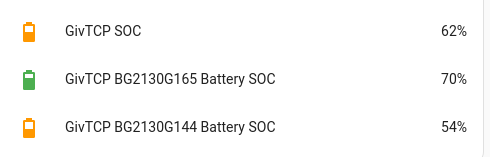
Sorry for the hijacking this, but what about mixed battery sizes? Should my SOC % be starting to level out? Currently my 9.5kw is at 60% and my 8.2 is at 69%

Mine are currently 14% apart with the overall value somewhere in the middle of the 2. Could do with an option on the portal to 'sync batteries' or something along those lines to trigger the process manually.

Ours appear to be tracking within a couple of % of each other now:

Waiting to see what the top end is like when they get near 100%, as that is usually when there is the biggest difference between the two batteries.
THALL
60% of 9.5 = 5.7 and 69% of 8.2 = 5.658 Any relevance?
Interested to know battery voltages?

Newman No access to givtcp from work, but the app now says 86% and 86% in both. the 9.5 is at 53.9v the 8.2 at 54.1. Oddly the 9.5 is reporting a temp 3c higher than the 8.2 even though they are outside and side by side. Other than that the soc has equalised.

THALL Interestingly, my older 8.2 is always warmer than my newer one (they are next to each in the garage). When they were being fitted I saw that the insides aren't the same so I guess one is just cooler by design.
This is the BMS temperature but the actually battery pack temperature always has one warmer than the other too.

judgepd I am guessing it only uses 1 battery at a time? Usage in blocks of power? At 91% now and temp difference has dropped to 2c. Will check again at 100%. Need second ac3!

judgepd Ok so dashboard now says 100% but both batteries say 97%? Tad lower. Voltages the same. Temps the 9.5kw is still 1.5c hotter than the 8.2. So I need the system to go hunting for full capacity.... has been at 100% for 1 hour, no adjustments yet.

THALL Mine got to 100% overall and 99%/92% for the 2 packs. It's now decided to start discharging to the grid at 300W which I believe an inverter firmware update is being worked on to fix.

judgepd My battery output power is 0, has been since hitting 100%. So oddly I do not have that 300w discharge issue....

Woodlands
Well, still a larger difference in the SOC at the top end compared to the lower values:

About 8%, compared to 2% when below 65% SOC.

THALL Odd that it seems to not effect everyone with the same setup.

judgepd Indeed. But the same can be said for the larger issues like sudden soc movement. Not everyone had it. People didn't get it at the same time, etc.

After the SOC's getting within 1% last night they have been drifting apart since. Now at 14% difference between the two batteries:

They don't appear to be balancing themselves, or shutting one off to let the other catch up.
@TheDragon (GivEnergy) I understood the new BMS was designed to prevent this.
Do the batteries need to go between 100% full & 4% empty to correct this with the new software?

Woodlands How long have you had the 3012 bms installed for?

THALL Since 4th May, but I also had the 4073 beta BMS installed since 29th April.
Even bigger difference now!

THALL Ok so dashboard now says 100% but both batteries say 97%? Tad lower. Voltages the same. Temps the 9.5kw is still 1.5c hotter than the 8.2. So I need the system to go hunting for full capacity.... has been at 100% for 1 hour, no adjustments yet.
I had this after the recent firmware update to 3102 (dashboard 100%, each battery 98%), I contacted GivEnergy and they carried out another calibration last night which appears to have sorted it out, all be it after 1 battery suddenly dropped from 100% to 1% today @ 12:40 but sorted itself out after I turned everything off then on again

Woodlands this BMS update has been known to show lazy cells, poor connections and so on.
Does the individual cell voltages offer any clues (any of them being out by more than 0.1V or so, and if that’s the case working back to see if the cell differentials are narrowing or widening)

hoggy All the cell voltages are well within 0.1v. Highest for the Secondary Battery is currently 3.337v & lowest is 3.324v
Also, both batteries overall voltage is within 0.1v of each other. Primary 53.005v Secondary 52.991v
Woodlands not quite there on the multipack balancing I'm afraid. Understand the decision was made to release with this missing as it was taking longer to crack and would have delayed release of the main fix for the SoC jumps. Currently only method to robustly balance them is drain to empty and wait about an hour for the OCV to do its stuff with them idle.
However the good.news is that it doesn't seem to stop discharge early like the old firmware did (when one hits empty, probably because the voltages are well matched), so hopefully more a cosmetic issue.


mpartington That's a shame as it was one of the features that @TheDragon (GivEnergy) had really been bigging up. Hopefully it won't take too long to sort out.

Thanks mpartington missed that. Found this from Paul, which helps explain what needs to happen.
TheDragon (GivEnergy) If you are on the new 3012 BMS.
Let it go to idle and watch the packs OCV function level them. If the voltages are within 0,5v they will track.
If one is different and exceeds the allowed tolerance, it will go offline and leave you one battery. till they next meet voltage wise.
How do you "force" the battery to go idle? As most of the time it is either charging or discharging.
The only way I can think to do it is to set the discharge rate to zero during the "off-peak" rate at night, so that the grid meets home demand, but is not charging the batteries.

Woodlands I guess you can just set the charge and discharge to zero... unfortunately there is an inverter bug stopping this from working for me at least.
Woodlands best you can do at the moment is set charge/discharge to 0, but as judgepd says, not currently working. A new pause function is apparently imminent. Currently the batteries also need to be below 50% to run the OCV (but I haven't tried it yet above 40%). Been getting some odd results on the levelling when I've tried to force it around 30% (not sure if it's to do with the 108W charge I still get), so think I need to fully drain them and try the bottom idle method.
judgepd if you take them to empty frequently, then they really do remain well tracked. Unfortunately I'm doing partial cycles in the top half.
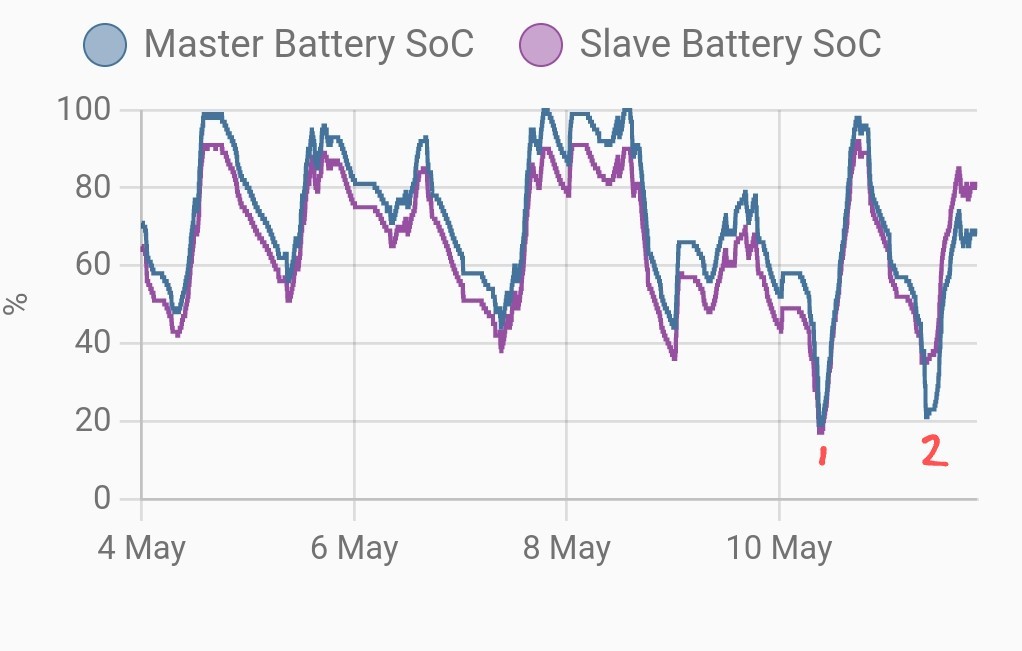
This is mine over the last week. Points 1 &2 are where I tried to force an OCV by setting charge power to zero.
1 worked quite well, but 2 has caused a big split as only one battery adjusted (possibly wrongly)

mpartington best you can do at the moment is set charge/discharge to 0,
Or alternatively I've deliberately run them out in the first hour of my charge period, then let them idle for an hour (and the OCV work) and set my charge to start 2 hours later than normal. Works well if I I don't need a full charge next day

Good idea but unless it starts causing genuine problems I think I'll wait for the firmware fix rather than deliberately costing myself money.
This is the key bit in the release notes on individual battery balancing. Seems to be slightly different methods depending on the SoC
- The OCV calibration is changed to below 50%, and the table lookup value can be calibrated below 20%

Woodlands Make sure you have no timed charge/discharge/export set and then disable ECO mode. This definitely puts a single battery into idle and I don't see why it wouldn't work with a multiple battery set up.

Woodstock Thanks. I'll try that when both batteries are below 50%.

Woodstock Just confirming this worked for me to stop the battery charging or discharging. Can't confirm if this triggers the adjustment as my batteries are both over 50% atm.
Whilst the documentation says below 50%, I've never seen it happen with any battery above 40%, (which is a real pain with a 12% split!!) so be curious to see if others have more success
I tried and failed to initiate an adjustment this morning

judgepd Same here, tried it and it did go to idle, but one battery is above 50% & the other below atm.
Will try again when they are both at a low %
Tried it with both batteries below 50%, it went to idle, but no sign of them balancing to the same %.
@TheDragon (GivEnergy) How long to they need to be left in "idle" to balance?