Hi, first comment here, really loving the GivEnergy platform, have a GIV-HY5.0 inverter with 9.5 battery.
I cannot get the time to display correctly in the web portal, or in the Android app. Let's focus on the web portal. I've followed this thread, and looked at many other posts. Current situation:
- It is now just after 14:30 BST.
- Data from API call to
/v1/inverter/{serial}/system-data/latest is showing most recent data around 13:30Z - which indicates that the time on the inverter is correctly set, and in UTC.
- Timezone in web portal is set to GMT (was GMT+1)
- I have synced the time using the button in the web portal settings.
- I have logged out of the web portal and back in.
- I would now expect to see data displayed in the portal to show the latest data around 14:30 BST.
- However, the web portal (and also the app on Android) are showing the latest data around 15:30, which is an hour in the future for BST, or GMT+2.
[Update 1] I think I've spotted what is happening. At 14:45 BST, if I look at the system data, the most recent update is still displayed at around 15:30. If the system was still displaying new entries at GMT+2, I'd expect to see more recent data. Scrolling down the list of data reveals that the roughly five minutes apart pattern of data points is disrupted between 14:30 BST and 14:45 BST, with entries seemingly being "doubled up" i.e. GMT+1 (or BST), and GMT+2
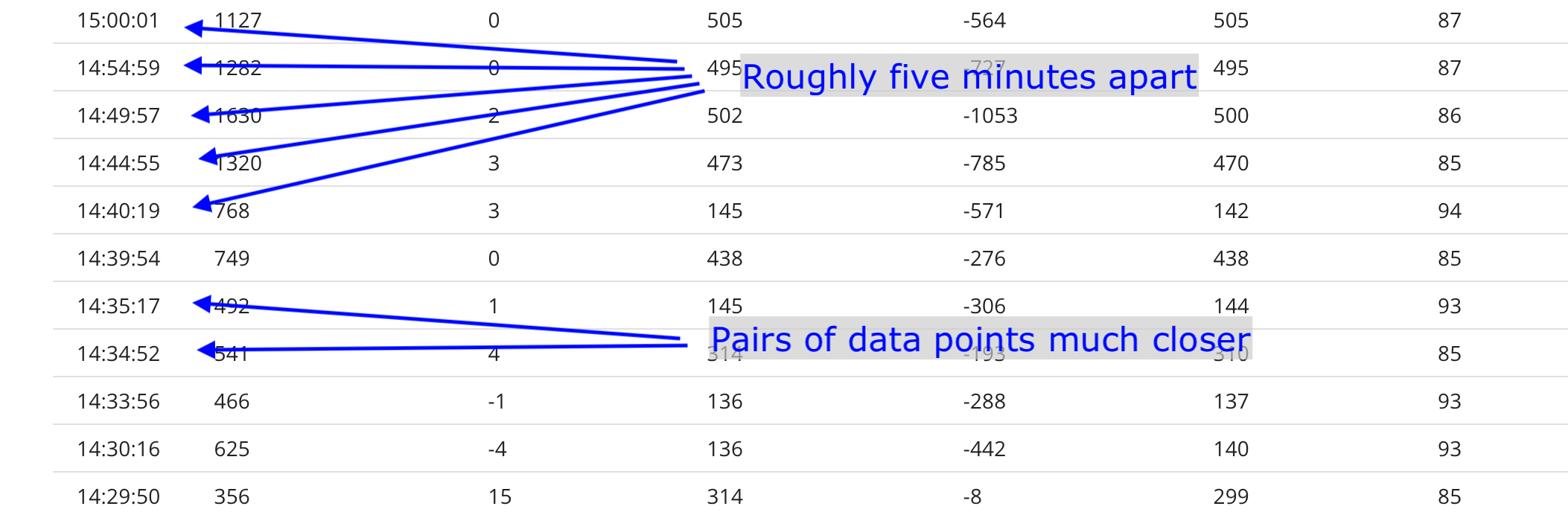
If my theory is correct, I should see new data points at the top of the list from just after 15:30 BST....
[Update 2] It's now just gone 15:05 BST, and I can see new "duplicate" data points up to 15:05. It definitely seems that the data, uploaded by the inverter in UTC, is then rendered into the configured timezone and stored in the database. Confusingly setting the timezone to GMT appears to result in "UK time", which is currently BST. Once you know this, it's simple, even if technically incorrect. We should be thankful that the designers and implementation team did the right thing in basing all timestamps on UTC 👍️
[Update 3] It's now just gone 15:30 BST, and the latest new data in the web portal, and in the Android app, is shown at around 15:30 🙂
Next question - if I configure the web portal to charge the battery from 02:00 to 05:00, will that be construed as UTC, or back-converted from BST to UTC 01:00 to 04:00 ? As an experiment, I have set a timed charge to 100% in web portal, 02:00 to 03:00. Getting the settings values from web portal "remote control", and from the API, suggests this has been stored as UTC. I'll update this thread tomorrow with the answer.
[Update 4] Confirmed - the system charged the battery from 02:00 to 03:00 UTC. Nice !
[Update 5] A week later, I've looked again, and the charging is using BST, not UTC. I've rechecked the data from last week, and either something has changed in the system, or more likely I read it incorrectly. So the charging happens on BST.
