Inverter connectivity issues

18 comments started 2023-05-19 last 2023-07-30
GivEnergy ProductsAC Coupled
K
#1 Kylemiller

Hello,

This is my first post on these forums and of course the only reason for posting is to report issues.

I have the 3kw AC inverter and a 9.5KWh battery.

My main issue is with the connectivity of the inverter. I would say about 95% of the time the inverter appears offline. Attempting to change any settings either via the app or with the web interface results in a failure message "Inverter Timeout". This is very annoying at the moment when trying to dynamically change the charge limit overnight to try to compensate for solar charge the following day. Often, even getting the SOC of the battery is troublesome with messages like "Last read 15 minutes ago" or something. Very rarely can I connect to the inverter locally. In addition, it sometimes says "You must be connected to Wifi" to use the local feature, despite having full bars on wifi.

So, it is in this situation that I find another problem. If I try to set the value of the charge overnight to (for example) 50% it often ignores this value. For example, last night I set it to 50% and it still charged to 80%. This is despite the app and the website informing me that the setting is currently 50%.

Just some additional information - I have a mesh network (BT Home hub). One of the mesh discs is a few feet away from the inverter in the garage and the mesh disc is connected via ethernet. No other items have a problem connecting to the network. There is also a solis inverter (for my solar) quite close to the GivEnergy Inverter which I think blasts out wifi on the 2.4GHz band. This may also be causing issues. Ideally, I would like to connect to the GivEnergy Inverter by cable, rather than wifi, but I don't suppose there are solutions for this?

Does anyone have any suggestions? This is really making what should be a good product a very poor experience. If you need any more info, let me know.

Apologies if that has been covered before.

Thanks,

Kyle.

K
#2 Kylemiller

Kylemiller

I should also mention, I have sent in a support request for the app issue (months ago) and got no reply from GivEnergy.

T
#4 TX200

Only the Gen2 has a LAN port (along with onboard WiFi dongle and USB port for external Dongle)

The Gen1 kits is WiFi dongle or mobile network dongle only.

The earlier WiFi dongles are 2.4GHz only, they don't support 5GHz.

Is your mesh offering 2.4GHz or just 5?

There's a few settings that you can try changing for mesh networks, have a search of the forums for the word mesh and hopefully you'll find what you are looking for.

T
#5 thewhalw21

Kylemiller Are you able to "Ping" the inverters IP address when it is showing as offline?

Might need to go to routers webpage to get the IP address.

T
#6 TX200

Plus if you need to change the WiFi network the inverter is connected to, there's a full guide on this page

https://kb.givenergy.cloud/article.php?id=1

You could try connecting it to a mobile phone hotspot to confirm or rule out issues with your WiFi or internet connection.

Bear in mind it can take up to 30 minutes sometimes for it to connect to the mothership once the dongle's internet details are changed.

#7 positor1

I agree with above replies, it seems far more likely it is a connection issue /poor wifi

K
#8 Kylemiller

Sorry to take so long to reply to this but thanks for the comments.

No, generally, if the inverter is showing as offline, I cannot ping it.

Then 3 seconds later it is on line then I can ping it again. Then, maybe 10 seconds later it is offline and then I can't ping it again.

It is pretty infuriating, I can't even do a firmware update.

For me, this is obviously a GivEnergy problem. I have something like 60 devices connected to the network (about half are probably through wifi). No other devices have a problem connecting. The mesh network uses an ethernet backbone so it isn't as if the 2.4Ghz band is being used for that.

K
#9 Kylemiller

I should say the mesh is both 2.4 and 5GHz.

M
#10 mrand31

If it's a gen1 inverter and WiFi dongle (or any other version and the WiFi dongle, then set up an SSID just for that connection and set it to no security and limited to just the dongle's MAC address. They seem to struggle with TKIP, AES and so-on.

A
#11 alan_johnston

AFAIK, the WiFi dongles can have an issue with MESH (there have been posts about this before).
Try what mrand31 suggested and create a no frills standalone SSID for the GivEnergy dongle.
Once you have a connection, you can start to tweak the router settings to see what your dongle can and can't handle.

S
#12 SimonP

You may be able to set the mesh system so that it doesn't try to move the inverter (specifically) from one node to another or switch its wifi band. I had this problem with another device when we had a mesh system and this solved a loss of connectivity problem. No longer use the mesh so I can't check what that setting was called.

#13 Cdent

SimonP I have this and it's called Bind on my Asus mesh nodes, I can choose which node in this setting

K
#14 Kylemiller

Hi All, sorry again for the delay in replying.

I tried the suggestion of creating a single AP. Luckily I have been using a load of old routers as wired network hubs (with the radios turned off). So, I just activated one of these and set the inverter to connect to it instead.

It seems a little better in that now local connections (to read the current status of the battery) are much more consistent. It works most of the time in fact.

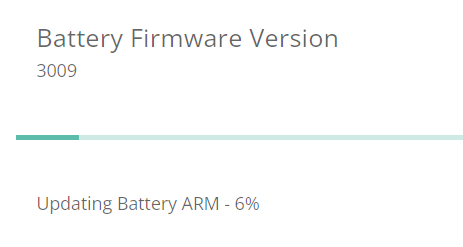
However, now trying to update the firmware results in it consistently failing - it gets stuck at 6% (it got further than this with the mesh, albeit inconsistently). After a few minutes I get a message saying firmware update failed.

I am a little bit wary of opening my network up to non-authentication access as I know you can fake mac addresses. I may try that as a last resort just to prove that it works like that then lock it down again but for the moment, does anyone have any more suggestions?

thanks,

Kyle.

K
#15 Kylemiller

Just to show, this is as far as it gets now...

T
#16 Tim

Kylemiller Could it be the USB stick needs wiping and reformatting?

K
#17 Kylemiller

Hi Tim, I did the update manually in the end by removing the usb stick from the BMS and adding the firmware file.

So, it has now gone from 3009 to 3012 at least. However, I still cannot update the firmware remotely. The same thing happens, it sticks at 6%. So now, I have an updated BMS firmware but not the inverter.

Do you think it is still worth reformatting the USB stick? I could read it fine from the PC when I but the .bin file on it.

regards,

Kyle.

P
#18 P3tro

Hello. I have a mesh wifi network and I've not experienced the same problem to the same extent, but my home network is based off of my own hardware & very minor tinkering, which then connects to my ISP's router.

Infrequently, it takes a few moments to connect locally or I'll get a message on the app to say it couldnt connect and tells me to retry but this seems to resolve itself within <5 minutes. I wonder if this is anything to do with 'polling' (sorry if thats not the right term) or how many requests the inverter can hand when it comes to network/API connectivity. Are you using Home Assistant or similar, or purely just relying on the GivEnergy app & portal?

Somewhat unrelated, the only issue I've had with mesh wifi is with some HomeKit accessories which is widely reported and HomeKit has its own issues from what I've read.

T
#19 Tim

Kylemiller The USB stick is for the battery, it doesn't affect the inverter. There have been issues with firmware updates recently. Personally, I'd leave any updates until office hours just in case you need intervention from Givenergy.