
I have 2 batteries a 9.5 (primary) & 5.2 every time the battery goes to 100% the 9.5 red status light comes on and the app shows the 9.5 red and empty but I know it’s around 53v so full as soon as it starts to discharge it goes green and works fine . I have just adjusted the full capacity to 99% to see if that helps. It seems to spike for a very short time to 56v .
I have updated the firmware to 3012 and have the 3.6kw inverter gen1 every thing works great so no issues running just wondering if anybody else has this issue and should I be concerned I have been in contact with technical and they are not worried as it’s only happens for short period and I do not get BMS warning.
Battery status light goes red when fully charged and graphic goes empty
I had a 9.5 and 5.2 in the same configuration, the 9.5 being primary. I never saw this behaviour with my setup.
Strange that you get a red error light but no notification in the logs.
BMS 3012, AC3.0, 5.2 x 2, D0.535-A0.535.
Since upgrading to 3012 I have had this at least twice. I have been told (or read) that the new BMS will occasionally turn off whichever battery is doing what it should, while the errant one is bought back into line. I only notice it when I am looking at the app as there are no warnings - it just happens. It does seem to keep the batteries more inline than the previous BMS and does not seem to cause any problems.
However, as my inverter is a Gen1 2208 one it could be an upgrade that is needed.
Update my 9.5 battery has scrambled now voltage overloads all afternoon % going all over the place and I was told to press the on/off button and it would not switch off. So getting a home visit from tech .
At the moment showing me a temp of 6535.5c
Alfieri14 At the moment showing me a temp of 6535.5c
BMS comms error? Check the Modbus cable between the battery and inverter.
Sorry to be a bit thick which cable is that?
The lights on the battery are staying all 4 green and the status is red so would that suggest something wrong internally with the battery . Batteries are still working as well though.
I have the same issue in that the Primary 9.5 Goes red sometimes. Power cycling batteries and AC3.0 inverter fixes the problem (Note to self - be patient and see whether it fixes itself)
I have switched the Primary and Slave batteries at the dip switches and cables - waiting to see which one goes red now.
As a small point - The GE App did not show the Primary/Slave switch for 3 days (The GE Monitor App did see the change)
Alfieri14 which cable is that?
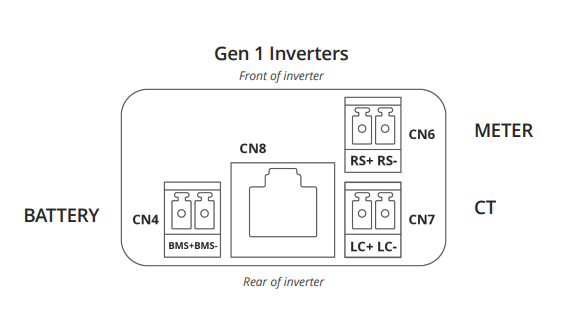
It's the small data cable from your battery to the inverter. It plugs in on the underside of the inverter by the dongle. Be careful if you take the cover off to look as if it's not pushed in firmly, it can drop out and then you will be wondering which of the many ports it could plug into it should plug into (CN4).

Or it could be the other end; at the battery?
Thank you I will check if it is loose
Getting battery over voltage alarms now again.
All cables feel tight nothing has come out.
I have contacted tech team again site visit has been organised so waiting now for date hopefully not to long I have had over 30 battery over voltage alarms now and have been told ok to leave the battery switched on but if I get concerned to throw the breaker switch.