LAN Connection for Gen 3 Inverter

12 comments started 2023-06-15 last 2023-10-05
GivEnergy Products
D
#1 deepanshus

Hi folks, i am getting my inverter installed in the garage and it has a LAN cable access so i am planning on connecting the inverter using LAN cable instead of Wifi.

Anyone has done this setup with Gen 2 or Gen 3 inverter, and if there are any pointers such as pros/cons?

DeepS

#2 Cdent

deepanshus pros - if you change router you won't have the issues others have trying to reconnect, in theory you shouldn't have any drop out of data, no issues about weak signal
cons - don't cut the cable by mistake?

But seriously, I think most of us would prefer LAN where possible over wifi

I
#3 IanW

If using the LAN connection you can then turn off the inverter WiFi in settings.

T
#4 TX200

Think the installer needs to change some DIP switches too? Or is that just between inbuilt dongle and plugin dongle?

C
#5 Capt_Rich

I have Gen 2 and my installer just can’t get the LAN connection to work. They’ve changed DIP switches, spoken to Giv but it just won’t connect. Waiting for them to take it further with Giv. At least got a strong Wi-Fi signal so system connected to that ok.

R
#6 rivimey

Are you saying there is a way for a GE HY5 Gen2 inverter to connect via LAN not WiFi? I'd love that (fed up with it dropping off WiFI for no good reason.)

#7 Cdent

rivimey yes, your installer really should have given you the option, but there should be a LAN port underneath and with some changes to the DIP switches it'll run off that instead of WiFi

R
#8 rjp

We're running powerline LAN to GEN 2 inverter in the garage. DIP switch underneath the inverter needs changing - see the installer training doc in the KB. Make sure you have DHCP configured on your router so the inverter gets an IP address.

It's worked fine for me. Only issue is that the holes in the black cover under the Gen 2 aren't big enough to take an RJ45 so you can't easily use a pre-made cable. Also because all the modbus connections are ALSO RJ45, there's a large risk of misplugging.

D
#9 deepanshus

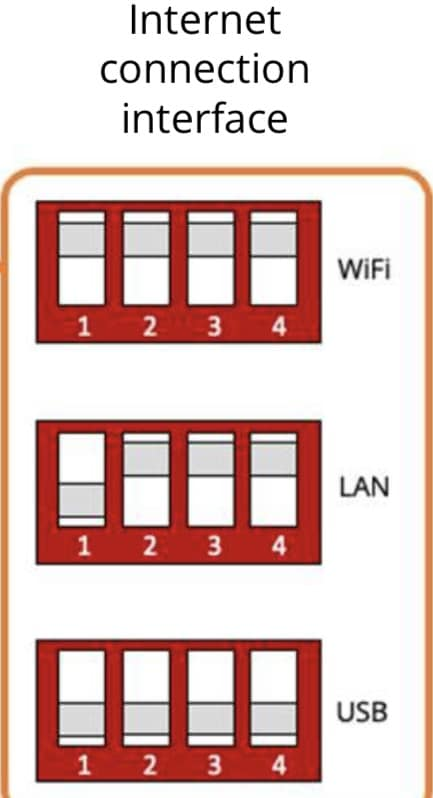
in case anyone is looking for a solution ! these are the positions of the switches for LAN connection.

C
#10 Capt_Rich

Turns out in my case there were various faults with the inverter as well as the LAN issue. It was replaced at the start of August by Giv and the new one connected to LAN no problem

W
#11 Whitzend

I have a MESH (BT Whole home wifi) system and was told that you are only considered to be "at home" on wifi when you are connected to the same wifi disk/mesh device as the Inverter, which is a bit rubbish imo.

So I tried adding ethernet a while ago and changed the DIP switches but I can't connect via ethernet. There's a strong chance it's because I did a bad DIY job crimping my own RJ45 connector because it's not possible to get one through the cable duct, but I've not got round to testing this theory yet. Capt_Rich I guess it's possible I have the same LAN issue as you? How was yours ultimately diagnosed?


C
#12 Capt_Rich

Whitzend mine was only diagnosed when I had a separate issue that required a new inverter. The new inverter connected to LAN with no issue. I still get the "home" issue from time to time, but I think it's more becasue the app is a bit buggy.