
Using HA and GivTcp can you check your HA Logbook for me?

15 comments started 2023-07-17 last 2023-07-19
Home AutomationHome Assistant
T
#1 TrignFlo

using GivTcp version 2.2.4 (with two Giv AC3.0 inverters each with a battery). The latest version of HA 2023.7.2 using MQTT 6.2.1

I have my system turn off discharge at 23:30 when the off-peak rate starts via an Intelligent Octopus Trigger which calls a script to Change GivTCP Force Charge Option to 180 (which should in theory be 02:30hrs). The reverse happens at 05:30 when the cheap rate ends and a script Calls Change Giv Force Charge Option to 'cancel'. Logs show both of these scripts being called at the correct time.

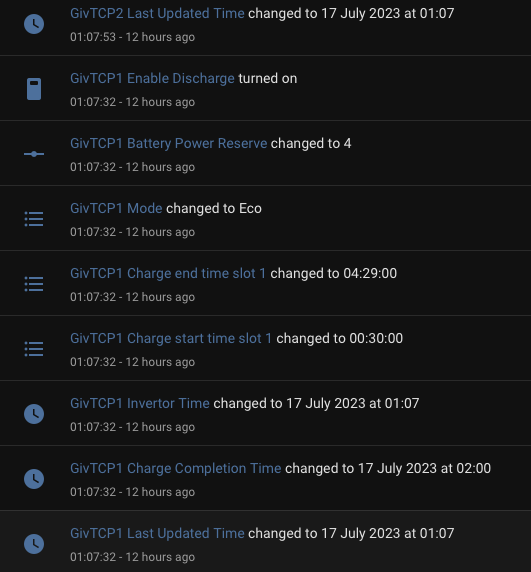
For the last two days, the following has been called at 01:07
GivTCP Enable Discharge - turned on
GivTCP Power Reserve changed to 4
GivTCP Power Mode changed to Eco
GivTCP Charge End time Slot 1 changed to 04:30:00
GivTCP Charge Start Time Slot 1 changed to 00:30:00

I have no reference to this in my automation/scripts or service calls, is this a GivTCP function calling this or could it be GivEnergy Servers doing something on their end?

I have had persistent issues with the GivEnergy App not allowing me to keep my settings of 23:30 - 05:30 charge period and it consistently reverts me back to 00:30 - 04:30 which was the Octopus Go Off-peak.

If anyone is using HA and GivTcp could they see if their logbook shows anything similar?

I'm still waiting over two weeks for anyone from Giv support to come back to my feedback request around this setting of charge start/finish times.
Graham

T
#2 thewhalw21

TrignFlo Hi Graham, Cant find anything simular in my logbook, tho im not using intelegent. i take it you've tried reseting your GE app settings from the portal. Do these events get trigger when the automation is disbaled to ?

Just noticed you have two instances of GivTCP Have you got 2 inverters?

T
#3 TrignFlo

thewhalw21 Yes, two inverters, but the app only shows settings from the original battery and not the second but does show both batteries on other screens. In the Giv Portal remote control page, inverter 2 retains all the settings, only inverter one gets affected by this change. I will try again to reset the settings on the app and see what occurs overnight.

A
#4 andydsmith

I don't have anything in my logbook for any of these entities. I wonder if it's something the Giv servers are doing related to smart tariff integration. Do you have anything set in the tariff automations section on the GivEnergy web portal?

Why do you need to disable discharge during the cheap rate period? The normal approach is to set a forced charge during the cheap rate with a target SoC based on the expected solar generation the following day. The battery will then either charge or discharge to this level by the end of the cheap rate period. There are various methods to automate the setting of the target SoC in Home Assistant.

T
#5 TrignFlo

andydsmith So Just double checked and I am on the correct "Intelli-var" showing on the tariff card (portal) having clicked this, which I admittedly didn't know you could do, it does show the correct rates for off-peak 23:30 - 05:30. There is a tab 'Tariff Automations' which suggests you pick an automation from a list below, but the list isn't populated so maybe this is a legacy from my old Octopus Go tariff which hasn't been cleared. I will click the stop automation button and see if this stops it from happening again. I have also reset the settings via the app but this only appears to turn off the Enable AC Charge Upper % Limit. Everything looks the same.

To answer your question about disabling discharging during the peak period, the behaviour I was seeing was Giv charging batteries to 100% around 3am, then immediately using this to discharge to the house. If Intelligent Octopus had a slot for charging after this time, then house batteries were discharging into the car leaving me with under 50% battery capacity. My solar capability is relatively low due to South / West split strings so very rarely do I get enough to replenish the batteries reliably. Rarely do I get more than 20Kwh from the panels.

I will re-look at the Solar predictions and Target SOC but I'm only a couple of weeks into HA and GivTcp so trying to learn things fast.

Stopping the discharge allowed me to start at 05:30 with 100% in both batteries which maximised the chance of going through the 23:30 without importing from the Grid.

Fingers crossed that stopping the automation will stop this 01:00 settings change.

Graham

T
#6 thewhalw21

andydsmith The idea of disabling discharge is better for those that have EV's and dont want to fiddle with changing the charge to % each night and just want to maintain the current battery level. I'm currently do this to, tho i just set my discharge power to 0 and let the 300W dribble out over night while the car is charging and pulling from the grid.

Would be interesting to know TrignFlo if you disable your automations does this reseting still occur? Might be something in the code

T
#7 thewhalw21

TrignFlo Whilst your going down the GivTCP Rabbit hole, Can i suggest looking into BatPred. Its an amazing add on to GivTCP and does aload of the fancy battery level setting to.

T
#8 TrignFlo

thewhalw21 will look into that and report back if the stopping of the automation stops this setting change.

Graham

T
#9 TX200

As said above, perhaps just change the discharge kW value to zero, then change it back to maximum when required?

T
#10 TrignFlo

TX200 Yes, that’s what I initially had before I found GivTcp could set discharge to off which seemed easier. If my changes on the portal haven’t been successful will go back to those settings.

T
#11 thewhalw21

TrignFlo As far as I know. In the next update Steve is adding in the new functions of pause charge and pause discharge. Similar to what's on the portal now.

Might be worth waiting a couple weeks to save your self a headache. (It's what I'm planning to do)

A
#12 andydsmith

TrignFlo If you have a timed charge period set from 23.30 to 05.30 then you shouldn't see the battery discharge until after 05.30. It will just charge up to your target soc and hold it there. (Or discharge to target if it starts above target).

T
#13 TrignFlo

andydsmith Andy, that’s what I was aiming for but this mystery command (See the first post) resets this and the battery starts discharging. Hopefully turning off automation from the rate card on GivEnergy portal will stop this command.

T
#14 TrignFlo

Overnight, no errant entries in the logbook, and both batteries at 100% at 0530 as desired. Will charge the car overnight tonight to make sure that doesn't change anything but will leave the automations alone and keep my fingers crossed.

T
#15 TrignFlo

I think this is closed for me, car was charged overnight, and everything worked as planned, 100% on both batteries at 0530 again. Thanks for everyone's help/suggestions.