J
Keep getting outages since this was installed, happened at 17:00, 18:22 and 20:56 for 18 seconds, anybody know what may be going on?
Nothing trips in the cupboard, it just goes off for 18s then comes back on.

Keep getting outages since this was installed, happened at 17:00, 18:22 and 20:56 for 18 seconds, anybody know what may be going on?
Nothing trips in the cupboard, it just goes off for 18s then comes back on.

Is the network cable between the AiO and the gateway loose?
As soon as that is disconnected the gateway snaps open which would basically give you a local powercut.
hoggy No idea im afraid, its all closed off and wiring covered and I am hesitant to go poking around, not sure what the network cable connection would look like but will inform installer tomorrow.
There were 3 outages totaling 48s at 17:00, 18:22 and 20:56 as I mentioned and if it helps the Solax inverter I have for the panels reports three separate errors each occasion "Grid Freq, Volt, Lost Fault" but I don't think its the solar inverter causing any problems for the rest of the system.
Solax X1-Boost/Air/Mini
With the gateway connected to both battery and grid why would I lose power at all, shouldn't grid be a passthrough and switch over to the gateway in the event of a grid failure?
Edit
Also was told the battery would do a calibration after install but it still has not force discharged and recharged yet to calibrate?
this kind of sounds like it's not commissioned properly to be honest. Perhaps the power cuts were the Gateway having firmware updates (or the installer trying) - bit poor on the installer to do a runner though!
Jellybaby the gateway has both a "brain" like the inverters do & relays on the Gateway Control board that can cut the Grid from the house (like pulling your main fuse before your smart meter)
The default state for the gateway is for the relays to be open ("fuse pulled") and once it is happy the relays close and allow power through. During a Firmware update or even a reboot who knows what it's brain has to do in regards to checks but I suspect it doesn't hold the grid relays on while it's doing it before it's made sure everything is safe first.
(Unless you have the Bypass MCB on all the time which defeats the point of the gateway)
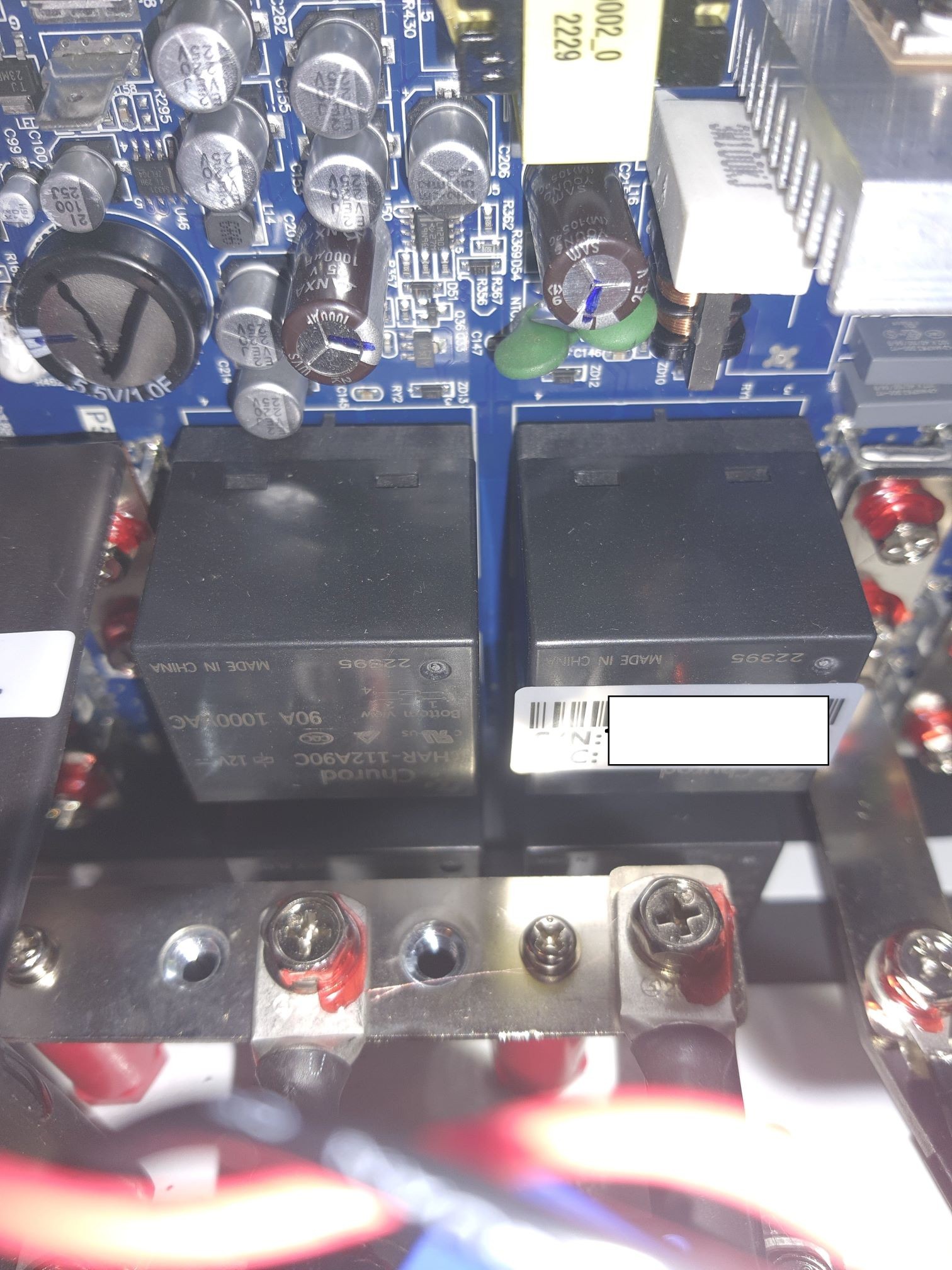
I know the guy tested the bypass but not sure where they left it. Will have to check.
Tried for a good 10 minutes, couldnt unlock the gateway door, it just wouldn't budge.
Would leaving bypass on just keep me on grid+battery and ignore the gateway?
Seems a bad design flaw if it shuts down house during just a firmware update or if something happens to it, grid should still be usable.
Power to house has gone out more since yesterday than it has in last decade.

GW version 5 (Firmware update) Allows the Grid relay to remain closed, for an AIO update.
If the installer didn't do the GW, any reboot of AIO will cut the grid, the GW doesnt recognise a real fault from a fake one. G99 regs state in fault the relay must open.
If the CANBus cable is not terminated correctly, the GW declare fault, to protect the grid, the relay opens.
As for Calibration, this should have been done on commissioning, if not. the system is not yet commissioned and therefore warrantied.
Installer would be good to come back and investigate.
TheDragon (GivEnergy) It was started yesterday, they contacted GE to get it started and the chap on the phone said it could take 30+ minutes, they hung around for at least an hour but this was the process.
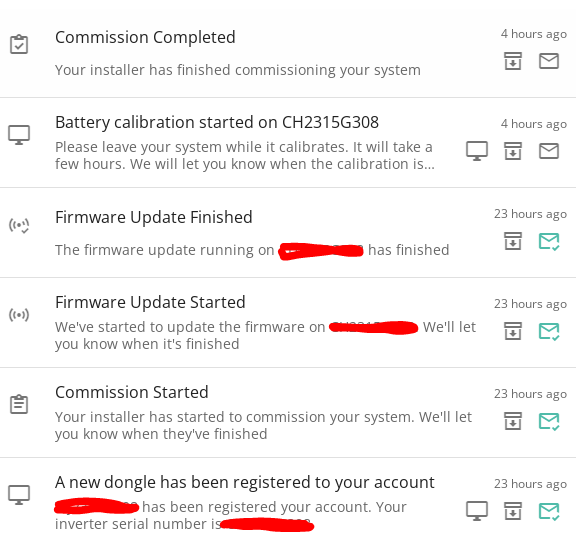
With the update this morning it went from firmware 4 to firmware 6 and the manual update button has gone so not sure why the firmware needed updating twice.
Also saw this pop up during the series of events
Grid Port Monitor Communication Fail 2023-07-20 09:54:58 2023-07-20 09:56:04
Installer got back to me they had been speaking with you lot and said there were a few issues getting things sent through properly so hopefully this was all just a breaking in issue, also is there nowhere I can double check warranty info, equipment was supposed to have been extended to 10 years but I can only check inverter on portal which says 5 years but no clue how to check gateway.
Edit
That was hte battery version updated to 6, where can I check gateway info?
Also isnt the battery supposed to discharge and then charge during calibration, it did not discharge at all since it displayed that message.
Sounds like your Gateway didn't get updated before the AIO. I had a similar issue until the gateway was updated.
TheDragon (GivEnergy) Thank you Dragon, now I have to just figure out why "home" wont work on the AIO.
Trying to get the following commissioned, with up to date firmware.
Currently dashboard shows the following:
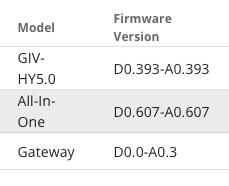
Is there a recommended order for updating the firmware?
At present I only see the button option to update the firmware on the AIO, but this fails at 0%
I did have an option to update the firmware on the GW, but this failed at 86% (and tripped the house) and is no longer available.
26Left - I had a bit of a faff and two attempts at getting the firmware on the Gateway up to v6. This is what I did - use at your own discretion; ensure you are connected over LAN - using the black lead - and have the DIP switches set as seen above / as per manual. Powercyle the entire unit (house too) - far right breaker - to then confirm connection by seeing flashing lights on your router that the cable is plugged into. Once this is done - open bypass relay. Go to the web version of the portal - then look for software tab - then you should see an update link. If there is no link to the Gateway information - use the gateway remote control link instead - and remove the remote control part of the URL - so you see: https://givenergy.cloud/inverter/GWxxxxGxxx
You should then be able to see the software tab - and hopefully the update button. Click that - then wait...
Refresh the page and with a bit of luck the version number should bump to D0.0-A0.5. The notifications told me the update had started - and also failed - but it had actually taken.
Put your bypass breaker to where it was before - and restart the whole thing once more for good measure.
The process above was a combo of a bit of research on here - and also some great help from Paul L - hats off.
Maybe it can help someone else - but as stated at the start - please only do this if you feel comfortable with all the steps - and if anyone else knows better - please do chime in too...
System seems solid now - fingers crossed. Tried an AIO restart via portal - and whole house remained alive :-)
BlokeFromStoke Thank you very much for writing up this procedure. I gave it one last try, but my sense is that the firmware on the Gateway is bricked.
Having unplugged the AIO from the LAN, and with the Inverter still showing online on the dashboard, I only have one IP address assigned to the GE kit (i.e. the Inverter). FWIW the GE kit sometimes shows up on my network with a name of "HF-121" or UNKNOWN, but you can always identify them as they all start with mac addresses in the range e8:fd:f8:XX:XX:XX - Shanghai High-Flying Electronics Technology Co., Ltd appears to be the manufacturer of the network chip.
So the GW isn't picking up an IP address after full power cycling despite the light on the relevant port switch being alight at my end of the LAN cable.
On the dashboard for the "Lost" Gateway it shows last connection time as lunch time yesterday when the firmware update was attempted. Clicking the firmware update button now it displays
Awaiting update - 0%
Updating Inverter ARM - 0%
Update failed - 0%
@Jellybaby - how do you not have a gateway?
On a wider piece, can I just check the current way to keep power on is:
https://givenergy.co.uk/giv-ing-you-support-a-live-qa-with-givenergy-guru-george-rawding/
So it isn’t a valid installation according to that comms piece from GE. It’s about the third question I think.
no gateway?
I see GW2315G276 at the same address as your AIO
I know snitches get stitches but you can pickup the Gateway on its own off ebay / batterygroup.
TheDragon (GivEnergy) weren't they saying that their Gateway isn't showing on their online account portal thing as an "inverter", rather than them not having one at all? Maybe I misunderstood though.
TheDragon (GivEnergy) Will I be able to combine my two customer accounts for this to have the full benefit?