Portal Data Lists now defaulting to ascending sort order - Not Ideal

12 comments started 2023-07-28 last 2023-07-30
Cloud PortalCards - Inverter
S
#1 SolSucker

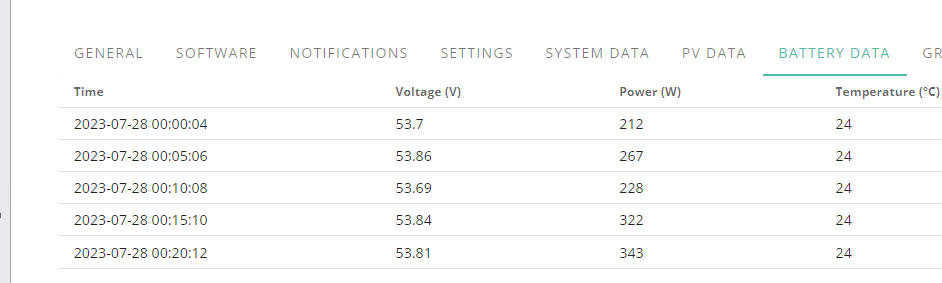
As title. In my opinion, I always want to see the latest data like how it used to be. 00:00am will always show no solar data so it's pretty useless when you want to see what's going on right now and I guess most of us do?

Can this be returned to the previous descending sort order default please? Unless I am missing a setting somewhere, I am happy to be pointed in the right direction by someone more knowledgeable.

Thanks.

T
#2 ThePud

SolSucker My inverter data is also coming out in time-sequence order in the browser as of this morning, but when I download it it is still in most-recent-first order, so my software still works. Like you I am not sure whether I have inadvertently done something in the browser (Chrome) to cause this, but I don't find it helpful either.

#3 Simon_C

SolSucker, I have found this same change today as well.

Previously I manually set the time sort order to be descending, so the most recent entry appears at the top of the list, then every time I visited the page the same sort order was used.

Now every time I visit the meter data the sort order defaults to ascending, and I have to manually change it every time. What a pain.

A
#4 anglefire

It may be security updates of browsers and cookies - loads of things that just worked before reset to defaults now.

S
#5 SimonClarke

Seems to be a little arrow next to the time label pointing up or down. Sorted mine

#6 gwynnej3

Yes I noticed earlier that it starts at midnight by default and the sort order is ascending. The sort order can be changed but deascending by default woudl be more convenient for most users I would venture to suggest. Is this a new feature?

T
#7 ThePud

SimonClarke Indeed there is, but it's invisible unless you hover over it! Thanks for pointing this out.
The inverter data has also developed another glitch in that if the first readings are recorded within a few seconds of midnight the "Meter Data" carries over the total generation from the previous day. For example, on 2023-07-20 the "Combined Gen Today" figure at 00:00:07 was 20.4kWh; on 07-23 at 00:00:02 it was 18.3 kWh etc. This is obviously unhelpful if you use the maximum value in that column to measure your consumption for the day and you have to write a bit of code to remove the first figure.

#8 Woodlands

Also, the refresh button no longer appears to work if you try to refresh after about 10 to 15 minutes.
Edit: Found that it does work, but you have to press the "Time" three times to get it to display the latest info!
@TheDragon (GivEnergy) Please can you get someone to put the portal back to how it used to work?

#9 TheDragon (GivEnergy)

This is already noted

T
#10 ThePud

gwynnej3 If the table starts by default at midnight, listed in ascending time-order, and the tabulation defaults to 15 lines, then both the "System Data" and the "Metric Data" will show (mostly) zeroes. This makes no sense at all. Maybe someone made a mistake at GE, but if this is a "revision" then it should be reversed.

T
#11 ThePud

TheDragon (GivEnergy) OK, my bad if being addressed, but for some reason the community forum doesn't update very quickly, at least for me.