Report data download as excel file

88 comments started 2023-08-17 last 2026-04-16
GivEnergy Products
S
#1 SteveCook

7 weeks after me telling Octo that their data is missing since July 1st Flux updated tariff - note meter comms is showing OK with 2 green flashes every 5 seconds - and numerous emails and tweets, Octo think they might have to undertake a "power cycle" (turn it off and on again).
They have said they will charge me at standard rate and credit my export at standard rate.
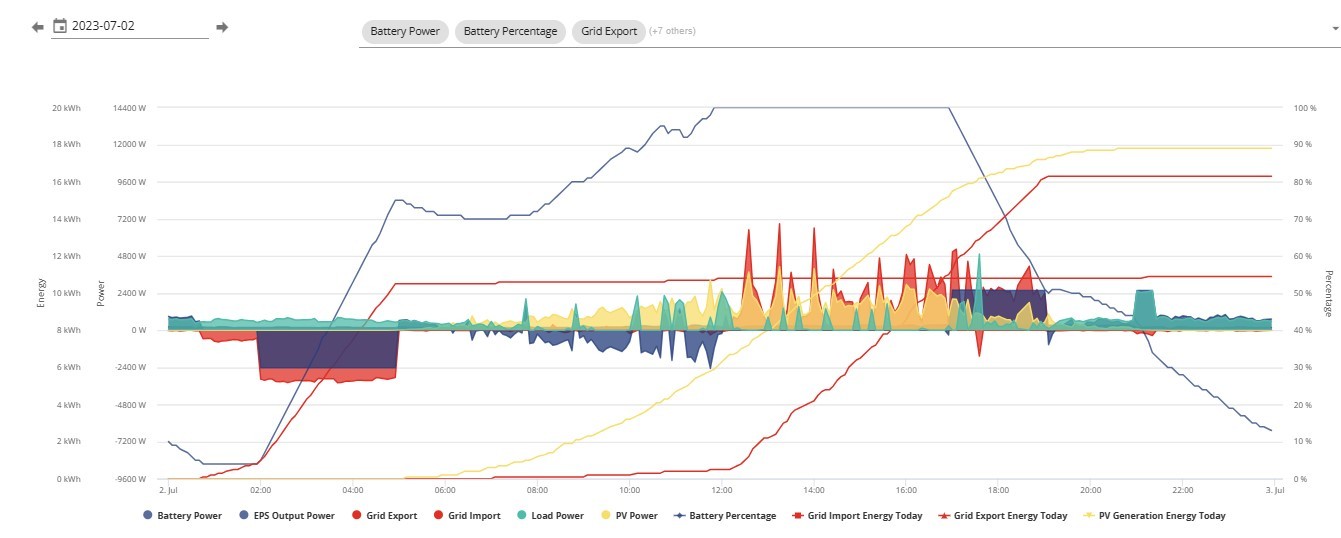
I charge each night 02:00-05:00 off peak and pretty much run all day on that 10kWhr with PV from 27 panels and do a peak export around 16:00-19:00. So I am not happy.

If they cannot get the data from my meter, I want to give them anything I have.
I have produced daily report graphs showing how my system works, but to pick over each day manually to get peak and offpeak import and export data for at least 8 weeks (goodness knows how long they will take to fix things) is a real PITA.

Does anyone know anyway to get the report data out in some sort of excel format, even If daily I can write some sort of conditional formatting to pick out cell info for peak and off peak times.

Thanks
Steve
R
#2 Rtidey

I produced some powershell scripts to extract data in csv format which can be opened in Excel or any similar spreadsheet program.

You can easily run them by just right clicking the script and selecting execute in powershell.

https://github.com/roberttidey/GivEnergyScripts

S
#3 SteveCook

Rtidey
Thanks. Is there some sort of idiots guide - ie me.
Regards
Steve

R
#4 Rtidey

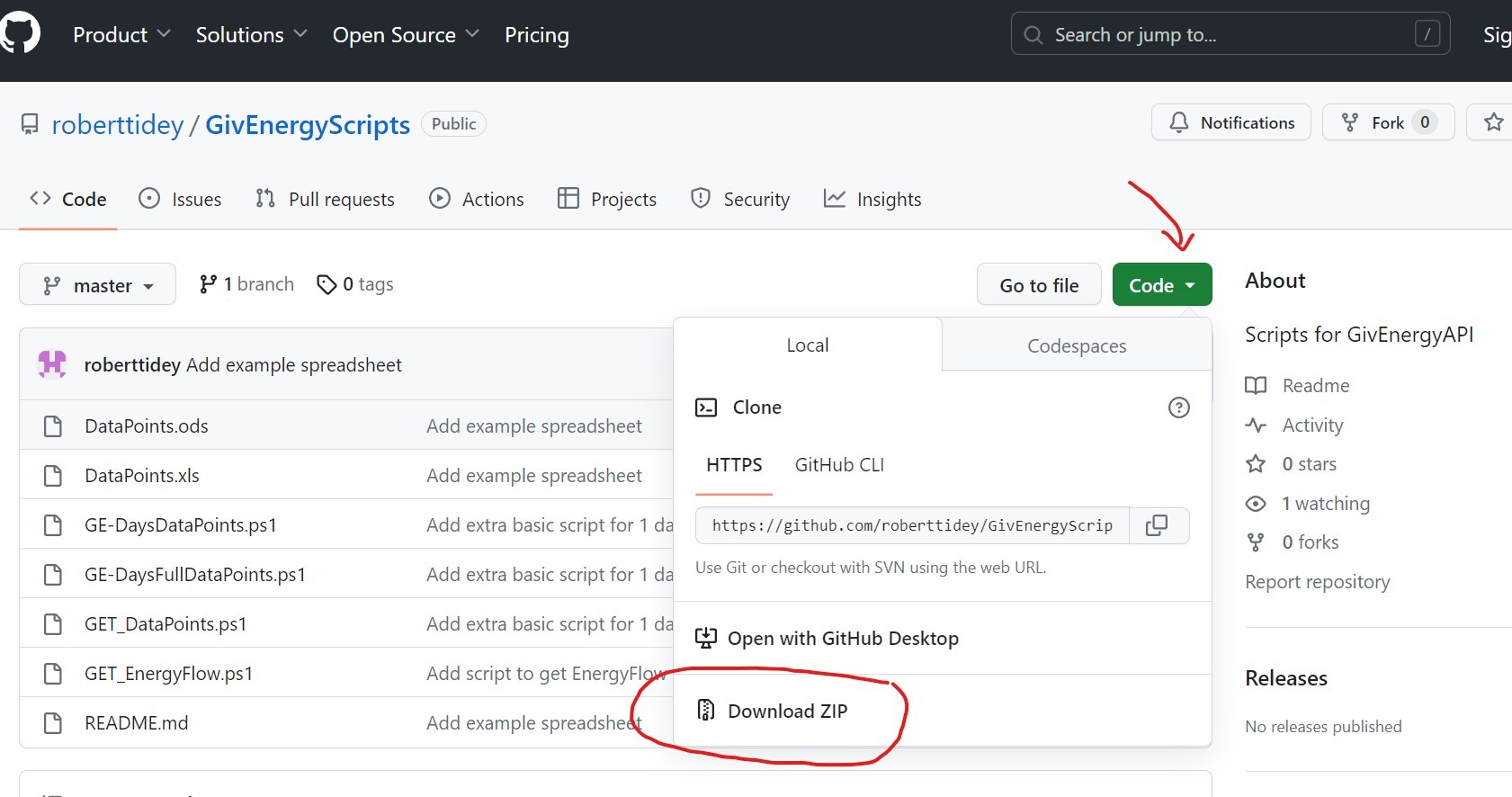
1) Go to that link.
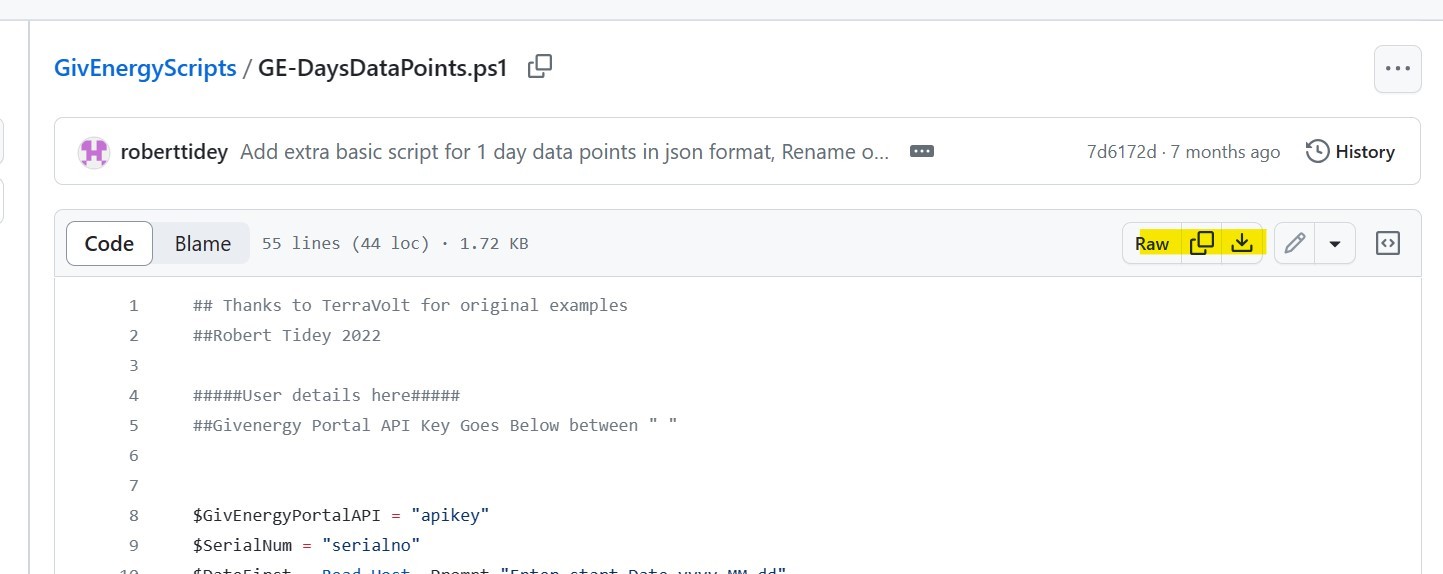
2) Click Code button and select download zip
3) In your Downloads folder Unzip to a folder and move it somewhere general like under Documents.
4) In your GivEnergy web portal go to my Inverter and get the inverter serial number e.g. CE9999X999
5) Under Account settings/Manage Account security/ManageAPITokens get the apikey for your system
6) For any of the scripts you wish to run then open it in a text editor like notepad and put your serial number into
$SerialNum = "serialno" so it is like
$SerialNum = "CE9999X999"
7) Repeat for the apikey into
$GivEnergyPortalAPI = "apikey"
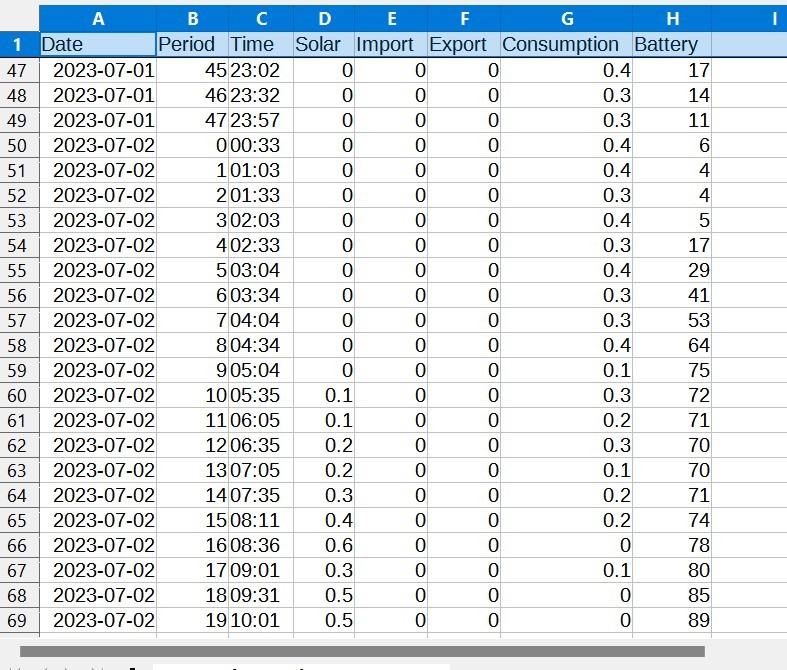
8) Save the customised script.
9) You can then run the script by right clicking and choosing Run with powershell
10) You should get a screen asking you to enter a start date and then for some scripts it may ask for the number of days of data to collect.
11) THe screen will show each day being processed and will save the result to a txt file containing csv data (or for some scripts json data). The txt files can be opened in a spreadsheet app.

S
#5 SteveCook

Rtidey
Thank you very much.
I will read, digest and try to understand.
Regards
Steve

S
#6 SteveCook

Hi downloaded the file, but could not find a "download zip". I hit download raw file.
I put in the API and Serial number.
I right clicked run in powershell. A powershell screen flashed up and then instantly went away. It did not ask for any dates.

R
#7 Rtidey

Strange about download zip. That appears in whatever your regular download folder is.

There are a couple of reasons why powershell may not execute the script correctly. First is if you run it from a folder that is in a position that does not have normal permissions. That is why I suggested to put it under Documents. Second is that if you have virus / software protection running then it might be blocking the script from running. If so you can normally change a setting to exclud ethe script from being blocked.

You can also run the script in a different way so that you can see any error messages. To do this navigate to the folder containing the script in file explorer. Right click in empty space in the folder window and choose Open in terminal. Then start to type in the script name and hit TAB to complete the name. Enter will now run the script but leave the window open so you can see any errors.

4
#8 4monks

Steve - I had the same issue with my smart meter going offline. Eventually the "right person" I was communicating with at Octopus said the meter stored the data for "weeks" (not sure exactly how many). Sure enough, after the reboot (an engineer visit) all of my missing data was uploaded. Hope the same happens for you.

#9 positor1

SteveCook
I struggled finding download zip too.
I made an assumption you downloaded just the script you wanted but you download all those scripts and then run the one you want.
when you click the link he gave you get a page showing the scripts he wrote.
at the top right of the list of scripts is a green "code" button
click that and a window opens. at the bottom of that window is "download zip"

#10 positor1

Rtidey
nice scripts thank you.
at what point is the battery percent taken>? is it the maximum charge the battery obtained that day?

I keep a spreadsheet every week for all the info from the GE weekly report, this may take some of the tedium out of doing that though inserting will require a bit of editing to match headings from your script to my headings.

R
#11 Rtidey

The battery figure is from the last reading of the day, i.e. around midnight. The api call actually gets all the data for the day (5 minute intervals). The DaysData script then gets the last field as that contains the accumulated solar, import, export, consumption for that day.

I have added the spreadsheet format I use to collate the results which gives averages and totals by month.

S
#12 SteveCook

positor1
Thanks
Please excuse my thickness. Can you post an image. I cannot find download zip anywhere.
Regards
Steve

S
#14 SteveCook

positor1
Fantastic thankyou.
I had clicked that but was on the Codespaces tab and did not know(think) to try the local tab.
Doh......

R
#16 Rtidey

The output file is in the same directory as where the script is. It actually labelled as a .txt file but contains csv data (e..g. DaysDataPoints_2023-08-01.txt). It can be opened by a spreadsheet program.

S
#17 SteveCook

Rtidey
Thanks
That was what I would have expected.
I ran the script, it showed it was doing the 30 days of July I asked for.
It got to the end and said "All done - Exit in 5...."
But no file?
I will keep trying

#18 hoggy

Wherever the script is you can try running it as admin (right click, run as administrator) it may be a permission thing.

S
#19 SteveCook

I tried other things and found that running the script directly rather than through Visual Studio Code creates the text file alongside the script.
Now to look at the data, but hoping Octo get their act together on my meter!

R
#20 Rtidey

Good to hear you've got it going now. It was designed to be run directly to put the txt file locally. If you run under another environment like Visual Studio then the output will be created in whatever is the current directory for that environment. It maybe that is c:\users\username where username is your normal login name.

S
#21 SteveCook

Well Octo have finally called me after 10 weeks of waiting and are now proposing some sort of average deal for all the import/export data missing since 1st July.
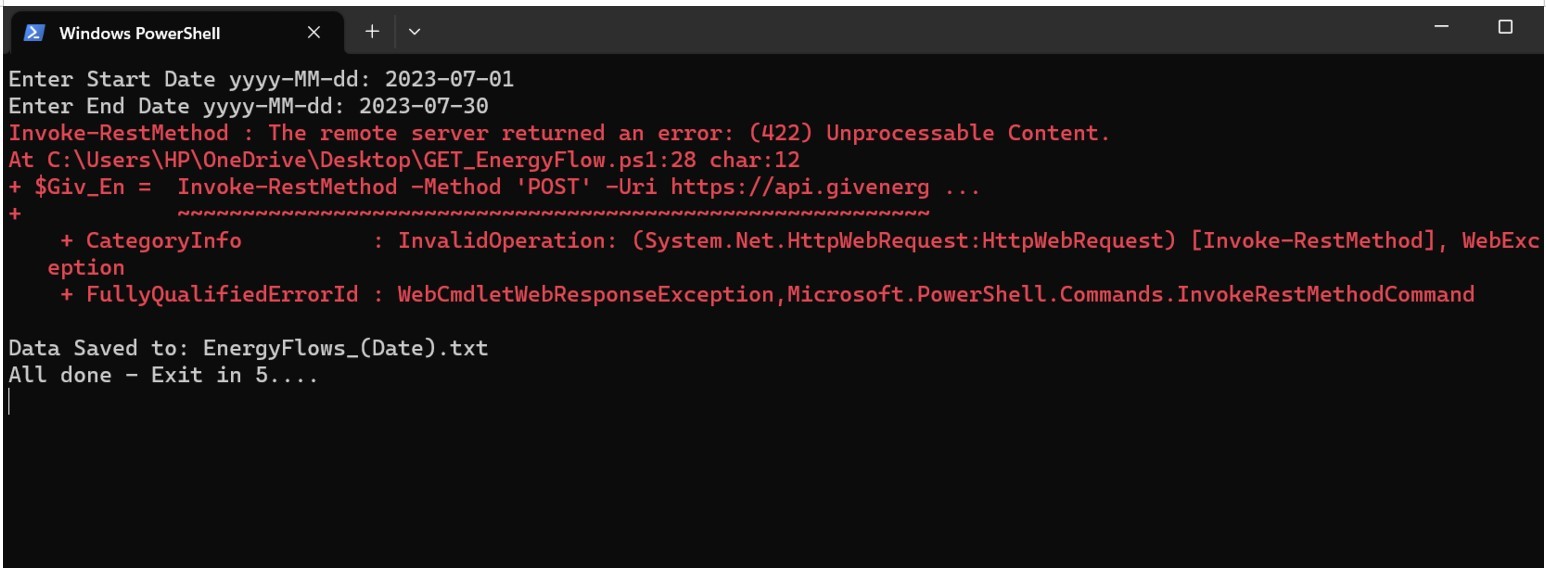
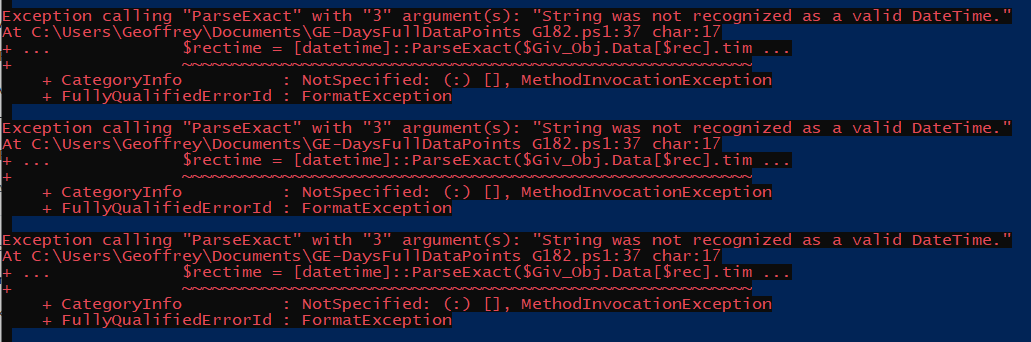
I have run 4 powershell files and 3 work great, however Energy Flow (which I presume is the one I want) just errors every time as below and then creates an empty file.
Any ideas please?

R
#22 Rtidey

I just tried it and it seemed to work OK for me.

However, I then tried again using your exact dates and it failed with same error message.

A bit of further experimentation showed that it was fine up to a 21 day period, but above that it gave the error.

I suspect that might be a limitation at the server end. I'll investigate a bit further.

I did also notice a small issue in that it wasn't including the date in the file name. I have fixed that.

S
#23 SteveCook

Rtidey
Thanks. If I set 14 days it works.
I guess I will send data to Octo in fortnightly chunks

S
#24 SteveCook

Just need to find a way to manipulate the data into a better/easier format.

R
#25 Rtidey

I would have chosen the DaysDataPoints script which puts each days data in csv format.

Putting that into the example spreadsheet then gives summaries.

S
#26 SteveCook

Rtidey
Thanks, I see what you mean, however I need that format, but half hourly so I can populate the off-peak, day and peak rate imports and exports.
I have run DaysDataPoints and it just gives the daily total but not timings

R
#27 Rtidey

DaysFullDataPoints will extract all available data for the days in csv format

R
#28 Rtidey

I have just found a significant problem with some of the scripts.

I had assumed that records were reported at 5 minute intervals which is true most of the time, but some days have bursts where the data is reported more often.

The scripts were set up to retrieve a maximum of 300 records which was sufficient for the 5 minute interval reporting but can miss some of the records at the end of the day if the number of records exceeded this.

I have increased the maximum to 1000 which is significantly larger than anything I have seen.

T
#29 TX200

Rtidey if you have the app open in local mode, it sends extra data points to the portal.

Not sure they intended to do that, maybe it was a troubleshooting thing that should be optional but now happens for everyone.

S
#30 SteveCook

Thanks to all.
In my "debate" with Octo I need to be able to send half hourly import and export kWhr numbers.
Is there anyway I can edit the script to do this please.
Ta
Steve

R
#31 Rtidey

If you use the fuldata version then you can import it into a spreadhsheet (Excel, LibreCalc) and use standard spreadheet functions extract half hour data.

I have added a new script GE-DaysFluxDataPoints.ps1 which is designed to extract data for the 5 Octopus Flux periods for each day.

That would be a good starting point to directly export data at 30 minute intervals.

R
#32 Rtidey

TX200
That's interesting about the app sending extra data. I'll have to check out how much extra it could send.

I have to include a pagesize to the API for maximum records to retrieve and I don't know if there is any limit on that.

S
#33 SteveCook

Rtidey
Thanks. I am off to London today, so will give it a shot over the weekend.

R
#34 Rtidey

I have replaced the Flux script with a more generic Intervals script.

This can work in 2 ways.

If the $PeriodInterval variable is set to a value in minutes then it will extract data at that interval throughout each day, e.g 30 minutes.

If the $PeriodInterval variable is set to 0 then it will use the $IntervalTimes array which contains the fixed times in minutes to record data. The default array is set for Flux.

The output format has been improved to make it easier to do spreadsheet calculations.

S
#35 SteveCook

Rtidey
Thankyou for doing this.

S
#36 SteveCook

Can I ask what the units are for the solar, import, export and consumptions are?
Are they kWhr that have taken place in the 30 minute slot?
Is there any rounding up of numbers going on as they are all just a single significant figure?
I have done a run and am confused by the numbers as I can't seem to match the spreadsheet with my GE graph.
I import/charge each night 02:00-05:00 but cannot see that in the spreadsheet. In fact I don't get any numbers for import in the 24hr period
I don't get any numbers for export in the 24hr period

R
#37 Rtidey

Units are kwHr.
The API actually returns cumulative kwHr for each time period returned so I just report the difference between the records as the kwHr in that period.

I don't do any additional rounding. I don't know what the API does. It seems to only report energy values to 1 decimal point.

There was an error on export, import value handling. That is fixed now.

I have also added an option to report either the energy in each interval or the running total. If $Cumulative is 0 then it reports the energy in each interval. If set to 1 then it reports the daily running total up to that time which is what the API actually reports.

S
#38 SteveCook

Thanks. I will give it a shot.

It is now 8 months since Octo paid me for any export on the basis the data was missing (there are a few days where some half hour readings are missing).
Funny though there is corresponding missing import data yet they still send me bills and even though I am £400 in credit I cannot lower my monthly direct debits!

S
#40 SteveCook

Fantastic. The data looks good and I will now do some manual checks against my GE graph and cursor (gonna be slow) and then I can shove the data right back at Octo!

S
#41 SteveCook

Hi. I have done a manual check of reading the data points in the GE portal graph and then doing subtractions etc to get the cumulative numbers and compared them to the data from the powershell extract.
Total daily figures match for import and export
I get slight oddities with the split for peak and offpeak import and export against their totals, and I think that relates to the timing slot for the readings.
Is there anyway the powershell readings can be taken at the same time as the Octo tariffs switch. eg on the hour and on the half hour.

Thanks for your fantastic help on this. This will be a brilliant tool for others who are being given the runaround by their energy supplier.

V
#42 Vestas

Not sure if it helps at all but if you have a SMETS2 meter then it will store 13 months worth of half-hourly data. Octopus can simply request a complete data pull by DCC for the period in question.

S
#43 SteveCook

Yes I have a SMETS2 - I am on the 6th one.
I have been round and round in circles with them.
I told them to take it away and manually read it if they can't get data form DCC, but I think their "engineers" who turn up just toss them in the bin.
I don't think they can do this or will be bothered to do it

Examples of incompetence.
They told me me meter would not work as I lived near Fylingdales on the East Coast and the radar would block the readings, I live near Skipton in the Pennines.
They told me the phone signal was poor so I would not get a signal. In the North the comms is RF and not GSM.

V
#44 Vestas

I see.

Have you considered getting a n3rgy.com account and looking at the data on your meter/data DCC hold?

Edit - Octopus DEFINITELY CAN request a new data pull from DCC. Have a google and you'll probably find an email address (can't post it here) for Octopus to report missing data and request a data pull. It works as it bypasses first line support, might take a week or two but it'll happen.

S
#45 SteveCook

I used a 3rd party app that showed data until 23:30 30th June and there is no further data because it all stopped working July 1st when the new Flux tariff was pushed out. The comms indication lights showed comms was good.
Octo say they have asked DCC data to complete all missing data, but the DCC don't have it.

I spent July phoning and emailing during July when data stopped, but nobody ever replied.
I did a tweet start of Aug (new to me) to get some action by embarrassment.
A man came after 4 weeks (7th Sept) and did a power cycle -turn it off and on again -, replaced the comms hub and did another power cycle and left without things working. Comms lights no longer working as well.
A man is booked in October to change the meters again! I think this is 7th time.

S
#46 SteveCook

SteveCook
A complaint has been running for a couple of months now.
I don't blame Octo because they don't seen to really know how to fix things and support seems to just be about pacifying the customer and hoping a power cycle fixes things.
I did say that I did not want a new meter as all data would be lost. They agreed, but now want to do some sort of tariff averaging which I am not happy about as I pretty much only import off peak and export during the day with a forced battery export at peak.
They say they can't see this as they don't have half hourly data!

V
#47 Vestas

Sounds like a software/configuration issue rather than hardware to me. ie someone has screwed up the MPAN import/export data pull for your property.

Did you have export going before Flux or did you get an export MPAN at the same time?

Sorry if you've already said but its a long thread now 🙂

Regardless, its long past the point at which you should register a formal complaint in order to refer it to the ombudsman 8 weeks later. That may be the only way to get it sorted out.

S
#48 SteveCook

It was all working on Eco7 import and export after a visit in Dec 2022 when an Octo man turned up to change the meters and said "I have been to this house before and am not going to the same thing and hope for a different result". He said "excuse me, I am going outdoors to use the phone and it might get fruity".
Things then all started working in about15 mins!
In March I switched to Flux and it all stopped again. I phoned up and got to talk to someone who seemed to know what to to do and in 15 mins all started working again.
All was fine until new Flux tariff July 1st.

I have told Octo all this stuff until blue in the face, but the response is "power cycle followed by new meter"

V
#49 Vestas

If its more than 8 weeks then ombudsman time. That might be the only way to escalate/rectify things 🙁

S
#50 SteveCook

New smart meters fitted today. Still dumb! 42 months since the start of this saga.

3 months of "missing" half hourly import/export data sent to Octo 2 weeks ago, but deafening silence from them on whether they are prepared to use it in their assessment of my usage.
I even offered them the ability to login to my GivEnergy portal (one of their partner companies) to see the data if they did not trust me!

Still no export payment since Feb 2023

I have asked to go to Eco7 for import and fixed outgoing and I will have to read meters myself!

S
#51 SteveCook

Octo now say "can't use 3rd party data" no explanation.
They can put me on Eco 7 for import, but say there is no tariff for export as I don't have a smart meter!

If I had a working smart meter I would not be here (there is a hole in the bucket dear Liza - look it up)

S
#52 SteveCook

Octo now say that bacause smart meter is dumb they can only put me on a manual read export tariff at 4p/kWhr.
I have contacted the Ombudsman as for years they were happy with manual readings at 15p

V
#53 Vestas

SteveCook Well lets see what happens now you're going to the ombudsman.

I can quite understand Octopus not relying on the GivEnergy data - the EM115 meter isn't MCS certified for export and is a simple current clamp so isn't as accurate as a wired meter (it certainly isn't here compared to either the smart meter or the hardwired meter fitted between the inverter and the consumer unit).

Still sounds like someone has screwed up a database entry somewhere rather than anything to do with hardware....

S
#54 SteveCook

I kind of agree they can't rely on EM115 data, but they can look at it to see my usage patterns rather than suggest "we work out an average" for 8 months of import and export when my automations were all set and working import off peak, use solar in the day and export at peak.

EM115 is MID approved though

I have suggested a back end issue until blue in the face, but the response is always - change the meter

#55 positor1

SteveCook
is it possible that changing to a true dumb meter for a few months and then back to a smart would cure it, as it seems to be some kind of setting somewhere that they do not know how to correct?

S
#56 SteveCook

I have spoken with Octo and we have a plan for manual readings on Eco7 over the winter while they take the matter up with the DCC.
It can't be hardware, not after 7 meters and about 10 comms hubs.
Octo still have the view it is not a setting issue at their end.

I can only be Octo settings or DCC and Octo think it is not them.
Hopefully over the winter it will get sorted.

T
#57 TX200

SteveCook keep a close eye on eco7. Octopus are known to have issues with charging people incorrectly. E.g. off peak timeslots added to peak billing and vice versa.

S
#58 SteveCook

I have no doubt about it. They have just credited my 2023 export from March 1st to 1st Oct, but somehow missed 4 months (April, May, June & July)

#59 positor1

SteveCook
your patience is astounding!

S
#60 SteveCook

Revised (corrected? bill came today.
Correct tariffs now applied.
April, May and June now included, but then July, Aug and Sept have dropped off!
Aaargh!

S
#61 SteveCook

Rtidey
Thanks for all you help.
Octopus would not "accept 3rd party data", no explanation given.

They said as my smart meters had been dumb they would charge me standard import and would only pay me 5p export.
I pretty much use only off peak import, regular export and during the summer a lot of peak export .
In the end they agreed to 15p export, standard import and gave me £200 goodwill to deal with the off peak import and peak export issue.
I think I came out neutral, but had to spend lots of my time getting to a resolution!

S
#62 SteveCook

G
#63 geoffreycoan

@Rtidey this is an excellent set of scripts, thanks for sharing them.

I wanted to use the scripts to bulk load historical GivEnergy data into my Home Assistant for the period of time before I started with HA. I made some changes to the full data script to obtain the extra fields I needed for this, and along the way fixed a couple of bugs and a BST/UTC 'feature' I found.

The script did the job perfectly and I'll be sharing how I did this soon.

Have raised a PR to include my enhancements to the code. Hopefully should be self-explanatory

Thanks again!

D
#64 Daft Vader

@[deleted] Thanks for the scripts they will be very useful .
Unfortunately I have tried the GE-DaysDataPoints script and all I get when I run in Powershell is a very fast Black powershell screen showing for a fraction of a second and then nothing! I don't get anything downloaded I'm afraid.
I tried GET_DataPoints as well with the same result.
I did enter a new API Code and the serial Number OK. But in my case I have an all in one and when I click on inverters I get 3 of them. One is definitely the Battery so I didn't try that but I tried both the other "Inverters" Listed .
I did run them from my "Documents Folder"
Have you any idea what I am doing wrong please?
Thanks

D
#65 Daft Vader

@Rtidey Thanks for the scripts they will be very useful .
Unfortunately I have tried the GE-DaysDataPoints script and all I get when I run in Powershell is a very fast Black powershell screen showing for a fraction of a second and then nothing! I don't get anything downloaded I'm afraid.
I tried GET_DataPoints as well with the same result.
I did enter a new API Code and the serial Number OK. But in my case I have an all in one and when I click on inverters I get 3 of them. One is definitely the Battery so I didn't try that but I tried both the other "Inverters" Listed .
I did run them from my "Documents Folder"
Have you any idea what I am doing wrong please?
Thanks

E
#66 Efpv

geoffreycoan Looking forward to seeing your revised scripts as i too would like to import historic data from GIV to HA.

S
#67 SteveCook

[unknown]
Take a look around post #6. I seem to remember a similar problem. I think I had to play with folder locations and permissions

G
#69 geoffreycoan

Daft Vader Unfortunately I have tried the GE-DaysDataPoints script and all I get when I run in Powershell is a very fast Black powershell screen showing for a fraction of a second and then nothing! I don't get anything downloaded I'm afraid.
I tried GET_DataPoints as well with the same result.

I have PowerShell installed on my Windows PC. I was able to edit the scripts within the Powershell UI, but if I try to run them in Powershell I get a permissions error.

However right mouse clicking the scripts from Windows and clicking ‘run with powershell’ worked reliably for me all the time.

Efpv I need to do a bit of tidying up of my writeup and then I’ll publish it all

N
#70 NickK

geoffreycoan Will your scripts include Grid voltage or be obvious how to modify to get it?

With all this sun, I'm getting periods where I go up to 258 volts. I don't believe its ever got to the point where the inverter shuts down but I would like to keep an eye on what has happened.

R
#71 Rtidey

[unknown]

The grid voltage is available in the data that the scripts retrieve but is not extracted in them.

The script GE_DataPoints saves 1 days data as a json file and shows all available elements.

E.g. for each time period there is a "power/ grid element"
"grid": {
"voltage": 242.7,
"current": 1.3,
"power": 0,
"frequency": 49.98
},
It would be very easy to add this voltage to the csv output in say the GE-DaysFullDataPoints script.
Something like
$voltage = $Giv_Obj.Data[$rec].power.grid.voltage
in the powershell version or something similar in the python version
One would need to update the $DataPointsStr and include the $voltage in $parArray

#72 26Left

For those working on Mac, the script throws a parse error as Mac PowerShell appears to use MM-DD-YYYY rather than the UK English localised Windows using DD-MM-YYYY.

MethodInvocationException: /Users/jarss/Downloads/GivEnergyScripts-master/GE-DaysFullDataPoints.ps1:35
Line |
  35 |          $rectime = [datetime]::Parse($Giv_Obj.Data[$rec].time)
     |          ~~~~~~~~~~~~~~~~~~~~~~~~~~~~~~~~~~~~~~~~~~~~~~~~~~~~~~
     | Exception calling "Parse" with "1" argument(s): "String '08/22/2024 22:56:43' was not recognized as a valid DateTime."

With the help of chatGPT I've managed to get it working for me. In case others are on Mac, the change I made was as follows:

Around line 35, replace this

$rectime = [datetime]::Parse($Giv_Obj.Data[$rec].time)

With this

$rectime = [datetime]::ParseExact($Giv_Obj.Data[$rec].time, 'MM/dd/yyyy HH:mm:ss', [System.Globalization.CultureInfo]::InvariantCulture)

G
#73 geoffreycoan

26Left With the help of chatGPT I've managed to get it working for me. In case others are on Mac, the change I made was as follows:

Great thanks.

I just tried this with Powershell on Windows and it doesn't work, I repeatedly get the error

Typical AI, gives you an answer with issues 😢

G
#74 geoffreycoan

The line you changed was the one I added to convert from UTC retrieved from the GivEnergy portal with BST. The Mac using different date format would explain why it works for me on Windows but not on Mac.

Exception calling "ParseExact" with "3" argument(s): "String was not recognized as a valid DateTime."
At C:\Users\Geoffrey\Documents\GE-DaysFullDataPoints G182.ps1:37 char:17
+ ...             $rectime = [datetime]::ParseExact($Giv_Obj.Data[$rec].tim ...
+                 ~~~~~~~~~~~~~~~~~~~~~~~~~~~~~~~~~~~~~~~~~~~~~~~~~~~~~~~~~
    + CategoryInfo          : NotSpecified: (:) [], MethodInvocationException
    + FullyQualifiedErrorId : FormatException

Exception calling "ParseExact" with "3" argument(s): "String was not recognized as a valid DateTime."
At C:\Users\Geoffrey\Documents\GE-DaysFullDataPoints G182.ps1:37 char:17
+ ...             $rectime = [datetime]::ParseExact($Giv_Obj.Data[$rec].tim ...
+                 ~~~~~~~~~~~~~~~~~~~~~~~~~~~~~~~~~~~~~~~~~~~~~~~~~~~~~~~~~
    + CategoryInfo          : NotSpecified: (:) [], MethodInvocationException
    + FullyQualifiedErrorId : FormatException

Back to ChatGPT ....

Either need a version that will work on Windows and Mac, or a version that detects what OS is being used (maybe the date format) and calls the appropriate routine?

#75 26Left

geoffreycoan

How about this instead

$timeString = $Giv_Obj.Data[$rec].time

if (-not [datetime]::TryParse($timeString, [ref]$rectime)) {
    $rectime = [datetime]::ParseExact(
        $timeString,
        'MM/dd/yyyy HH:mm:ss',
        [System.Globalization.CultureInfo]::InvariantCulture
    )
}

So basically tries the original, and if it fails, try the alternative.

Not the most elegant but might work?

G
#76 geoffreycoan

26Left that doesn't work, I get the error:

[ref] cannot be applied to a variable that does not exist.
At C:\Users\Geoffrey\Documents\GE-DaysFullDataPoints G182.ps1:45 char:21
+ ...          if (-not [datetime]::TryParse($timeString, [ref]$rectime)) {
+                  ~~~~~~~~~~~~~~~~~~~~~~~~~~~~~~~~~~~~~~~~~~~~~~~~~~~~~
    + CategoryInfo          : InvalidOperation: (rectime:VariablePath) [], RuntimeException
    + FullyQualifiedErrorId : NonExistingVariableReference

I tried

if (-not [datetime]::TryParse($timeString, $rectime)) {

which ran without errors but didn't populate $rectime, so blank dates in the output file

Here's my further (no AI involved) version. This works fine on Windows, both for dates/times in UTC and BST

                $timeString = $Giv_Obj.Data[$rec].time

                if ([datetime]::Parse($timeString)) {
                        $rectime = [datetime]::Parse($timeString)
                    }
                else {
                    $rectime = [datetime]::ParseExact(
                        $timeString,
                        'MM/dd/yyyy HH:mm:ss',
                        [System.Globalization.CultureInfo]::InvariantCulture
                    )
                }
V
#77 Vestas

geoffreycoan Where have you been hiding - holidays?

R
#78 Rtidey

Thanks for these posts. I am a windows user so I don't really have an opportunity to try these on a Mac.

I normally use the python variants and it might be easier to adjust these for dual Windows / Mac use.

In the light of the announced cloud subscription plus administration, I am assuming I will lose API access soon, so I am working on an alternative way of gathering this data from Home Assistant / GivTCP. I have got most of this working and am successfully exporting the statistics I need. I just need to do some more formatting so I can get it into my spreadsheet more easily.

G
#79 geoffreycoan

Vestas geoffreycoan Where have you been hiding - holidays?

It wasn't much of a relaxing time as I was gardening for 10 days, but yes, have been away, and decided that I would take the opportunity to take a sabbatical from the forums and github. Particularly github. I plan to stay 'away' until next Monday which will be two weeks offline (but James, @26Left pulled me in by messaging me directly).

Rtidey In the light of the announced cloud subscription plus administration, I am assuming I will lose API access soon, so I am working on an alternative way of gathering this data from Home Assistant / GivTCP.

Yes assuming the subscription goes ahead, which to keep GivEnergy software afloat makes sense, then yes would lose API access if you don't pay.

Maybe too late for you, but there are easy ways of getting the data out of Home Assistant:

  • either display the entity you want in a history chart in HA, then click the three dots and there's a download option
  • or use the import statistics integration which can extract and reload long term statistics in and out of HA for you

I did cover these in the 'how to manipulate HA stats' article I wrote.

My use case for using the integration was to extract historical data from the givenergy portal to load it into HA so I had full history for my entities, and to fix glitches when HA wasn't working.

R
#82 Rtidey

I am using the import_statistics integration to get the raw long term statistics from HA, effectively the equivalent of the GivEnergy api call.

The bit I am working on is reformatting and summarising that data to make it more suitable for my spreadsheet usage.

R
#83 Rtidey

The Mac error referred to is indeed a problem for that one script, and would also not get correct timestamps in the windows version. I had fixed in the python version but not updated in the Powershell.

Line 35 should just read

$rectime = $Giv_Obj.Data[$rec].time

Github to be updated.

G
#84 geoffreycoan

Rtidey Line 35 should just read

$rectime = $Giv_Obj.Data[$rec].time

Github to be updated.

No !

I changed this in a PR in github some time ago to:

$rectime = [datetime]:😛arse($timeString)

The reason (as per the comments in the script) is that the portal holds dates in UTC so in summer time when you download a day of data you get 23:00 (yesterday) - 23:00 (today)

R
#85 Rtidey

OK. Updated again. Sorry for any confusion. This is a script I never personally use.

I haven't updated the python version yet.

Most of my attention on this is towards avoiding the api in future and using HA to give me the same data.

R
#86 Rtidey

I have updated the python version of GE-DaysFullDataPoints and that seems to work OK.

I normally recommend using the python versions rather than the powershell ones. They are more portable and seem to run faster.

G
#87 geoffreycoan

Rtidey I just started with the powershell and other than the date issue (and needing to add some more fields to the output), it did what I wanted. So never looked at the Python versions.

Thanks

geoffreycoan Here's my further (no AI involved) version

@26Left did you get the chance to test my updated date time handler (above) on Mac powershell? It worked fine on Windows, be good if we could get a single version for both platforms

R
#88 Rtidey

I have now added an experimental HA_statistics.py file into my github repository.
This can now transform HA statics data into a more friendly spreadsheet format like the original GE api scripts

#89 26Left

geoffreycoan

Sadly no good

First error was this:

ParserError: /Users/jarss/Downloads/GivEnergyScripts-master/GEv3-DaysFullDataPoints.ps1:27
Line |
  27 |  function WriteDateFullPickData {
     |                                 ~
     | Missing closing '}' in statement block or type definition.

I added a missing } on row 46 as I think this was the right place to close the else {} condition.

Script would then initiate but throwing parse errors on Mac PowerShell of the same type:

MethodInvocationException: /Users/jarss/Downloads/GivEnergyScripts-master/GEv3-DaysFullDataPoints.ps1:37
Line |
  37 |          if ([datetime]::Parse($timeString)) {
     |              ~~~~~~~~~~~~~~~~~~~~~~~~~~~~~~
     | Exception calling "Parse" with "1" argument(s): "String '04/15/2026 22:59:17' was not recognized as a valid
     | DateTime."

The result is that the data file has no datetime header for the row for any dates with a day that is greater than 12 - the headers that do work are in MM/DD format.

So it seems that whatever the IF condition is testing, it's true on Mac, and so uses the Windows code rather than the Mac version. I know this works because if I remove the IF part and just leave the ELSE, it runs fine - producing a file with datetime headers that are complete in the DD/MM format.

R
#90 Rtidey

Yes. Not quite sure how that happened my development version did have the } on line 46

Now corrected.

R
#91 Rtidey

Can you try the python version on the Mac as that use different date handling?