AIO and Givtcp

32 comments started 2023-08-29 last 2023-10-27
Home AutomationGivEnergy ProductsAC Coupled
S
#1 s_r_thomas

Hi all,

I understand Givtcp isn't a supported option but looking to see if anyone has it working against AIO and what their settings are. I am getting continual "consecutive failures" with v2.3.3 regardless of how I configure the slides "AIO?" and "old firmware".

Appreciate any pointers or where to ask for further help.

Thanks

S
#3 s_r_thomas

Thanks so much! For others finding this, set old firmware to false, AIO to true and the key is number of batteries to 0.

J
#4 Jellybaby

Pandorian love that guy, he has helped me a lot with videos AND responding to messages.

S
#5 s_r_thomas

Jellybaby I just need to find suitable power card now and set up old phone with dashboard

J
#6 Jellybaby

s_r_thomas Still trying to decide what to get to put home assistant on, thinking about picking up a 5070 thin client,

S
#7 s_r_thomas

Jellybaby I'm currently using my Synology which I added extra ram too. Anything with Intel processors can run virtual machines nicely without complication (in my opinion) of docker

G
#8 geoffreycoan

Jellybaby I bought a cheap i5 tiny PC from eBay. Runs home assistant perfectly in a virtualbox VM under windows 10

J
#9 Jellybaby

geoffreycoan was thinking about doing direct home assistant install instead of faffing about with VM's on a mini pc, plus would be less power consumption.

J
#10 Jellybaby

s_r_thomas I wanted to get one of those but the fact that if the machine dies your hard drives are useless until you buy another put me off, if they could use a PC file format system id be all for it.

S
#11 SpeakToTheGeek

Jellybaby Yeah, he's also really good looking too 🙂

B
#12 Barns

s_r_thomas I've got a Synology I'm hoping to run HA on, I wanted to use Docker but there looks to be an issue where you can't run Supervised HA on Docker on Synology, have you found it easy enough to run it in a VM and does it run well with GivTCP etc?

My Synology has 8gig RAM but runs a bunch of dockers so I was concerned about performance and was considering a standalone Pi4 to run HA, but saving a hundred quid by running on existing hardware would be good.

S
#13 SpeakToTheGeek

Barns I've tried it in a VM on Synology and it works pretty well. Performance-wise it barely touches the hardware (DS918+), but I did struggle with the reliability of using any USB dongles (Zigbee Conbee II, Aeotec Z-stick, etc). You can bodge it to work by installing drivers and hacking the DSM's Linux config files to enable them, but every update just resets it. Same if you use it via Docker on Synology too. If you don't need physical hardware interfaces like that though then it's a great way to run it - so for GivTCP and other network-based monitoring solutions like that then you should be fine.

P
#14 Pandorian

I run HA as a VM in Proxmox - so its the full operating system version. The dongle is attached via a pass through from Proxmox to the VM. Nice thing with Proxmox is that you can backup the vm and move it to another Proxmox instance if you have to.

J
#15 Jellybaby

SpeakToTheGeek lol heya, did you see my vid on teh API options?

S
#16 SpeakToTheGeek

Jellybaby I might have done, I've watched a few, but I'm afraid your username on here is too cryptic for me to match you up the channels I've viewed sorry!

J
#17 Jellybaby

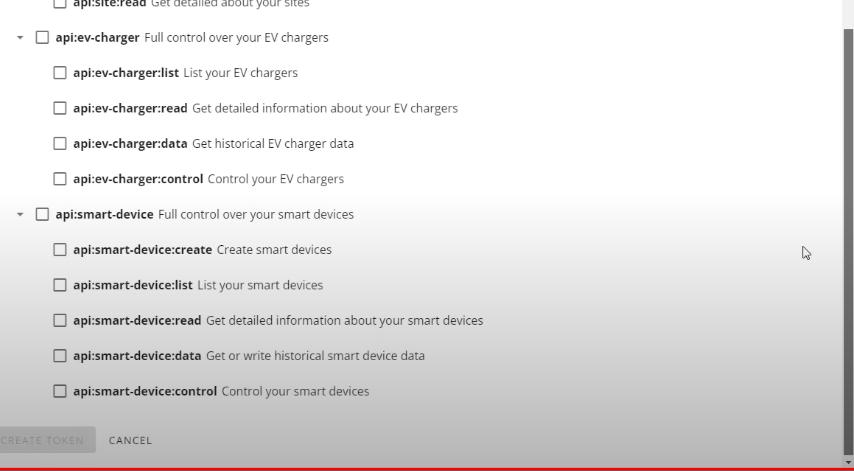
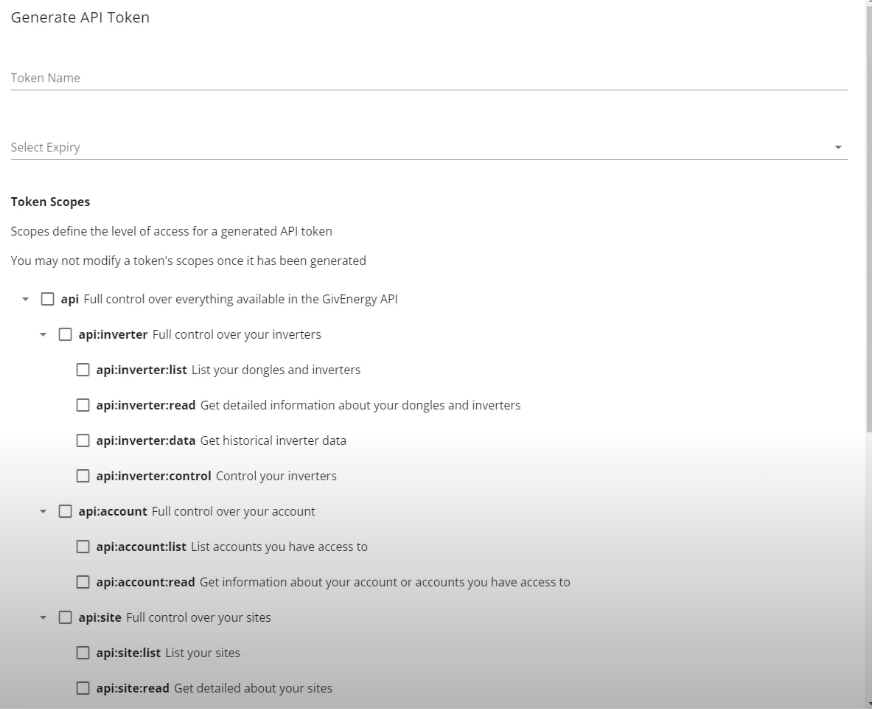
SpeakToTheGeek no worries, it was inquiry on API settings and all the tick boxes, was just a video of me scrolling through them.


S
#18 SpeakToTheGeek

Jellybaby Ah I’m with you now, and no, the link didn’t appear in the comments but I see your picture now. Those options are all new since I set mine up so I guess by default I must have them all ticked. They’re basically allowing you to give your API key only specific rights so as to improve security but if you plan to use this key for lots of things and aren’t bothered by security then tick everything! It would be a bit of trial and error/guesswork to get it perfectly correct for just one service otherwise.

S
#19 s_r_thomas

Barns
Vm on mine works well, Intel cpu for best results and I have ssd drives over spinning disks.

I haven't bothered with usb sticks, I've a homey I can use for any thing like that I need to work with.

Not huge fan of containers, prefer flexibility of Vm.

R
#20 Rubikcube

A question for anyone running GivTCP with an AIO:

On each cycle of GivTCP, does data get uploaded to the portal?

T
#21 TimClement

Has anyone got GivTCP running with HA and the AIO Gateway on different (but mutually visible) subnets? If I'm reading my logs right, it is searching the HA subnet and not finding the inverter, despite being given the IP address on the other subnet in the configuration.

T
#22 TimClement

TimClement: to answer my own question, when I add a second Ethernet port to my HA VM with access to the other subnet, it finds the AIO battery and the Gateway. The battery then fails to look like an inverter, but the gateway reports back happily via MQTT.
I should now investigate what happens if I give the Gateway IP address rather than the battery IP address in the configuration.

#23 PianSom

TimClement
I'm intrigued.

(My AIO/Gateway and HA instance - a docker container - are on the same IoT vlan, so I don't have your issue. My MQTT broker is in another container also. )

When you say the battery "fails to look like an inverter", what do you mean? And what do you mean by "the Gateway reports back happily via MQTT"? I have only ever used the AIO IP with GivTCP, never the Gateway. And I can see nothing on the MQTT postings that suggest the Gateway is doing anything at all.

On another matter - please can I ask what version of GivTCP are you using? I have found it hard to go above 2.2.2

EDIT - now I re-read, my guess is you are using the Terrvolt method for searching, rather than using a config file for GivTCP like me. So perhaps ignore my naive questions!

T
#24 TimClement

PianSom: I'm on v2.3.3. First install on HA, following the Geek's instructions (thanks). I have one of the IPs configured through the UI. When I have the energy I'll try restarting using the other one, as that may be what triggers the search. To explain the rest it seemed easiest to attach the HA log. Just realised it now finds them on both networks - weirder and weirder.

2023-10-26 11:37:33,298 - startup - [CRITICAL] - HA MQTT Service has been found at core-mosquitto
2023-10-26 11:37:33,323 - startup - [INFO] - Supervisor Timezone: Europe/London
2023-10-26 11:37:35,333 - startup - [INFO] - Networks available for scanning are: {0: '10.2.2.100', 1: '10.2.1.100'}
2023-10-26 11:37:35,333 - startup - [CRITICAL] - Scanning network for inverters...
2023-10-26 11:37:35,333 - startup - [INFO] - Scanning network (1):10.2.2.100
2023-10-26 11:37:36,596 - startup - [INFO] - 2 Inverters found on 10.2.2.100 - {1: '10.2.2.1', 2: '10.2.2.11'}
2023-10-26 11:37:36,646 - startup - [ERROR] - Gathering inverter details for 10.2.2.1 failed.
2023-10-26 11:37:36,949 - startup - [ERROR] - Gathering inverter details for 10.2.2.1 failed.
2023-10-26 11:37:37,173 - startup - [CRITICAL] - Inverter GWxxxxxx which is a Gen 1 - Gateway has been found at: 10.2.2.11
2023-10-26 11:37:37,173 - startup - [INFO] - 2 Inverters found on 10.2.1.100 - {1: '10.2.2.1', 2: '10.2.2.11'}
2023-10-26 11:37:37,245 - startup - [ERROR] - Gathering inverter details for 10.2.2.1 failed.
2023-10-26 11:37:37,404 - startup - [CRITICAL] - Inverter CHxxxxxx which is a Gen 1 - All in One has been found at: 10.2.2.1
2023-10-26 11:37:37,654 - startup - [CRITICAL] - Inverter GWxxxxxx which is a Gen 1 - Gateway has been found at: 10.2.2.11
2023-10-26 11:37:37,656 - startup - [CRITICAL] - GivTCP isAddon: True
2023-10-26 11:37:37,656 - startup - [CRITICAL] - Config directory already exists
2023-10-26 11:37:37,795 - startup - [CRITICAL] - Running Redis
2023-10-26 11:37:37,795 - startup - [CRITICAL] - Setting up invertor: 1 of 1
2023-10-26 11:37:38,597 - startup - [CRITICAL] - Recreating settings.py for invertor 1
2023-10-26 11:37:38,602 - startup - [CRITICAL] - Removing old invertor data cache
2023-10-26 11:37:38,602 - startup - [CRITICAL] - Removing old battery data cache
2023-10-26 11:37:38,603 - startup - [CRITICAL] - Rate Data exisits but is from today so keeping it
2023-10-26 11:37:38,605 - startup - [CRITICAL] - Running RQ worker to queue and process givernergy-modbus calls
2023-10-26 11:37:38,605 - startup - [CRITICAL] - Running Invertor read loop every 15s
2023-10-26 11:37:38,609 - startup - [CRITICAL] - Subscribing MQTT Broker for control
2023-10-26 11:37:38,617 - startup - [CRITICAL] - Starting Gunicorn on port 6345
2023-10-26 11:37:40,760 - Inv1 - mqtt_client - [CRITICAL] - Connecting to MQTT broker for control- core-mosquitto
[2023-10-26 11:37:41 +0100] [36] [INFO] Starting gunicorn 21.2.0
[2023-10-26 11:37:41 +0100] [36] [INFO] Listening at: http://0.0.0.0:6345 (36)
[2023-10-26 11:37:41 +0100] [36] [INFO] Using worker: sync
[2023-10-26 11:37:41 +0100] [40] [INFO] Booting worker with pid: 40
[2023-10-26 11:37:41 +0100] [41] [INFO] Booting worker with pid: 41
[2023-10-26 11:37:41 +0100] [42] [INFO] Booting worker with pid: 42
2023-10-26 11:37:52,262 - Inv1 - read - [CRITICAL] - First time running so saving AC Charge status
2023-10-26 11:37:52,267 - Inv1 - read - [CRITICAL] - Publishing Home Assistant Discovery messages

#25 PianSom

TimClement
Ta.

For some reason, when I put 2.3.3 in my docker-compose it fails to start with a "Garbage or failed inverter Response" error. Going to have to spend some time tracking down why. <sigh>

G
#26 geoffreycoan

TimClement 2023-10-26 11:37:35,333 - startup - [INFO] - Scanning network (1):10.2.2.100
2023-10-26 11:37:36,596 - startup - [INFO] - 2 Inverters found on 10.2.2.100 - {1: '10.2.2.1', 2: '10.2.2.11'}
2023-10-26 11:37:36,646 - startup - [ERROR] - Gathering inverter details for 10.2.2.1 failed.

I have Gen 1 hybrid inverters, two of them, and for some reason I’ve never understood, despite me putting in the IP addresses in the givtcp config I see similar “searching for inverters” messages in my log, it finds 3 on different IP addresses and then decides that the first isn’t really an inverter, just like you see in the log above.
I suspect that there’s something wrong in the detection logic but since it finds my two real inverters it didn’t concern me

Just thought might be relevant to the above

T
#27 TX200

geoffreycoan my Octopus mini is detected as an inverter by GivTCP. It connects to the real inverter and (not surprisingly) fails to connect to the other one!

T
#28 TimClement

geoffreycoan I took a quick look at the GivTCP code. The only place where I could see inverters being added was in startup.py, which searches all the subnets that HA can see, and doesn't look at the configuration. However, that may not be what the Docker image does. As you say, if something works, it takes the pressure of finding something better.

G
#29 geoffreycoan

TX200 I don’t have an octopus mini so it’s not that that givtcp is finding.
Dunno, next time I restart givtcp I’ll try to track down what’s on the IP address it thinks is an inverter

#30 ProximusAl

geoffreycoan GivTCP finds my QNAP NAS, and thinks that's an inverter, but quickly dismisses it.

#31 hoggy

I forget now how the search works in GivTCP - I think it just assumes anything that responds to modbus is one then tries to grab an inverter serial (which will fail on anything else not part of the Givenergy family)
(I did build one very early on that's not used anymore that compares the known first few portions of Dongle MAC addresses...but then they came out with newer dongles & the addresses kept changing so was a never-ending moving target)

#32 PianSom

I too took a bit of a poke around in the code last night, and like TimClement, on a quick glance found it looks like startup.py does a subnet search to find inverters (and, yes, it seems that anything that responds to modbus is a potential inverter). Given that my GivTCP is running in a Docker container not using host networking mode, it doesn't get very far in finding any.

Just to try it out, as well as changing ENV variables, I tried amending the settings1.json file that is created by later versions - but no success.

So I am stuck using 2.2.4, which seems to be the last version where one can actually specify an inverter IP.