
New Installation, battery SOC seems a bit variable...

9 comments started 2023-08-29 last 2023-08-30
GivEnergy ProductsBattery
S
#1 sm9ai

Just got a new setup installed on Friday, the solar seems to work well, but the Battery(8.2kwh) seems to have some odd issues.

Whenever I draw a significant load on the battery (e.g. Oven), the charge status drops quite a bit.
I had the battery at 99%, 10 minutes later it is at 76% (This would suggest that it has used around 2Kw in 10 minutes - which I do not think is possible)

I have used the app to put some charge into the battery, using a scheduled charge overnight. It should have only charged to 50%, yet charged to 100%

Finally, the battery temperature reports vary wildly. Yesterday it was reporting it was around 6,000 degrees?

Is there some form of calibration required for the battery? or Firmware updates?
I have seen firmware mentioned, but not seen how to check which version I am running.

Any thoughts or suggestions would be really appreciated.
T
#2 Tim

sm9ai Heavy discharge will result in a voltage drop and temperature rise, both of which will affect the SoC displayed. When the discharge settles down back to normal level, you'd likely see the SoC rise again as the voltage recovers and temperature drops.

Temperatures outside of a "normal" range are often associated with data comms issues. Check the Modbus cable and connections between your EM115 meter and the other end, which is a plug which slots into a socket on the underside of the inverter. If you remove the cover to look, just be careful in case the plug falls out and you have to work out which socket it should go in!

S
#3 SimonP

Battery should be calibrated as part of installation -- discharge to 'real' zero and charge to absolutely full (ignoring buffers). Don't know about the temperature side though.

S
#4 sm9ai

Thanks for the replies, I think I will get the installer back to take a look.

With regards to the battery temperature, noticed that it records high when at home (6,545 degrees), and low when set to away (-8.2 degrees)

Looking at the SOC this morning. it went from 16% to 67%. During this time the battery charge from Solar was 586 W.

I
#5 IanJ

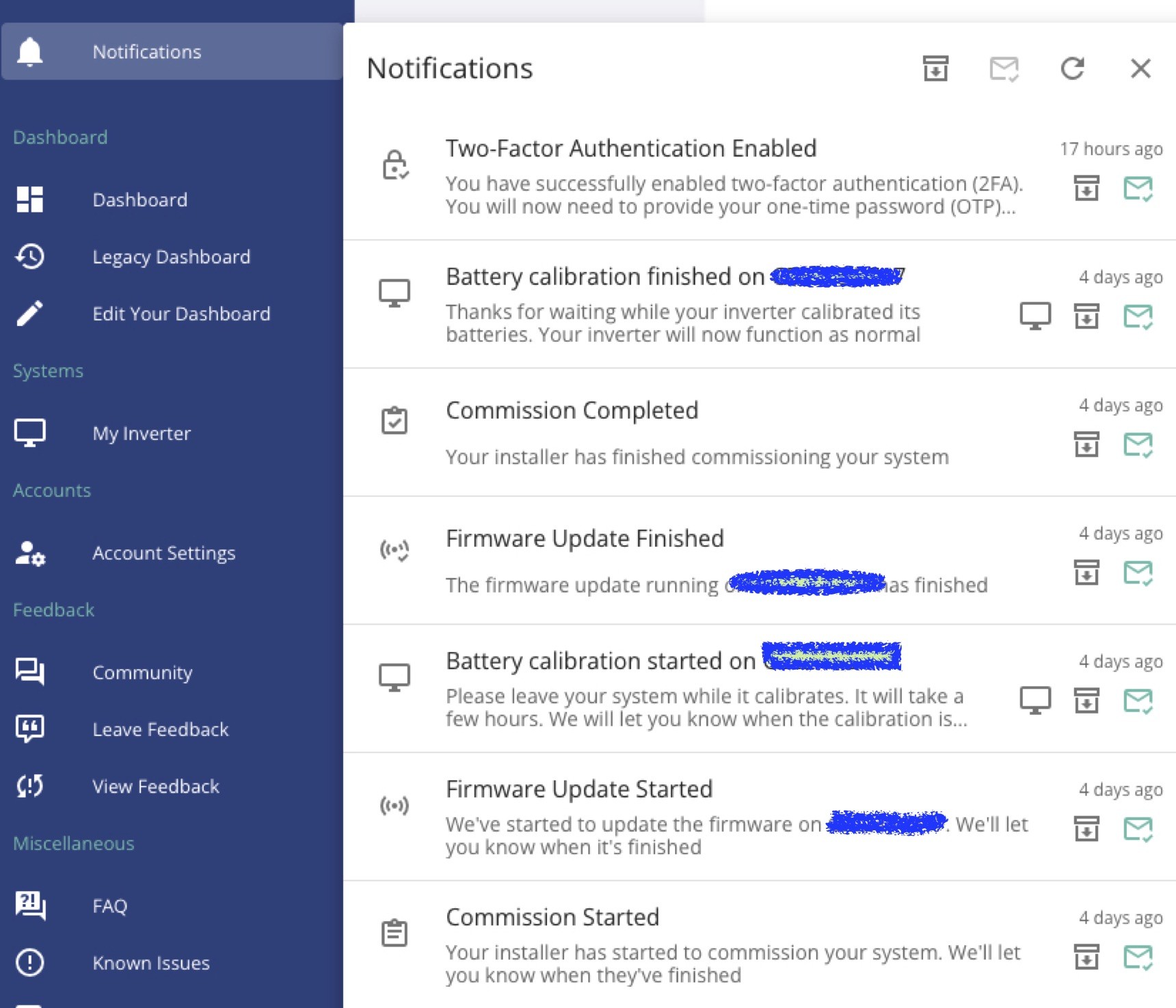
Go into the web portal (not the app), open up the menu to the left of the screen, click on Notifications and then you should see messages relating to the commissioning by your installer. On my account I have messages telling me when commissioning started and ended and, more importantly for you, when battery calibration started and completed.

S
#6 sm9ai

Thanks IanJ, didn't know about the web portal. That offers more information.

The notifications show 2 saying commisioning started twice, but nothing else. So that is looking a bit suspect.

I
#7 IanJ

sm9ai If it helps, here's a screenshot of my notifications. The blanking out is the battery id number.
Good luck with your installer.

S
#8 sm9ai

IanJ yes, that certainly does help, most of that is missing on mine.

Hopefully that is the issue and the installer will be able to resolve it.

G
#9 geoffreycoan

sm9ai you don't always seem to get the commissioning complete messages. I only got the start message for both of my installs. But for the software upgrades and battery recalibration I got all the messages
But worth getting the installers to look at it