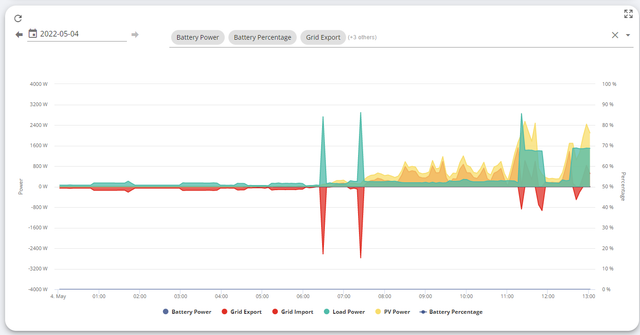
Thread for feedback / Questions for this card

Thread for feedback / Questions for this card
I like the view on the old/legacy portal, where you can see all information on one graph (generation, usage, export, import). This gives you an information quickly about how much do you generate vs use.
It would be even better, if bars on the chart are not stacked, but side by side (so you can easily compare amounts).
I beleive the "Energy Chart" does what you are looking to do, and a lot more
For energy creators buttons are the destination of the energy ( Grid in, PV, Battery Out )
For energy consumers buttons are the source of the energy ( Home, Grid Out, Battery Out )
the bar graph is the destination ( all apart from the home button )
colours are consistent across those
Red = Grid
Green = House
Blue = Battery
yellow = PV
For you specific question:
If you select the "Generation" button that then changes the graph to show the total generation and the breakdown of where the energy went.
The legend of the graph is active. If you click on a title it will deselect from the graph. That also changes the totals
If you hover over a section of the stacked chart it gives the numbers
If you click on a bar the pie chart changes to just show that day ( to give the proportions )
Does that meet you needs?
Hi,
I'm new here, but I would like to be able to change (save) the graphs that I want to see.
At the moment, every time I open this card (it is titled Power Graph on my portal), I get the same graphs selected: battery power and %, grid imp/exp, load and PV power. I don't have a battery yet, so I don't need the battery graphs.
I know how I can change the displayed graphs, and every time I close and open the card again, I get the same list of 6 graphs.
Thanks, rio
@rio911 now sure if it is what you are looking for but if you edit the dashboard you can change the default card that is displayed when the dashboard is opened and also the sequence of cards that are listed on the left hand site of the dashboard. (make sure to save once changes have been made)
as it stands I don't believe there is a way to save any changes made to the power graph card. Suggest raising a feature request. In the case where there is no battery, the only difference to not having battery items selected is the battery items will disappear from the legend. The graph itself will stay the same

I like to see the link between Grid Export and Grid voltage. Maybe have an option to add more than 1 of these cards, each set differently
TheDragon (GivEnergy) well spotted! I'm going to add this combo to my regular graphs to check out. 😀