
Local Search Failing AIO+Inverter

33 comments started 2023-09-03 last 2023-09-20
GivEnergy Products
J
#1 Jellybaby

I got the AIO and Inverter on LAN connection and it was working fine 20m ago but no updates have gone through since 17:43 and its now 18:10, they are both showing up in router page and both responding to pings extremely quickly.

Anybody else experienced similar?

Edit
Inverter showing green light on settings page but trying to change anything is failing.

I can also access both of them via their ip addresses

Edit 2
Tried inverter reset but no luck

Fired up home assistant VM to see logs when trying to connect

2023-09-03 18:24:21,848 - startup - [CRITICAL] - Inverter which is a Gen 1 - Gateway has been found at: 192.168.0.148
2023-09-03 18:24:23,859 - startup - [ERROR] - Gathering inverter details for 192.168.0.215 failed.


J
#2 Jellybaby

I give up, going to just wait and hope it comes back online.

Edit 19:04
Hey, it just came back online, got a reading from 18:59

I am curious as to if this has anything to do with the issue of the discharge being less than the consumption issue I had a few days ago and whether instead of it just breaking the numbers the whole thing just goes offline.

1H 15M gap in data, has anybody else experienced this occurrence?

Edit
Also I see 5 times a day a missed 5m interval and it jumps 10 minutes.

M
#3 morgs

Also having drop in comms intermittently. I have not seen any pattern that explains the AIO going OFFLINE. System appears to be working correctly but just unable to monitor.
My system is hardwired with a local switch going to my router.
Previously I have rebooted the battery to get back online.
It has also rectified itself without interaction.
Currently I am waiting to see if it fixes itself

J
#4 Jellybaby

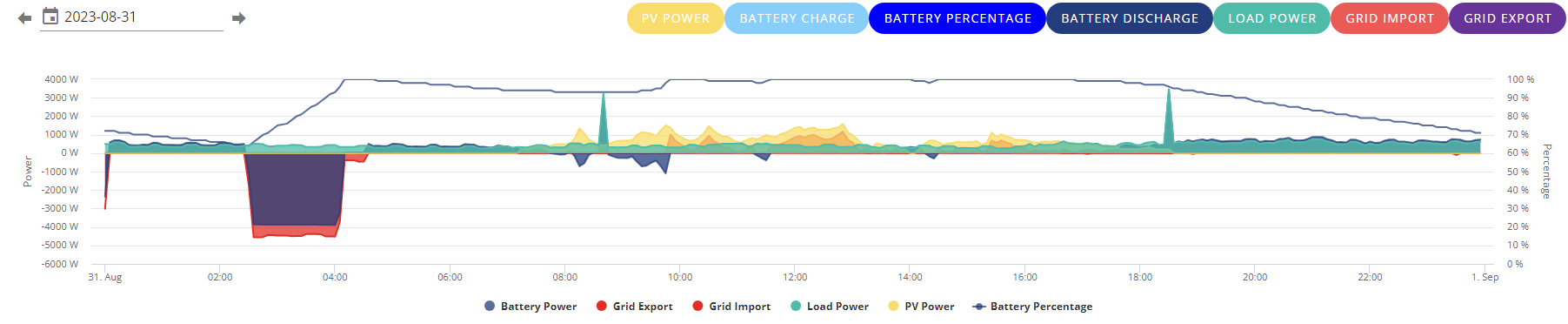
Ive also noticed since september started that the battery wont stay at 100% despite solar generating 5x house load it always reads as discharging around 30w at 99%

Compared to 31st August

Only dipped when solar dropped below house load or when kettle went on.

M
#5 morgs

Discovered today my Gateway which is LAN connected has DIP switch 1 ON. Installation manual states should be DIP switch 4 for LAN.
Also I don’t have any activity LEDs on the gigs-switch for the Gateway.
Battery/Inverter has DIP switch 1 ON. This is correct with the installation manual and activate LEDs on the LAN switch.
Active LEDs on Batteries remain flickering even when comms is lost.
I would like clarification if the Gateway should E set for DIP switch 4 ON for LAN comms

J
#6 Jellybaby

morgs Switch should be on 4, also if you have a lan connector black wire you need a connector to attach LAN to that and not the LAN connection on the board.

If it doesn't have a short LAN wire then you can hook it up to the board.

M
#7 morgs

Thanks. I found the black cable socket and connected LAN. Changed DIP 4 to down.
Activity LEDs now flashing on my network switch.
What is the purpose of Gateway LAN connnection ?
Should I see any data from here.
How do I view any data
Thanks

T
#8 treborUK

morgs the only use I can see for the Gateway LAN connection is firmware updates and the ability to send a restart if needed so. It appears to just send 0’s in all the stats, as the numbers all come out from the AIO.

J
#9 Jellybaby

Just happened again, can ping it fine, access its page and restart it but last update time was 52 minutes ago.

Lets see if I break my old record of 1h 15m

Edit
Broke old record, can see it on network via router, can ping it and can access it web page but app cannot connect.

Edit 2
Been down almost 2 hours, I really can't take much more of this between it not sending data or communication despite being actively seen and able to interact with its page and the state of charge problem.

Can't charge, cant see status, cant do diddly squat.

Edit 3
Now been 3 hours, this system shouldn't be this stressful.

Same issue as before, it finds them but for some reason radio silence, I have restarted inverter twice.

2023-09-17 20:34:35,641 - startup - [INFO] - Scanning network (1):192.168.0.1
2023-09-17 20:34:36,947 - startup - [INFO] - 2 Inverters found on 192.168.0.1 - {1: '192.168.0.148', 2: '192.168.0.215'}
2023-09-17 20:34:37,158 - startup - [CRITICAL] - Inverter which is a Gen 1 - Gateway has been found at: 192.168.0.148
2023-09-17 20:34:39,165 - startup - [ERROR] - Gathering inverter details for 192.168.0.215 failed.
2023-09-17 20:34:41,174 - startup - [ERROR] - Gathering inverter details for 192.168.0.215 failed.

Two months of stress and grief with this thing.

D
#10 DJBenson

Jellybaby out of interest do you know if there are two revisions of the gateway as it seems some people have the cable (myself included) and where the cable is present, the onboard LAN connector does not work. The ethernet connector is not mentioned anywhere in Giv's installer documents and it's causing lots of confusion for installers as to whether they should use the LAN port or the mysterious ethernet cable that seemingly doesn't exist in everybody's gateway.

J
#11 Jellybaby

DJBenson No clue I just saw someone mention that if the cable is present you have to use a block that you plug a cable in at both ends as a middleman to connect them.

I am now 4 hours in and no inverter data yet, system less than 2 months old if they cant figure it out they can come and replace it all.

Edit
and now im drawing from the grid, still no updates from inverter.

Edit 2
I ran consecutive pings to 8.8.8.8 as instructed in an E-Mail previously, 54 sent and received with
14.781ms Minimum
22.349ms Average
41.287ms Maximum

So its able to ping out when connected to the inverter.

I have just sent off another E-Mail to support, I am not happy, either this gets sorted or replaced as something is going on and I want it rectified immediately as its been not stop troubles for 2 months.

J
#12 Jellybaby

Whelp, still not up so can't set a charge schedule for cheap flux rate, hopefully its working before I have to resort to calling them.

I fired up home assistant as that will keep trying in the background and I can just refresh the portal page every now and then but home assistant is just a VM mess about thing on a PC that gets turned off overnight to no avail.

Edit
If you connect phone to access point I don't know why you cant do something, also I honestly have no idea how the inverter can be detected, its IP show, connection to data cant be established but yet I can ping and ping the internet if I access the access point.

At the very least home on the app or home assistant should work as a base level system, how can you lose access to basic settings of the inverter when you can see it, ping it and ping the internet from it when connected to its AP

I can even check my lottery ticket on the lottery app when connected to the access point for inverter for heavens sake.

M
#13 morgs

I have the same issue. AIO connected via LAN. I have noticed a pattern when coms is lost and it goes offline.
Every time I schedule a car charge via my Zappi the AIO goes offline.
My Zappi is connected into the Gateway via the EV circuit breaker.
Occasionally it will re-establish coms on its own but can take more than 24hours. But usually I have to manually reboot the AIO.
Has anyone else noticed if it’s the EV charger that kills it ?
Normally we have the AIO and cars to schedule a charge at midnight and this is when it happens.
I will now stagger the AIO and Zappi to start charging half hour apart to see if it helps.
Zappi in Eco or Eco+ mode seems to work without losing coms.

J
#15 Jellybaby

morgs I don't have an EV myself, just woke up and its still not updating, how do you manually reboot.

For a 7k+ piece of equipment it shouldn't be doing this, everything about the inverter works, if I connect to the AP I can access internet and via LAN I can access its web page to restart the inverter and gateway so why the hell are settings not available, it literally makes zero sense whatsoever.

No sun to store some energy for expensive flux period so looks like im paying out today ><

M
#16 morgs

I am rebooting by pressing the blue button on the side, holding down for 5s and the switching off the AIO circuit breaker in the Gateway . After 15s turn back On the AIO circuit breaker.
I have factory reset both AP and removed them from by Wi-Fi. Connection is via LAN.
I can still see the dongles and connect to them via the IP shown on my router.
Resetting via the AIO AP does not re-establish coms.
It’s a simple fix if I’m home but I work away a lot and often the system is offline for days. Very annoying as I cannot adjust the daytime charge level.
I’m hoping it will be fixed with new fw.
I believe new dongle fw is being tested now

J
#17 Jellybaby

morgs I am running LAN as well, but I leave the AP secured and on to connect to it to make sure its at least got a connection itself to the outside.

J
#18 Jellybaby

@morgs I done that button thing, then flipped the breaker in gateway, waited a bit then turned it back on.

Was 1 minute of blinking green light and clicking but all lights steady, looks like its back online now, for how long I hope forever, but now ive done it once I know how to do it.

Only down side is ive lost all of yesterdays data to input what was imported/exported etc etc to enter into spreadsheet.

On another note should I have had an AC Isolator box fitted, lot of places say they are not always required, the equipment is in same cupboard as my consumer unit.

M
#19 morgs

I also do not have a AC isolator for the AIO.
Glad you got it back online.
I am now also experimenting with reducing the charge level to 5907W to see if not maxing out will keep it alive.

J
#20 Jellybaby

morgs I used to charge at 3.6, figured why overtax it if I didn't have to, spread out the charge over full flux period lol

It is frustrating that despite being visible on network, pinging ok and connecting to its access point I can browse the internet but it just blocks anything that sends data to cloud and blocks local connection to access its software for lack of a better term. I done a 10 minute 6kw charge just to get me past expensive flux period because the sun can't make its mind up today lol.

J
#21 Jellybaby

@morgs forgot to ask when you rebooted the AIO when you opened the gateway did you only flip the blue switch or all 3 (Blue + L/N), I done all 3 then tried to move them all up at once but the L/N wouldn't stay up til I flipped the blue one first.

J
#22 JTG

just to add more evidence to this thread. seeing exactly the same behaviour with our newly installed AIO. commissioned under two weeks ago. all great until sunday morning when all data just stops appearing in the dashboard. tried all the basic connectivity tests (similar to those discussed above) - was able to ping the admin interfaces of both the AIO and gateway from our home network, and able to log in to the local admin webpage on each device too. phone app couldn't connect locally either.

several reboots of both admin interfaces hadn't resolved the issue. i'd tried powering down the AIO too (holding down the blue button on side for several seconds then releasing, waiting for several seconds, then momentarily pressing the button again) - but this didn't resolve it.

only on spotting this forum thread tonight (monday) did i try turning off the AIO and then flipping the AIO breaker off in the gateway, waiting 10 seconds or so, then flipping breaker back on. (no need to power AIO itself back in via blue switch on AIO as it seems to power back on itself on turning the breaker back on)

data now appearing in the dashboard again. will be raising issue with support for a response as to what's happening and will update here when i hear anything.

J
#23 Jellybaby

JTG If this is going to be an every couple of weeks thing its going to get real old real fast, this is the third time its happened to me since install but the first time I just assumed it was related to wifi issues but twice its happened on LAN so that ruled that out straight away lol

I also don't know why when you set a charge period it activates it at midnight for 1 minute, like wth.

I got it set to charge 02:30-04:00

If I turn timed charge off it doesn't happen, only ever happens when its on.

M
#24 morgs

Jellybaby
You only need to switch the black lever AIO circuit breaker - not the blue RCB.

M
#25 morgs

Interestingly. Last night I had my first AIO and car charge success without losing coms for weeks.

I set the car to schedule a charge first and then once completed I scheduled the AIO to charge at 3am at 4949W. This was successful

So conclusion could be to not simultaneously set the AIO and Zappi to schedule a charge or
Reduce the Charge Power.

I expected to have issues with this system as it was a new product and am confident the problems will be resolved hopefully with new firmware and not hardware mods.

With the experiment of separate charging last night I conclude the issue is probably the AIO firmware bug rather than a dongle AP firmware bug. I will continue to make my own experiments to try and track down exactly what scenarios cause the AIO to go Offline.

P
#26 Pandorian

morgs The AIO Gateway is completely unaware of the EV charger though ie there is no software communication link between gateway and charger. The EV simply appears as a high load.

M
#27 morgs

Pandorian

Pandorian
So the issue could be an overload of power draw that the AIO cannot currently handle and crashes the coms. ?

Zappi could draw 7.6kW and AIO will draw 7.2kW totalling 14.8kW for the first 10s.
Maybe the AIO spec of peak power >6.5kW for 30s and/or 7.2kW for 10s is currently not working.

Or is it just the discharging that has the increased short term peak power capability.

P
#28 Pandorian

morgs Could be that. I've had mine wired such that my EV connects to the live busbar rather than the house load so that I cannot accidentally overload the AIO with a 7.2kW load if it in island mode.

My AIO has not yet been commissioned due to a gateway firmware update failure and so I can't give any feedback on the performance of my arrangement.

M
#29 morgs

FYI. My Gateway software version is D0.0-A0.5 and has not been updated.

J
#30 Jellybaby

morgs I don't now what my gateway version is, I don't have it on portal.

P
#31 Pandorian

morgs Mine is the same version, but reported this error on the portal:

The firmware update running on GW2315Gxxx has failed. You can start it again on the inverter card

B
#32 Barns

morgs That is the latest Gateway software version I believe? Mine performed an update back when commissioned in July and it's currently on the same version as yours with no updates available.

T
#33 treborUK

Pandorian mine shows 2 failed firmware updates but I’m sure the version reported did change with the 2nd fail. Doesn’t report new firmware available any longer either.

P
#34 Pandorian

treborUK Thank you - i've had other confirmation that my firmware is the current version.