
R&D Labs Vs Home Assistant

5 comments started 2023-09-05 last 2023-09-06
APIsHome AutomationHome Assistant
A
#1 alan1977

Hi, i tried R&D labs earlier for the first time with varied results..
set an of peak charge to 30% and that worked fine
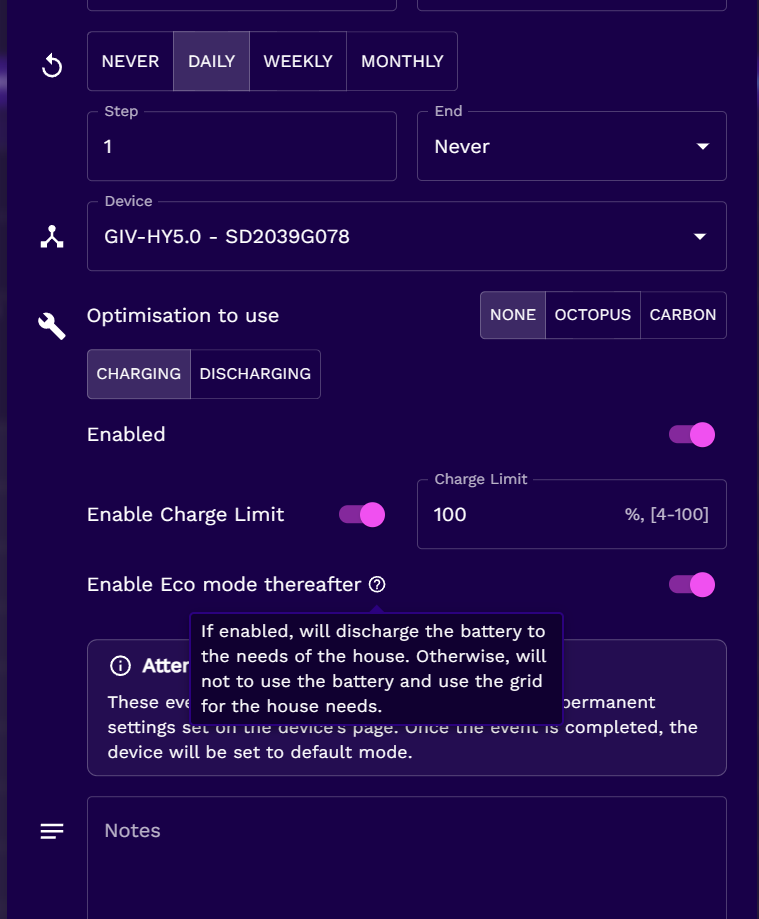
set a peak discharge to 90% and it just kept going, looking in the command log, the discharge times were sent, eco mode was turned off and the percentage was sent. Now, im guessing hte inverter software doesnt currently support the percentage setting..
OR
was it that R&D labs wasnt working correctly? theres a SOC graph in there which hasnt updated since 6am this morning, but all other data was.
does R&D labs check in to return the inverter back to ECO?

Is this were HA comes into its own, as its real time connected to the inverter on the LAN? ie not requiring internet connectivity, GE's servers, and R&D labs all to be working correctly?

and before i set up HA (will need to buy kit) is there any roadmap for GE's software development?

G
#2 geoffreycoan

alan1977 I setup R&D labs but have never used it so I can only repeat what other people have said. I believe there is a recent bug in it that after a forced discharge it now no longer switches the inverter back to Eco mode.

I also considered using wonderwatt as this seems quite promising for simple automation but at present they don’t support multiple inverters (which I have).

What I did was buy a second hand Intel i5 Tiny PC from ebay (about £60) and installed Home Assistant on it myself. GivTCP to communicate to the inverters and have started learning how to monitor and write scripts to control them.
The big advantage of HA is that it communicates directly with your inverters on your home network, it doesn’t retrieve data and send commands up and down via the GivEnergy cloud, and nobody else’s cloud is required either.
Lots of people are using HA very successfully but there is definitely a learning curve both for HA itself and for working out what the different GivTCP controls actually do and how they work.

I’ve now got HA scripts working to record the different Octopus Flux tariff switches (so I get accurate daily import and export cost figures), to automate the discharge of my batteries down to a certain SoC in the peak flux period (maximise export income whilst retaining enough SoC to last through the night/to the offpeak period), and now to take advantage of the Octopus Power Up events by keeping empty capacity in the batteries until the power-up period and then force charging with the free electricity.
HA gives you lots of flexibility but its nowhere near as easy to setup as Octopus R&D, wonderwatt or even the GE app/portal.

A
#3 alan1977

Yup..did another test earlier to see if it would discharge to 50%
It just kept going..SOC was correct on R&D Labs..so conclusion is that it is relying on the percentage discharge value in the GE remote control section..which doesn't work ....

Just ordered up a HP thin client to get HA set up on....

#4 hoggy

there's a tick box on mine in R&D (admittedly i don't use it anymore) specifically toggling eco mode back on after it's finished. Does this not work?

A
#5 alan1977

Yup..the eco box has worked every time ..
Just not the discharge limits