Inverter settings

8 comments started 2023-09-08 last 2023-09-09
GivEnergy ProductsBattery
I
#1 IanMc

I am a bit new to this, so a couple of questions.
I am considering a move to octopus agile.
can I charge from grid in low cost periods and top up from solar through the day so I can discharge at hight cost periods?
I currently receive generation and deemed fit payments, which, if any, will I be able to retain once on Agile?
In the inverter settings what do the read categories do and mean?
Thanks

A
#2 alan1977

Yes ..
But you really need to set up home assistant to control it..
The GE software or even R&D Labs can only manage the most basic automations currently

I too am new to GE and quickly realised the software is very much in development

G
#3 geoffreycoan

IanMc Yes you certainly can do all this, and depending on the size of your batteries, how much solar you generate and what your house demand is there’s the potential to make money out of it https://mysmartenergy.uk/Prices/South-East-England

A simpler option could be Octopus Flux which many of us are on, 3 different tariffs, overnight cheap, day-time same as the price cap, evening peak at a premium rate. Import and export tariffs at the 3 times of the day.

Bear in mind that if you don’t have an export MPAN (which if you are on FIT deemed export you probably won’t), it can take 6-8 weeks (or longer) to get the export setup and we are coming out of summer so the amount of solar generated will be dropping off.

When you go onto an export tariff you have to give up the FIT deemed export payments (the 50% of generation at 6p/kWh) but you retain your generation payments. Whether this is worth it, again depends on size of your arrays, how much you consume, etc. For me it was, I gave up about £100 a year in deemed export payments and since August 10th when I went onto Flux export I have earnt £140

Definitely agree you want to get Home Assistant if you want to control your inverters and batteries properly

T
#4 Toogie

alan1977
Is there anyone out there who could post a tutorial on programming HA to control import/export on Flux please. I don’t have a clue,

G
#5 geoffreycoan

Toogie Certainly, happy to share my scripts and useful videos. Suggest you follow these in order:

Assume you have Home Assistant and GivTCP installed? See this speak to the geek video https://www.youtube.com/watch?v=ygD9KyciX54 for how to setup GivTCP.

This video from Oliver (speak to the geek) covers incorporating GivTCP data into the HA dashboard https://youtu.be/YPPpwTKIz7M

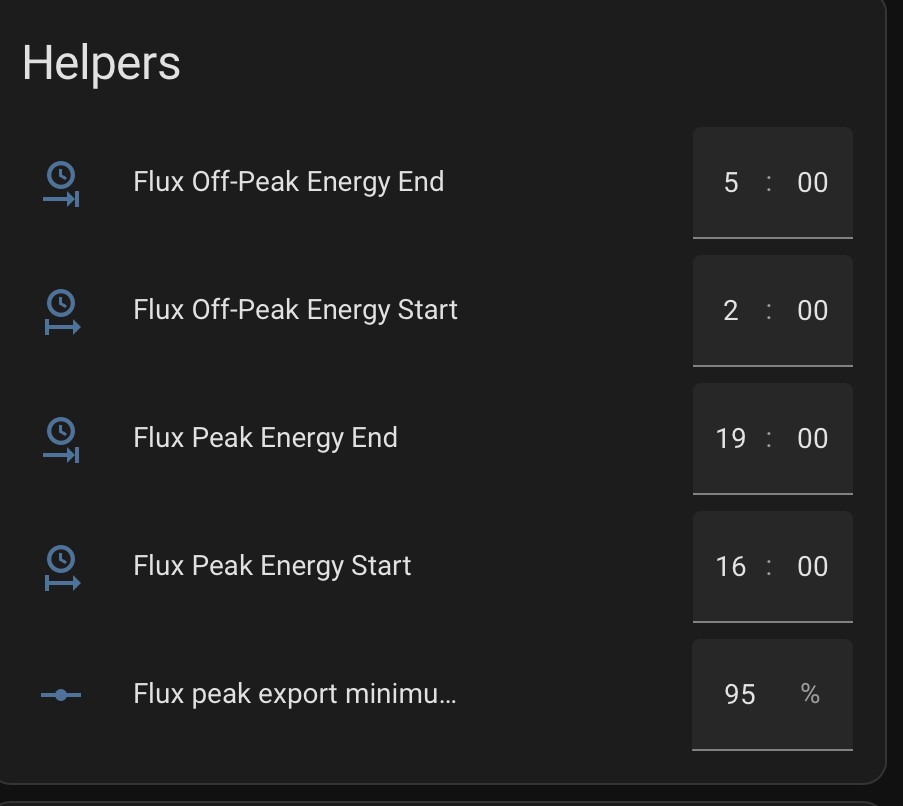
And https://www.youtube.com/watch?v=bb5aDtn2wUA covers the concepts of how to include different time period charging rates in HA dashboard. I took the principles of this video and extended them for Flux, setting up 4 helpers for the start and end of peak and offpeak periods:

And then I created this automation script to swap between the peak/day/offpeak/day tariffs at the appropriate times:
`alias: "Flux energy meters: Switch between Off-peak, Day and Peak Tariffs"
description: ""
trigger:

  • platform: time
    at: input_datetime.flux_off_peak_energy_start
    variables:
    tariff: offpeak
  • platform: time
    at: input_datetime.flux_off_peak_energy_end
    variables:
    tariff: day
  • platform: time
    at: input_datetime.flux_peak_energy_start
    variables:
    tariff: peak
  • platform: time
    at: input_datetime.flux_peak_energy_end
    variables:
    tariff: day
    action:
  • service: select.select_option
    data:
    option: "{{ tariff }}"
    target:
    entity_id:
    - select.grid_import_today
    - select.grid_export_today
    mode: single
    `

grid_import_today is a utility meter set to “GivTCP <inverter number> Energy G Import Energy Today kWh” and grid_export_today is the same for the export kWh.

So that gets you with inverter data in HA and import and export data with the right tariff in the Energy dashboard.

I created a custom dashboard to show me what my inverters are doing (I have two Gen1 5kW hybrid inverters) and to give basic control over them all in a single place.

I used the Power Flow Card Plus energy https://www.youtube.com/watch?v=C4Zh35E9wJE and added controls for my inverters. Here’s the dashboard contents (cut down for just a single inverter, mine repeats for them both):

`views:

  • title: Home
    type: panel
    icon: ''
    badges: []
    cards:
    • type: vertical-stack
      cards:
      • type: horizontal-stack
        cards:
        • type: entities
          entities:
          • entity: sensor.g_XXXXXXX_soc
            • entity: select.g_XXXXXXX_mode
            • entity: select.g_XXXXXXXX_force_charge
            • entity: select.g_XXXXXXXX_charge_end_time_slot_1
            • entity: select.g_XXXXXXXXX_temp_pause_charge
            • entity: number.g_XXXXXXX_battery_charge_rate
            • entity: select.g_XXXXXXX_discharge_end_time_slot_1
            • entity: number.g_XXXXXXX_battery_discharge_rate
              title: G182 Inv1 Control
          • type: custom:power-flow-card-plus
            entities:
            battery:
            entity: sensor.g_sd2237g182_battery_power
            state_of_charge: sensor.g_XXXXXX_soc
            grid:
            entity: sensor.g_XXXXXXX_grid_power
            invert_state: true
            use_metadata: false
            solar:
            entity: sensor.g_XXXXXXX_pv_power
            display_zero_state: true
            home: {}
            clickable_entities: true
            display_zero_lines:
            mode: show
            transparency: 50
            grey_color:
            • 189
            • 189
            • 189
              use_new_flow_rate_model: true
              w_decimals: 0
              kw_decimals: 1
              min_flow_rate: 0.75
              max_flow_rate: 10
              max_expected_power: 2000
              min_expected_power: 0.01
              watt_threshold: 1000
              transparency_zero_lines: 0
              title: G182 PowerFlow+
  • title: SoC History
    path: soc-history
    type: panel
    badges: []
    cards:
    • type: history-graph
      entities:
      • entity: sensor.g_XXXXXXX_soc
        hours_to_show: 6
        `

I’ll continue on another response as this one is getting long already !

G
#6 geoffreycoan

Toogie OK, programming HA to control import/export on Flux. It all depends on what you want to achieve, what size your solar is, what size batteries you have and what your house loads are as to what the strategy is.
But I’ll share my thinking.

Firstly I do (currently) import anything at the flux offpeak period overnight. Other people do but I do not. My reason for not importing is that at the moment I still have excess solar every day. I generate between 20-45kW a day but only consume 13-18kW a day so I let the batteries fill up in the morning with solar, I export the excess, and then in the flux peak period I partially discharge the batteries to maximise my income. Leaving enough in the batteries to run the house off until the next morning’s solar.
An alternative strategy could be to charge the batteries overnight so that in the morning they are full/full-ish, and you start exporting PV earlier. I take the view that whilst the flux offpeak import rate is cheap, it is only a couple of pence cheaper than the day-time export rate, so by the time power losses are considered there’s little financial benefit (and possibly it would cost more) to start exporting sooner. As the solar generation drops to the point that I don’t get enough to charge the batteries fully every day I will revisit this (or change tariff).

So I currently have only one set of scripts that control the peak period export. There’s one for each inverter but they are identical. Its all controlled by the helper flux_peak_export_minimum_soc which is the minimum SoC that I want the battery to discharge down to to give me enough battery power to last through to the next morning.

The script runs every 5 minutes between 5pm and 6:55pm (I don’t start the discharge until then as I’m letting any excess solar go to export from 4-5pm). It starts a timed (forced) discharging of the battery, then every 5 minutes the script is triggered to check the SoC of the battery. If its less than the minimum SoC then the discharging is stopped and the inverter is put back in Eco mode. At 7pm (end of the flux peak period), and again at 7:15 and 7:30pm (just as belt and braces and extra braces) the discharging is stopped and the inverter put in Eco mode.
If its particularly sunny when the discharging finishes the battery will recharge and SoC could rise back above the minimum, in which case at the next 5 minute trigger it will be discharged down below the minimum again.

I could probably make this script more elegant without the nested if/then/else’s, and that’s on my ‘less important to-do’ list. Higher priority is to look at incorporating next day’s solar PV predictions in the script to more cleverly adjust the target SoC to discharge to.

`alias: G182 Inv1 Start & stop flux peak discharge
description: ""
trigger:

  • platform: time_pattern
    hours: "17"
    minutes: /5
  • platform: time_pattern
    hours: "18"
    minutes: /5
  • platform: time
    at:
    • "19:00"
      • "19:15"
      • "19:30"
        action:
  • if:
    • condition: or
      conditions:
      • condition: time
        after: "18:59"
        • condition: numeric_state
          entity_id: sensor.g_XXXXXXX_soc
          below: input_number.flux_peak_export_minimum_soc
          then:
      • service: select.select_option
        target:
        entity_id: select.g_XXXXXXXX_discharge_end_time_slot_1
        data:
        option: "00:00:00"
      • service: select.select_option
        target:
        entity_id: select.g_XXXXXX_mode
        data:
        option: Eco
        else:
      • if:
        • condition: and
          conditions:
          • condition: numeric_state
            entity_id: sensor.g_XXXXXX_soc
            above: input_number.flux_peak_export_minimum_soc
          • condition: not
            conditions:
            • condition: state
              entity_id: select.g_XXXXXXX_mode
              state: Timed Export
              then:
        • service: select.select_option
          target:
          entity_id: select.g_XXXXXX_discharge_end_time_slot_1
          data:
          option: "23:59:00"
        • service: select.select_option
          target:
          entity_id: select.g_XXXXXX_mode
          data:
          option: Timed Export
          mode: single
          `

NB: Since I have two inverters I installed my GivTCP so that the inverters are prefixed G_ and H_ rather than the default GivTCP_ and GivTCP2_

NB2: I said I have only one script for flux export and I don’t do flux import, that’s true-ish. I’m in one of the postcode areas that Octopus are offering the Power-Up trial to. This is where there are periods of excess electricity in the network and Octopus and the DNO encourage you to use as much electricity as you can during that period and all the electricity you use is free. So far there have been 3 of these power-ups, between 2-4pm each time.

I have scripts that keep the battery partially full in advance of the power-up event and then do a force-charge during the power-up event to fill the battery so I can then export it during the normal Flux peak period. This script includes stopping the battery from charging and forcing charging, so might be useful anyway if you want to do those things even if not in a power-up area. Can share these.

T
#7 Toogie

Thanks for sharing; I’ll give it a try

T
#8 Toogie

geoffreycoan
Appreciate you sharing this. It gives me a good base to work from.