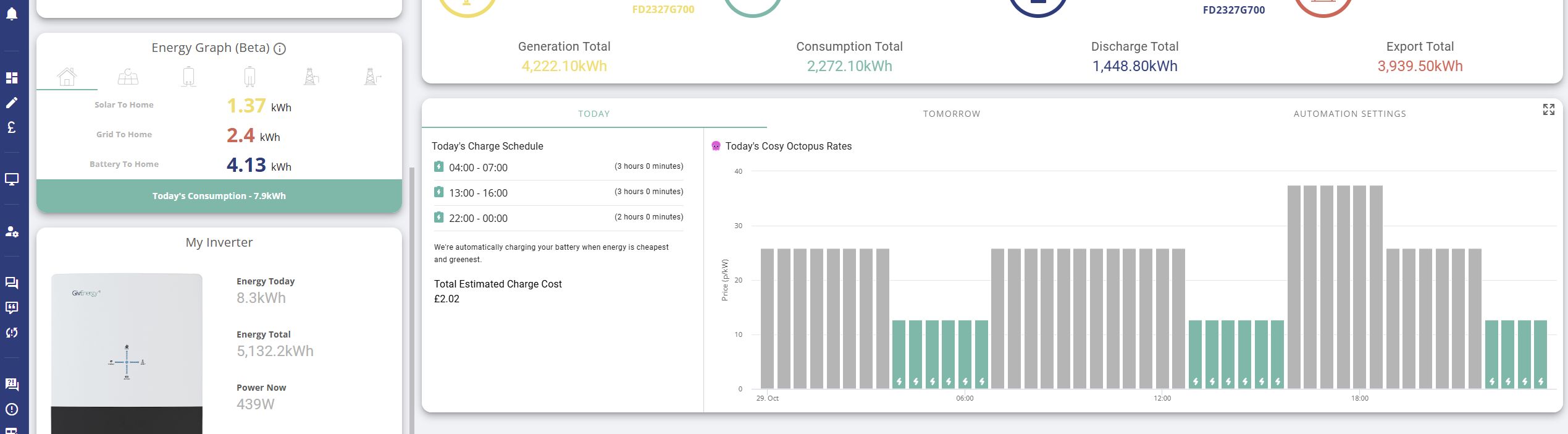
As a ASHP user, I have switched to Cosy Octopus, although the heating is not on yet due to warm weather. However, as I also have a GivEnergy battery I would like to maximise the use of the two 3-hour low tariff periods. My GE app appears to only allow 1 such period to be used per day. Does anyone know how I can automatically top up my battery at both periods ?
Many thanks
Cosy Octopus - 2 low tariff phases
DJWB you'll need a separate automation to do this. PALM or Home Assistant will do what you need.

DJWB you'd need to remember to do it manually through the app/portal or using something like Octopus R&D or Home Assistant to have a second charging period
DJWB So I've hit the same issue over the last week. ASHP with solar and a GE AIO battery system fitted over the summer. Switched to Cosy earlier this week once smart meter was fitted, in anticipation of the heating being on in the coming months. So I've been trying to find the best way to set up automated charging between 4-7am and 1-4pm, the cheap Cosy times.
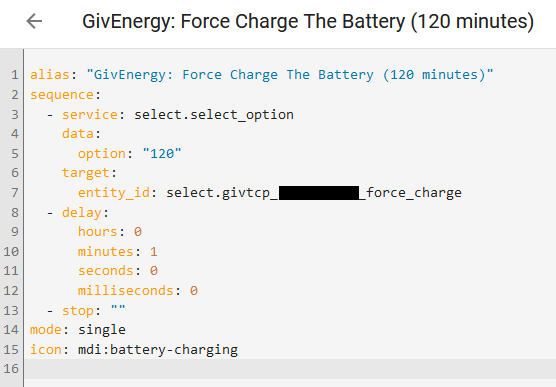
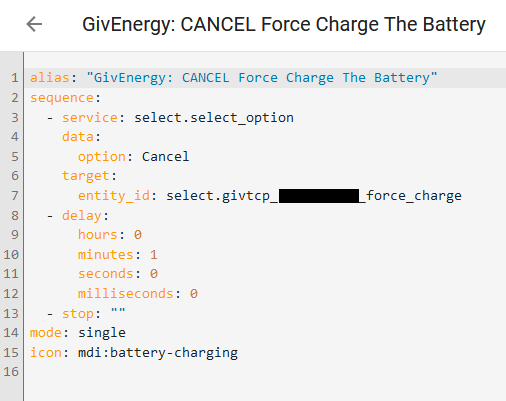
What I've got so far is a RaspberryPi 4 running Home Assistant on an external USB SSD (surprisingly easy to set up!). In Home Assistant I've installed the GivTCP integration so it can talk to and control the battery. Then I've got some scripts I modified from one of "SpeakToTheGeek" (YouTube, very useful content) which start a force charge for a hard coded duration (so separate scripts for each duration I might want, I'm sure there's better ways of doing this if I knew more about HA scripting). I also have another script which cancels a force charge if one is running.
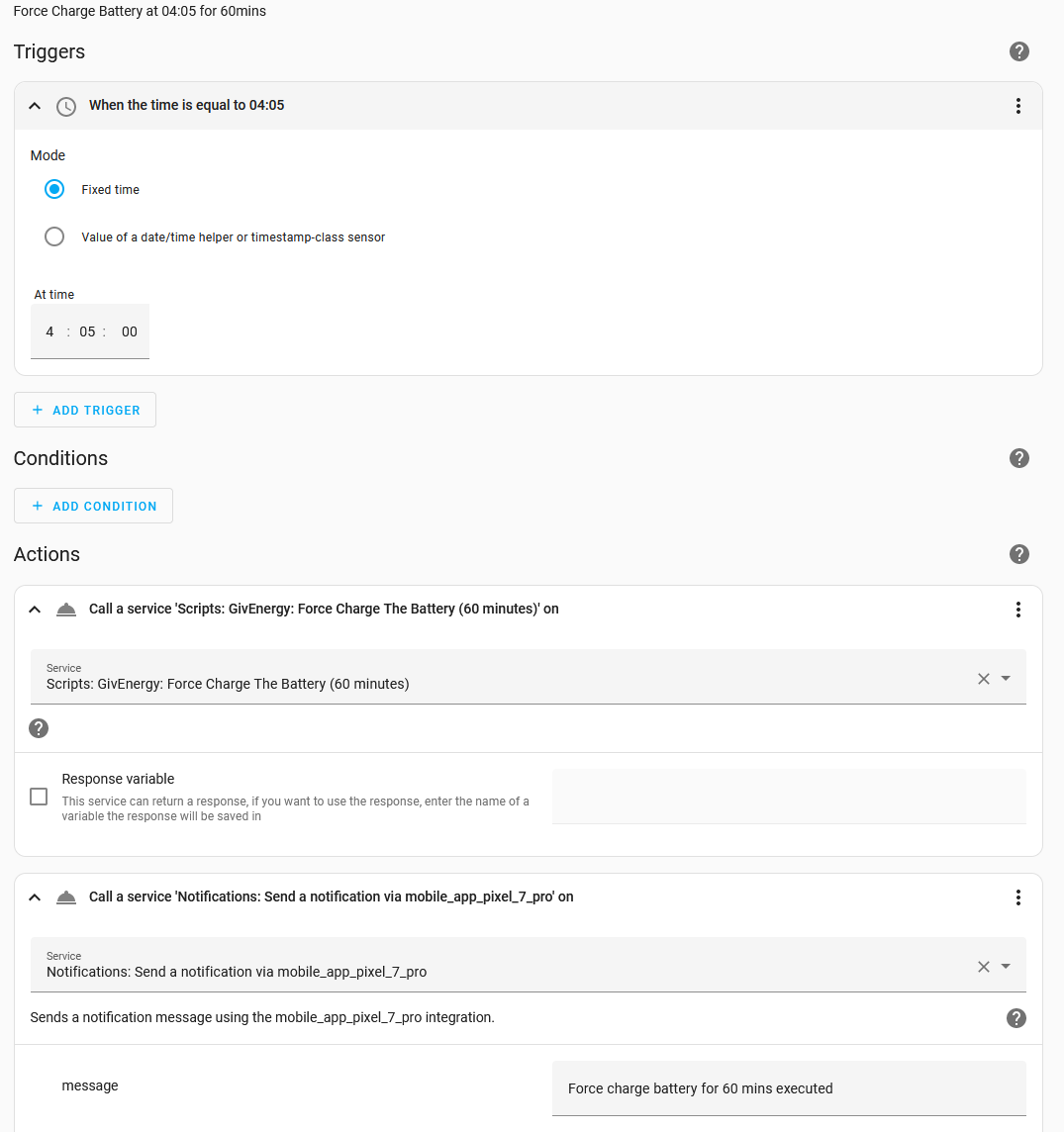
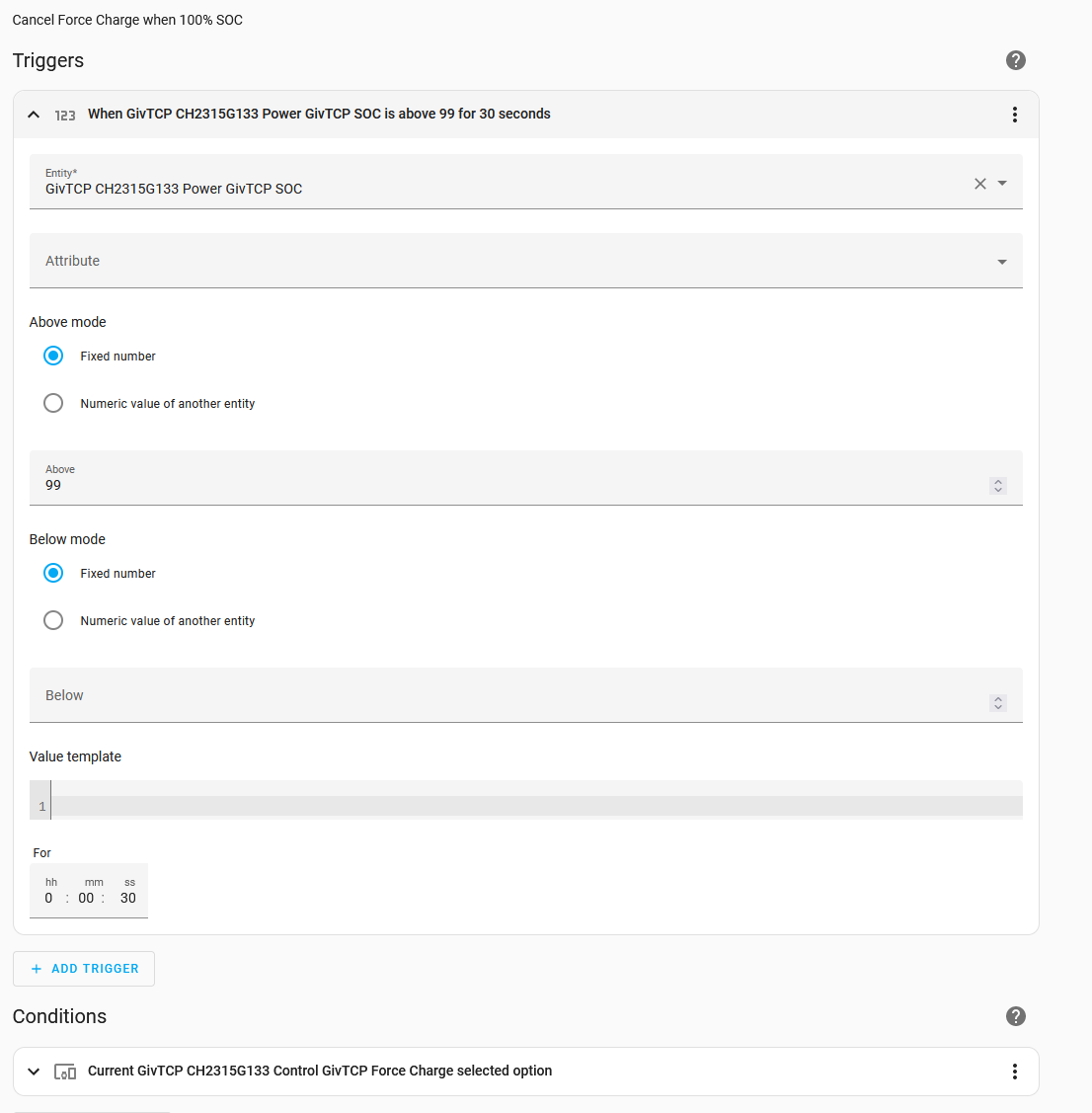
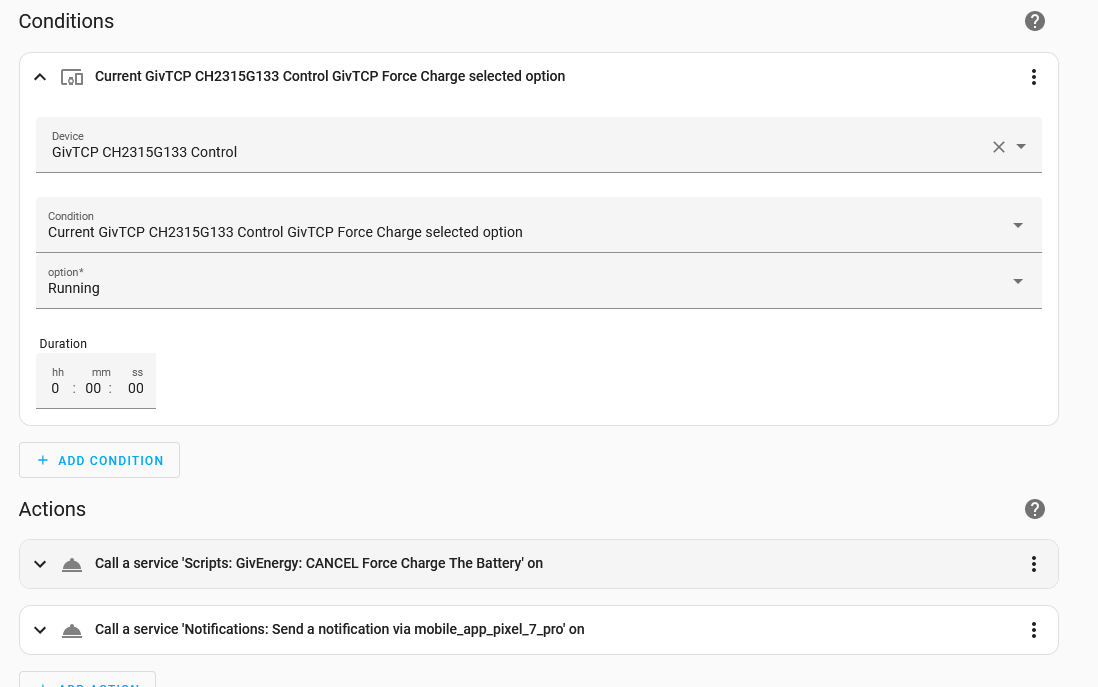
Then I've set up a few automations in HA to trigger at the needed times (like 4:05am etc) and which start the appropriate force charge script. And I have another automation that triggers if the battery SOC (charge level) reaches 100% and force charge is "Running", and which calls the cancel force charge script (so battery can go back to powering the house once it's charged).
Not at home right now but I'll try to attach examples of the scripts and automations if you're interested. But it'll need a Home Assistant instance running somewhere to work! So you'd want to look into that first.

if you have Gen2 onwards 10 charge slots with targets & 10 discharge slots with targets are being added tot he portal. They are already in the firmware and usable for GivTCP users
TheDragon (GivEnergy) Awesome! This includes the AIO I hope? Any idea to timescales to make them visible? All my tottering edifice of Home Assistant automations and scripts will become redundant, which is probably a good thing š
Barns Ok so here are examples of the scripts and automations I have. Hope it helps someone!
YAML script to force charge for 120 minutes (edit the 120 to desired duration in mins)
Credit to SpeakToTheGeek for the basic script.

YAML script to cancel any ongoing force charge

Automation to start force charge for 60mins at 04:05am, and send a notification to my phone

Automation to Cancel any ongoing force charge once it reaches 100% full (SOC) on battery for >30s and notify phone


TheDragon (GivEnergy) I have linked to Octopus Cosy in the smart tariff card and all the timing and cost data is present. In future, will this automatically configure the forced charging times but also provide flexibility to use both solar and grid charge as solar reduces. This would be particularly useful as the afternoon Cosy charging period will also be my Solar peak generation period albeit in a winter setting. In essence I would like to do this as economically as possible but end up with a full battery by 16:00 hrs.
Mike M I think if you use smart tariff automations it's the supplier that actually writes the automation.
So it's more likely a question for Octopus?
TX200 Thanks, I did contact Octopus earlier in the summer, noting to them that their āpartnerā company only had a single time slot for charging, they didnāt reply. Iāll try them again, could be they only go as far as the smart meter, but then again I gather Octopus applies the tariff rates to the smart meter data they receive, maybe neither knows what they are doing, joined up thinking is hard to come by.
hi, any idea what timeframe we're looking at please?
Similar to others i have solar, batter & ASHP, i've literally switched this afternoon, and have just set the battery to charge 1-4 and discharge from 4pm-4am the next morning as i wasn't sure how else to do it!
Doesn't feel 'smart' enough, but not sure if the automations are a) easy enough & b) worth doing if this update is imminent.
thanks for any info!
Steve

You have an AC coupled, this hasnt the memory for the 10 slots. Hence its Gen2 onwards
TheDragon (GivEnergy) Does the AC have enough memory for 2 Time slots?
ahhh that's right. we originally had a gen2 installed but they had to replace it as it wouldn't work having already got another set of panels and inverter already in situ before we added more.
Are there any other options to cope with the double dip? or do we just need to work out whether we can save enough by timing the ASHP for heating & hot water and running the battery over the 4pm-7pm slot to make it worthwhile?
Guess we'll see how we go!
steve_dadswell Automating with Home Assistant would still work I expect as that only "uses" a single time slot and just updates those times on the fly for whatever actual slots you set up. So you could get it charging on both Cosy slots like you wish to.
Bit of a hassle and effort to get it set up if you're not already mired in geeky gadget tech terminology but worth it for future flexibility.
Barns
Thanks for the thinking, we've got a decent amount of geeky gadgets by most standards, but possibly not to the extent for this!
Here's hoping we might be able to get 2 slots on the Ac coupled, or i'll be even more miffed the G2 couldn't cope with another solar inverted in the house and we had to swap it out! š
I'm working on the assumption that with most of us out in the day, and most of our electricity usage in the winter being through heating and hot water, that the basic set up will still prove worthwhile... we'll find out!
thanks for your thoughts and welcome any more!
Barns Nice set of scripts. Iāve recently been through the HA script learning game myself, sometimes getting simple things to work seem inordinately difficult, the syntax, error messages and debugging are not great (and Iāve worked in IT all my life!).
Couple of observations on your scripts:
- you donāt really need the delay at the end of the start/stop charging scripts, its not adding anything, other than delaying when you get the mobile phone notification
- if this is all you want to do in HA then you could merge the start/stop charging commands into the automation scripts, so things are more in one place. One advantage of your approach is that you can reuse these scripts with dashboard quick-action buttons for example, something I am yet to get to. So swings and roundabouts
- you can combine different triggers and actions to take on those triggers in a single script by using trigger-id and the āchooseā command. Learnt about this earlier in the week and it really simplified my scripts which previously had lots of if-then-elseās in them
- when stopping the forced charge I set the force_charge control to Normal. Youāve used Cancel. Seems both work!
- one thing I have done is more belt and braces to ensure the inverter is set correctly after I have finished the charge is to set the mode back to Eco and the charge rate to 2000. I added this to my scripts when I found that the inverter sometimes ended up on charge rate zero after finishing the charge. I have a 30 sec delay in between stopping the force charge and setting the mode to give time for the first command to take effect
Here for what its worth is my script to control my inverter during the Octopus power up event. These events give you 2 hours of free electricity from 2-4pm on certain days so I hold the battery SoC at between 40-45% beforehand then force charge during the period (and then another script does a force discharge during the normal flux peak period afterwards at 5pm).
`alias: G182 Inv 1 Octopus Power Up
description: >-
Only let the battery charge to 40-45% in the morning; hold charge at that
level, then force charge 2-4pm in the Octopus Power-Up period
trigger:
- platform: time_pattern
hours: 8
minutes: /10
id: 10-min-soc-check - platform: time_pattern
hours: 9
minutes: /10
id: 10-min-soc-check - platform: time_pattern
hours: 10
minutes: /10
id: 10-min-soc-check - platform: time_pattern
hours: 11
minutes: /10
id: 10-min-soc-check - platform: time_pattern
hours: 12
minutes: /10
id: 10-min-soc-check - platform: time_pattern
hours: 13
minutes: /10
id: 10-min-soc-check - platform: time
at:- "14:00"
- "14:05"
id: power-up-start
- "14:05"
- "14:00"
- platform: time
at:- "15:59:10"
id: power-up-end
condition:
- "15:59:10"
- condition: template
value_template: >-
{{ (now().date()) | string ==
states('input_datetime.octopus_power_up_date') }}
action: - choose:
- conditions:
- condition: trigger
id:- 10-min-soc-check
sequence: - if:
- condition: numeric_state
entity_id: sensor.g_xxxxxx_soc
above: 44.9
then: - service: number.set_value
data:
value: "0"
target:
entity_id: number.g_xxxxxx_battery_charge_rate
else: - if:
- condition: numeric_state
entity_id: sensor.g_xxxxxx_soc
below: 40
then: - service: number.set_value
data:
value: "2600"
target:
entity_id: number.g_xxxxxx_battery_charge_rate
- condition: numeric_state
- 10-min-soc-check
- conditions:
- condition: trigger
id:- power-up-start
sequence:
- power-up-start
- service: select.select_option
data:
option: Normal
target:
entity_id: select.g_xxxxxx_temp_pause_charge - service: select.select_option
data:
option: Eco
target:
entity_id: select.g_xxxxxx_mode - delay:
hours: 0
minutes: 0
seconds: 30
milliseconds: 0 - service: number.set_value
data:
value: "2600"
target:
entity_id: number.g_xxxxxx_battery_charge_rate - service: select.select_option
data:
option: "120"
target:
entity_id: select.g_xxxxxx_force_charge - service: homeassistant.turn_off
data: {}
target:
entity_id: switch.g_xxxxxx_enable_discharge
- condition: trigger
- conditions:
- condition: trigger
id:- power-up-end
sequence:
- power-up-end
- service: select.select_option
data:
option: Normal
target:
entity_id: select.g_xxxxxx_force_charge - delay:
hours: 0
minutes: 0
seconds: 30
milliseconds: 0 - service: select.select_option
data:
option: Eco
target:
entity_id: select.g_xxxxxx_mode - service: select.select_option
data:
option: "00:00:00"
target:
entity_id:- select.g_xxxxxx_charge_end_time_slot_1
- select.g_xxxxxx_charge_start_time_slot_1
- select.g_xxxxxx_discharge_start_time_slot_1
- select.g_xxxxxx_discharge_end_time_slot_1
- service: number.set_value
data:
value: "1900"
target:
entity_id: number.g_xxxxxx_battery_charge_rate - service: homeassistant.turn_on
data: {}
target:
entity_id: switch.g_xxxxxx_enable_discharge
mode: single
`
- condition: trigger
- conditions:
Speak to the geek videos and scripts are excellent, +1 vote from me

steve_dadswell, off topic I know, but what was the reason you could not have a Gen2 hybrid inverter in parallel with another solar inverter? Electrically I cannot think of a reason, so was it just that the Gen2 hybrid power and energy numbers would not stack up and potentially have -ve home consumption due to the other inverter generating?
steve_dadswell assume you won't get 2 slots on the AC3 - the register has been there for ages but doesn't work. Automation is your answer.
Raspberry pie is in stock at Cool Components, Iāve decided to go down that route.
Simon_C The multiple inverters setup is exactly what I have. I have a Growatt inverter (no wifi or integration at all, but maybe modbus into HA as a future project) connected to a 4kW FIT array.
I then have two newer arrays with Gen 1 hybrid inverters, both with batteries attached to them.
The GivEnergy inverters donāt know about each other and neither do they know about the Growatt inverter. The Growatt inverter pushing power into the house is I think one of the causes of very screwy numbers in the app/portal reports, on sunny days I get negative consumption!
But they all work fine together. Effectively the Growatt inverter soaks up some of the house demand that the GE hybrids then donāt have to discharge or supply from solar to meet.
The Cosy Tariff gives you two ācheapā periods at about 18p per kWh and a normal daytime rate, plus a higher rate for the peak period. My question is can you also have a second Octopus tariff eg if you Have an EV on āGOā as well ?
Simon_C
sorry for delay in coming back to you. from what they said it was entirely a software issue and the hybrid unit 'got confused' by the other inverter?
was really disappointing, but as the existing unit was under an existing FIT agreement we couldn't/didn't want to muck around with it.
TheDragon (GivEnergy) Hi I am on a Gen3 and am looking at using automations with GIVTCP but if the upgrade to the portal is due shortly I would prefer to go down that route rather than use the HA.
Can you give us a hint as to the planned portal implementation date so we can decide which route to go down at the current time?
geoffreycoan
I'm intrigued about how yours managed to work, yet the guys here spoke to Givenergy who assured them it couldn't work and i ended up with another solar inverter and an AC coupled unit on our battery?
pleased you managed to get it working - presumably the hybrid can use any excess from the existing set up to charge the battery and doesn't 'get confused'?
steve_dadswell Hi Steve, unfortunately there isnt as much āgetting it to workā as you might think there is.
My existing Growatt FIT inverter converts the DC off the 16 FIT panels into AC and pushes it into the house.
Depending on the house demand that AC will either be consumed by the house or any excess exported to the grid.
Then separately I now have two GivEnergy 5kw gen 1 hybrid inverters, each with their own panels and each with their own battery. Each GE system also has its own CT clamp attached to the meter tails to measure current flowing in or out of the house. The hybrid inverters receive DC from the panels, store it in the batteries or convert it to AC to meet house demand. When the batteries are full the excess solar continues being converted to AC and is exported.
key point is that any excess AC from the FIT arrays is exported, its not captured by the hybrid inverters (there is an edge case where I could be force charging the GE batteries and some of that power comes from the FIT AC rather than the grid, but thats low volume and only if I were force charging the GE batteries on a sunny day - unlikely)
GE are correct, the only way to capture this excess FIT AC is to have an AC coupled battery and separate DC inverters for the extra arrays. Theres clearly a benefit in solar capture of this approach but I believe its more expensive (more inverters) and certainly more power losses as DC solar is converted to AC home and then back to DC to go in the batteries
geoffreycoan
ah makes more sense, i wonder in hindsight whether we could have gone with that approach - our myenergi eddi captures 'excess' for the hot water, so reality is that on a sunny day we're producing more than the 3kw that can go into the battery anyway so don't need the FIT panels for the battery (if that makes sense). it's been fine over the summer, and only just coming across this timer issue that i think i've noticed a difference in the system set up.
oh well, we are where we are. for not i've set up forced charge of the battery in the second 'dip' ahead to cover the 4pm-7pm expensive bit! Heat pump is set to do heating and hot water in the dips, so should be majority of our use in the dips but will see how we go!
steve_dadswell be interested to hear how you get on. Are you planning on running the heat pump for just certain hours (eg the cosy periods) and then rely on stored house heat to get you through the peaks, or charge the battery before the peaks and leave the heat pump on through the peaks and rely on battery storage to avoid the peak grid draw?
Last winter we had our ASHP on from midday to midnight, not wanting to have it on 24x7 which is what we were advised. We tried lots of settings and were ending on leaving it on all the time (with an overnight temperature setback) by the end of the winter. Its this running near 24x7 for best efficiency that leaves me concerned about how Cosy would work in practice
geoffreycoan We've had an ASHP fitted since July, obviously haven't used it for heating yet though, just water. Switched to Cosy recently. My plan, and we shall see how well this works, is to charge up the AIO in the two dips, and run the heat pump all day bar the 4-7 expensive bit. And if it's really cold, let it run then as well and hope the total draw of heat pump, oven, steamer, induction hob etc doesn't push us too much over the 6kw output max of the battery. But I've no real idea yet how much the pump will draw and how well the house will heat so this winter will be a bit of a learning exercise!
Barns Makes sense. I didnt believe it but I finally saw calculations that showed that running the ASHP 24x7 is the most efficient way of using it. More electricity is used bringing it up to temperature especially if done over a short period of time than maintaining the temperature.
If your battery is fully charged before the expensive periods then you should have enough to see you through the peak. Thereās always a slight lag in battery ramp up whern you turn loads on and off so you cant get zero draw, but should be low if youve got 6kW max output. Iāve got 2x 9kW ASHPās so in theory they will completely swamp my 2x 2.6kW gen 1 inverters, but so thatāll be something for me to look at as well.
BTW have a look at what your ASHP flow temperature and hot water tank temperature are set to. Installers tend to leave them set high which uses considerably more electricity. We turned our heating down from 55 to 48 and the hot water down to 50. I was taking daily heat pump readings and it definitely saved money
geoffreycoan Our installers were pretty switched on, we deliberately went with a local "Green enthusiast" type company rather than one of the big outfits, despite probably paying a premium for it, as they gave a much more personal and tailored install and were happy to spend as much time as I wanted discussing stuff. One 8.5kW ASHP here. Currently flow temp is 45C and hot water 45C as well, we find that's plenty warm enough for showers and washing up. Weather compensation is apparently set up. We got a bunch of radiators replaced with larger ones and one new one fitted so are crossing fingers that that'll mean 45C flow will be ok. And that the bundles of extra loft insulation the eldest son and I rolled out will make a difference!

@TheDragon (GivEnergy)
"Does the AC3 have enough memory for 2 Time slots?"
was there ever an answer to this? and is it planned if not in development.
positor1
don't believe it was answered, i'm keen to know too!
Barns @geoffreycoan
last year was our first proper winter with the ASHP but we only had the battery installed this spring, so more learning needed.
The house is empty most of the day, with kids at school/work etc so had planned to do the heating during the second dip, off for the pricy bit (as it'll rinse the battery) and then potentially back on for bedtime. will have it come on in the early dip probably too - whether 2 x 3hr slots is enough to heat the house properly i don't know, we live in a barn conversion with thick stone walls and high ceilings - so not ideal! š
as an aside - whilst a bit of sun has helped recently, having 1 timed force charge in the second dip with discharge over the expensive bit, and hot water top off if the solar diverter hasn't done it has worked this last week. Days like today where it's cleared up enough to charge battery, do hot water AND export some are the thing of dreams when it's been so cold and wet!! š
steve_dadswell All you can do is trial an monitor different approaches.
I would think that with thick stone walls, once youve got to the desired temperature the barn should retain the heat well and not require a lot of extra heating, but I doubt that 2x 3 hour slots will be sufficient to get there initially.
Weāve a 1980ās detached house, more insulation added where I could in the extension and loft conversion. My ASHP initially was on 4-11:30pm but this had to be stepped up to 12-11:30 to get the house warm enough at night. We only had our batteries in January so more learning for us as well
geoffreycoan be interesting to see, some of hte house is a newer construction, and i've upped the loft insulation considerably over this summer too.
The walls are thick, but could prob do with more insulation in the loft, and annoyingly the vaulted ceilings mean you heat all that dead space too!
i'd still love to be able to force charge the battery in the first dip, which would mean could continue running the ASHP through the day until the 4pm slot but unless we get the answer on the s lots for the AC coupled i might not get that option!
ps - here's hoping for a mild winter eh?!
steve_dadswell vaulted ceilings look great but lots of air to heat up before the heat gets to you ā¦
in terms of the double charging slot you could do the charge manually on the app, bit of a daily faff with alarms but doable. Or try Octopus R&D or wonderwatt, I dont know if they support the all in one, but worth looking at.
Or home assistant gives the most flexibility but more work to setup
geoffreycoan
interestingly when we moved house we moved from Tado (supported under R&D) to Nest (maybe not supported?)
Also looks like our solar diverter (myenergi eddi) doesn't look supported
crazy how hard it seems to be to get all these 'smart' products to work together!
steve_dadswell crazy how hard it seems to be to get all these 'smart' products to work together!
thats what home assistant is designed to do. Loads and loads of integrations and all open source not a closed ecosystem. As ever a learning curve in using it

steve_dadswell
Donāt the on-off āsmartā controllers like Tado & hive /nest mess up the weather compensation on the ashp? Iām happy if they can play nicely together but I understood that they donāt
positor1 @TheDragon (GivEnergy)
Can we request 2 time slots on the AC3? can it do it?
billG At first the Octopus agent said yes! Then later this was reversed. Am I dealing with ChatBots or real people at Octopus? The emails had strange ring to them?
billG it's a Givenergy thing rather than Octopus i think. at the moment i'm having to remember to manually change the charging every day in the morning and then evening to charge in each slot !!
I've just joined the forum today, with the same question (switched from Go to Cosy this morning, plan to switch back to Go in February or March, depending on the weather). Glad to have found this thread, but sorry that the conclusion is that I'll be manually changing the forced charge times twice a day until we switch back to Go.
We have a 4kWh solar array on FIT with no export meter (deemed 50% export rate), installed in 2012, 8.5Kwh ASHP installed in 2013 and a Nissan Leaf 24kWh that we've owned since 2017. Had a 9.5kWh GE battery system installed in September with Grid-tied inverter and EPS. We had an extra 1.3kWh solar array with small local inverter put in at the same time, because that made the whole installation VAT-free, so the solar panels and inverter were effectively free.
Presumably because of the legacy solar system, the GE reporting is complete nonsense: On sunny days in Spetember, it would report negligible generation, then when the heat pump kicked in, it would suddenly report 5kW of demand and 5kW of generation. It has also reported significant generation when there is a high load at night! But the battery has also charged from solar at over 3kW, so even though I suspect that there has been unreported export at times, it does appear to be charging from the legacy panels as well.
Because we've had the ASHP for over 10 years, we've had plenty of time to experiment with different flow temperatures and heating regimes, and it is definitely worth keeping the flow temperatures as low as you can.
Until December 2020, we had an Economy 10 meter, but sometimes we were on a single rate tariff, and when on a dual-rate tariff, there was sometimes not much difference between the two rates. At those times, we ran the ASHP 24/7, with much lower flow temperatures, and the CoP was much higher. But when the rates were more different, we used a higher flow temperature and ran the ASHP entirely in the cheap periods (except in very cold winter weather). With the car charging at those times as well, we were managing 75-80% cheap rate consumption.
Since December 2020, we've been on Octopus Go. Before we got the battery system, we were managing 45-50% of consumption at the cheap rate. We ran the ASHP on a weather compensation curve of 45 at -14, 36 at 6, but manually varied the flow temperature by +2 for the cheap rate period and -2 the rest of the time, with no running 04:30-08:00 or in the late evening, turning of somewhere between 9pm and 11pm, depending on the weather. We also had the rooom thermostats in each room set for 1-2C higher for the Go cheap period. We have a 500l. thermal store, the top of which we use to heat the hot water, the bottom 300l as central heating buffer to see us through the down periods. Up until yesterday, we have only had one day where our mean p/kWh was above the Cosy cheap rate, but with colder weather and less sunshine that will be changing now. Plus having a cheap period to charge the car in the afternoon means we can use our Leaf twice as much, and not have to spend so much fueling our diesel car.
We heat our hot water buffer to 44C, but of course we can only do this because the water coming out of the taps has been heated instantly, not stored at that temperature, so there's no legionella risk. The water in the buffer tank circulates through the heating system, but both ASHP and hot taps are connected via plate heat exchangers.

MarkDearden there are several options to automate two charge periods each day, plus solar forecasting to minimise summer export, etc. My setup is very similar to yours and I've published software that will do what you're looking for. www.github.com/salewis38/palm
MarkDearden I've just joined the forum today, with the same question (switched from Go to Cosy this morning, plan to switch back to Go in February or March, depending on the weather). Glad to have found this thread, but sorry that the conclusion is that I'll be manually changing the forced charge times twice a day until we switch back to Go.
...
Had a 9.5kWh GE battery system installed in September with Grid-tied inverter and EPS
Which version of inverter do you have ? As mentioned above, the latest firmware on recent inverters has more than one charging slot - my 3rd-gen hybrid on software 305 seems to offer 10 on the web portal, though the app only offers one. (I've not tried using more than one, though.)
stevelewis Thanks for this Steve. I can see I really need to get my head round the automation question. Home Assistant is new to me, so it looks as if I'll have to start by doing some reading!
Your software looks as if it will be very useful. As our battery only went live at the end of September, we only had a couple of weeks of setting the night top-ups to leave room for the incoming sunshine, but I won't want to be doing that manually every night once the sun comes back.
I have no experience with Raspberry Pi to date, but I guess I might have to bite the bullet now. My only experience of making electronbics was the control unit for our thermal store, and since I was learning on the job, I did the old-fashioned way with rack-mounted relays and a rat's nest of wires! Aside from some macros in Excel and Lotus (and even they were last century), my last experience of programming was in BASIC for my computer studies O Level in 1980! So once I find the time to get into this, I may be coming back with a few questions!
DD We have the grid-tie inverter. Our installer said a hybrid inverter would be incompatible with an EPS, and from the sound of it, perhaps it would be incompatible with the legacy FIT-paying solar setup too.
From the discussion earlier in this thread, I got the impression it is only the hybride inverter firmware which offers multiple timed charging sessions. We have the option of only one timed charging session, but multiple timed discharges (which we don't use)
MarkDearden no problem. My code doesn't rely on Home Assistant (although parts of it are also used in the GivTCP module for HA).
The easiest way to get into this is to start with the Windows executable.

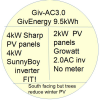
MarkDearden we have a FIT panel block and separate inverter with a 9.5battery and ac inverter.
If your installer adds another current transformer on you fit line then you will read correct total generation.
It will mean your battery system will have to be re-initialised and hence re-calibrated
We realised this only after we were given access to the manuals post original install
But they did come back and do it (eventually)

steve_dadswell There seems to be a reluctance for GivEnergy to answer the question of whether the AC3.0 inverters will support two time slots? This absence of an extra time slot is the only reason I haven't switched to Cosy yet. If GE haven't got it in the pipeline for early release, how difficult is it for a non-techie such as me to develop a workaround?
Dougal It doesn't support the second slot and there are (apparently) memory constraints with the AC3 (the registers have been there for several years, but unsupported by the code). My advice with all technology is not to assume anything that's coming "soon" will arrive in the timescale you want.
As for whether it's easy for a non-techie to devise a workaround, you could use the Octopus automations or run some of the pre-existing software that's out there on a PC, Raspberry Pi, etc that's permanently on.

stevelewis I was trying out Octopus Energy R&D in the summer but was concerned to lose Eco at the time. I wasn't convinced that it was properly selecting the lowest price half-hour intervals. GivEnergy have since swapped me and my three three-phase inverters to their Multiple Inverter portal settings and I can no longer access the APIs for the three inverters - in Octo R&D at least. I guess I may have to go back to treating the inverter 'pack' individually as single inverters in order to apply some programming. Without the APIs II no longer have access to the R&D setting page so I am not aware if in Octo R&D I can set two Timed Charge sessions during a 24-hour period? Any idea? As for other solutions, we have a Mac network so I guess I would have to acquire a Raspberry Pi unless there are any Apple automations out there? I can't find any but haven't looked very hard yet. I hear talk of the Raspberry Pi in Community posts. How does that connect to the inverters? Is it through an ethernet interface or simply using IP addresses and wifi? If you can direct me to any good resource on this without wasting any more of your time I will be grateful for the direction.
Dougal of you have a Mac that's always on, you could run my code - it's written in Python, which comes pre-loaded in OS X. It would need some fettling for your 3 inverters if they're not treated as a single entity on the GivEnergy side (or run 3 separate instances of the code). www.github.com/salewis38/palm
Barns Help!
I am trying to set up your automations but I can't link to the service that you are calling in the action. I seem to be hopeless in setting up automations and yaml.
I have tried the following.
- I have copied your yaml scripts into various files: configuration.yaml, automations.yaml and scripts. yaml. But the alias name doesn't show up.
My yaml code is clean (once I sorted out the strict yaml spaces rules).
When I select 'Action' and 'call a service', I get options for 'Scripts: on', etc but nothing to your specific script. - I have also tried showing the 2 scripts within a single yaml file but I get an error that I can't have 2 documents in same file. My failure above is trying to link to just 1 of your 2 scripts to get it accepted by HA.
Do you know what I am doing wrong? Should I put the 2 scripts into their own yaml files and link to them within 'configurations' using an !include.
This is why HA drives me crazy. I spend days and can't seem to get anywhere with automations. I am fine with setting up dashboards, cards, gauges, etc and used to be a proficient coder for C and Pascal.
Thanks for any help. All I am trying to do is to automate Cozy for 2 charging sessions a day, having an AC3.0 inverter which only allows one session to be input.
Thanks for any help.
Rob
Dougal Super late to reply on this, apologies.
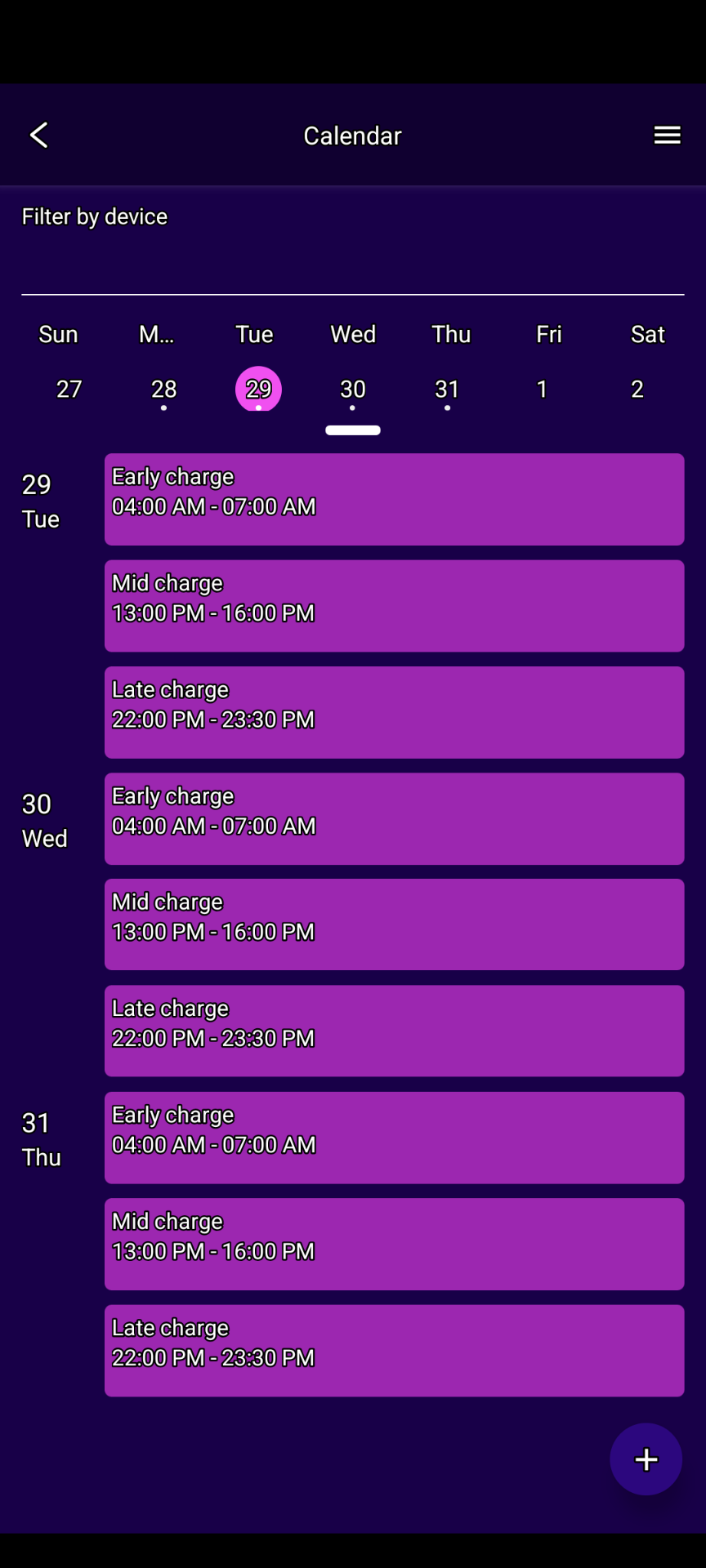
my non-tech work around currently is an alarm on my phone, and manually changing the charging periods each morning after 7am, and each evening after 4pm (when the cosy periods end).
it's a faff, i don't like it, and it's a real shame given the amount of money we've spent on the set up. really disappointing to not have an answer from GE on it, but it's effective and for the last few months our average cost is around 18p/19p per KWH.
@TheDragon (GivEnergy) - any chance of 2 slots on the AC coupled unit?
Our heat pump is on during the 2 x 3hr slots, as well as force charging our battery, we knock the heating down for the increased cost segment (pre-heating the house) which works well for the most part.
The really cold periods (-6 degrees c) was more challenging, but worked just about š
bring on more sunshine and it's less of an issue i think!
steve_dadswell Sounds like my experience up until mid January. I also have an ASHP and was on the Cosy Tariff.
In mid January, I switched to Agile import. I was still chasing low rates and set them manually, but Agile has been consistently cheaper than Cosy. I tried Octopus R&D labs which worked most of the time, selecting lowest slots, but it could be temperamental, missing slots at random.
I also looked at WonderWatt and PredBat.
https://www.wonderwatt.com
https://springfall2008.github.io/batpred/what-does-predbat-do/
I set up PredBat on my Raspberry Pi. The documentation is very good, making the installation bullet proof (provided that you follow the instructions closely). It is not for the weak hearted, but once installed, it runs itself.
On 30th January, I 'went live' with PredBat and it does everything for me, selectively choosing the cheapest slots. Ideal for Agile. Compared with Cosy, my energy costs with Agile + Predbat have halved. With some more solar and warmer temperatures, my total energy costs have been virtually zero for the last few days.
..... And I haven't needed to select charging and discharge slots at all. No more alarms.
With GE AC Coupled inverter, I think GE state that there are not enough registers to add another charging slot. But there are 2 discharge slots, which I have never needed. I might ask if GE could swap one of the discharge slots to become a 2nd charging slot. I may be wrong here and GE could clarify.
It is worth investigating WonderWatt and PredBat.
Wonderwatt is the easier to set up and support seems to be very good.
PredBat is a Jack of all trades, even automatically enrolling me onto saving sessions and able to car charge.
Rob
steve_dadswell an alarm on my phone
So unnecessary when there are plenty of solutions around. Wonderwatt and predbat are excellent, Wonderwatt is currently free, predbat needs a HA box but can be done for under £100.
Even easier, get an android tablet for under £50, and use this app (which costs another £10) .
Disclaimer: The link for an android tablet is just an example, search online sites and read reviews before selecting a purchase. Second hand may be cheaper. Friends or family may have an old one they will give you for free!
Rubikcube Or just a cheapy raspberry pi (first generation model is perfectly adequate, or a Zero W) with cron jobs to run trivial api scripts.
DD Indeed, although cron can be challenging for anyone without unix experience.
Anyone with reasonable programming skills should be able to write their own solution with python, java, kotlin multiplatform, or any modern language (but probably not COBOL) š
Although I do use this forum to plug my own solution, and I appreciate that you have also promoted my app, thanks, I try to do it in an informative way that will help people discover all the options available.
Rubikcube And I don't think I've ever actually thanked you for your app, so thanks. As it happens, my installer miscommunicated my givenergy account credentials when he initially set it up, so I couldn't use the official app to see what was going on that first night. Your app came to the rescue :-) [got it all sorted the next day]
(I really ought to get round to learning kotlin / android app development.)

steve_dadswell there are many ways to get extra slots.
Mimicking 10 slots for older inverters is requested. But it's down to priorities.
This can be done now via API. Such as using Octopus RnD.
Or using Homeassistant.
steve_dadswell my non-tech work around currently is an alarm on my phone,
As well as Wonderwatt and other more technical options, if you don't want to re-invent the wheel, have a look at My Energy Optimiser (MyEO). Coupled with the Agile tariff it has saved me 50% compared to Octo's Flex tariff. I have a 14kW ASHP so am using 40 - 70kWh/day. And get hold of the Octo Compare app if you don't have it already.
DD (I really ought to get round to learning kotlin / android app development.)
Off-topic, if you want to develop android apps, this free online course is a good starting point
https://developer.android.com/courses/android-basics-compose/course
I have a Gen 1 Inverter and therefore just one charging slot. It appears fro the discussions above that using Cosy other slots is possible without having to daily change the slots manually.
Would like to get ready for winter.
Any advice on how to proceed would be appreciated.
Cheers
I finally sat down with the octopus r&d app and couldn't believe how easy it is. I now use all 3 cosy sessions and you can even set how much you want the battery to charge.
well worth a look, you need to get the API key from octopus and then just use the scheduler in the R&d app
steve_dadswell octopus r&d
I have an Octopus App, what is the R&D App?
I use the smart tariff beta card on the givenergy portal: 
steve_dadswell
How do you get hold of it please.
Went to the R&D site. All I could find was mention of Agile.
Cheers
this is in the play store - https://play.google.com/store/apps/details?id=com.smartenergymobile
once you've set up an account and done the API key you can set the schedule as you wish-


Weāre using octopus R&D to schedule the 3 charge slots on our battery. Itās worked well mostly (funnies on clock change and occasional comms like miss a 30 mins charge slot). Agree itās dead easy to use.
I have AC3 GE inverter with its one rate slot restriction. And my first winter with an ASHP and no gas. This is what I tried last year:
- Summer to mid November: Flux with one 3 hour charging slot a day + PV works great.
- Mid-November: Flux couldn't get me through the day with one 3 hour charging slot and declining PV. I swap to Cosy.
- mid Nov - mid Jan. 'Two charge slot' Cosy was better but I was still running out and having to feed batteries with some Flexible rate 'food' during the day.
Having to set up charging slot twice a day was a pain.
At some stage in Dec, I discover R&D labs and this worked well. I could set it up and almost leave it. The only downside was that slots were sometimes missed so I was still having to check that R&D labs was working. I was still having to using Flexible rates at times and three slot Cosy would obviously work better. - mid-January. I had investigated Agile which looked as if it could have been more cost-effective than Cosy. I switched and my costs fell but R&D labs was still inconsistent at times. I investigate Predbat.
- Late January. After several weeks of setting it up, I stop using R&D labs and move over to Predbat.
- Late January to Now. Agile import, 15p Outgoing with Predbat. I have never looked back and am well in profit since late January (by £450). The downside of Predbat is that it takes a lot of setting up and understanding. But after the learning curve, it ticks over looking after every 30 min slot for me during the day. Lots of support in this GE community and on Github with very comprehensive documentation.
In your shoes, I would try three slot Cosy with R&D labs and see how it goes.
Best of luck
Rob
I have a small glitch with R&D Labs, it won't recognise my password nor does it send a reset code.
I am using MyEnergyOptimiser which is working well with the 30 minute slots and control over when or how much to charge. There is a glitch, as far as I am concerned, with the Discharge control but over winter that is hardly and issue.
MyEO also has a feature to allow for the Solar Forecast which, for me, limits the upper charge level in the Flux cheap charge period. I have been using it for the last 4-5 days and it has worked every day with Solar taking me to 100% on those days where MyEO limited the charge due to the forecast.
Does R&D allow for solar forecasts?
Roy124 Does R&D allow for solar forecasts?
I don't think so. You would need to allocate slots yourself from your own solar forecasts, via Solcast.
R&D labs is really set up to automate via GE Inverter and Agile tariffs. This is explained in the R&D help section.
For tariffs such as Cosy, you can allocate the regular Cosy slots and you should then be away.
Rob
Rbor my thought with Cosy and battery management is to top up the battery at every opportunity at low tariff or solar. Solar would only be realistic between 0700 and 1300 in winter.
Roy124 Good choice.
Grab what you can from low tariff slots and solar when it appears.
You will get the odd 'good solar winter day'.
On the plus side, things start to pick up from mid January and February really perks up.
But mid Nov to mid Jan are often gloomy.
The crunch comes when the temperature drops and we need more energy for heat pumps.
But with good planning, we will all get there.
Rob
Rbor Gloomy all day but a small positive PV input from 0830-1500. Eyeballing, it was about 700w and just run out of our 0500 boost. I am just glad we went for a 5kW battery over the initial quote of 3kW.