P
Does anyone know how often the portal requests the Solcast forecast via the API? I want to use Solcast in PredBat and don't want to consume the 10 daily API calls in the portal.

Does anyone know how often the portal requests the Solcast forecast via the API? I want to use Solcast in PredBat and don't want to consume the 10 daily API calls in the portal.
Are you using Predbat in Home Assistant? I removed Solcast from the portal and just have an automation to call the update in HA so I don't run out of API calls. If you want to see forecast vs actual like the portal does then these can be graphed in HA instead.


geoffreycoan hi, I’m having trouble getting solcast to work within PredBat, I’m seeing all the services but all values are zero I’m see my 2 array names so API key is working. It says my last poll was 53years ago!
Anyone seen this before?
Tried posting on Facebook Givtcp page but keeps deleting my post!
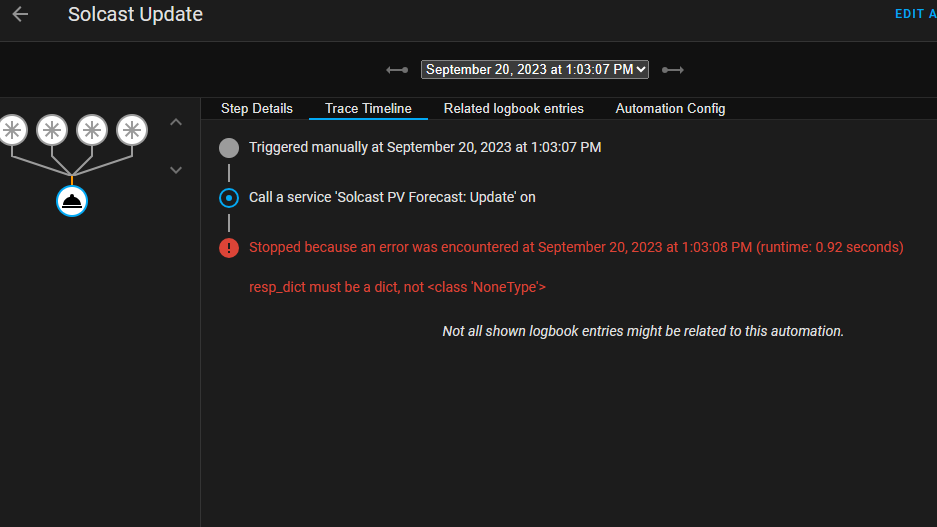
Jase1703 looks like the solcast update call is failing
my automation script for the same is trivial which suggests its a solcast integration problem?
you’ve added the solcast API key to the HACS solcast integration?
the right key, the API key not roof id or similar?
`alias: Solcast solar forecast update
description: Update solar generation forecast
trigger:
geoffreycoan excellent thank you, all working now, looks like I exceeded daily poll requests. I’ve now removed solcast from my Givenergy cloud dashboard thereby reducing the polling calls significantly. All data correctly populated today, now I can install PredBat and give it a try. Thanks for your advice.
Jase1703 Glad you are sorted. The API used count is one of the things the HA solcast integration reports so you can monitor it there.
I finished my batpred setup last night and turned it on by commenting out the template=true line in apps.yaml
It ran ok and created dozens of sensors, switches and helpers in HA. Many of these such as car charger are irrelevant to me but I wasnt able to hide them. As it was late I put the template=true line back in to stop it running.
Unbenownst to me it had setup a 2am-5am charging slot, but only on 1 inverter not the other so I found that battery more charged this morning than I wanted it to be. Having to export to get it down to 50% for the Octopus power up event at 2pm. I suspect that batpred is not going to like these power up events as its 2 hours of free electricity and I force charge the batteries but the tariff rate on the octopus API doesnt change and I get a credit back for the electricity used in this period.
I’m going to watch the batpred videos to work out how to use it in ‘predict but don’t do’ mode until I better understand how it works !
geoffreycoan switch off the set charging window and set soc enable controls, and maybe set discharge if you have that turned on. That way it should show you all the predictions but not make any changes.
I thought I'd seen something about powerup stuff in either the octopus integration or predbat but I can't find it now
Phil_H Thanks for the tips. I wasn’t quite expecting it to take control so quickly and hadn’t seen the list of things to toggle to stop it doing so. Its quite vast the range of settings !
Ive changed these as you suggested and also turned off Octopus Intelligent Charging, Car Charging Hold and Set Reserve Enable.
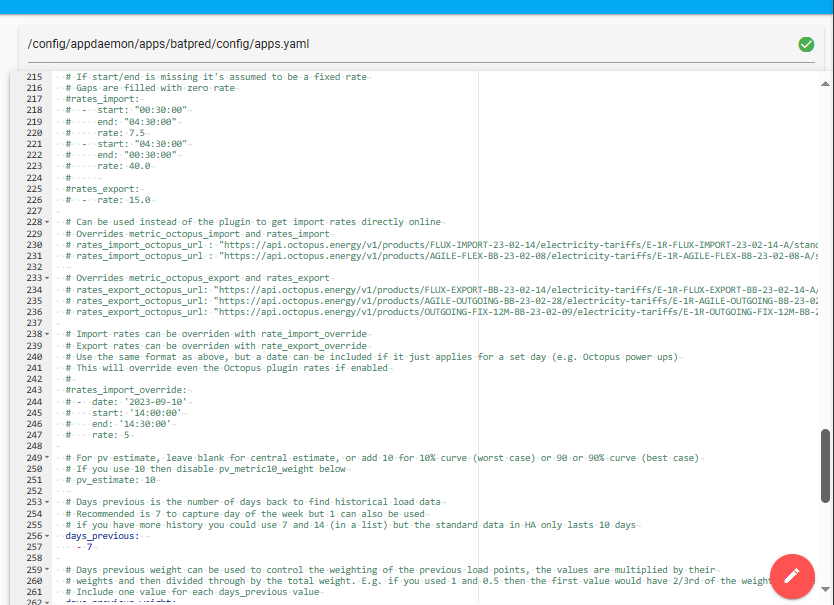
Jase1703 see line 238 in the appdaemon/apps/batpred/config/apps.yaml for how to deal with Octopus power ups
ah excellent, I was wondering if something like that might be the case that I could override for specific days not the whole tariff schedule. Its very powerful thats for sure.
One thing Ive found useful already is the calculated predbat_soc_kw_h0 which gives the current battery Soc in kWh rather than a percentage. Very useful as I have different battery sizes; added this to the dashboard.
Found this morning that predbat wasnt running after I upgraded to the latest version from HACS. Had to restart the appdaemon addon and that fixed it