Homeassistant Agile - ECO mode

53 comments started 2023-09-27 last 2023-11-26
Home AutomationHome Assistant
D
#1 deepanshus

hello,

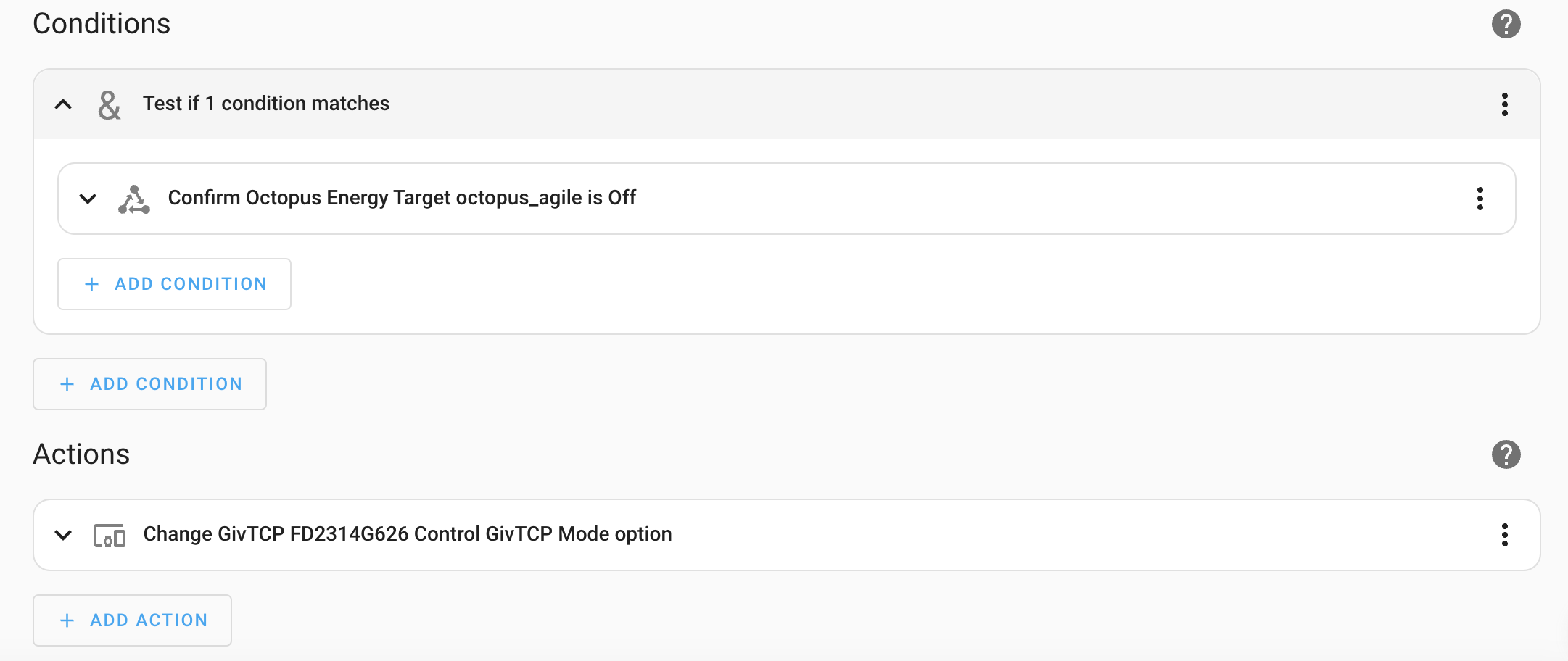
i moved to Agile from Flux and wanted to create an automation in HA for charging based on 30mins slot. i have the HACS integration by "BottlecapDave - HomeAssistant-OctopusEnergy" which gives me top 6 slots to charge my battery.

i am checking the state and making the GivTCP Control state to "Eco" when the sensor is Off. I dont want to update the state if its already in ECO mode.

how do i check the current state of the GiveEnergy inverter mode?

Kind regards,
Deepanshu

ps: i know this is not exactly GE question but this is the only forum that i use and i am sure there are a lot of HA punters who can help with this petty query

S
#2 SteveCook

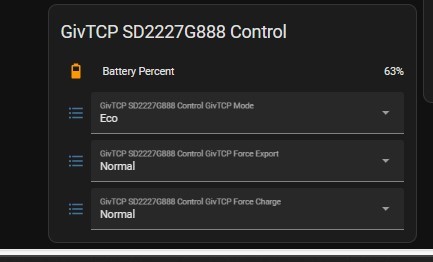
GivTCP control shows current inverter mode.

D
#3 deepanshus

i want to check the mode in automation, as a part of condition. if i use the control, it changes the mode rather than just returning the status.

i don't want to be changing the mode to ECO every 2 mins :-( seems i am missing something very basic here

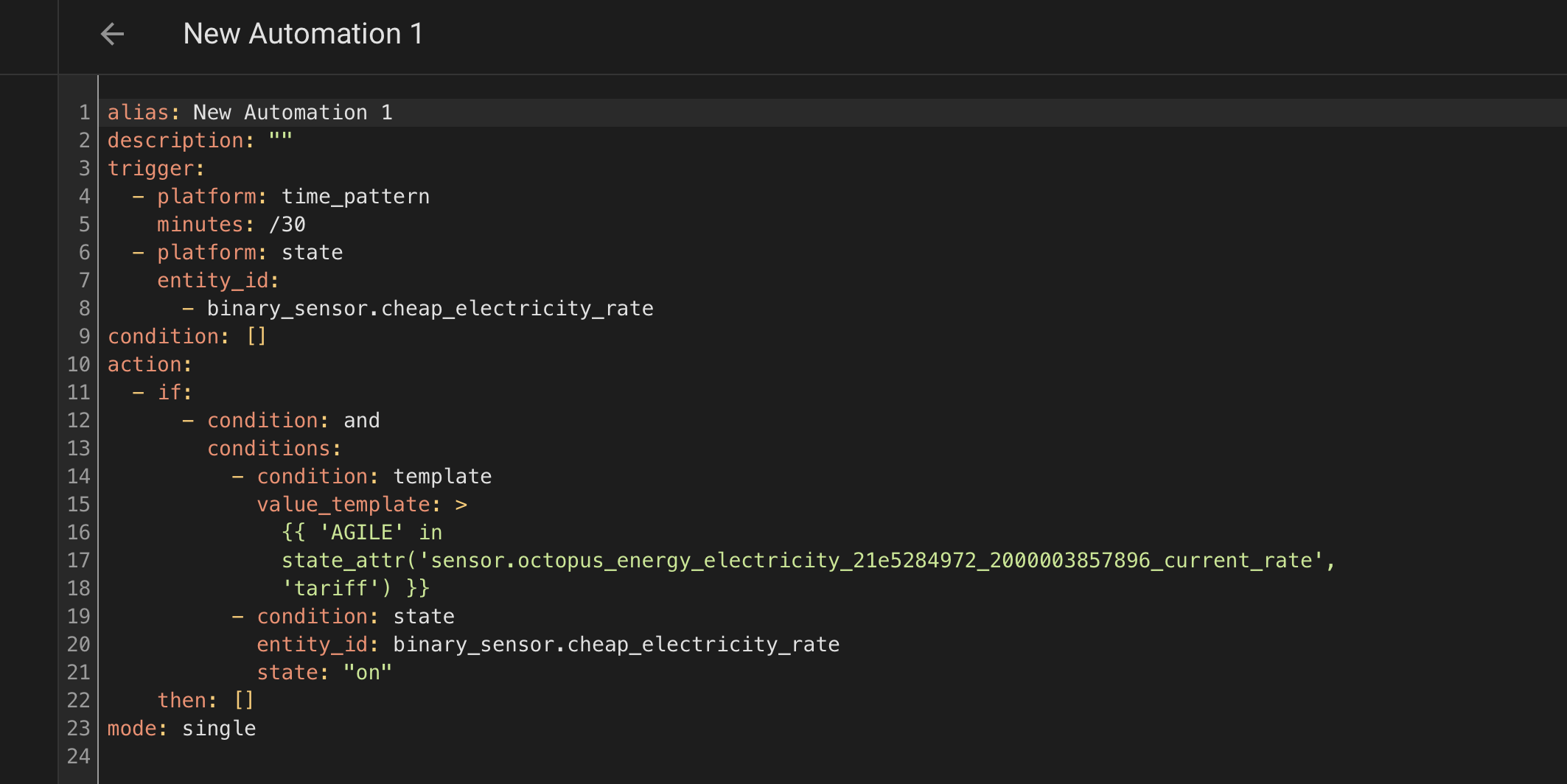
S
#4 SteveCook

Oh sorry. Misunderstood

#5 Lofthouse

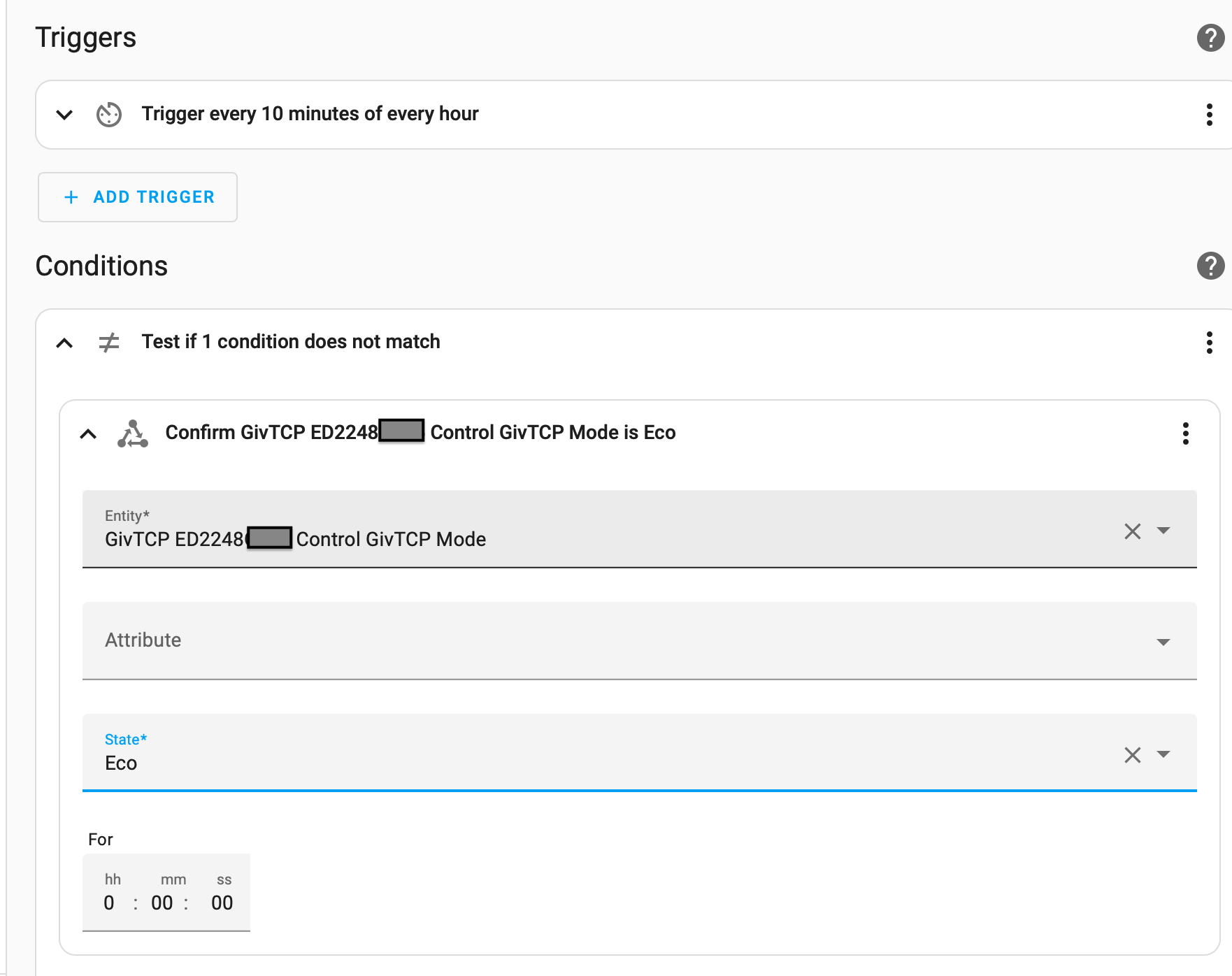
Hi Deepanshus - I think you can just use the ‘State’ option in a Condition. This will allow you to enter the Mode entity (GivTCP ED2248xxxx Control GivTCP Mode for me) and confirm its State. If you want to check it is NOT Eco, you can first add a ‘Not’ option in the condition, then add the ‘State’ condition.

#6 Lofthouse

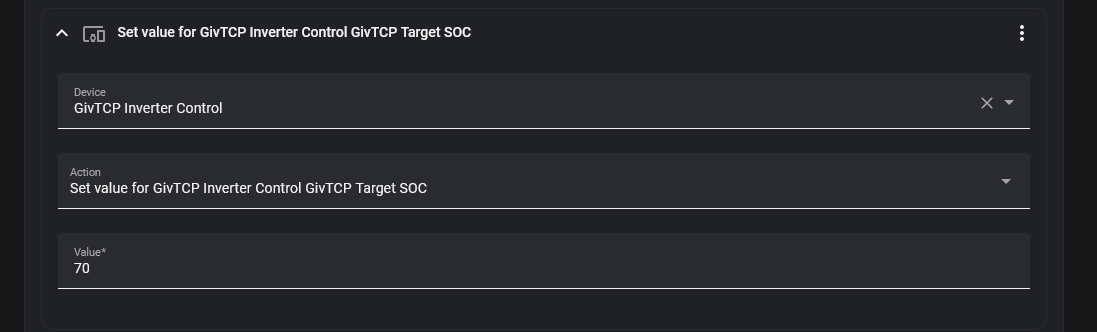
A
#7 Arg0t

I come at this a little differently.

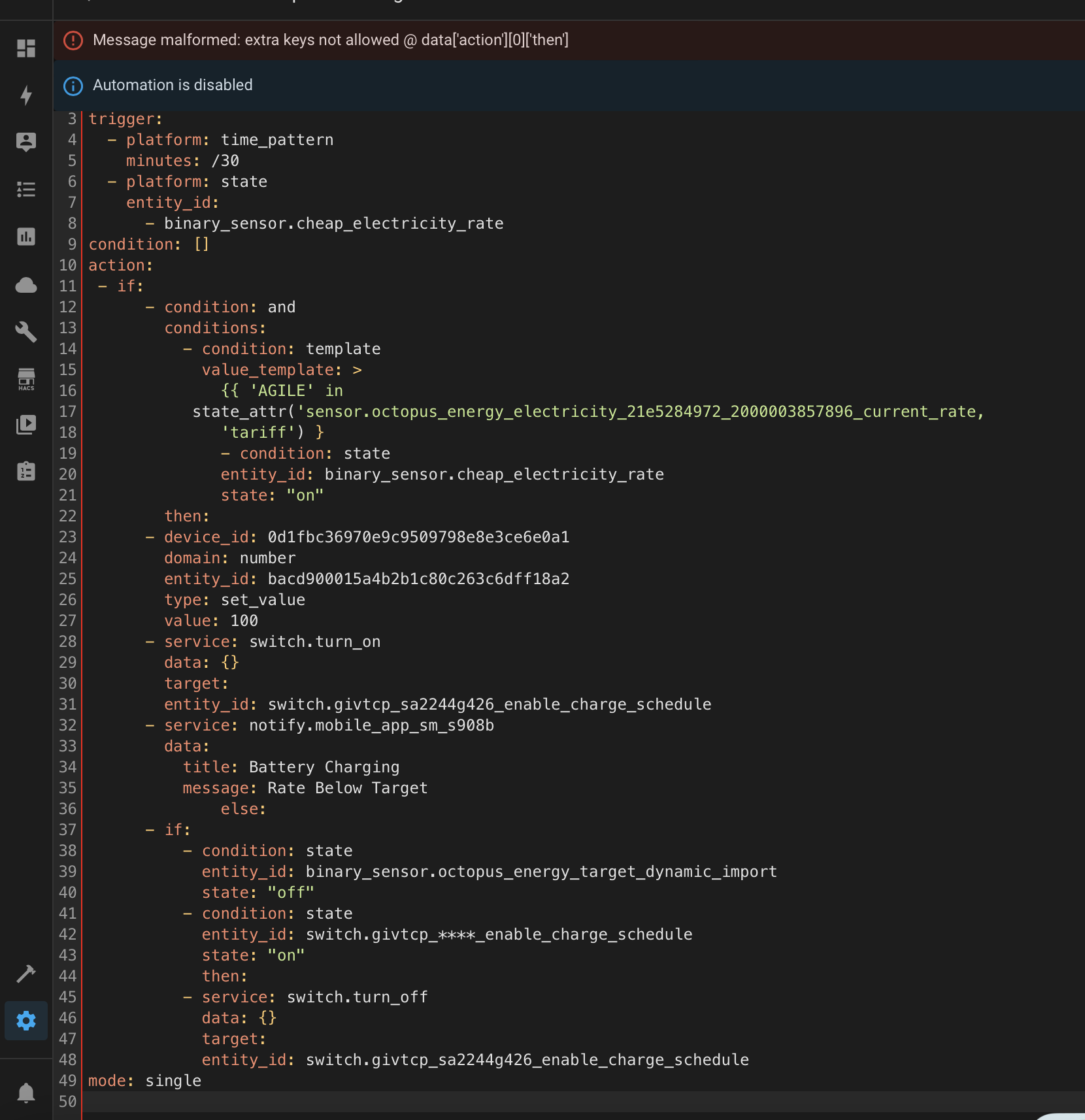
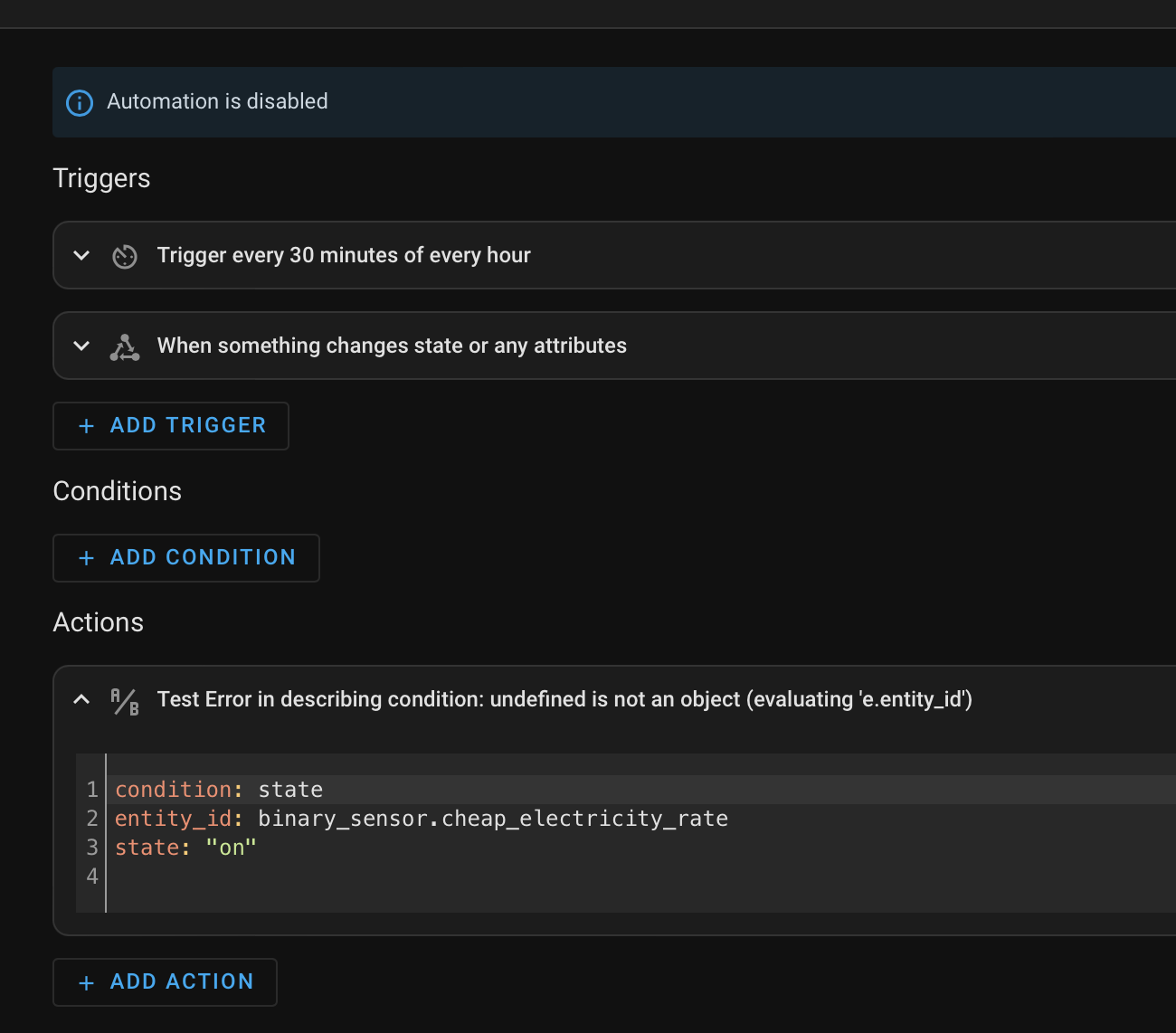
I use just one charge slot, it's 00:00 to 23:59. Combined with four automations and a helper. The bottlecap dave integration gives you a target entity, change the values in that entity based on the forecast tomorrow. Have the inverter set to charge when the target entity switches on. Determine if it actually charges or not based on the battery SOC target. Plus a side piece to charge if the rate is effectively free.

Helper:

Threshold. If current Agile rate is below a threshold then switch on the helper. My threshold is 1p.

binary_sensor.cheap_electricity_rate
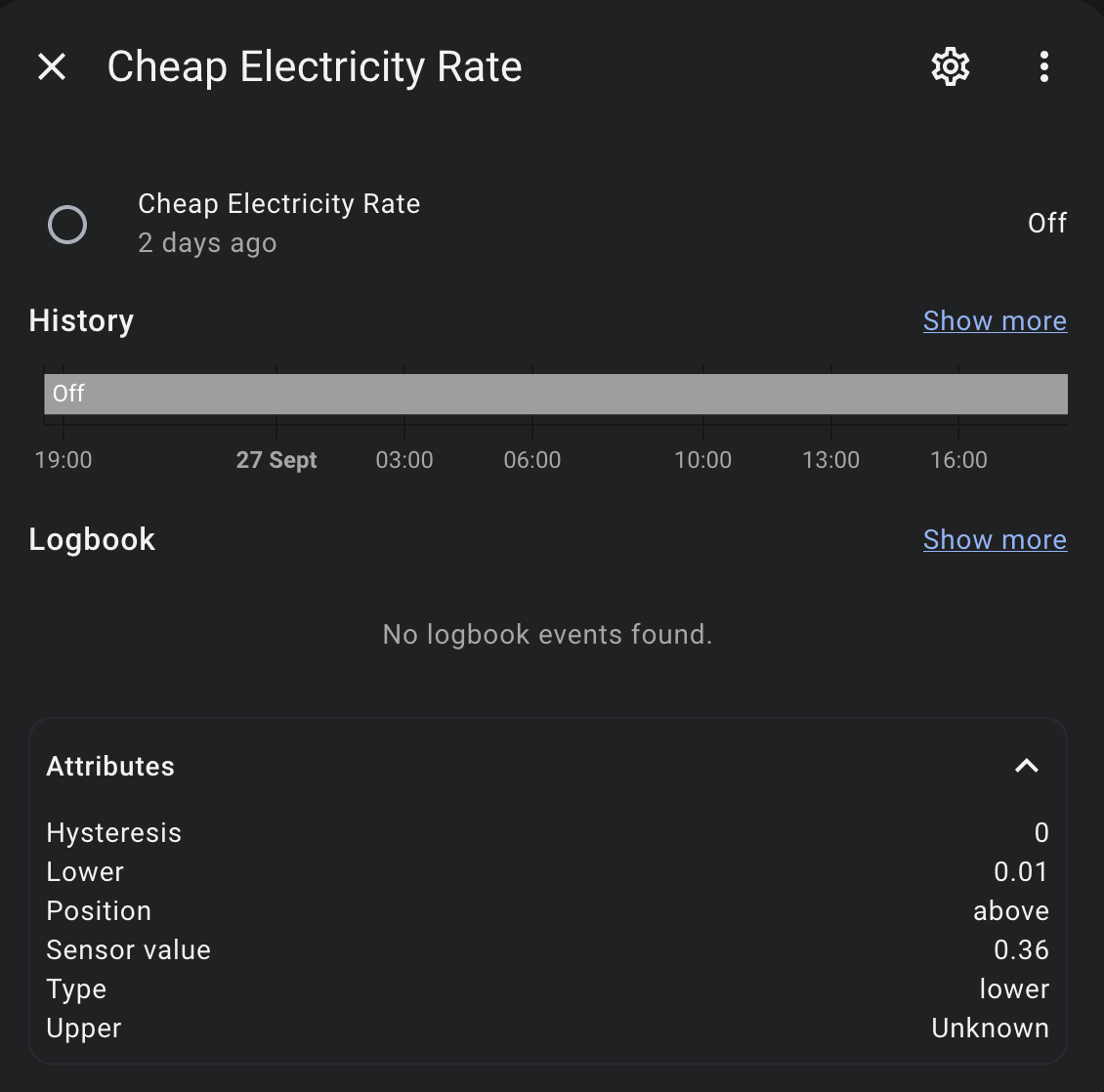
Automation 1:

If the cheap rate helper threshold switch is on then set the battery SOC to 100% and charge. Ignore anything else, the rate is so low I don't care if I need it or not.

alias: "Automation: Cheap Rate Charge"
description: ""
trigger:
  - platform: time_pattern
    minutes: /30
  - platform: state
    entity_id:
      - binary_sensor.cheap_electricity_rate
condition: []
action:
  - if:
      - condition: and
        conditions:
          - condition: template
            value_template: >
              {{ 'AGILE' in
              state_attr('sensor.octopus_energy_electricity_***_***_current_rate',
              'tariff') }} # replace with Octopus import current rate entity
          - condition: state
            entity_id: binary_sensor.cheap_electricity_rate
            state: "on"
    then:
      - device_id: 58aea2749b18c9e79de484f5e61b64f5 # Replace with GIVTCP Inverter
        domain: number
        entity_id: 16c460fc885f7183afbed96ec5c21ff4 # Replace with GIVTCP SOC Target Entity
        type: set_value
        value: 100
      - service: switch.turn_on
        data: {}
        target:
          entity_id: switch.givtcp_****_enable_charge_schedule #replace with relevant GIVTCP entity
      - service: notify.mobile_app_jpl_iphone13
        data:
          title: Battery Charging
          message: Rate Below Target
    else:
      - if:
          - condition: state
            entity_id: binary_sensor.octopus_energy_target_dynamic_import
            state: "off"
          - condition: state
            entity_id: switch.givtcp_****_enable_charge_schedule #Replace with relevant GIVTCP entity
            state: "on"
        then:
          - service: switch.turn_off
            data: {}
            target:
              entity_id: switch.givtcp_****_enable_charge_schedule #replace with relevant GIVTCP entity
mode: single

Automation 2:

Switch on Enable Charge Schedule when BottleCap Dave Target entity switches on.

alias: "Automation: Inverter Dynamic Charge - Enable"
description: Enable Inverter Timed Charge Based on Target Import Rate
trigger:
  - platform: state
    entity_id:
      - binary_sensor.octopus_energy_target_dynamic_import #rename to the bottlecap dave target entity
    from: "off"
    to: "on"
condition: []
action: # sets battery charge/import rate to maximum
  - device_id: 58aea2749b18c9e79de484f5e61b64f5
    domain: number
    entity_id: 3a48dd6829849544d2571334ec5a30d8
    type: set_value
    value: 3600
  - service: switch.turn_on
    data: {}
    target:
      entity_id: switch.givtcp_*****_enable_charge_schedule # replace with your enable charge schedule entity
mode: single

Automation 3:

Switch Off Enable Charge Schedule when BottleCap Dave Target entity switches off or cheap rate entity threshold switches to off. Some loop to avoid they conflict.

alias: "Automation: Inverter Dynamic Charge - Disable"
description: Rate Based Charge Switch Off
trigger:
  - platform: state
    entity_id:
      - binary_sensor.octopus_energy_target_dynamic_import
    from: "on"
    to: "off"
  - platform: state
    entity_id:
      - binary_sensor.cheap_electricity_rate
    from: "on"
    to: "off"
condition:
  - condition: and
    conditions:
      - condition: state
        entity_id: binary_sensor.cheap_electricity_rate
        state: "off"
      - condition: state
        entity_id: binary_sensor.octopus_energy_target_dynamic_import #rename
        state: "off"
action:
  - service: switch.turn_off
    data: {}
    target:
      entity_id: switch.givtcp_***_enable_charge_schedule
mode: single

Automation 4:

Set the battery SOC % and the number of charge hours based on the Solcast forecast for tomorrow. This is very subjective, the above and below numbers, the SOC charge % and the hours charge required are all based on my consumption and GIV hardware.
Simply, poor forecast, find 5 hours and charge the batteries to 90%, OK forecast 3 hours and 55%, Good forecast, 1.5 hours and 20%, Amazing forecast, .5 hours and 10%. With a little check in the morning to top up if the SOC is low before midday.

alias: Automation - Agile Charge
description: ""
trigger:
  - platform: time_pattern
    minutes: /30
condition:
  - condition: time
    after: "08:30:00"
    before: "22:30:00"
  - condition: template
    value_template: >
      {{ 'AGILE' in
      state_attr('sensor.octopus_energy_electricity_***_***_current_rate',
      'tariff') }} # replace with Octopus import current rate entity
action:
  - if:
      - condition: or
        conditions:
          - condition: and
            conditions:
              - condition: numeric_state
                entity_id: sensor.givtcp_***_soc # replace with relevant GivTCP SOC entity.
                below: 30
              - condition: time
                after: "00:00:00"
                before: "12:00:00"
              - type: is_energy
                condition: device
                device_id: de0cdb51f56ffd273500fdc038cc63d1 # replace with Solcast entity
                entity_id: fd3daddb661ab6011a6c177909ef660a # replace with Solcast forecast remaining today entity
                domain: sensor
                below: 9
        alias: Low Daytime Charge and Solar Forecasted
    then:
      - service: octopus_energy.update_target_config
        data:
          target_start_time: "08:30"
          target_end_time: "16:00"
          target_hours: "3"
        target:
          entity_id:
            - binary_sensor.octopus_energy_target_dynamic_import # replace with name of your Octopus target entity
      - device_id: 58aea2749b18c9e79de484f5e61b64f5 # replace with GivTCP inverter 
        domain: number
        entity_id: 16c460fc885f7183afbed96ec5c21ff4 # replace with GivTCP SOC Target Entity 
        type: set_value
        value: 70
    else:
      - if:
          - condition: or
            conditions:
              - condition: and
                conditions:
                  - condition: time
                    after: "18:30:00"
                    before: "22:30:00"
                  - type: is_energy
                    condition: device
                    device_id: de0cdb51f56ffd273500fdc038cc63d1
                    entity_id: 58e026d0819e0fd33ccfc6dfe314e52e
                    domain: sensor
                    below: 9
            alias: Low Solar Forecast
        then:
          - service: octopus_energy.update_target_config
            data:
              target_start_time: "22:30"
              target_end_time: "16:00"
              target_hours: "5"
            target:
              entity_id: binary_sensor.octopus_energy_target_dynamic_import
          - device_id: 58aea2749b18c9e79de484f5e61b64f5
            domain: number
            entity_id: 16c460fc885f7183afbed96ec5c21ff4
            type: set_value
            value: 90
        else:
          - if:
              - condition: or
                conditions:
                  - condition: and
                    conditions:
                      - condition: time
                        after: "18:30:00"
                        before: "22:30:00"
                      - type: is_energy
                        condition: device
                        device_id: de0cdb51f56ffd273500fdc038cc63d1
                        entity_id: 58e026d0819e0fd33ccfc6dfe314e52e
                        domain: sensor
                        above: 9
                        below: 16
            then:
              - service: octopus_energy.update_target_config
                data:
                  target_hours: "2"
                  target_start_time: "22:30"
                  target_end_time: "16:00"
                target:
                  entity_id: binary_sensor.octopus_energy_target_dynamic_import
              - device_id: 58aea2749b18c9e79de484f5e61b64f5
                domain: number
                entity_id: 16c460fc885f7183afbed96ec5c21ff4
                type: set_value
                value: 55
            else:
              - if:
                  - condition: or
                    conditions:
                      - condition: and
                        conditions:
                          - condition: time
                            after: "18:30:00"
                            before: "22:30:00"
                          - type: is_energy
                            condition: device
                            device_id: de0cdb51f56ffd273500fdc038cc63d1
                            entity_id: 58e026d0819e0fd33ccfc6dfe314e52e
                            domain: sensor
                            above: 16
                            below: 25
                then:
                  - service: octopus_energy.update_target_config
                    data:
                      target_start_time: "22:30"
                      target_end_time: "09:00"
                      target_hours: "1.5"
                    target:
                      entity_id:
                        - binary_sensor.octopus_energy_target_dynamic_import
                  - device_id: 58aea2749b18c9e79de484f5e61b64f5
                    domain: number
                    entity_id: 16c460fc885f7183afbed96ec5c21ff4
                    type: set_value
                    value: 20
                alias: High Solar Forecast
                else:
                  - if:
                      - condition: or
                        conditions:
                          - condition: and
                            conditions:
                              - condition: time
                                after: "18:30:00"
                                before: "22:30:00"
                              - type: is_energy
                                condition: device
                                device_id: de0cdb51f56ffd273500fdc038cc63d1
                                entity_id: 58e026d0819e0fd33ccfc6dfe314e52e
                                domain: sensor
                                above: 25
                    then:
                      - service: octopus_energy.update_target_config
                        data:
                          target_end_time: "09:00"
                          target_start_time: "22:30"
                          target_hours: "1"
                        target:
                          entity_id: binary_sensor.octopus_energy_target_dynamic_import
                      - device_id: 58aea2749b18c9e79de484f5e61b64f5
                        domain: number
                        entity_id: 16c460fc885f7183afbed96ec5c21ff4
                        type: set_value
                        value: 10
                    alias: Very High Solar Forecast
                    else: []
            alias: Medium Solar Forecast
mode: single

#8 Lofthouse

Arg0t, could you remind me how to paste in the YAML so neatly - I seem to remember it was something to do with a double set of quotes ??

T
#9 TX200

think it might be back ticks

T
#10 TX200

TX200 yep, I think I was right. 🤣

It's like the single quote but it's the one that is slanted: `

Put two of them at the start and two at the end.

#11 Lofthouse

@TX200 - that’s great, thanks 😀 - just got to find the backtick on my iPad keyboard now 😳

T
#12 TX200

Lofthouse either copy mine from above, or

Press the 123 button, then hold down on the apostrophe key and swipe across to the back tick option that appears.

#13 Lofthouse

You are a … ⭐️!

M
#14 MarkTim

Arg0t, fantastic work ... presumably automations 1, 2 and 3 could be adapted to give new automations that focused on export, giving 3 new automations

D
#15 deepanshus

Arg0t this is fantastic .. kudos

D
#16 deepanshus

TX200 lol.. these are like the hidden gem messages that you will not get in normal conversation.. awesome info !

W
#17 Wavy Davy

Don't know what I'm doing wrong, but when I create the automations, they save but if I open them there's no info there except description.
Also the helper has a error which says User input malformed: Entity binary_sensor.cheap_electricity_rate belongs to domain binary_sensor, expected ['sensor'] for dictionary value @ data['entity_id']
Probably my error as I've only just started with HA.

G
#18 geoffreycoan

Wavy Davy I’m guessing that you are creating automations in yaml rather than in the visual editor? That could cause your automation to disappear if you don’t have the yaml correctly indented, it could be ignored

If you can post screenshots we can try to debug for you.

Been there! Once you get the hang of home assistant it’s fairly straightforward but I too found my automations didn’t work initially. Took ages to understand the sensors

W
#19 Wavy Davy

geoffreycoan Thanks. Decided to try in Visual editor starting with Automation 1 but getting stuck with the Then statement (the one after the entity_id: binary_sensor.cheap_electricity_rate). I'm not sure which option to select to enter device id, domain and entity id.
Also which entity does Replace with GIVTCP Invertor mean
Here is a screen shot of what the yaml looks like so far

A
#20 Arg0t

Wavy Davy you need to create the cheap rate sensor as a threshold helper.

W
#21 Wavy Davy

Arg0t Thanks, but have done that.
I think the main problem apart from my HA ignorance is which inverter entity to use. Tried the ones I could find but it wont accept them.

G
#22 geoffreycoan

Wavy Davy I'm not sure which option to select to enter device id, domain and entity id.

You only need to enter the entity Id which will be something like sensor.givtcp***soc where **** is the serial number of your inverter.

Some people use device id’s in their HA scripts but this ties the script to that specific device whereas entity id’s are not. I think it’s generally advised to not use device Id any more.

Anyway, entity Id is simpler, and you can make use of auto complete in HA, so if you type sensor.givtcp and then type soc (no spaces so it’s sensor.givtcpsoc) it will match any entities with the same matching characters and you can just select the entity id for your inverter.

Soc is state of charge - % level.

W
#23 Wavy Davy

Still trying to get this to work.
Could someone tell me what device this is referring to?

  • device_id: 58aea2749b18c9e79de484f5e61b64f5 # Replace with GIVTCP Inverter?
    I realise I have to put my details in, but which details?
    Is it an entity or is it something else?
    It appears in the first 2 Automations.
    Have tried all the entities I thought it might be but no luck.
G
#24 geoffreycoan

Wavy Davy as I said above, don't bother with device id's, just use entity id's.

e.g. here is a bit of YAML to set my inverter to full discharge:

  - service: select.select_option
    target:
      entity_id:
        - select.g_sd2237g182_discharge_start_time_slot_1
    data:
      option: "00:00:00"
  - service: select.select_option
    target:
      entity_id: select.g_sd2237g182_discharge_end_time_slot_1
    data:
      option: "23:59:00"
  - service: number.set_value
    data:
      value: "2600"
    target:
      entity_id: number.g_sd2237g182_battery_discharge_rate
  - service: number.set_value
    data:
      value: "4"
    target:
      entity_id: number.g_sd2237g182_battery_power_reserve
  - delay:
      hours: 0
      minutes: 0
      seconds: 10
      milliseconds: 0
  - service: select.select_option
    target:
      entity_id: select.g_sd2237g182_mode
    data:
      option: Timed Export

As you can see I only ever use entity_id's in my scripts. I changed my inverters to be prefixed g_ and h_ in GivTCP, so yours will be called givtcp_XXXXXXX_mode etc

And to explain the script, it sets:

  • start discharge time to 00:00:00
  • end discharge time to 23:59:00
  • discharge rate to 2600 (for my gen 1 hybrid inverter, yours may be higher)
  • battery reserve % to 4% (full discharge to empty)
  • wait 10 seconds for all the previous changes to have been applied by givtcp
  • set battery mode to Timed Export
A
#25 Arg0t

Wavy Davy

Use a device action, select givtcp inverter control, set value. In YAML this then uses entity ID.s

device_id: 58aea2749b18c9e79de484f5e61b64f5
domain: number
entity_id: 16c460fc885f7183afbed96ec5c21ff4
type: set_value
value: 70
W
#26 Wavy Davy

just checked and don't have givtcp invertor control entity in my list.
I have uninstalled Givtcp add on and re-installed it and it's still not there.
I did uninstall predbat and am wondering if that's got rid of it.
I have a backup I did after I first set up HA so I may take another one, and try the first one.

G
#27 geoffreycoan

Wavy Davy predbat uses givtcp but it’s completely separate. Uninstalling it would have no impact on givtcp.

You should have a whole load of givtcp entities on the default dashboard. There’s controls, meters, switches, etc for the battery, the time slots and the inverter.
first thing I’d look at is whether givtcp is up and running ok. Did you follow the speak to the geek video to set it up?

Check the add-on list. Did you start givtcp after you had install It? Maybe check the givtcp log for errors?

W
#28 Wavy Davy

Have got a bit further, managed to save Automations 2 and 3 with no errors. Haven't had chance to test it yet but will do tonight, but having problems with automation 1.

Can someone ell me what have I got wrong?

G
#29 geoffreycoan

Wavy Davy looks like your YAML indenting is wrong.

the if and then should be aligned

entity_id should be two spaces to the right of target

and as I've said a couple of times, just use entity id's instead of domains and device_id's, it makes the code much simpler as you can see and understand what the objects are you are manipulating rather than random id's

(my inverter prefixes are g_ and h_ so just change the g_ to givtcp_ and put your inverter serial number in instead of mine

e.g. the code should be something like this:

  - if:
      - condition: and
        conditions:
          - condition: template
            value_template: >-
              {{ AGILE in
              state_attr('sensor.octopus_energy_electricity_22j0452464_1012444237400_current_rate')
              }}
          - condition: state
            entity_id: binary_sensor.cheap_electricity_rate
            state: "on"
    then:
      - service: number.set_value
        data:
          value: "100"
        target:
          entity_id: number.g_sd2237g182_target_soc
      - service: switch.turn_on
        target:
          entity_id:
            - switch.g_sd2237g182_enable_charge_schedule
        data: {}
W
#30 Wavy Davy

geoffreycoan Thanks for the reply.
I used your data and the automation does seem to save without errors appearing, but when I go to the visual editor the data disappears, with the exception of data down to just before the IF statement.
The visual editor shows as below.

This is my code (pasting has replaced the underscore with dots)

alias: "Automation: Cheap Rate Charge"
description: ""
trigger:

  • platform: time_pattern
    minutes: /30
  • platform: state
    entity_id:
    • binary_sensor.cheap_electricity_rate
      condition: []
      action:
  • if:
    • condition: and
      conditions:
      • condition: template
        value_template: >-
        {{ AGILE in
        state_attr('sensor.octopus_energy_electricity_21e5284972_2000003857896_current_rate')
        }}
        • condition: state
          entity_id: binary_sensor.cheap_electricity_rate
          state: "on"
          then:
      • service: number.set_value
        data:
        value: "100"
        target:
        entity_id: number.givtcp_sa2244g426_target_soc
      • service: switch.turn_on
        target:
        entity_id:
        • switch.givtcp_sa2244g426_enable_charge_schedule
          data: {}
      • service: notify.mobile_app_ sm_s908b
        data:
        title: Battery Charging
        message: Rate Below Target
        else:
      • if:
        • condition: state
          entity_id: binary_sensor.octopus_energy_target_dynamic_import
          state: "off"
        • condition: state
          entity_id: switch.givtcp_sa2244g426_enable_charge_schedule
          state: "on"
          then:
        • service: switch.turn_off
          data: {}
          target:
          entity_id: switch.givtcp_sa2244g426_enable_charge_schedule
          mode: single
G
#31 geoffreycoan

Wavy Davy I wasn't trying to recreate the entire script, I was trying to show where the YAML indentations were wrong which was why your script was being rejected.
I suspect you still have another indentation problem which is why you've now lost half of the script.

What I have just done is to copy/paste the original integration 1 script into my home assistant and got it to save. You will have to make some changes to get it to save in your own HA as the entity names of your inverter and your electricity meter will be different from mine

Here's the full script, its exactly the same as Arg0t had it except I have got rid of the device id stuff in the first part of the then and replaced it with (my) direct entity:

alias: "Automation: Cheap Rate Charge"
description: ""
trigger:
  - platform: time_pattern
    minutes: /30
  - platform: state
    entity_id:
      - binary_sensor.cheap_electricity_rate
condition: []
action:
  - if:
      - condition: and
        conditions:
          - condition: template
            value_template: >
              {{ 'AGILE' in
              state_attr('sensor.octopus_energy_electricity_XXXX_XXXXX_current_rate',
              'tariff') }} # replace with Octopus import current rate entity
          - condition: state
            entity_id: binary_sensor.cheap_electricity_rate
            state: "on"
    then:
      - service: number.set_value
        data:
          value: 100
        target:
          entity_id: number.givtcp_sdYYWWgNNN_target_soc
      - service: switch.turn_on
        data: {}
        target:
          entity_id: switch.givtcp_sdYYWWgNNN_enable_charge_schedule
      - service: notify.mobile_app_jpl_iphone13
        data:
          title: Battery Charging
          message: Rate Below Target
    else:
      - if:
          - condition: state
            entity_id: binary_sensor.octopus_energy_target_dynamic_import
            state: "off"
          - condition: state
            entity_id: switch.givtcp_sdYYWWgNNN_enable_charge_schedule
            state: "on"
        then:
          - service: switch.turn_off
            data: {}
            target:
              entity_id: switch.givtcp_sdYYWWgNNN_enable_charge_schedule
mode: single

Create a new automation in HA, starting from a blank template
Edit in YAML and select and delete the 4 lines or so of blank template you are given
copy all my YAML above and paste into the new template
then, before you can change it, you need to change the references to my inverter and my meter to your own....

so where it says sensor.octopus_energy......._current_rate. Select all this, and delete it, then start typing sensor.octopuscurrent
HA will pattern match what you have typed, looking for a sensor that has "octopus" and "current" in the sensor name, you can then select the correct current rate sensor for your electricity meter

then do the same for number.givtcp_xxxxx_target_soc, select and delete the entity, start typing number.targetsoc and select the correct entity for your givtcp inverter

ditto the enable charge schedule switches

and finally, the mobile_app_jpl_iphone13 which is the author's mobile phone. Unfortunately this won't autocomplete as its a service name not an entity name, so navigate to developer tools/services
and in the service box type mobile and you will get the name of the mobile devices you have the home assistant app installed on. If you haven't one this yet then just delete the service: notify.mobile and the following data, title and message lines

Once you have changed the sensor names to your matching HA entries the script should save OK

W
#32 Wavy Davy

geoffreycoan Thanks very much, that worked a treat.
I need to compare your code with mine and try to see where I went wrong, because at the moment yaml is a complete mystery to me.
Hi Thanks for your patience and help. I think I will have a break before I attempt the 4th automation....

W
#34 Wavy Davy

geoffreycoan Have just done this and it saved ok.
Is there anyway to test this when the charge schedule is off? If I select run nothing happens, presumably because the schedule is off.

G
#35 geoffreycoan

Wavy Davy assuming haven’t disabled the automation, it’s setup to be triggered who run every 30 minutes or when the cheap electricity rate sensor is set to true

So it will have been running already and you can check the previous 5 run states by clicking on the automation and then TRACES up at the top right. You can see what happened on previous runs
Looking at the conditions though, when it’s triggered it won’t proceed unless you are on the agile rate and it’s a cheap rate. So presumably it’ll first actually run overnight when it’s cheap rate

A
#36 Arg0t

Wavy Davy what value did you set in the cheap rate threshold?

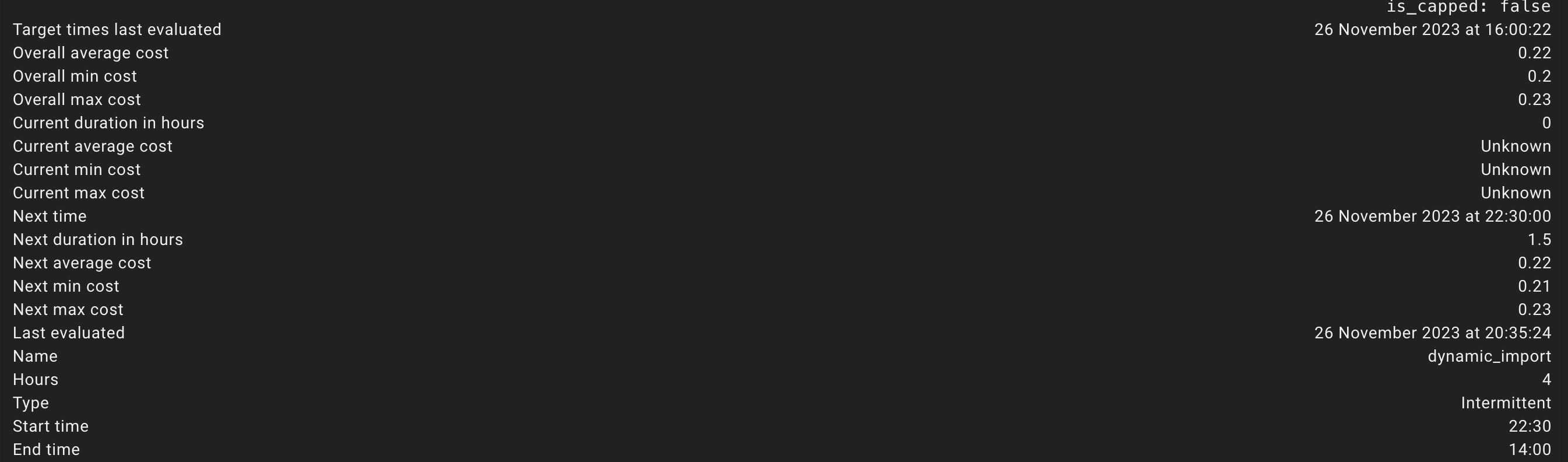
If you look at the attributes of the octopus energy target entity it should tell you when the automation plans to charge.

J
#37 Jellybaby

geoffreycoan Tried watching those myself, started to get a headache trying to follow everything, all turned into french for me really quick lol. Need to find a weekend where I can do nothing but mess about with HA.

W
#38 Wavy Davy

Think I figured out what's happening, I don't have "binary_sensor.octopus_energy_target_dynamic_import" or any octopus_energy_target entities in my list other than the one I created "binary_sensor.octopus_energy_target_my_charge_slots". Should these have been set up when I installed the octopus app?
Also in answer to Arg0t I don't remember setting a cheap rate threshold. Have I missed out something?

A
#39 Arg0t

Wavy Davy so change and entries referencing binary_sensor.octopus_energy_target_dynamic_import to binary_sensor.octopus_energy_target_my_charge_slots. The code will update your target entity with a charge duration and time window, the integration then determines the best slots.

The threshold entity should have a value, if the cost of energy is lower than that value it will force charge independent of all other factors.

W
#40 Wavy Davy

Arg0t Thanks. I did have 0.01 in the setup (as in your photo of the helper). have changed the name as you suggested. Just have to wait for the entity to change to on, to test.

W
#42 Wavy Davy

No it didn't start charging. Have disabled it for the time being until I can find out what's happing.
I think it enabled the "switch.givtcp_sa2244g426_enable_charge_schedule", but it didn't start charging. I used the R & D labs app last night and it worked ok. I also tried another integration called plunge rate sensor and that didn't work either.
As there's no "on" periods for the charging schedule today I'm wondering if I can write a simple integration to see if enabling switch.givtcp_sa2244g426_enable_charge_schedule will start charging.

W
#43 Wavy Davy

Just put a time into the schedule, and then enabled the schedule and it worked, so that bits ok.

A
#44 Arg0t

Wavy Davy Make sure charge schedule 1 is 00:00 to 23:59

W
#45 Wavy Davy

Thanks didn't know that. That's probably what happened.
Would it be possible to set that as part of the integration, in case it's been changed by something else?

W
#46 Wavy Davy

Have written a simple automation to change the start/stop times when the sensor changes to on which works. !!!!!.
Will see if charging works tonight.

G
#47 geoffreycoan

Wavy Davy Would it be possible to set that as part of the integration, in case it's been changed by something else?

In my automations I take the "trust nothing" approach and set things like charge rate, reserve, start/end times, etc so I have confidence that the inverters will be in a "known state" when I trigger things off

W
#48 Wavy Davy

geoffreycoan Thank you and Arg0t for your help. I finally got some time to sort out the automations 2 & 3 and they are now working. I took your approach and managed to add time setting and power setting into the automations. I have also done the first one but as we haven't had a negative rate for the last few days don't know if that one works yet, but feel a bit more confident I can get it to work if it doesn't.
Next thing I want to do is to display the slots that are going to be used, but the only thing I've found so far is for intelligent tariff not Agile, and uses sensors associated with that.

G
#49 geoffreycoan

Wavy Davy Next thing I want to do is to display the slots that are going to be used, but the only thing I've found so far is for intelligent tariff not Agile, and uses sensors associated with that.

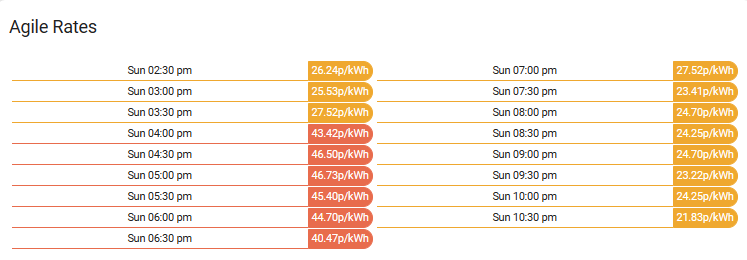
If you already have the octopus energy integration then Octoblock https://github.com/badguy99/octoblock is useful for calculating the 'next cheapest X hour slot"

eg

And for displaying the agile rates Octopus energy rates card https://github.com/lozzd/octopus-energy-rates-card

There's other ways of displaying the rates over time on the octopus integration docs

Both of these need HACS installed. Plenty of tutorials on youtube if you don't have hacs already installed

W
#50 Wavy Davy

Thanks, I have the octopus energy integration installed, but I think octoblock only displays the next cheap rate slot. I also have the energy rates card installed. What I would like to have is the rates that have been selected by the octopus energy integration to be "on". I can see them by clicking on the binary sensor my target slots, don't know how to display them on my dashboard.

A
#53 Arg0t

Wavy Davy

The Octopus energy target entity has attributes that display the details of the next time slots where the target entity will switch on, these are always the lowest rate.

Reminder that the automations set the duration hours in the target entity, based on the solar forecast. The target entity switching on, which it does when at a determined low rate, triggers enabling scheduled charge on the inverter.

I do not bother with displaying all the charge slots, simply next charge and total hours charging planned.