'My Inverter' Settings

21 comments started 2023-10-02 last 2023-10-06
GivEnergy Products
D
#1 Davegreen1

I am operating on the Octopus Energy 'Flux' tariff which has a cheaper import cost between 02.00 - 0.500 and imported energy is expensive between 16.00 - 19.00. I have been trying to change my inverter settings to allow a Timed Discharge during the tariffs expensive period, currently using battery charge accumulated from solar input over the day.

To achieve this I disable Eco Mode and enabled Timed Discharge Mode. I have now taken that action many times over 3 days but when I return to the portal the Settings have reverted to Eco Mode enabled and Timed Discharge disabled.

Am I missing something here?

Dave

P
#2 Phil_H

I'm also on Flux and just have the system on Eco and set to charge in the cheap rate, so it will topup with whatever solar there is during the day then run me through the expensive period and onto the next cheap period. This doesn't involve setting any discharge periods at all. What are you trying to achieve that is different to that?

D
#3 Davegreen1

Thanks Phil. Basically my aim is to preserve the battery power for discharge during the Peak Rate period whilst using whatever solar is generated during the daylight hours to supplement the Daily Rate import. Because of the offset of my roof mounted panels from South they generate fairly limited to almost no energy as the days get shorter so the battery will soon by discharging to almost its 4% low threshold before the Peak Rate starts. As soon as it becomes necessary (and that will be fairly soon) I will set the battery to charge during the Flux Rate.

G
#4 geoffreycoan

Davegreen1 if you find your batteries don’t last through the peak period, with solar charging and even overnight cheaper rate charging, set the discharge rate to zero and it will hold the battery at the current level (eg during the day). Then change it back to max discharge at the start of the peak rate.

Bit of a cludge and you would need something like home assistant to automate this but it’ll avoid you drawing from the grid in peak if that starts happening

D
#5 Davegreen1

Thank you Geoffrey, that seems like a workaround if I can't enable the inverter settings to do it for me.

P
#6 Phil_H

You could try the pause function on the portal. It has a time range on it so you could set it to pause discharge during the day until 4pm, at which point it would then discharge to meet peak time load. During the day any solar would feed your house and charge the battery up in addition to whatever cheap rate import you did.

D
#7 Davegreen1

Thanks Phil. What I did yesterday was to:

Disable Eco Mode
Enable Timed Charge - 02.00 - 05.00
Enable Timed Discharge - 16.00 - 19.00

This morning the battery was at 100% charge and checking the inverter settings:

Eco Mode - Disabled
Timed Charge - Enabled
Timed Discharge - Disabled

Currently the battery is Idling at 100% charge, which is promising, although solar generation and current consumption are about the same. I have enabled Timed Discharge again and wait to see what happens.

D
#8 Davegreen1

Just visited the portal to find that the settings that I created above had, once again, been overridden. Eco Mode is enabled, the batter had discharged down to 81% and is now shown as back at 100% - but still charging at 165W. It seems, on the face of it, a very simple thing to achieve but obviously the only thing that is simple around here is me. Frustrating to say the least.

D
#9 Davegreen1

This just total garbage !!! So I have Timed Discharge Enabled. The descriptor says; "This will discharge the battery to your home during a defined period". See above for my 'Defined Period'.

The battery is currently discharging at 2.6Kw - TO THE GRID!!!

I find this simply astonishing and I am now officially very grumpy.

S
#10 SimonClarke

Davegreen1 isn’t that what it is supposed to be doing? You’re trying to export it aren’t you? I don’t do this as I’m on Intelligent so no expert

V
#11 Vestas

Davegreen1 That's what its supposed to do. Timed discharge forcibly discharges the battery at a defined rate. If you don't have sufficient load in the home to achieve that rate it'll export the power.

Eco is the setting you want. Also RTFM.

S
#12 Slartibartfast

What FM?

D
#13 Davegreen1

Folks, the clue is in the definition of Timed Discharge:

"This mode will discharge your batteries to your HOME during a period you define" (and that is a cut and paste from the definition on the portal).

Discharge to the HOME NOT to the grid. There is no mention that I can find that includes any reference to home load having a bearing on the process. Also, when I restored the settings and re-enabled 'Timed Discharge' the discharge to the grid stopped. I did discover why it was discharging to the grid. When I first started this process I mistakenly enabled 'Timed Export'. I immediately disabled that option and enabled 'Timed Discharge'. However, the Timed Export option had re-enabled itself and Timed Discharge had been disabled. I have now cancelled the time frame on the Timed Export Mode.

ECO is not the mode I want because ECO determines the timing of battery discharge to the home and I want to discharge to the home at the period of the Flux Tariff peak cost. Import at the low unit cost period use it at the high unit cost period.

S
#14 SimonClarke

The last couple of days have been cloudy so I set the battery to charge at Intelligent cheap rate. The house then runs off the battery no other setting required. Eco still on. Borderline no export because there wasn’t enough juice. Only grid use charging the battery.

D
#15 Davegreen1

Hi Simon, could you help enlighten me please and point me at this 'Intelligent' option? New one on me.

S
#16 SimonClarke

Octopus Intelligent. You need an EV then you pay 7.5p between 23.30 and 5.30 and about 30p the rest of the time and get 15p for export. You plug the car in and it tells you when it will be charged but you still get the cheap rate but sometimes some extra time.

D
#17 Davegreen1

Thanks Simon. That will explain why I hadn't heard of it - I don't have an EV.

S
#18 SimonClarke

I think you can get Go without a car

T
#19 TX200

SimonClarke not supposed to be able to... 🤣

There's the new intelligent Octopus Flux for GivEnergy battery users. Early days of their trials. They take control of the inverter though

J
#20 JMA

Davegreen1

Have a look at my post https://community.givenergy.cloud/d/3111-combine-eco-mode-and-timed-export/17.

The text on the portal "... discharge batteries to your home..." for "timed discharge" is indeed very confusing. I've been emailing to and from with GE and what the timed discharge setting actually does is "... force discharge to the grid UNLESS there's a demand from the home and then priority goes to home and only after that to grid.

GE explained that they are modifying the export and discharge settings (some changes are already visible under the "remote control" section of "my inverter").

Just like yourself I've gone through testing out all possible permutations and I found the one that works. Bottom line is do not use "timed export" as that automatically disables ECO and you will therefore import from grid rather than draw from battery (yes - that's correct).

You can however combine ECO + timed charge + timed discharge. If you don't want ECO, you can leave that off as well.
You'll see that if you change timings in timed discharge, it will adopt the same in timed export (even though you have disabled that).

I'm now on:

  • ECO : enabled
  • timed charge: enabled from 4:45-5:00am upto a max of 9% (that works for me in case I drop to say 6% and I need some extra cheap juice before the sun comes up)
  • timed discharge: enabled from 16:47-19:00pm (in my case that usually exports my battery from 100% to about 12% - leaving me just enough to get through the evening and night on the battery).
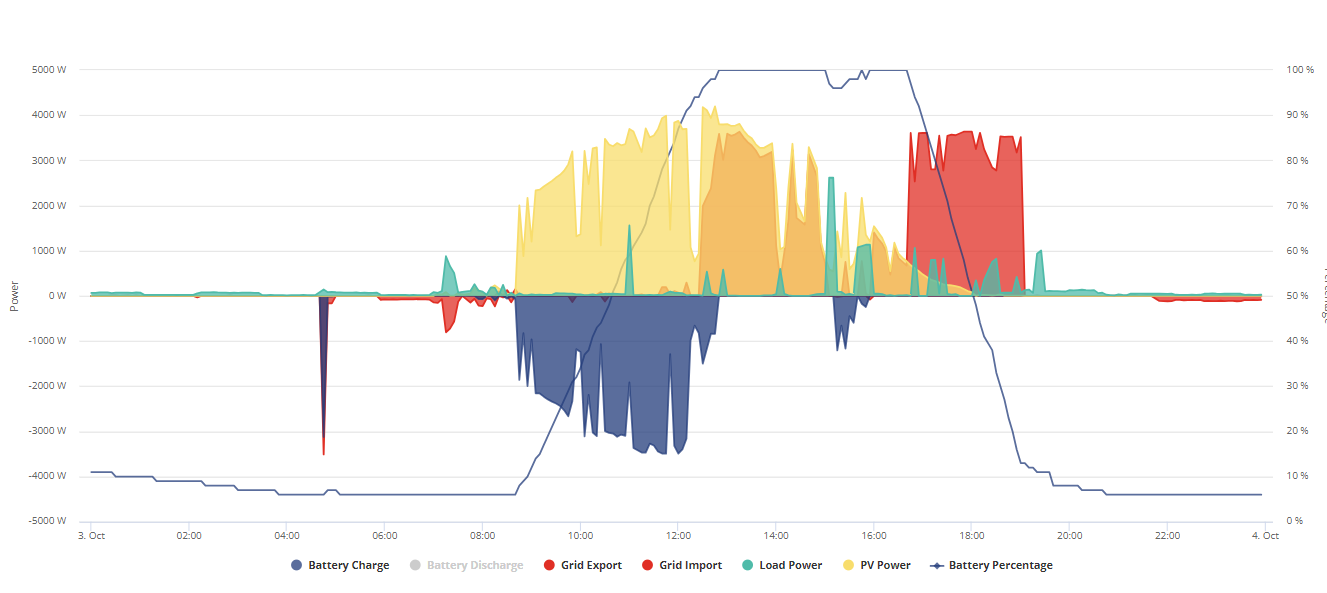
Hope that helps and confirms you are not alone with interpreting GE's mystic language. Soon a new set of settings will come out apparently which will be more user-friendly and easier to understand. Finger's crossed.

P
#21 Pete UK

JMA - Thats really helpful. Thank you for posting.