I have an AIO, an EV and on the Intelligent Octopus tariff. I have install the Octopus Energy component from BottlecapDave and I looking at the best strategy to stop the IO slots from draining the battery.
I am considering using an automation based upon the Octopus Energy Intelligent Dispatching binary sensor.
What strategy are you using, and is it working?
T
#2tomorrowman
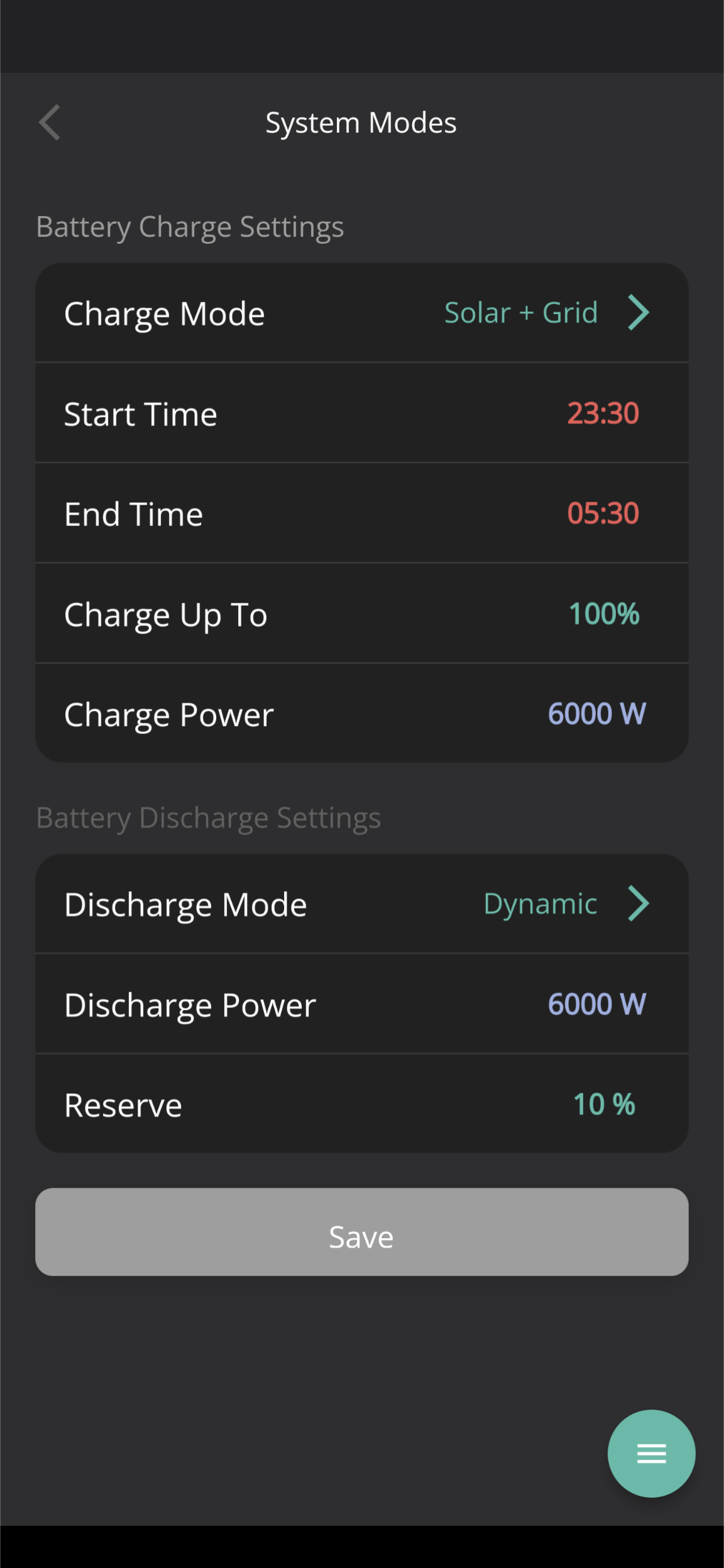
Below app settings worked for me. On the portal it's under the battery inverter page. Eco Enabled, charge period 23:30-5:30 with the discharge stuff not enabled.
T
#3tomorrowman
As you can see no battery drain during off peak window
P
#4Pandorian
tomorrowman This is fine for the majority of charging, but IO slots can go past 05:30 which can then drain the battery.
T
#5tomorrowman
Ah the additional slots either side of 23:30-05:30.
To be honest I did not worry about them as they tend to be the exception rather than the rule with my charging profile.
Would be curious to see where you get to with this. I did play around with octopus R&D labs but they don't seem to pay attention to the additional charging slots outside the standard off peak period.
Basically as it currently stands my battery is not empty at the end of the day so no problem. With incoming heatpump and induction hob that may change and I'll be more focused on optimum battery usage
S
#6stevelewis
Pandorian@tomorrowman the extra slots can take up a large portion of the day - I had about 5 hours yesterday.
The Octopus integration doesn't work well... you need to know when the car is actually connected and charging. A Shelly EM power monitor works for me with some software to pause or charge the battery during these extra slots.
B
#7Ben_Collier
Set your Octopus ready by time for 05:30 and most charges will be in the 23:30 - 05:30 window unless you are doing a big charge.
T
#8tomorrowman
stevelewis I've been lucky with the Octopus Intelligent integration with my Tesla which has been faultless over the approx. 11 months I've been on the tariff.
I'll keep an eye on this thread though to see if anybody finds a way to get the battery usage to map directly onto the octopus intelligent charging plan created when I plug my car in ie potentially giving me cheap electricity beyond the minimal 23:30 - 05:30 window (this could equate to multiple 'do not discharge' battery windows in a 24 hour window)
P
#9Pandorian
stevelewis If you have the Octopus integration in home assistant, can you add a graph of the entity binary_sensor.octopus_energy_intelligent_dispatching for the day when it went over the 05:30 window please?
If possible a graph of the off_peak binary sensor for the same time.
S
#10stevelewis
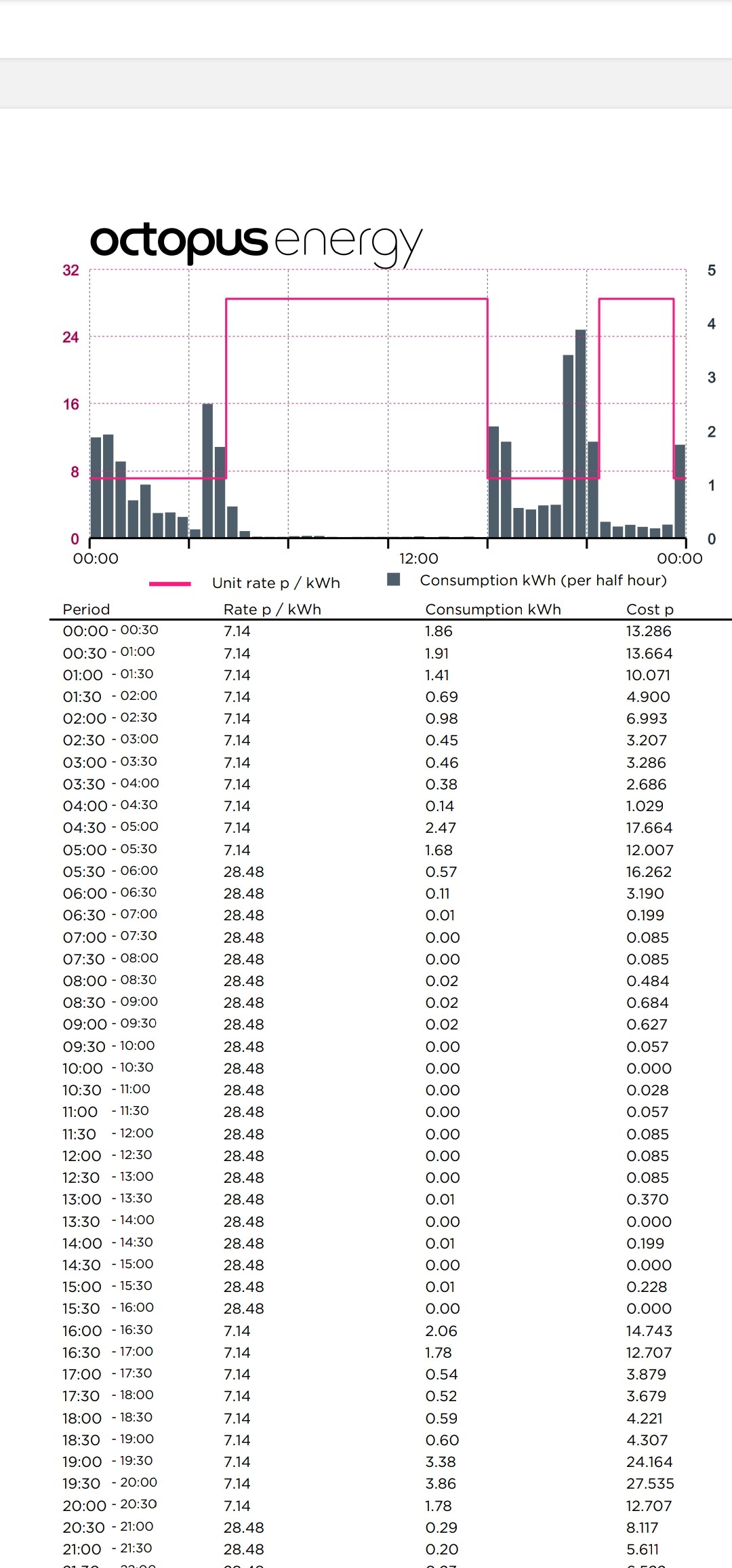
Pandorian I query the Octopus server directly rather than using HA. The Ohme charger negotiates slots in a different way and actual slots used gets uploaded to Octopus retrospectively for billing. See the image below.
My sensor is simply a current clamp on the charger with a 500W threshold.
I just need to remember to put the battery in pause mode in the app while my Ohme is negotiating with the car / Octopus to get the slots, and then either resume (if later at night slots) or fill my boots if I get one straight away (and then set an alarm to remind me to set it back to normal settings). A little bit of faff, but this could be quite useful over winter to change my charge regime to little and often so I can maximise the amount of battery charge I can use up in a day / and do heavy loads like cooking and washing at the same time to reduce the burden on the battery when a daytime cheap slot kicks in.
Now obviously what I've just said above would be more streamlined with automation, but literally took 1 minute of my time last night to manage.
I’ve not seen that behaviour yet but will keep an eye on it.
#13Hook
Shikoku14 I presume you can charge your home battery up at the same time on the cheaper rate?
U
#14Usamagpie
How do you find out the additional cheap rate windows in advance? Does Octopus publish them? I’m on IO too and thought cheap rate was just 11:30-5:30
T
#15TX200
Hook believe so yes. Not sure how they'd tell what was going into the house Vs the car battery.
T
#16tomorrowman
IO gives you a personal charge plan that you can see in your Octopus app/portal when you plug your car in.
It's typically several charge windows in the 23:30-05:30 time frame but as mentioned above not always.
I tend to get charge windows outside the above if battery is particularly empty and I want a 100% charge in preparation for a long trip for example.
For these additional periods (I've had 21:30-22:30 before) your charged at off peak for house and car usage
U
#17Usamagpie
tomorrowman Thanks for your reply. I’ve only ever used the Ohme app when I plug the car in so will take a look on the Octopus app too next time
S
#18Shikoku14
I have an Ohme type 2 cable (old school) to connect between my dumb charger and my Soul EV. As the Soul isn't capable of connecting with Octopus all the IO stuff is handled through the Ohme app, if you have this setup you need to make sure that you have Ohme app notifications set to persistent, as this is how you get the slots sent, and then you need to hold on the notification to expand it and see it (on iOS, may be different if you are on Android) so basically you need to be careful not to dismiss the notification otherwise you are flying blind (this is after you have plugged in, usually 2-3 minutes after).
I've just got an email from Octopus pushing this behaviour and they will send you a weather forecast weekly or twice weekly to know when to maximise charging based on excess wind, I assume this has gone out to all IO customers today.

S
#19stevelewis
Usamagpie using an Ohme charger, the extra charging period don't get displayed by Octopus. They are negotiated between Octopus and Ohme and only captured retrospectively for billing. Ohme doesn't provide an API and the simplest thing to do is put a power meter on the cable to the Ohme charger.