H2 detect that GivTCP has stopped working?

52 comments started 2023-10-19 last 2023-11-16
Home AutomationHome Assistant
G
#1 geoffreycoan

Does anyone have a home assistant script or method of detecting that GivTCP has stopped working?

Got up this morning and found that both batteries were fully exhausted and they didn't charge overnight. batpred had set the reserve soc, charge period etc to charge the batteries (could see in HA) but the inverters hadn't done anything. Nothing in the inverter notifications log, but eventually I found in the HA GivTCP console log that there were repeated "connection refused" messages.

I restarted the GivTCP add-on (which of course cleared out the console log) and communication to the inverters was re-established.

Does anyone have a script or method of checking that GivTCP is working and the commands sent to the inverters are actually being received and acted upon? All the Home Assistant entities showed as if the commands had been accepted and processed.

There's very little written to the GivTCP logs on the HA server, only this:

2023-10-19 08:00:00,329 - write - [INFO] - Setting battery charge rate to: 2600 (50)
2023-10-19 08:10:00,269 - write - [INFO] - Setting battery charge rate to: 2600 (50)
2023-10-19 08:20:00,284 - write - [INFO] - Setting battery charge rate to: 2600 (50)
2023-10-19 08:30:00,293 - write - [INFO] - Setting battery charge rate to: 2600 (50)
2023-10-19 08:40:00,244 - write - [INFO] - Setting battery charge rate to: 2600 (50)
2023-10-19 08:50:00,290 - write - [INFO] - Setting battery charge rate to: 2600 (50)
2023-10-19 08:59:02,848 - mqtt_client - [CRITICAL] - Connecting to MQTT broker for control- core-mosquitto
2023-10-19 08:59:08,970 - read - [CRITICAL] - First time running so saving AC Charge status
2023-10-19 08:59:08,980 - read - [CRITICAL] - Publishing Home Assistant Discovery messages
2023-10-19 09:00:00,164 - write - [INFO] - Setting battery charge rate to: 2600 (50)
2023-10-19 09:00:02,158 - write - [INFO] - Setting battery charge rate 50 was a success
2023-10-19 09:00:02,331 - read - [CRITICAL] - Publishing Home Assistant Discovery messages
2023-10-19 09:00:04,424 - read - [CRITICAL] - Publishing Home Assistant Discovery messages
2023-10-19 09:10:00,299 - write - [INFO] - Setting battery charge rate to: 2600 (50)
2023-10-19 09:10:02,324 - write - [INFO] - Setting battery charge rate 50 was a success
2023-10-19 09:10:02,570 - read - [CRITICAL] - Publishing Home Assistant Discovery messages
2023-10-19 09:20:00,295 - write - [INFO] - Setting battery charge rate to: 2600 (50)
2023-10-19 09:20:02,058 - write - [INFO] - Setting battery charge rate 50 was a success
2023-10-19 09:30:00,158 - write - [INFO] - Setting battery charge rate to: 2600 (50)
2023-10-19 09:30:01,954 - write - [INFO] - Setting battery charge rate 50 was a success
2023-10-19 09:40:00,140 - write - [INFO] - Setting battery charge rate to: 2600 (50)
2023-10-19 09:40:01,630 - write - [INFO] - Setting battery charge rate 50 was a success

From 8:00-8:50 the 'set charge rate' command was sent to the inverter, at 8:59 I restarted GivTCP, and then from there every 10 minutes when the charge rate is sent you can see there's a success message.
So maybe I could write something to parse for set commands but no success response?

(The every 10 minutes heartbeat is my Octopus power up script running today to get the battery up to 50% ahead of the free electricity this afternoon)

But there's no timeout errors written to the GivTCP HA log file, I just saw them in the console log.

(There's a separate issue with the givtcp logs not being log rotated properly that's been opened for a while on brikat's GitHub, but that's not the issue today)
V
#2 Vestas

Doesn't the watchdog option work?

G
#3 geoffreycoan

Vestas no it didn't

I think the problem is that givtcp was running ok but not able to connect to the inverters - connection refused

A
#4 athresuk

Not sure if this helps, but I have sensor.givtcp_XXxxxxGxxx_last_updated_time displayed as an entity, this counts up in seconds until the GIVTCP values are updated and the count resets.

If this is any more than a minute or so something has gone wrong and needs investigating.

G
#5 geoffreycoan

athresuk that's a great idea, I can write an automation to check and raise an alert if its not incrementing.

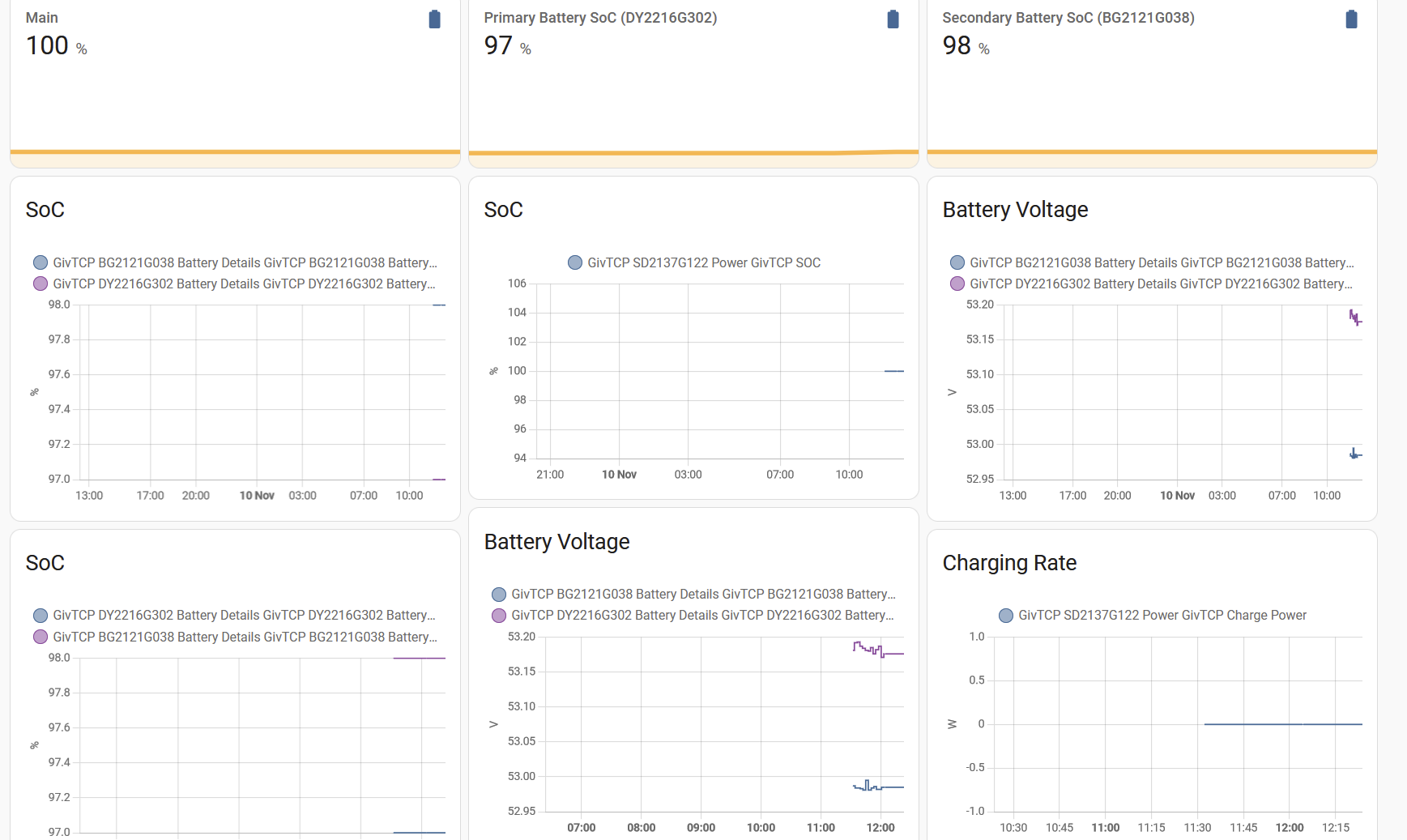
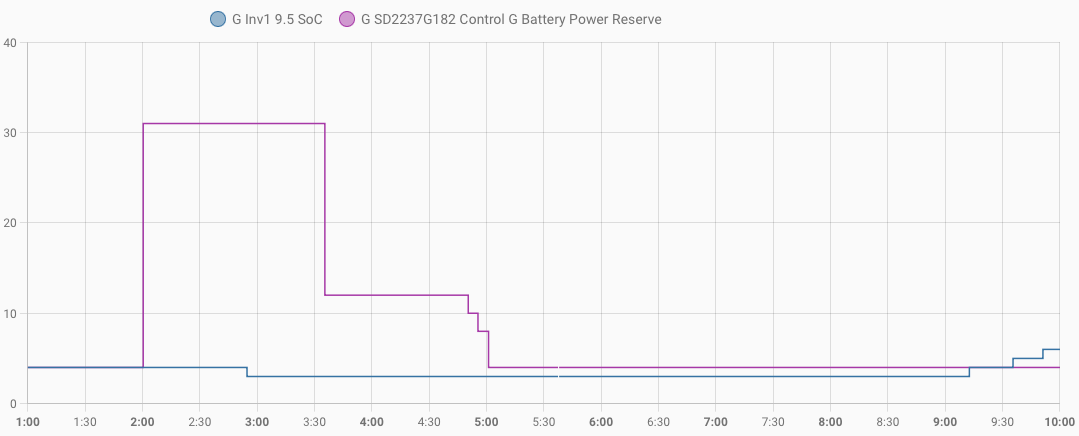
I'm not sure that is wholly bullet-proof for what happened this morning with GivTCP, looking at the HA history, can see that the battery reserve (purple line) went up at 2am (set by predbat) but the battery soc (blue line) didn't increase until after the restart at 9am:

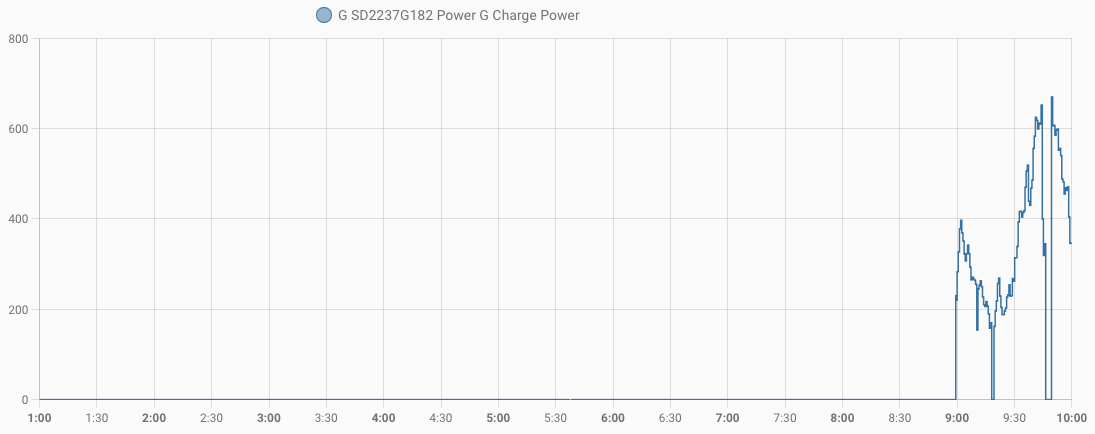
And the battery charge power didn't start spiking until 9am when I restarted GivTCP:

But the last updated time for that inverter froze much later at 5:11, suggesting the GivTCP was still communicating OK with the inverter all the way through the overnight charge period before it decided that it wasn't:

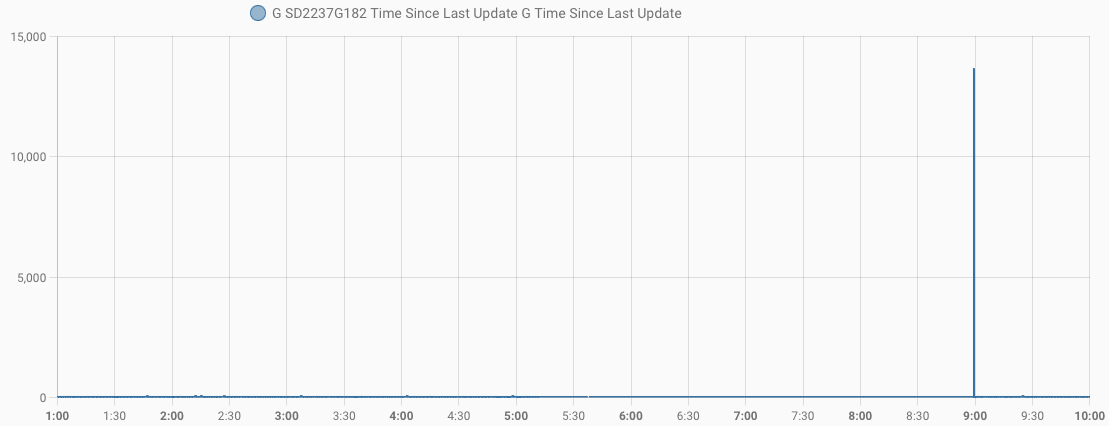
There is a time_since_last_update sensor as well but that doesn't give me any help. It was stuck at 0 and only updated itself once I restarted GivTCP:

But last updated time will give me at least some indication of loss of comms that I don't have at the moment

#6 PianSom

You can also have a glance at <your_givtcp_ip>:3000 to see the update time, if you want to have a quick eyeball at what is going on.

(At least, this works if you are using givtcp standalone; not sure about what happens if you have it as a HA add-on as I've never used it the way. And also assumes you are using the default ports, and have set WEB_DASH to be TRUE.)

N
#7 naltsta

alias: Lost connection
description: ""
trigger:

  • platform: state
    entity_id:
    • sensor.givtcp_sa2246g693_time_since_last_update_2
      for:
      hours: 0
      minutes: 15
      seconds: 0
      condition: []
      action:
  • service: notify.mobile_app_iphone_11
    data:
    message: Lost connection to Inverter
    title: Inverter
    mode: single
G
#9 geoffreycoan

Finished testing, here’s my automation script. I have two inverters so the alert distinguishes between the two:

alias: GivTCP activity monitor
description: Alert when inverter communications to GivTCP have ceased for an hour
trigger:
  - platform: state
    entity_id: sensor.g_sd2237g182_last_updated_time
    to: null
    for:
      hours: 1
    variables:
      inv_id: inverter 1
  - platform: state
    entity_id: sensor.h_sd2237g395_last_updated_time
    to: null
    for:
      hours: 1
    variables:
      inv_id: inverter 2
condition: []
action:
  - service: notify.all_devices
    data:
      title: GivTCP communication issue
      message: >
        {{ now().timestamp() | timestamp_custom('%-d %b %H:%M') }} ISSUE: No
        GivTCP update received from {{ inv_id }} for the past hour
      data:
        tag: GivTCP_issue
        visibility: public
        persistent: true
mode: single

And a notification group in configuration.yaml:

notify:
  - name: all_devices
    platform: group
    services:
      - service: mobile_app_iphone_xyz
      - service: mobile_app_ipad_etc
A
#10 anglefire

I take it you are all running GivTCP as an addon to HA? I only ask because I run it in a separate Docker container and it fails almost never. Weeks and dare I say months without issue.

G
#11 geoffreycoan

anglefire yes I am running givtcp as a HA add-on which I understand is running in a similar container platform as well.

TBH it’s been very reliable for me too. I’ve maybe had one previous givtcp issue, can’t remember, it just runs and does its thing. I think it’s good to have a monitor in place to check its polling ok so maybe this was a wake up call I needed ?

N
#12 naltsta

anglefire my issues are almost exclusively my inverter dropping off the WiFi but think AP positioning has finally solved it!

A
#13 anglefire

naltsta Ah, yes that can be an issue - fortunately I have good wifi - but I'm running separate AP's to the incoming router which are very good. Running 2.4 and 5Ghz networks with the same SSID causing no issues at all.

G
#14 geoffreycoan

anglefire I changed our Wi-Fi about a month ago from using powerline extenders to a mesh Wi-Fi (Mercusys AX3000). The powerline was pretty reliable and it was what the inverters were connected to as they couldn’t see the main router in my study, but every now and again they would lose the signal and I’d have to unplug and plug g them in again to reboot.
The inverters wouldn’t connect to the mesh until I turned off the 5GHz network but once done the first time I could turn 5GHz back on. The mesh has been more reliable and as it’s the same ssid everywhere I can use local mode in the GivEnergy app regardless of where I am in the house.

A
#15 anglefire

geoffreycoan weird how the 5ghz network affects some and not others.
I use UniFi kit with a couple of AP’s which the dongle occasionally switches from one to the other. Never a hitch.

#16 nophead

Yes I use a Google Home mesh system for my WiFi and that has a single SSID for 5GHz and 2.4GHz and no way to disable it, but it works without any problems when connecting 2.4GHz only devices. Since the 2.4GHz devices never see the 5GHz signal it must be a router problem if it won't connect at 2.4GHz to a 2.4GHz device.

G
#17 geoffreycoan

nophead I believe the problem is with newer routers (new standards?) that the router steers the connecting device to use the 5GHz SSID which our inverters can’t accept so they get stuck in a loop of never being able to connect. Turning off the 5GHz for the initial connection solves this problem 🤷‍♂️

A
#18 anglefire

geoffreycoan Ah, I have band steering turned off on the router.
I have quite a few wifi devices on the 2.4Ghz band - this is my currently connected network - but at least three devices (Phones) are not on the network at the moment!

#19 PianSom

geoffreycoan

Rather than sensor.g_sd2237g182_last_updated_time and an arbitrary time period, might it not be better to use sensor.g_sd2237g182_status (and have a trigger of it changing to offline, possibly with a for condition if it triggers often)?

EDIT - I'm assuming here that the devs have implemented the standard MQTT LWT mechanism for unscheduled terminations. This may or may not be the case!

G
#20 geoffreycoan

PianSom I’ve been looking at my history of the inverter status and it always seems to be “online”.
There are occasional breaks possibly when I rebooted HA or something but the status changes from online to online with no intermediate other state.
I think I’ve seen in the givtcp logs that if it can’t read data it uses the previous cached version so I think this means that it hides comms failures and so checking time last updated Is possibly the only approach

#21 PianSom

geoffreycoan
Yes, you are correct (about it never showing offline). I went and had a look at the code on Github, and looked at my MQTT broker. My assumption that a LWT message is published was wrong. (This solution, incidentally, would take care of your concern of using cached data - if it went offline then the MQTT broker itself would publish the changed status.)

I will raise this as an issue on Github. Though the project does not seem to be in active development, so who knows when or if this will be taken up.

G
#22 geoffreycoan

PianSom yes I noticed that there’s quite a few issues on GitHub for givtcp that haven’t been updated. I made a patch and did a pull request to merge it in (minor issue on the configuration screen) but nothing back from that.

I heard on Oliver’s speak to the geek channel that updates are in beta to talk to the GivEnergy car charger so that’s positive but a lot of people need the core inverter integration supported as well

#23 hoggy

Depends which repo your looking at, The Givenergy one is miles behind, the Britkat one is the one that gets maintained and is the original author of GivTCP.

Although the britkat Repo appears a bit barren, all the juicy new stuff is on his Dockerhub Dev builds (including new things for the AIO and the EV charger that is already working in local)

#24 PianSom

hoggy
Thanks for this. On inspection, I see that I posted the issue in the GE repo (even though I am using Britkat's docker image), so will probably not get seen. I will cross-post to his repo later today.

Is there somewhere where Britkat discusses his docker work? I haven't found it easy to work out versioning, env variables etc for my AIO

#25 hoggy

PianSom he should pick it up on his Github.
Not sure where (if any) features/bugs are discussed anymore. There was an old Teams group for it but thats been dead for over a year.
Over to @Britkat I guess!

G
#26 geoffreycoan

hoggy I was looking at brikat’s giv_tcp GitHub which has 30 open issues on it, and last update was back in early August.

But then today 4 patches got merged in, including my humble fix and @stevelewis’s latest PALM changes. Good to see activity coming

#27 PianSom

geoffreycoan @hoggy

I see that GivTCP 2.4 has been released. I just got a GitHub notification on the issue where I raised the request to Briskat to use an LWT. He replied:

latest version 2.4.0 includes a PR for MQTT will capability, so online topic should update when the connection dies.

G
#28 geoffreycoan

PianSom yes I saw that response as well. Didn't entirely understand it. I'm presuming it means that we can monitor a sensor topic (the time last updated?) to detect when the inverter stops sending to MQTT

I've not installed the GivTCP update yet. Thought I'd give it a while to see if there are any bugs that need ironing out, but great to see the new release that includes a number of enhancements

#29 PianSom

geoffreycoan
Part of the MQTT protocol is the ability of a client (for example, GivTCP) to post a message to the broker which is called a LWT ("Last Will and Testament") message. If that client subsequently unexpectedly disconnects from the broker then the broker will publish for all to see the LWT message.

So what BritKat was saying is that GivTCP 2.4.0 now includes that ability to post a "will". Now if the GivTCP program loses connection with the MQTT broker (because of a comms failure, a program crash, or whatever) then the broker will publish offline to the sensor sensor.g_sd2237g182_status automatically.

So you can post a notification to your phone or whatever if/when GivTCP goes offline - a nice easy automation; no need to monitor anything.

Like you, I was planning on waiting for a bit before updating. But in my case, only a short while, as I am planning on doing some HA work this coming week (finally).

N
#30 naltsta

geoffreycoan and 2.4.1 is out already!

G
#31 geoffreycoan

naltsta PianSom thanks both.

I’ve extended givtcp automation that was looking for the inverter last updated time not changing for an hour to also look for the givtcp status changing from online for 5 minutes (for each inverter).

Since I put the automation in, it’s never triggered, givtcp has been very stable.

I saw the latest givtcp bug fix as well. Will still wait a bit

Z
#32 Zakalwe

Why does every GivTCP update break all of the Home Assistant dashboards? Updating it is like playing Russian Roulette!!

G
#33 geoffreycoan

Zakalwe really, what’s changed, sensor names ?

I have a number of the key sensors wrapped in utility meter helpers which should make it easier if things do change.

Putting together a proper dashboard is still on my to-do list. At the moment it’s spread over the Energy dashboard, another one with GivEnergy sensors and controls, and. 3rd for predbat graphs, controls and agile rate cards. Bit of a mess

BTW I found this custom hacs GivEnergy battery card the other day https://github.com/Codegnosis/givtcp-battery-card

Z
#34 Zakalwe

geoffreycoan really, what’s changed, sensor names ?

Blowed if I know. It's not the first time that this has happened either and it properly brasses me off. No amount of prodding and poking has got it back either.

A
#35 anglefire

Zakalwe it only changed once for me some while ago. I forget why but was unavoidable apparently.

I am in the beta group - and update mine regularly to different dev’s and never an issue - except not always working when installed, but reverting to an earlier version brings it all back with no issues - apart from a short loss of data.

Z
#36 Zakalwe

Still not able to get it running. I've deleted and reinstalled GivTCP and MTT numerous times but I cannot seem to get it running.
MQTTExplorer is showing that MQTT is working, but GivTCP is not showing.

The GivTCP Logs are showing (Ive bolded where I think the problem is):
2023-11-09 20:13:52,767 - startup - [CRITICAL] - HA MQTT Service has been found at core-mosquitto
2023-11-09 20:13:52,779 - startup - [INFO] - Supervisor Timezone: Europe/London
2023-11-09 20:13:54,795 - startup - [CRITICAL] - Scanning network for inverters...
2023-11-09 20:13:57,240 - startup - [CRITICAL] - No inverters found...

2023-11-09 20:13:57,254 - startup - [CRITICAL] - Running Redis
2023-11-09 20:13:57,264 - startup - [CRITICAL] - Setting up invertor: 1 of 1
2023/11/09 20:13:57 [notice] 49#49: using the "epoll" event method
2023/11/09 20:13:57 [notice] 49#49: nginx/1.20.2
2023/11/09 20:13:57 [notice] 49#49: OS: Linux 6.1.21-v8
2023/11/09 20:13:57 [notice] 49#49: getrlimit(RLIMIT_NOFILE): 1073741816:1073741816
2023/11/09 20:13:57 [notice] 49#49: start worker processes
2023/11/09 20:13:57 [notice] 49#49: start worker process 54
2023/11/09 20:13:57 [notice] 49#49: start worker process 55
2023/11/09 20:13:57 [notice] 49#49: start worker process 56
2023/11/09 20:13:57 [notice] 49#49: start worker process 57
2023-11-09 20:13:57,338 - startup - [CRITICAL] - Running RQ worker to queue and process givernergy-modbus calls
2023-11-09 20:13:57,339 - startup - [CRITICAL] - Running Invertor read loop every 15s
2023-11-09 20:13:57,347 - startup - [CRITICAL] - Subscribing MQTT Broker for control
2023-11-09 20:13:57,356 - startup - [CRITICAL] - Starting Gunicorn on port 6345
[2023-11-09 20:13:58 +0000] [61] [INFO] Starting gunicorn 21.2.0
[2023-11-09 20:13:58 +0000] [61] [INFO] Listening at: http://0.0.0.0:6345 (61)
[2023-11-09 20:13:58 +0000] [61] [INFO] Using worker: sync
[2023-11-09 20:13:58 +0000] [62] [INFO] Booting worker with pid: 62
[2023-11-09 20:13:58 +0000] [63] [INFO] Booting worker with pid: 63
[2023-11-09 20:13:58 +0000] [64] [INFO] Booting worker with pid: 64
2023-11-09 20:13:59,660 - Inv1 - mqtt_client - [CRITICAL] - Connecting to MQTT broker for control- core-mosquitto
2023-11-09 20:15:39,790 - Inv1 - mqtt_client - [ERROR ] - No serial_number found in MQTT queue. MQTT Control not available.
Traceback (most recent call last):
File "/app/GivTCP_1/mqtt_client.py", line 402, in <module>
client.loop_forever()
File "/usr/local/lib/python3.10/site-packages/paho/mqtt/client.py", line 1756, in loop_forever
rc = self._loop(timeout)
File "/usr/local/lib/python3.10/site-packages/paho/mqtt/client.py", line 1164, in loop
rc = self.loop_read()
File "/usr/local/lib/python3.10/site-packages/paho/mqtt/client.py", line 1556, in loop_read
rc = self.
packet_read()
File "/usr/local/lib/python3.10/site-packages/paho/mqtt/client.py", line 2439, in packet_read
rc = self.
packet_handle()
File "/usr/local/lib/python3.10/site-packages/paho/mqtt/client.py", line 3039, in packet_handle
return self.
handle_connack()
File "/usr/local/lib/python3.10/site-packages/paho/mqtt/client.py", line 3138, in _handle_connack
on_connect(
File "/app/GivTCP_1/mqtt_client.py", line 386, in on_connect
client.subscribe(MQTT_Topic+"/control/"+GiV_Settings.serial_number+"/#")
AttributeError: type object 'GiV_Settings' has no attribute 'serial_number'

Getting ready to smash the bloody thing with a hammer!

#37 PianSom

Zakalwe
Yes, I have the same error (AIO user), and have raised it as an issue on Github.

No response as yet.

v2.2.4 works fine, couldn't get the 2.3 branch to work.

A
#38 anglefire

I have my inverter ip hard coded into the config file and when I look at the logs I see the inverter not found error too but works fine.
Is this with the AIO? Or a standard inverter?

Z
#39 Zakalwe

Gen 1 5 Hybrid.
Worked absolutely fine until I upgraded to the latest version of GivTCP. I have the inverter IP set correctly in the GivTCP Config.

G
#40 geoffreycoan

Zakalwe is your inverter on the same subnetwork and IP address range as home assistant/ givtcp?

Z
#41 Zakalwe

geoffreycoan
Yes, it is.
It was working fine until the latest update.

A
#42 anglefire

I too have a gen 1 and had issues with some of the dev versions but the latest dev (I’m not at home so can’t tell you which one I’m on now) works fine and that is the one that I thought was being pushed out to the public release.
I assume you are using the addon? If so can’t you roll it back to the previous version that worked? (I don’t use the addon so I’m not sure how you do it)

Z
#43 Zakalwe

Utterly bizarre.
I put the inverter IP address in the Inverter 2 IP address field (I have a single inverter). No change. Restarted GivTCP- no change. Deleted the IP address in Inverter 2 and restarted HA. Data started flowing and my previously blank dashboards have started to populate.

The GivTCP logs still are stating that no inverter is found and that the inverter reads are failing though....

#44 PianSom

Zakalwe
I tried your magic incantation and - sadly - it didn't work for me 🙁

Z
#45 Zakalwe

Bummer :-(
There's no rhyme or reason as far as I can see, but it's still working! I really appreciate the effort that people put into these things. The amount of time invested must be huge and for very little reward so it's hard to be churlish. However, experiences like this is why HA will never be mainstream. The average Joe will not spend time trying to fix stuff like this where an update just borks things. He/she certainly won't spend hours scrolling through text logs and trying arcane things to get it working again.
Hell, if they enjoyed that then they'd be Linux users! :-)

Z
#46 Zakalwe

I spoke too soon. It worked for a bit and now everything has flatlined.

Bloody thing!
Still, at least MTTExplorer is now seeing the inverter, which is an improvement.

G
#47 geoffreycoan

Well I installed GivTCP 2.4.1 just now, and absolutely no issues at all.

predbat barfed briefly that the 'inverter' object has no attribute 'log' but this was probably because GivTCP was reloading, because next predbat run it cycled round and worked perfectly.
Looking on the dashboards everything looked good, couldn't see any issues or sensors disappeared/changed name etc

So for me, a good upgrade.

There is something weird about the scan for inverters, I too get "no inverters found" (whereas before it used to find 3 inverters, one of which didn't exist!), but then it goes on to set those inverters up.
Looking at your log Zakalwe it looks similar, it says 'no inverter found' then sets the inverter up, then there's an MQTT error

Here's my log for comparison:

2023-11-10 19:47:18,875 - startup - [CRITICAL] - HA MQTT Service has been found at core-mosquitto
2023-11-10 19:47:18,884 - startup - [INFO] - Supervisor Timezone: Europe/London
2023-11-10 19:47:20,942 - startup - [CRITICAL] - Scanning network for inverters...
2023-11-10 19:47:23,780 - startup - [CRITICAL] - No inverters found...
2023-11-10 19:47:23,782 - startup - [CRITICAL] - Running Redis
2023-11-10 19:47:23,809 - startup - [CRITICAL] - Setting up invertor: 1 of 2
2023/11/10 19:47:23 [notice] 49#49: using the "epoll" event method
2023/11/10 19:47:23 [notice] 49#49: nginx/1.20.2
2023/11/10 19:47:23 [notice] 49#49: OS: Linux 6.1.59
2023/11/10 19:47:23 [notice] 49#49: getrlimit(RLIMIT_NOFILE): 1073741816:1073741816
2023/11/10 19:47:23 [notice] 49#49: start worker processes
2023/11/10 19:47:23 [notice] 49#49: start worker process 53
2023/11/10 19:47:23 [notice] 49#49: start worker process 54
2023/11/10 19:47:23 [notice] 49#49: start worker process 55
2023/11/10 19:47:23 [notice] 49#49: start worker process 56
2023-11-10 19:47:23,863 - startup - [CRITICAL] - Running RQ worker to queue and process givernergy-modbus calls
2023-11-10 19:47:23,863 - startup - [CRITICAL] - Running Invertor read loop every 30s
2023-11-10 19:47:23,864 - startup - [CRITICAL] - Subscribing MQTT Broker for control
2023-11-10 19:47:23,865 - startup - [CRITICAL] - Starting Gunicorn on port 6345
2023-11-10 19:47:23,876 - startup - [CRITICAL] - Setting up invertor: 2 of 2
2023-11-10 19:47:24,006 - startup - [CRITICAL] - Running RQ worker to queue and process givernergy-modbus calls
2023-11-10 19:47:24,014 - startup - [CRITICAL] - Running Invertor read loop every 30s
2023-11-10 19:47:24,025 - startup - [CRITICAL] - Subscribing MQTT Broker for control
2023-11-10 19:47:24,077 - startup - [CRITICAL] - Starting Gunicorn on port 6346
[2023-11-10 19:47:24 +0000] [60] [INFO] Starting gunicorn 21.2.0
[2023-11-10 19:47:24 +0000] [60] [INFO] Listening at: http://0.0.0.0:6345 (60)
[2023-11-10 19:47:24 +0000] [60] [INFO] Using worker: sync
[2023-11-10 19:47:24 +0000] [65] [INFO] Booting worker with pid: 65
[2023-11-10 19:47:24 +0000] [67] [INFO] Booting worker with pid: 67
[2023-11-10 19:47:24 +0000] [68] [INFO] Booting worker with pid: 68
[2023-11-10 19:47:24 +0000] [64] [INFO] Starting gunicorn 21.2.0
[2023-11-10 19:47:24 +0000] [64] [INFO] Listening at: http://0.0.0.0:6346 (64)
[2023-11-10 19:47:24 +0000] [64] [INFO] Using worker: sync
[2023-11-10 19:47:24 +0000] [72] [INFO] Booting worker with pid: 72
2023-11-10 19:47:24,797 - Inv1 - mqtt_client -  [CRITICAL] - Connecting to MQTT broker for control- core-mosquitto
[2023-11-10 19:47:24 +0000] [73] [INFO] Booting worker with pid: 73
[2023-11-10 19:47:25 +0000] [76] [INFO] Booting worker with pid: 76
2023-11-10 19:47:25,434 - Inv2 - mqtt_client -  [CRITICAL] - Connecting to MQTT broker for control- core-mosquitto
2023-11-10 19:47:30,023 - Inv2 - read        -  [CRITICAL] - First time running so saving AC Charge status
2023-11-10 19:47:30,037 - Inv2 - read        -  [CRITICAL] - Publishing Home Assistant Discovery messages
2023-11-10 19:47:30,564 - Inv1 - read        -  [CRITICAL] - First time running so saving AC Charge status
2023-11-10 19:47:30,569 - Inv1 - read        -  [CRITICAL] - Publishing Home Assistant Discovery messages
2023-11-10 19:48:15,100 - Inv1 - read        -  [CRITICAL] - Publishing Home Assistant Discovery messages
2023-11-10 19:48:18,442 - Inv2 - read        -  [CRITICAL] - Publishing Home Assistant Discovery messages
2023-11-10 19:48:20,705 - Inv2 - read        -  [CRITICAL] - Publishing Home Assistant Discovery messages
G
#48 geoffreycoan

And back to the original title of this post, here's my latest iteration of my GivTCP activity monitor, changed to also detect change of state away from 'online' to take advantage of the last will & testament mqtt message in this release

It fired yesterday for the first time since I created this (with GivTCP 2.3.3) due to one inverter loosing comms. Unfortunately I didn't see the alert so I've upgraded the alerts to being critical alerts now.

Relies on a notify group in configuration.yaml

alias: GivTCP activity monitor
description: Alert when communications to GivTCP have ceased for 30 minutes
trigger:
  - platform: state
    entity_id: sensor.g_sd2237g182_last_updated_time
    to: null
    for:
      minutes: 30
    variables:
      inv_id: inverter 1
  - platform: state
    entity_id: sensor.h_sd2237g395_last_updated_time
    to: null
    for:
      minutes: 30
    variables:
      inv_id: inverter 2
  - platform: state
    entity_id:
      - sensor.g_sd2237g182_status
    from: online
    for:
      minutes: 30
    variables:
      inv_id: inverter 1
  - platform: state
    entity_id:
      - sensor.h_sd2237g395_status
    from: online
    for:
      minutes: 30
    variables:
      inv_id: inverter 2
condition: []
action:
  - service: notify.all_devices
    data:
      title: GivTCP communication issue
      message: >
        {{ now().timestamp() | timestamp_custom('%-d %b %H:%M') }} ISSUE: No
        GivTCP update received from {{ inv_id }} for the past hour.
      data:
        tag: GivTCP_issue
        visibility: public
        persistent: true
        push:
          sound:
            name: default
            critical: 1
            volume: 0.8
mode: single
#49 PianSom

FWIW when I enabled Debug logging I could see that it had indeed picked up my specified AIO inverter IP (even though normal logs said no inverter found).

I think it fails because for some reason this version can't identify the serial number of the AIO (though I haven't spotted any discrepancy at that point in the Debug logs between 2.4.1 and 2.2.4, which works). This then causes a fail in the MQTT processing, when it attempts to post to a serial number-related topic, and reports the attribute as being missing.

But really this is all heroic extrapolation - I don't know what is actually going on.

G
#50 geoffreycoan

PianSom very frustrating. I can post a debug log of my gen 1 hybrid starting up if that’s any help, but probably one for @Britkat

Z
#51 Zakalwe

I've cracked and reverted to the old version. Worked perfectly on reboot.

#52 PianSom

After much reading around and trying endless combinations, I have finally got v2.4.1 working.

The trick was to include the following env variable in my docker-compose.yml -

- INVERTOR_AC_1=False

Quite what that has to do with the error messages, I really don't know!