i currently programme my battery to charge between 2am and 5am as cheap tarriff on octopus.
at this time of year my panels are struggling to maintain enough charge so between 4pm and 7pm when its expensive im having to use grid.
my question is.
is there a 2nd option to set up a charge from grid to battery on a daily basis now that we are in winther . im looking at toping up battery in the afternoon as tarrif still cheaper than between 4pm and 7pm as well as during the night.

timed charge from grid
watsonchris this question has been asked several times recently - please look in the forum !
If you have a newer inverter you can set more than 1 charge slot in the portal. Gen 1 inverters and the GivEnergy app only allows settings the first one up but the capabilities are there in newer inverters

watsonchris as geoffreycoan mentions Gen 1 can only have 1 time slot, gen 2/3 have more.
For gen 1 if you look at Octopus R&D that could be an option, providing all works well in communication. Otherwise look at Home Assistant
Or, if your use case allows, Extend the night charge slot for 2 or 3 hours? This will obviously mean you are drawing from the grid in that time but that could be preferable to to using the peak grid time.
Octopus Agile is another option - there's a surprising amount of cheap power on various 30-60 minute slots during the day, one typically being the "school run" time in the afternoon.
You need to be able to take advantage of it though which means either some automation as mentioned above or do it manually via the app/portal (which isn't really that much of a chore).
geoffreycoan hopefullly GivEnergy will update Gen1 to allow for Octopus Cosy tariffs twice per day?
Alan M thanks it’s unfortunate as this Gen 1 was only installed 2 years ago and it has taken me almost that long to get a smart meter and onto Octopus Cosy and now I need to upgrade!

Alan M I think they mentioned something before about lack of memory to be able to do this, so it's doubtful
Alan M no need to upgrade the inverter, use one of the many automation options.
Alan M my gen 1 inverters were only installed in January this year!
As @stevelewis says, use one of the external other scheduling tools works fine and gets around the issue.
I agree it would be definitely better if it was available out of the box from GivEnergy but I’m not holding my breath for it to come. I too have heard that there’s a memory limitation. Does make me wonder why there are two discharge slots on the gen 1 and one charge slot, I’d have thought that most people would favour more charging slots than discharging
geoffreycoan
i have same issue. how do you know if you have a gen 1 invertor. where does it tell you? i had mine installed 10 months ago

Seems odd that I have a gen 3 inverter installed in Sept when gen 1 were still being installed in Jan. Did GE really progress through two generations in 8 months?
nophead
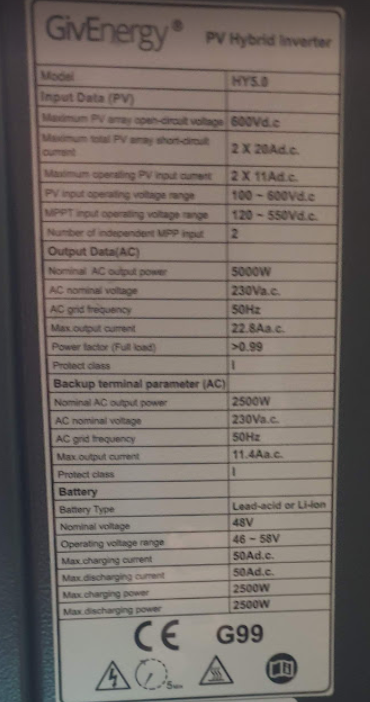
Look at the specs on the plate and see.
I thought Gen 1 was wifi only.2.6kw
Gen2 can omit antenna and have LAN 3.6kw
Gen 3 black bottom section on front panel. (1and 2 connections visisble)


Generally it's if it's got the white dongle stuffed in it, it's Gen1 BUT you can & there have been people with Gen2's fitted with the Gen1 Dongle anyway so not 100% foolproof. The dataplate as above is the best way.
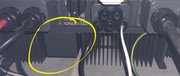
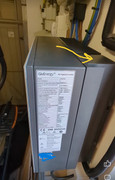
If yours is in a tight spot such that you can't read it then you can quickly tell from above / below as well, they moved the Inductor pockets from the middle (Gen1) to the Right hand side (Gen2) of the heatsink.
Also the serial numbers are different. Gen 1 is SDxxxx