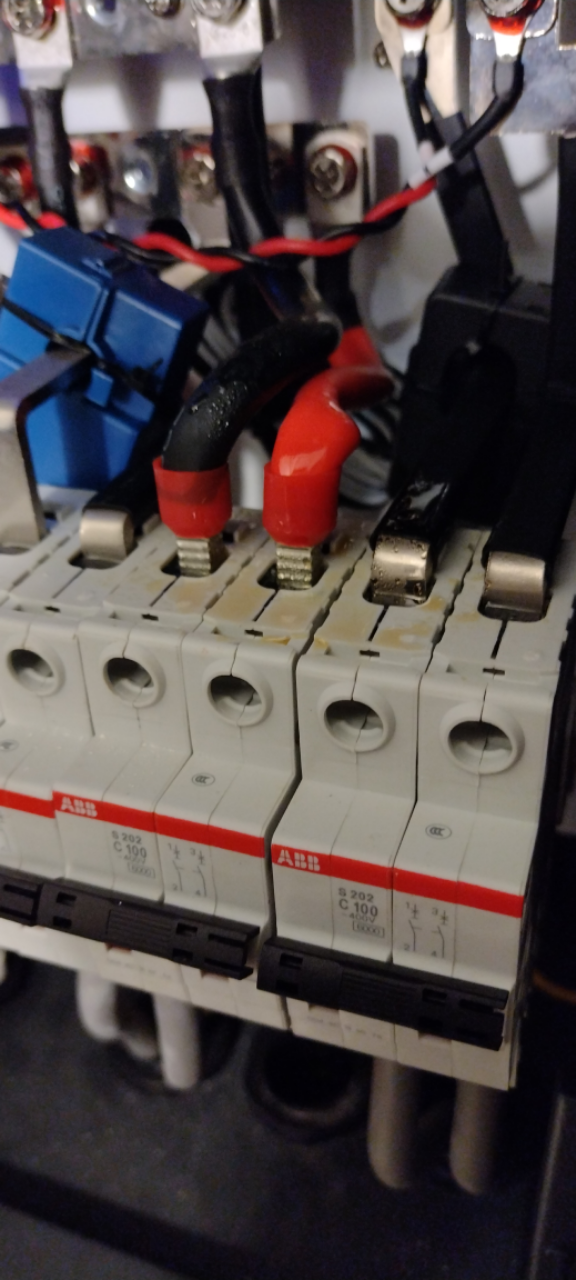
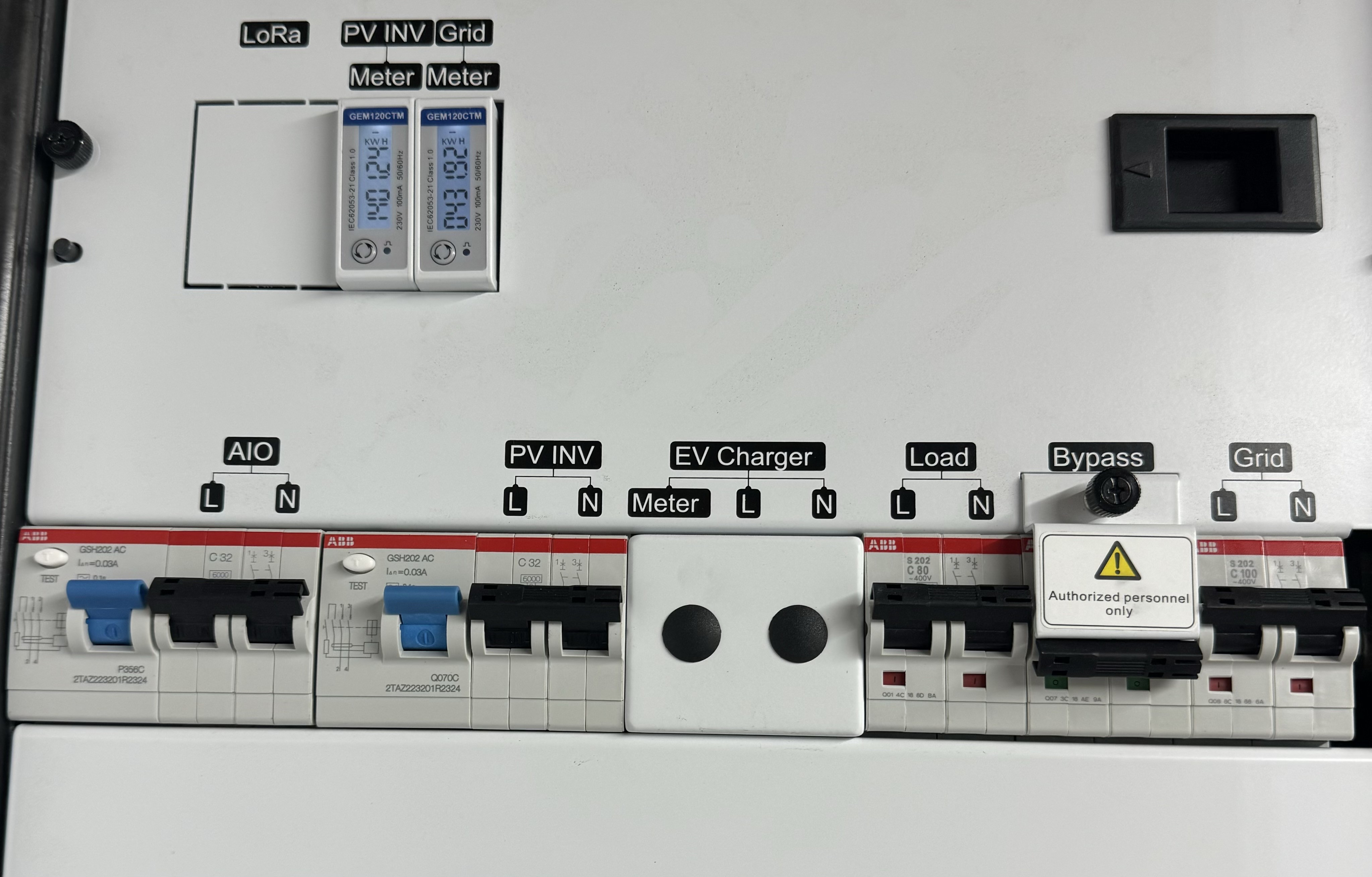
Yikes! we just had power cut - I looked at the Gateway to see what was happening and saw smoke coming out of it! I turned the AIO off and then opened door of Gateway to have a look. Once the smoke had cleared, I could see that the cable entering the top of the bypass breaker have melted. The breaker was still on so i turned it off (what does this breaker do?)
Two questions: 1) any idea what might have gone wrong? Should the bypass breaker have tripped off (as it did last time we had a power cut)? 2) Is there a procedure for shutting things down if something like this happens? The On/off button on AIO pretty obvious but how does one turn off the Gateway (preferably without tuning off all power in the house)?

Smoke coming out of Gateway after power cut

SteveUK if you've had the bypass breaker on while the AIO is running then I guess your system has tried to backfeed the entire street on power fail.
It should however have tripped the AIO so not sure how it's got to the point of melting cables?
Not at all good though, without seeing it there's not really anyway anyone can condone you doing anything but isolating the entire house. (Ironically the usual plan would be, turn the AIO off and use the bypass breaker but that's not really an option now)
Worrying if the bypass breaker was on.
I could have sworn there was a screw in blocker to stop this accidentally being switched.
I don’t know what it is, but on a gateway 2 there is a switch only, a cartridge files and an MCB.
What does the GE gateway have?


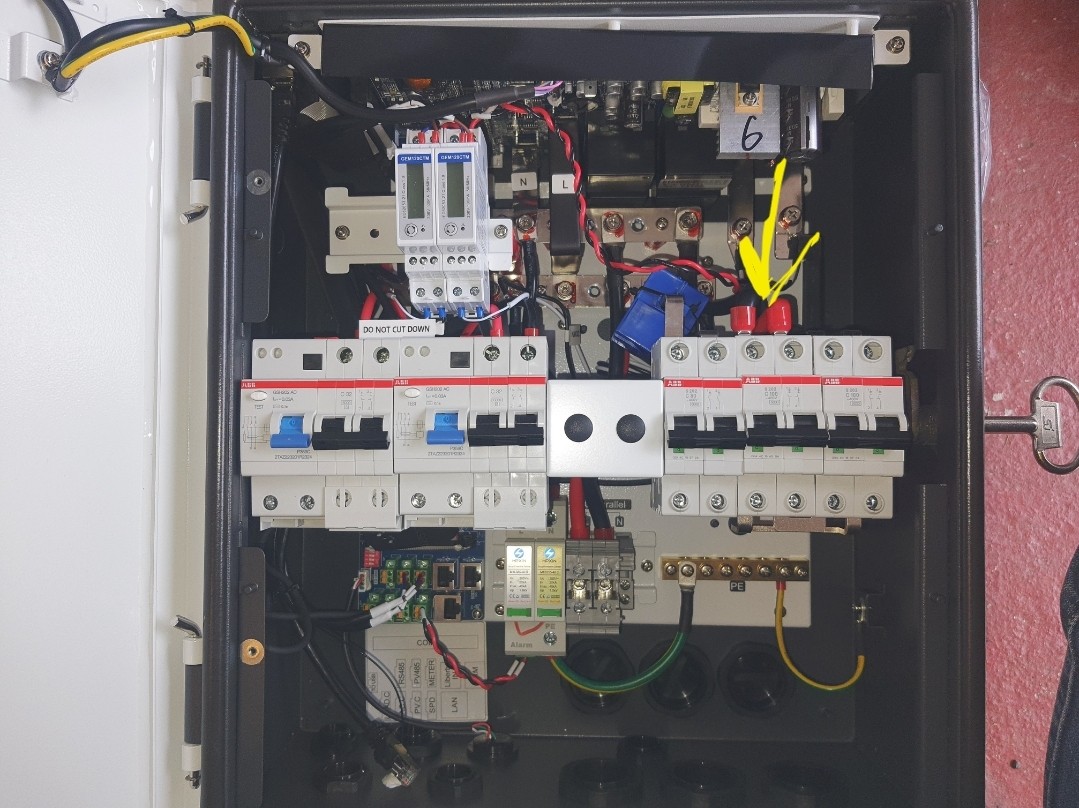
That's the gateway. Arrow denotes the bypass.
Please may I check: is the UP position of the breakers ON or OFF? All breakers on the Gateway are up (see right hand breakers in photo) as are the breakers on the AIO. I was advised to put the bypass breaker (the middle pair in the photo) down by Givenergy to get the system going again after the last power cut (although also had to re-start AIO and Gateway). As mentioned, I have put the bypass breaker up after the smoke issue.
Please explain the function of the bypass breaker (in both up and down positions). Thanks.
My breakers are all up except the bypass breaker - this is clamped in the down position.
There’s is note in bold in the installation guide that the bypass should not be left on.

I'm a little confused as when the bypass MCB is down there is 0 current flowing in those cables so how they are melting is very concerning, are you sure it was off before the smoke?
I really can't stress enough that this isn't something to play around with as a consumer. Your dealing with non RCD protected circuits directly from the smart meter so all you've got is the main 80/100A rather slow to react fuse between you and the local grid.
I'm not Givenergy but the bypass works as so:
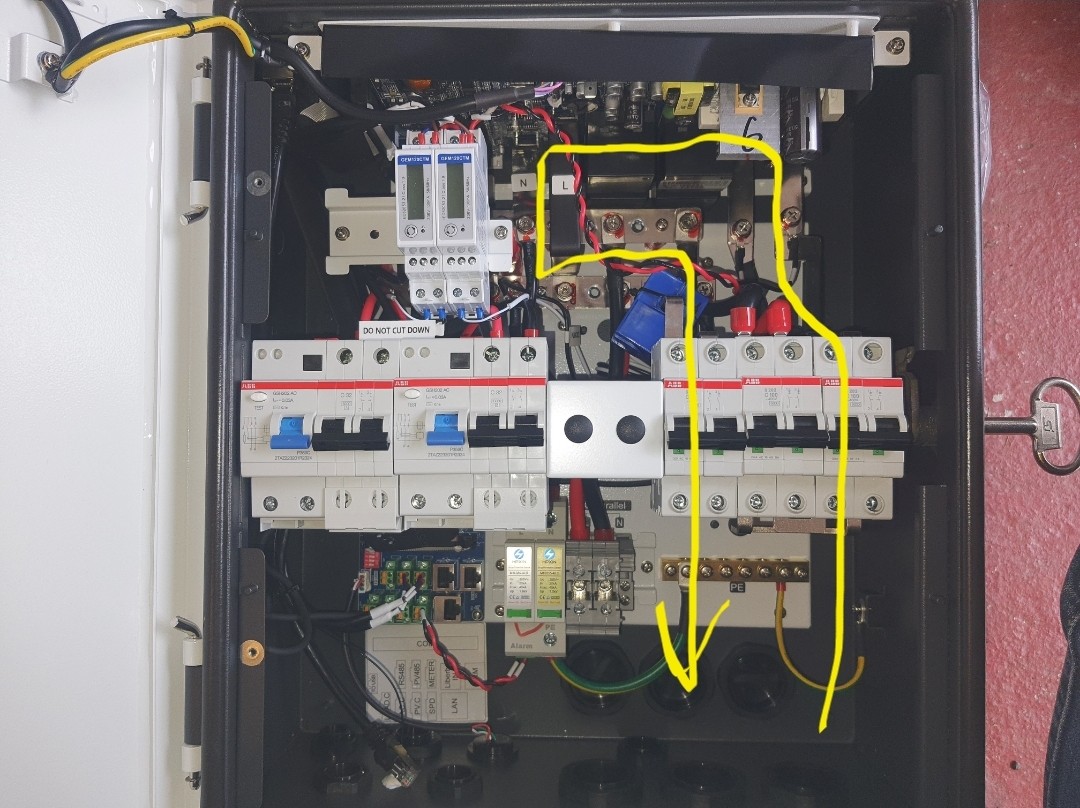
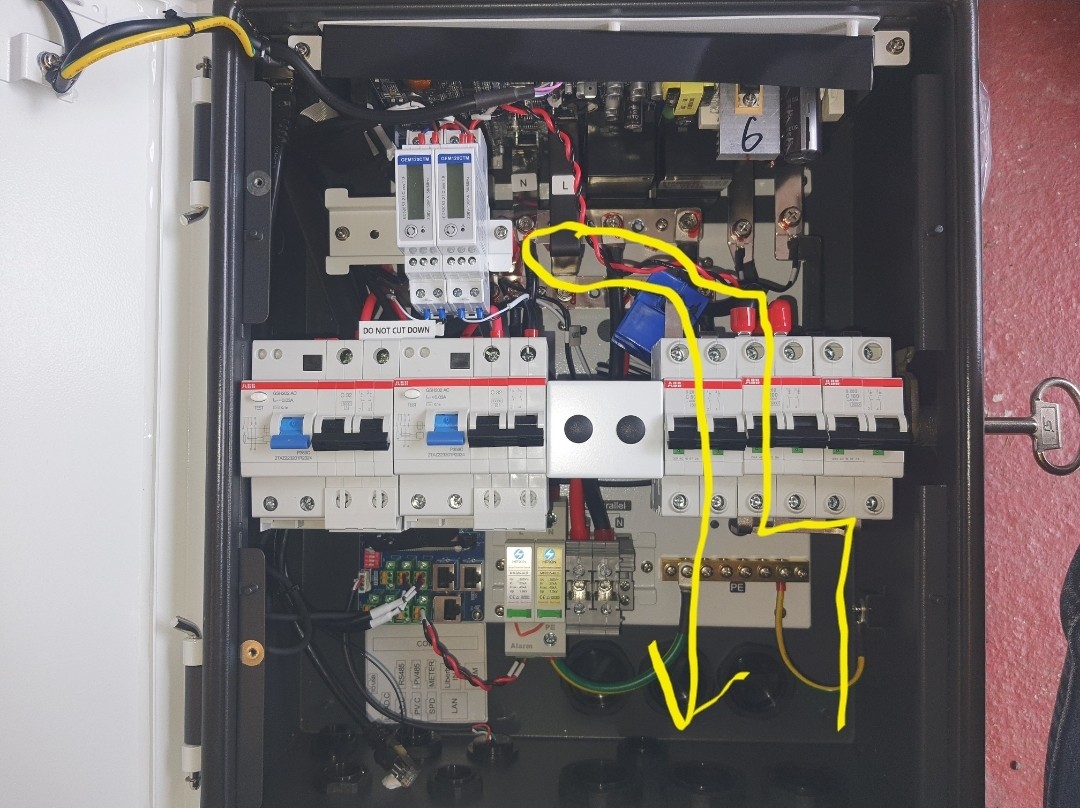
Bypass MCB is down, bypass is off - and power flows through the gateway itself and back out to your normal fuseboard. Uses the gateways relays. This is normal operation with the special bypass flap thing in place.

MCB is up (flap thing removed) the bypass is on which feeds the input from the smartmeter back out to the house fuseboard directly 'missing out' the gateways relays and controller. This is for emergencies only where the gateway isn't working properly and you have no power in the house.

This is what mine looks like. So down is the correct position.
My understanding is in the down position the Gateway is active, e.g EPS/working normal.
If the Gateway is faulty or not working you need to isolate the Gateway.
You remove the blocker and flip the breaker up.
Your installer should have also installed an earthing rod.
As per hoggy above for more detail

Was going to say that with a 100A MCB, it’s a bit of a worry that from what the OP says the cables appear to have melted/smoked.
Gut feel would be the MCB didn’t do its job quickly enough, or the cable isn’t up for 100A for the period the breaker takes to cut.
Does anyone know if that cable 16, 25mm or something else?
At this point as we’re all speculating of course, so I’d take anything said with a giant punch of salt until it’s been professionally diagnosed.
Thanks for your responses. I have spoken to the installer and ensured it is in a safe setup until it can be looked at.
The bypass breaker was down (and is still down) so not sure what has caused the cable to melt in response to the power cut we had this evening.

As a bare minimum you will need 2 of those ABB breakers replacing (id personally change all 3), they have heat discolouration on the grid input and bypass ones so their reliability cannot be trusted now.
Obviously you need to find the root cause of them overheating in the first place as well, be that loose connections, overloading (bypass is capable of 100A) or something else going on.
Your first post suggested it had tripped, so good to clarify as I had assumed you were running on bypass.
Either way I think GE need to investigate to understand if it is a one off, bad batch or something else.
As an Australian electrical engineer once said to me when I connected up a mass flow sensor incorrectly. "You need to keep the smoke on the inside". Hope it gets sorted quickly.
Installer attended promptly this morning to completely disconnect AIO and Gateway whilst solution sought. They struggled to get any urgency or helpful technical advice from GivEnergy. Not yet clear what caused the problem and why it was triggered by a power cut. Replacement Gateway likely but they are anxious to find out what caused the problem to ensure not repeated when next power cut occurs. Has anyone experienced problems with Gateway triggered by a power cut?
Not had a power cut that I am aware of yet but we got them quite infrequently, wonder if UKPN will shut off the grid im on for a minute or two to test 😃

First one I've ever seen on here with anything like that going on. Worst I've seen was nuisance RCD tripping on power failure but that's more of an annoyance than a fire risk.
I just can't see how the AIO can push enough current to roast its own gateway. Its only capable of 32A for any meaningful timespan.
Is the AIO actually OK or is that toast aswell?
kram In my first post, I think I was confused as to whether up or down was 'off' for the breaker. In hindsight (and slightly calmer frame of mind), I think the breaker was down (ie off) . So not clear why power cut triggered overheating of cable. Also not clear what stopped the overheating (eg re-instatement of grid power within a few seconds, failure of overheated component, switching off the AIO or something else). GE have 3 week delay (!) for engineer visit (despite potential seriousness of the problem) and installer cannot themselves dismantle any parts of Gateway to find out what has failed if they want GE to cover the cost of a replacement Gateway.
I would have thought they got someone out same day or day after being called tbh if it nearly went up in flames otherwise this could be a potential MASSIVE problem where they need to figure out just what went on.
To be honest in your situation, regardless of the brand, if the manufacturer doesn’t see a new customer having this sort of problem as top priority then I would ask the installer to remove and refund/find a suitable alternative.
Just wondered if you had managed to get any progress on this or still in a waiting state?

Related - if I've had a power cut and the gateway has cut over correctly to isolate and power the house from battery, (and then reset after grid comes back) - how would I know (hopefully without the GW going up in smoke...)?
Would I get an alert or notification through the app or dashboard?
Would I have to go fishing in the AIO logs (provided it bridged the 5 minute sampling?) for grid voltage = 0?
Haven't had any update from installer yet - I'm leaving them to chase GE for help at the moment. They were hoping to get a replacement Gateway for installation next week.
26Left: Good question. I suppose the lights on the front of Gateway should show if you're being powered by the grid and/or battery. We were being powered by the battery when the brief power cut occurred but all the house lights etc still went out and came back on.
I assume that the gateway is fitted between the meter and the rest of the House & GE kit. If so, it's worth getting a 100A isolator fitted on the supply side at the same time. I had one fitted when I had a meter changed (pre-smart meter days). I'd bought a 63A isolator and cable ready so it could be fitted, but the meter changing chap trotted out to his van and replaced it with a 100A one 🙂
My reason was so that I could safely work on the consumer unit and the Tee off the supply before that, which goes to my workshop's distribution board. Oddly, I replaced the original (two fuse) consumer unit live in 1985, with a 10 way one, but I was young and immortal in those days! I've now got a 13 way with two RCDs plus the separate breakers for the workshop cable.
mrand31 I rewired our house in 1993 - and replaced the consumer unit. Replaced the tails from the DNO's fuse. Not working live honestly. 🙂
Any update on this, generally curious.
@SteveUK please tell us you or you installer have had something back from GE one week on?
Installer disconnected battery and Gateway the morning after the event. They've now managed to get new Gateway from their wholesaler and should be coming to fit it on Monday. Further update in due course.
Honestly I feel that is unacceptable from GE, given what happened they should have come out within 24hrs as an emergency call out with new Gateway and inspected, documented everything with your current one then took it away for further investigation into what happened and replaced it.
Why? It is the installers' responsibilty, after all?
wilfleek Yes but GE equipment potentially catching fire you would think they would want untampered access to the unit to investigate if it was down to the equipment or not as if its to do with the unit and its something that needs to be checked on and they didn't early on it wouldn't go too well for them.
Jellybaby I see your point of view, but taking the analogy of any other electrical appliance such as a washing machine, I’d expect Currys or whoever to be replacing it and not expecting a Hotpoint engineer to be coming to my house. Yes there is escalation to the manufacturer for a possible safety recall but unlikely that they’d be coming onsite. And to be honest I doubt that they’d even have engineers that could come onsite, that’s all done by the retailer and installer
Using the white goods analogy, when there is a fault and they start causing house fires you’d expect the manufacturer to care and they are responsible. A certain manufacturer of tumble driers is still getting fallout of this many years after a resolution was determined.
As this was a near miss, I’d expect the manufacturer to be going back and testing it.
Do they need to do a recall.
Is it a faulty breaker from a third party
Was there damage to this single unit from manufacture that needs to be checked for
Installer error
One of many other things.
Yes a replacement will come, but wouldn’t you want the manufacturer to care as to why?
I’d be equally disappointed with any manufacturer, as I was elsewhere when a pcb turned to charcoal in a white good appliance.
Jellybaby That is between the installer and the supplier of the equipment, i.e. Ge. For all we know, the issue was an installation problem rather than an equipment fault - why do you jump to the conclusion that Ge MUST somehow be at fault on insufficient information?
wilfleek Why are you jumping to teh conclusion that I am blaming GE for this, if you actually bothered to read what I typed properly I said
"you would think they would want untampered access to the unit to investigate if it was down to the equipment or not"
If during the removal of unit something is pulled off/cut or any number of things any findings after the fact could be put on that instead of what may have been the real cause.
My point was GE should have had FIRST ACCESS to investigate without ANYYTHING being done to the unit from when the incident occurred to when they got there so they know that everything is how it was when the incident occurred.
I would have thought they would have made it a priority to investigate before removal to see how everything is set up to see if it may have been equipment failure or installation failure or a defective part of the gateway.
geoffreycoan Washing Machine/Tuble Dryer is a bit different to something that has to be tinkered with by an installer and wired up and whatnot instead of just dropped off and plugged in, there is no modification done to the unit itself so anything that may happen could be put solely on the unit, there would be no reason to investigate on site.
If it was my product I would have sent an engineer round to take video of the unit all over as well as several pictures, take a personal look and take care in removal and make sure no damage is done during the process that could interfere with further investigation into what happened and get a first hand look at how it was installed to rule if that may have had something to do with it.
Jellybaby I don’t disagree with your logic of the potential importance of this kind of failure to GivEnergy, and yes it is more complicated installation than a washing machine, oven, etc, but I’d doubt that Worcester Bosch comes out for every gas boiler failure,
From a personal story perspective I had one of my two heat pumps failed in May last year with what was a manufacturing fault of unprotected wires chafing on motherboard that caused mains power to short circuit inside and blow the board. Fortunately no smoke but a dead £6000 or what3words it was ASHP. I spent months and months chasing for repair because the manufacturer were replacing the board and the high pressure sensor that caused the arcing. Eventually getting it fixed in October. Fortunately it wasn’t the heat pump that controlled the hot water, the other one did that, and it was summer so I didn’t need it until the winter.
My point being that the manufacturer wasn’t at all in a hurry to replace it, certainly not to look at the issue either, and I was struck between the installer and the manufacturer. When an engineer did come he wasn’t from the manufacturer, he was subcontracted by the manufacturer and he’d come 100 miles to do the job. Twice as it turned out as the manufacturer had sent the new pressure sensor to me but the new motherboard to the original installer.
Reminds me of Fight Club. Big companies do the cost benefit analysis of vehicle recalls
At last an update (4 weeks after event). Installer advised some while ago that now in the hands of GE and wholesaler. I was informed today that GE would contact me in next couple of days to schedule replacement of the Gateway next week. I asked why there has been such a delay and was advised that this was due to difficulty in accessing stock (which I find somewhat difficult to believe). Fingers crossed that they follow through as promised.
Final update (hopefully). GE engineer came 2 weeks ago, studied set up, decided wiring was all OK so Gateway could be replaced but declined to fit it as no isolation switch between 100amp fuse and meter. Not sure how genuine this excuse (?) was. GE engineer could also not offer any explanation as to why Gateway had failed so spectacularly. Installer came yesterday to install new Gateway - seems to have all gone well and system now working again (although had to change time on cloud from BST to GMT). Fingers crossed that all will continue working as intended. 7 weeks without working system resulted in loss of approx £120 savings (cheap rate v day rate).
I don't have any isolation switches either, they were in the quotes for hybrid inverter but not for the AIO and Gateway, sounds like he just couldn't be bothered.

Can I assume this has been tested in island / grid fail mode and things don't get melty?
If the installer has not touched anything else (same AIO and same house wiring) then it can only have been a fault in the gateway.
FYI - I have since this first post found out that in island/grid fail mode the AIO output switches to split phase output. So instead of 240V between L-N and L-E you get 120V on both L & N in relation to earth (120V - 0 - 120V) which are 180' apart (essentially like American 240V)
Whether this oddness has had any hand in your fault I don't know (it shouldn't have been able to push enough current to take out the bypass cabling) but this does explain why some peoples installs suddenly trip their RCDs in the house board after getting an AIO fitted when changing to island mode.

SteveUK, the GE engineer was correct to apply safe working practice. No local isolation of live and neutral from all potential power sources means no wiring changes allowed.
Simon_C There must be many houses without such an isolation switch. When did this become a requirement? And who installs them? Our meters were last changed in 2012. And if permission has to be requested, how many weeks/months would this take? I've also read that SSE allow some electricians (presumably with specified level of qualification) to remove the 100 amp fuse.
hoggy The installer said he'd simulated a power cut to check. He also still thinks the bypass breaker failed (but still not sure why). I don't know about the island/grid fail mode issue you mention. The GE engineer said he's had a problem with another 2-phase system but having carefully drawn out how ours is connected up, and double checking with his manager, he concluded our set up was OK.
It isn’t a requirement, but only the DNO or their authorised subcontractors can remove the 100 Amp (or 60/80A) main fuse.
It is illegal for others to do so, and very dangerous if they get it wrong.
I would pay for a suitable contractor to install a 100A isolator as without such a switch working on the gateway or fuse board replacement etc becomes complicated in the future.
SteveUK
I have to say I’m a bit concerned that there’s no diagnosis of which part failed or why it failed so fantastically rather than just tripping. How do you know the same won’t happen again?
@hoggy
Re the North American split phases, that’s odd. Even the American Powerwall gateway provides 240v L-N
https://www.tesla.com/sites/default/files/pdfs/powerwall/Backup_Gateway_2_Datasheet_en_GB.pdf
I remember you suggesting the AIO looked a bit like two inverters tagged together before, hence some people not seeing full capacity or charge rates. I guess one outputting +120v with the other-120v would tie up with this too?
Edit: The illegal thing might be a bit strong as there are many discussions, but it’s definitely at least against you electrical supply T&Cs.
Worth bearing in mind that only your electricity supplier is allowed to touch the wiring to your meter.
If you're with Octopus, they'll come and fit an isolator for free. Other suppliers may charge. (Shell wanted over £100 to do it.)

kram It came up somewhere that you should see 120V on each Leg (L-E, N-E) so yes that does lean me even more in the direction of 2 inverters. Also why certain PV inverters get upset (Growatt) when in off grid mode.
Not sure how I feel about it, on paper it doesn't matter (not that it matters to me, I don't have one) but my inquisitive side needs to scratch it's head as to the wider connotations of it - from both protection aspect and also what things like Multifunction / RCD Testers & UPS systems make of it (if they are not universal / worldwide then they will probably either stop or pop when it throws over)

hoggy things like Multifunction / RCD Testers & UPS systems make of it (if they are not universal / worldwide then they will probably either stop or pop when it throws over)
Interesting thought. Even though I now have an AIO, I still have a few UPSs around the place. Most are decent APCs, but there is a cheap Amazon one on the modem.
Unnecessary excitement in prospect.
PianSom Sadly APC hasn't been "decent" since Schneider Electric took them over but we digress....
hoggy
I’d be a bit concerned around single pole breakers when off grid.
China, Germany and other countries have 220/230V and 50Hz, so any non international model (eg one design, but regional certifications) might be unhappy if they have an operating voltage range of approximately 210-250V
hoggy
This got me curious so I tested mine in island mode
https://www.youtube.com/watch?v=92HrYgF48LY
I also probed with a multimeter and found that L-N is 240V
but L-E and N-E sweeps from 0V to 240V to 0V
When I switch on island mode, my UPS hums for about 15 seconds before settling down.
When switching back to grid mode, there socket tester indicates that it's not instant, there's a bit of a delay (guessing it's trying to match voltage to grid?) and then my speakers "popped" on the switch.
I don't think the switch between grid and island is very electronics friendly...
Blasteh I've got confirmation from GE that this is a split phase system and is expected behaviour.

Blasteh that's even weirder, (unless your meter doesn't know what to make of split phase) are you saying you get 240V in relation to earth but it switches between the L & N legs?
The resync delay will be it matching frequency with the grid. Your speakers would go with much more of a pop if it got that part wrong.
Good on the confirmation part though, at least my years of elec eng wasn't a waste now I live behind a desk...
hoggy I honestly don't know what to make of the L/N to earth reading as it's just a cheap multimeter.
I had 1 probe on earth and 1 probe on live, the voltage would go from 0 to 240 then back down to 0, same behaviour from neutral to earth.
If someone had some proper test equipment and an AIO they could try it out 🙂
hoggy how do PV inverters work off grid then with the AIO?

deanjesper in off grid mode most simply ignore that it's split phase and carry on. Growatts seem to get a bit upset about it.
The power output of the PV inverter can be cut by the AIO (such as when it's battery is full and nowhere for excess PV to go) by pushing the frequency up to >52Hz which basically makes the PV inverter switch off.
Wonder the effect of earth neutral bonding relays would be on a split phase system?