Monthly Report - Creation & Deletion ?

12 comments started 2023-11-01 last 2023-11-02
Cloud Portal
#1 mrphackett

Good Morning,

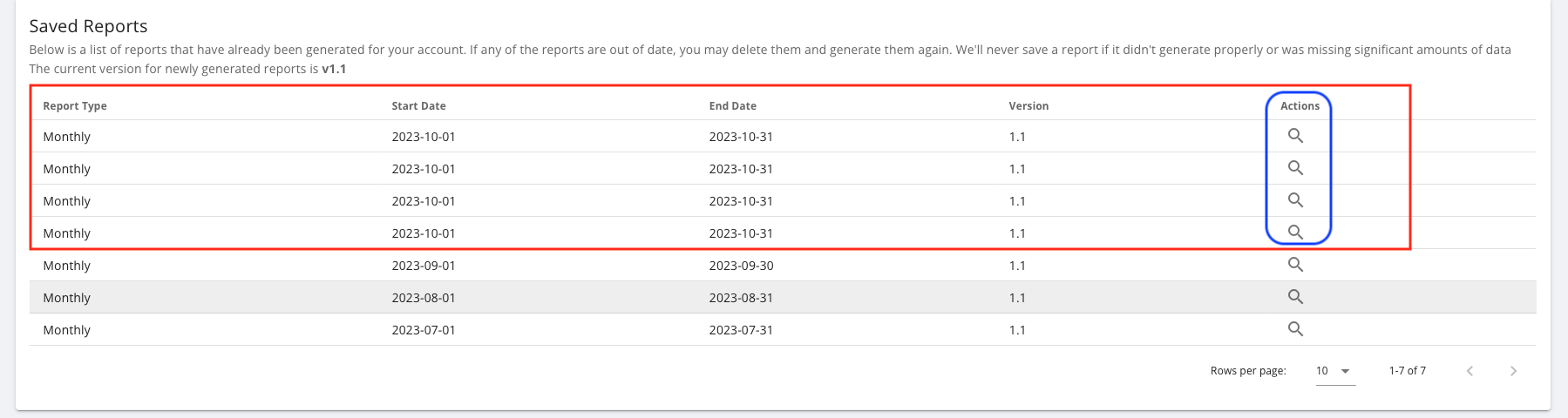
I am trying to understand how I can view my Monthly Reports without having to create a new report every time... When I click onto the 'Magnifying Glass' to 'View' the Report, it creates a new one ???...

I also cannot find an obvious way of deleting duplicate reports that have been generated ? I use an apple iMac Desktop computer with Safari... I am wondering if this is an issue with Safari ???

Any advise will be appreciated...

Paul Hackett

#2 Cdent

mrphackett might be a Safari issue, I've tried in Chrome and I can view my historic monthly reports ok. Try another browser, or clear the cache in Safari?

#3 mrphackett

Hello Cdent,

Thank you for your reply... I have tried using Chrome and I have the same results... Clicking on the 'magnifying' glass creates a New Report as opposed to letting view the report... And there does not appear to be an obvious way of deleting the duplicated reports ???

![
](https://)

#4 Cdent

mrphackett I see what you mean - no there is no way to delete a duplicate. You might want to log it with GivEnergy in their feedback section. As long as the data between them is the same it shouldn't be an issue, it's also not saved on your inverter, only on GE servers so won't cause issues there

W
#5 wilfleek

You used to be able to delete old reports or view them as pdfs, that facility seems to have gone. I reported this via the feedback facility a while back.

D
#6 DD

Sorry, newbie question - where are monthly reports created/viewed ?

D
#8 DD

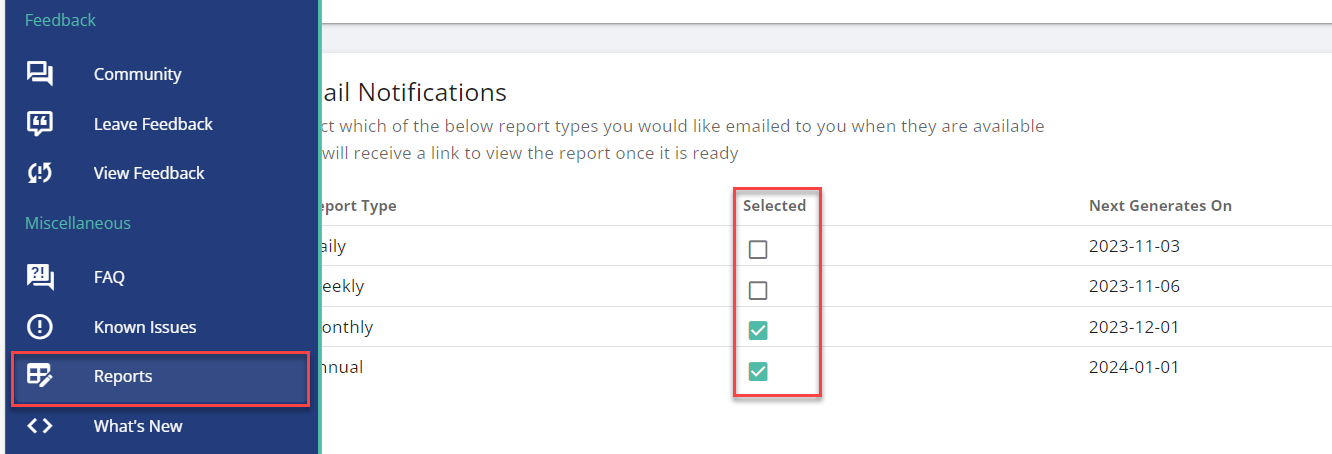
Doh! Found it on the portal - there's a link in the 'misc' section in the left panel, under Known Issues.

C
#9 cluelesscris

mrphackett Just in case anyone doesn't know this - the system does NOT store generated reports it merely saves the parameters used to create them. Each time you click on a link in your report list the report is regenerated using the saved parameters (and with the current data if it has changed). The list is more like a bookmark list. GE's servers are not stuffed with bazillions of reports few of us look at more than once.

#10 mrphackett

Cdent Thank You Cdent,

I'm glad its not just me experiencing the issue 🙂

Hey Ho, never mind, hopefully it will be fixed at some point...

Thank you for your assistance 🙂

#11 mrphackett

DD Hello DD,

The Reports can be setup / viewed within the online Portal... I have mine setup to run on a Monthly basis... The Reports can also be run Manually too with the Portal...

P
#12 Pandorian

cluelesscris All well and good, but this does not obviate the need to have a delete function to manage the list.