GivTCP and HA - docs and examples

12 comments started 2023-11-17 last 2023-11-21
APIsHome Automation
#1 PianSom

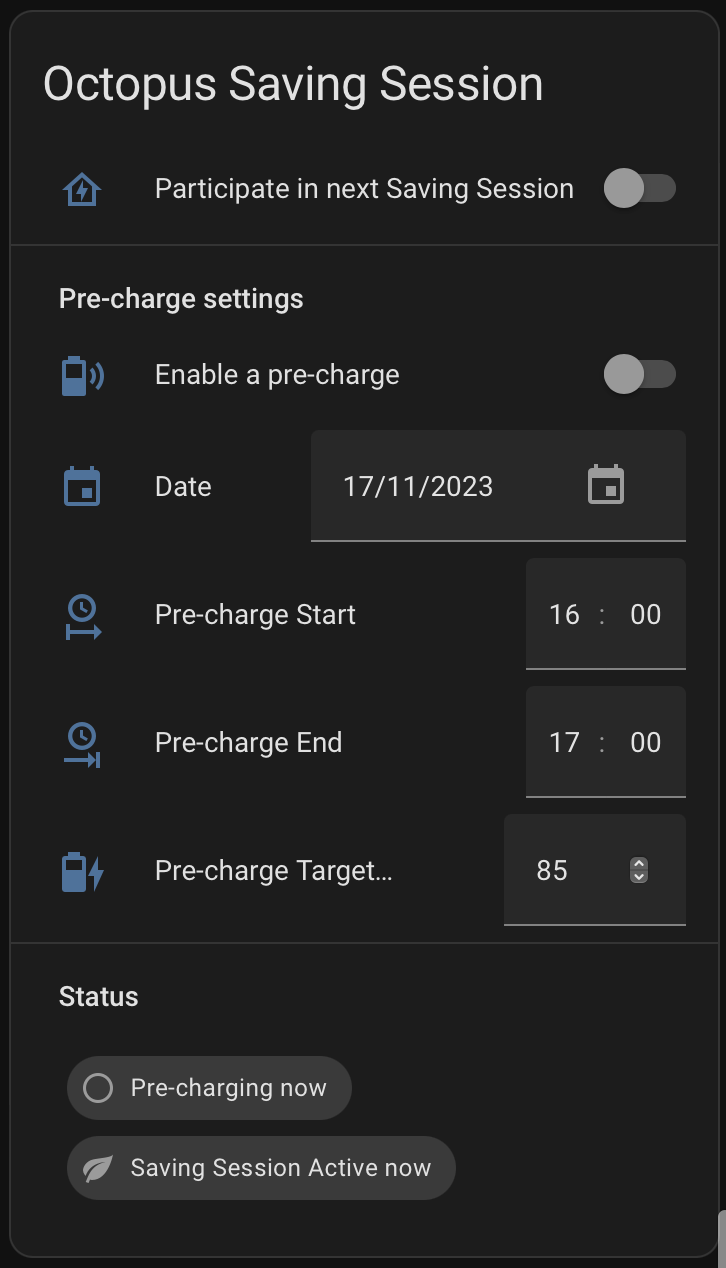
I've been busy putting together a card for my HA dashboard for Octopus Saving Sessions, which looks like this -

I've done all the basic HA plumbing (automations, helpers, scripts, templates etc) and have now reached the point where I want to make sure that the GivTCP interface is going to do what I want it to before I do a final debug. (It's stuff like setting off a discharge, setting up a charge and then ending it, resetting the inverter to its normal settings when done - that kind of thing.)

I haven't managed to find a decent resource for HA/GivTCP interface as yet. Has anyone come across a reasonable site with a few automation examples, and maybe even some description of what entities actually do?

G
#2 geoffreycoan

I've not seen it on a website. I worked out myself how the givtcp interface worked from looking at scripts on speak to the geek website and trial and error with the scripts until I got to my own that work.

I've got some similar ones for Octopus power up events I can share that do much the same, except they do a pre-discharge to make room in the battery before a forced charge. You just swap the two parts around for the different time slots

J
#3 Jon-boy

PianSom thinking of something similar myself. I took part in last saver session and controlled it manually through GivTCP in HA as follows (All GivTCP standard Entities):

  1. Set Discharge slot 1 start and end times
  2. Enabled Scheduled Discharge
  3. Set GivEnergy Mode to Timed Demand
    I didn't pre-charge and system behaved as normal until time then started to export.
    I didn't wait for end of slot as battery running low so decided to stop.
  4. Set GivEnergy Mode to Eco
  5. Set Enable Scheduled Discharge to Off

In you control dialogue, dont you also need start and end times for the saver session?
I would also recommend the Speak to the Geek YouTube videos for setting up GivTCP in HA.

S
#4 SteveCook

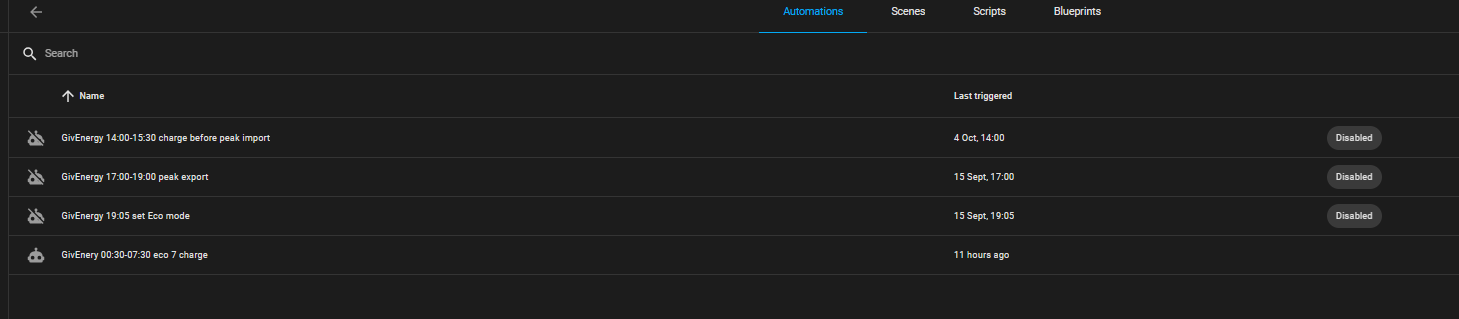
i have done something similar for when my smart meters did work and I was on flux. They have stopped and I have switched back to Eco7 (not much export over winter in any event).
I just used the automations area
There is the pre charge before export, but I guess you could add a max % in there somewhere if you wanted.


A
#5 Al

SteveCook

Hi do you have any guidance how to create this service within HA?

#6 PianSom

@geoffreycoan - many thanks for the response. If it's ok, I will be asking some questions in the near future ...

@Jon-boy - thanks, but I was planning on using HA to control charge and discharge, rather than using slot times. I am just trying to understand the GivTCP function calls which control these. Like you, I did it all by hand last time. Boring! 🙂

@SteveCook - what I have in mind is an easy-to-use front end to the automations, which I hope will (largely) be driven by just accepting the Octopus email. See below.

All - what I am half way through implementing is a development from the setup described here for Power-ups: http://www.marlow.org.uk/blog/2023/09/05/automating-octopus-power-ups/ . This is an excellent start, and all kudos to the author.

I have got set up all the infrastructure, and now what I need to have is a small library of HA scripts calling GivTCP functions that I can call to control my battery. (See below for an example.) My intention is to re-use those scripts in future (in particular for an upgraded Power-up card).

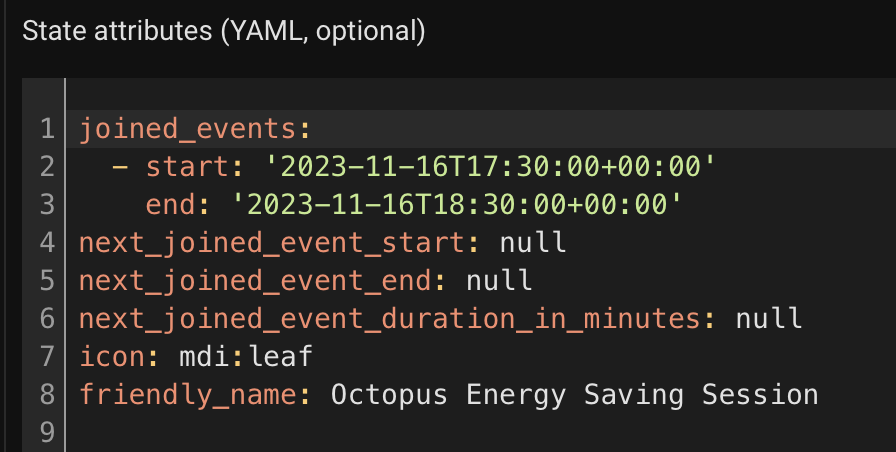
Since I posted the above, I have found out that the Octopus HA integration returns a binary_sensor.octopus_energy_saving_sessions for Saving Sessions (sadly, not for Power-ups, I believe) which has the attributes:

which has rather changed my mind about my implementation.

I am now hoping that when I next accept a Saving Session email the next_joined_event_start/_end attributes will update themselves. I will then use these to populate the card (and automations) with data. The infrastructure I already have will then (a) control whether the battery discharges in the Saving Session, and (b) control and manage any pre-charge. That's the plan, anyway.

As an example, here's where my "return to my default state" script is at at the moment:

put_aio_in_default_setup:
  alias: Put AIO in default setup
  sequence:
  - service: select.select_option
    data:
      option: Normal
    target:
      entity_id: select.givtcp_SERIALNO_force_export
    alias: Put Force Export to Normal
  - delay:
      hours: 0
      minutes: 0
      seconds: 2
      milliseconds: 0
    alias: Wait 2 secs
  - service: switch.turn_off
    data: {}
    target:
      entity_id: switch.givtcp_SERIALNO_enable_discharge_schedule
    alias: Turn off discharge schedule
  - delay:
      hours: 0
      minutes: 0
      seconds: 2
      milliseconds: 0
    alias: Wait 2 secs
  - service: switch.turn_on
    data: {}
    target:
      entity_id: switch.givtcp_SERIALNO_enable_charge_schedule
    alias: Enable charge schedule
  - delay:
      hours: 0
      minutes: 0
      seconds: 2
      milliseconds: 0
    alias: Wait 2 secs
  - service: select.select_option
    target:
      entity_id: select.givtcp_SERIALNO_mode
    data:
      option: Eco
    alias: Put into Eco mode
  mode: parallel
  icon: mdi:home-battery-outline
  max: 3

(I can obviously amend this to reset my standard charging slots etc etc)

There will also be scripts for starting, ending charge and discharge. Hence my desire for some docs, to make sure I am making the correct calls.

S
#7 SteveCook

Al Hi do you have any guidance how to create this service within HA?

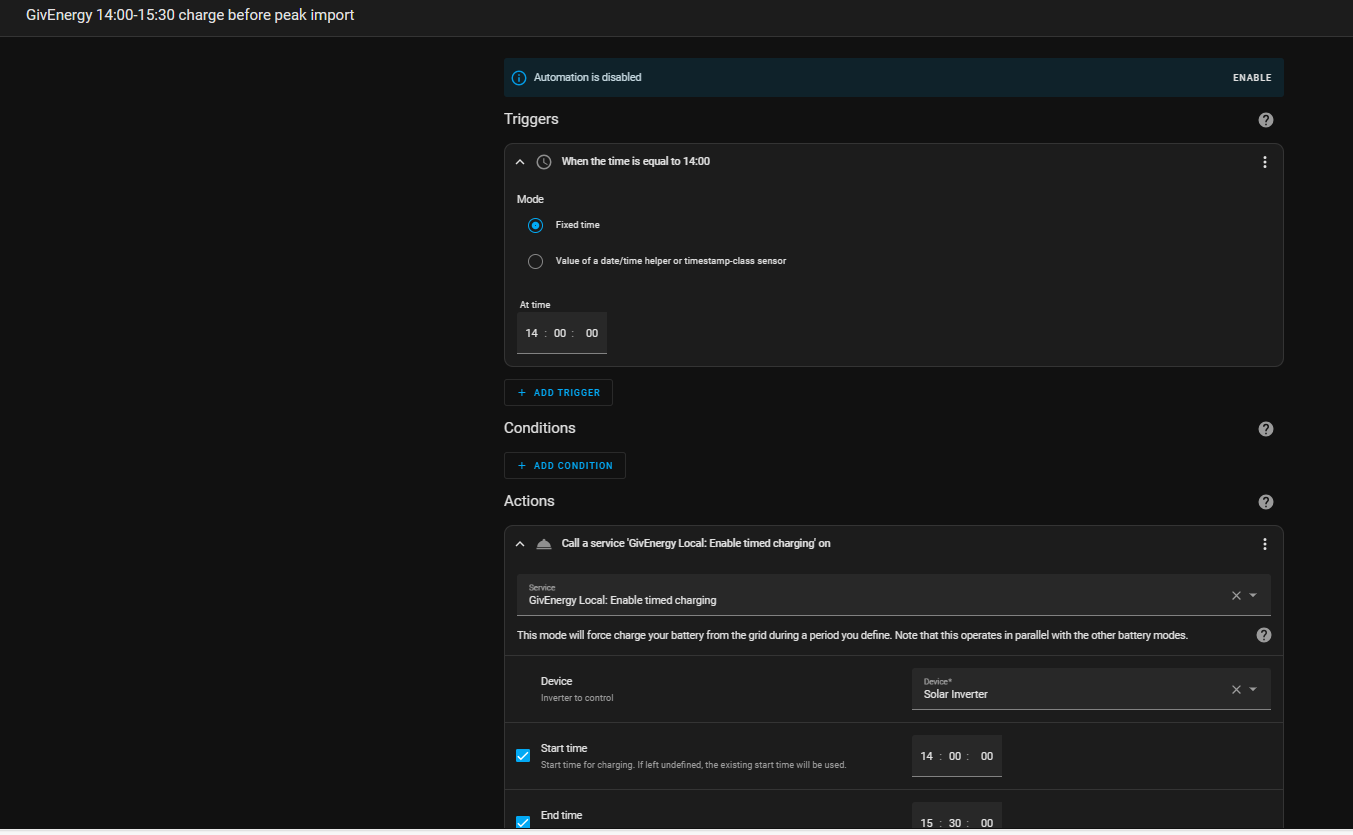
You need to have GivEnergy Local running so HA can pick up connect to you inverter

Go to automations in HA
Create a new automation
Give it a name
Pick "triggers" and what sets things in motion. In my case it was fixed time.
Pick the time, I wanted 14:00
Go to actions to tell the system what you want it to do. In my case "enable timed charging"
Pick the device you want to charge. In my "solar inverter"
I also set it at 100% charge.
I then added a start time of 14:00 and an end time 15:30

I set up a number of different automations but they are all pretty similar once you get the hang of it

G
#8 geoffreycoan

Jon-boy Set Discharge slot 1 start and end times
Enabled Scheduled Discharge
Set GivEnergy Mode to Timed Demand
I didn't pre-charge and system behaved as normal until time then started to export.
I didn't wait for end of slot as battery running low so decided to stop.
Set GivEnergy Mode to Eco
Set Enable Scheduled Discharge to Off

PianSom

My scripts do much the same. For belt and braces I would also set the discharge rate to 2600 or whatever is the maximum rate for your inverter and set the battery reserve to 4% or whatever you want to discharge the battery down to. Since the saving session export rate is so much better than the normal import rate it’s worth pushing out everything you can even if you have to import at peak afterwards, you’ll still save money.

Once you set mode to Eco afterwards you don’t need to change t8med discharge to off,m8t happens automatically.
I personally use Timed Export not Timed Demand but I think either will work

S
#9 SteveCook

geoffreycoan
Some inverters do not return to Eco after a timed discharge or timed export.
My Gen1 Hy5.0 does not.
If you look at my automations, when I was using Flux , I set a return to Eco automation 5 mins after my timed export ended

#10 PianSom

geoffreycoan

I have now just about finished the scripting project that went on longer than I had anticipated. Please can I ask you to check my understanding of a few things? (I did have a look at the SpeakToTheGeek website, but I prefer to have HA manage everything rather than have to manually set times for each Saving Session.)

As background, I now have the following card:
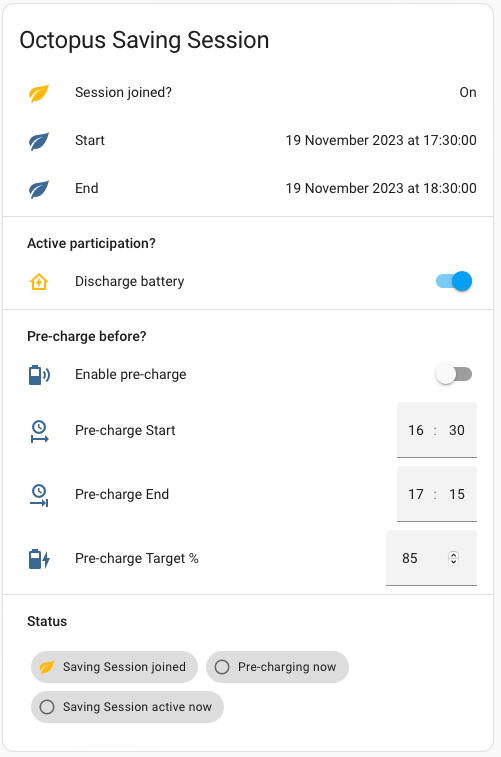
When I join a Saving session by accepting the Octopus email then

  • the card will populate itself with data about the Saving Session (scraped from the Octopus API by the integration), and
  • automatically get HA to do a battery discharge during the SS times (if I later change my mind then I can prevent the discharge with a simple switch), and
  • revert back to my default desired settings (Eco, plus a few others) afterwards
  • it will also get ready to do a Pre-charge of the battery (if this is something I want to do).

It all seems to be working (though won't be properly debugged until the next SS goes live). But I'd like to check my understanding of the GivTCP/HA interface with someone who's been there before me! Let's assume my serial number is "xxxxxx". Hopefully you can answer a quick YES to the following:

1 - will this code set the target battery charge level to 100%?

  - service: number.set_value
    data:
      value: 100
    target:
      entity_id: select.givtcp_xxxxxx_battery_charge_target

2 - will this code force a battery charge from the grid (up to the target set above)?

  - service: select.select_option
    target:
      entity_id:
        - select.givtcp_xxxxxx_force_charge
    data:
      option: Running

3 - will the same code with option: Normal stop charging the battery from the grid? (As you suggested, I do have a default battery reserve set, which is never changed.)

4 - will this code force a battery dump to the grid?

  - service: select.select_option
    data:
      option: Running
    target:
      entity_id: select.givtcp_xxxxxx_force_export

(BTW I think Timed Export is different from Timed Demand? Isn't one dump to grid, and the other dump to load? Maybe not.)

5 - as above will a Normal option stop the battery dump?

Finally - have you found that comms between HA and your battery/inverter are stable? It will be pretty trivial for me to add in "check+repeat if necessary" code for all commands, but I haven't gone there (yet).

FYI I had hoped to automate in a similar way Power-ups. But, sadly, they are not currently exposing these events to the API, according to BottlecapDave.


G
#11 geoffreycoan

PianSom answering your questions:

  1. I think you mean g_xxxx_target_soc - this is the entity used to set the target charge level

  2. I have only ever set it to a duration, e.g. 120 for 2 hours of charging and then the status then changes to Running. From a quick test, setting it to Running (having set target_soc beforehand), it looks like it starts a force charge as you want.
    Beforehand I also set the charge rate to 2600 and I turn off enable_discharge - but I have two inverters so this is to prevent cross charging more than anything else.

  3. Yes.

  4. It looks like force_export works in the same way as force_charge, you can either set a duration or set it to running. Personally I have never used this, I worked out my scripts by looking at what entities changed to when I used the mobile app to initiate a charge or discharge, so I set g_xxxx_discharge_start_time_slot_1 to 00:00:00 and _discharge_end_time_slot_1 to 23:59:00 and then set givtcp_xxx_mode to Timed Export. But I don't see any issue why this wouldn't work in the same way as the charge does.
    Before setting it I would set the discharge rate to 2600 and the battery reserve to 4 just to be sure that these are set correctly. My script then waits 10 seconds before starting the discharge to be sure that the prior commands have been received.
    I think the force_export and force_charge functions are not native to the inverter, they are wrappers provided by givtcp. Certainly when you kickoff a forced charge for X minutes and then later on cancel it, you can see in the givtcp logs that it is retrieving the job number of the scheduled activity so my guess is that it schedules cron jobs to stop the charge at the required time.

  5. Yes, should work. For belt and braces I set the control mode to Eco afterwards to be sure.

I find that comms between HA and my inverter are pretty stable but I have put in place a script to detect if comms have failed. Last night it pinged me and I restarted givtcp which restored comms.
One thing I do do though is put a few delays between some of the commands just to give the inverter time to process them rather than blasting a whole long sequence of commands and hoping they all arrive.

Unfortunately there isn't an API for powerups. I have a couple of helpers with the power up date and end time, that automatically run (only on the power up day) to control the battery activity. Means I only have to set the date helper usually as its all pre-programmed for 2-4pm power up. If the times are different I have to manually edit and disable bits of the scripts. The recent 9-1pm script really caused problems as I wasn't able to discharge my battery enough before the start of the powerup. If these happen again early I'll have to start pre-power up activities earlier in the night !

#12 PianSom

geoffreycoan
Many thanks for the detailed reply.

Hmm - not sure how I got the SOC-target function so completely wrong. I will amend, thanks.

I don't change charge_rate, so no need to ever reset it for me, and I am not entirely sure I understand what enable_charge and enable_discharge actually do. (If they are turned off then would eg a force_export, force_charge etc actually do anything? It's all a bit of a mystery to me at present. Hence the desire for some GivTCP documentation.)

I'm intrigued by your thought that force_export/force_charge are not native function calls of the inverter. If a GivTCP timed charge consists of the inverter generating two jobs (a start plus a cron'ed end) then surely start and end jobs should/could be native calls? I guess this mystery would be easily solved by having a poke around the code and/or API docs.

Thanks for your thought that it's worth doing a battery dump before a Power-up. Because I'm a newbie, and only got my system in the last few Autumn/Winter weeks (and because I am on Octopus Go, where this is a minimal difference between import at off-peak and export rates) I have managed by limiting my charging in the day before a Power-up. When I change to a better tariff then I will implement a pre-Power-up dump.

I guess what I need now is a few events to get the bugs ironed out of my scripting. Once again, many thanks for your assistance.