Hi all, hopefully someone can help: I schedule my battery to charge during cheaper rate (2am-5am) which works a treat, however I schedule it to discharge during peak times and no matter what I do it just starts discharging straight away. I can pause it manually but I then will have to remember to log in and unpause it. Is there an easy fix?
Scheduling battery discharge not working
What hardware and software versions do you have?
How do I find this out? In the app I presume ?
Hardware : is it a hybrid or AC inverter, or all-in-one?
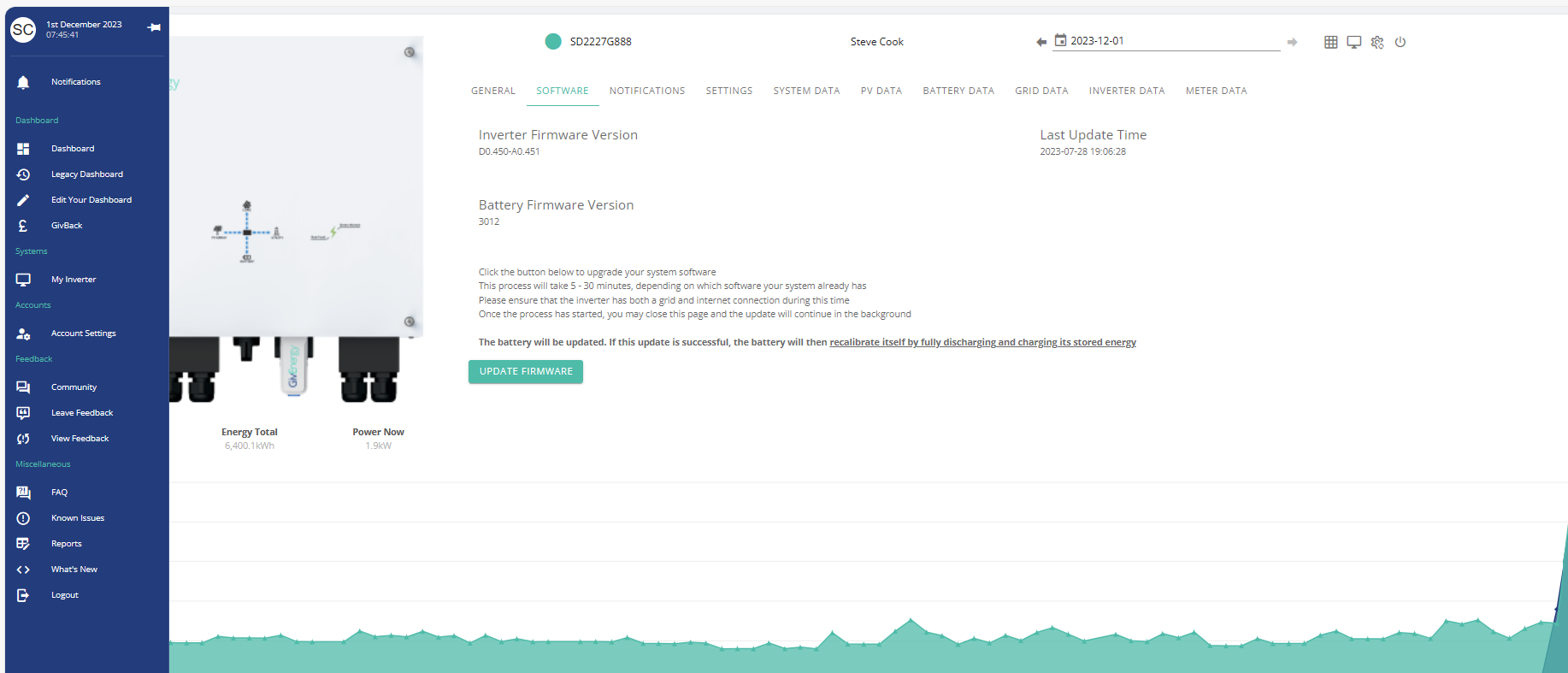
Software: on the web portal, in the inverter section there's a software versions tab. I'm not sure where you find it on the app
Also, was it through the app that you tried to schedule the discharge, or through the web portal?
On the GivEnergy portal
LHS My Inverter - Along top Software.
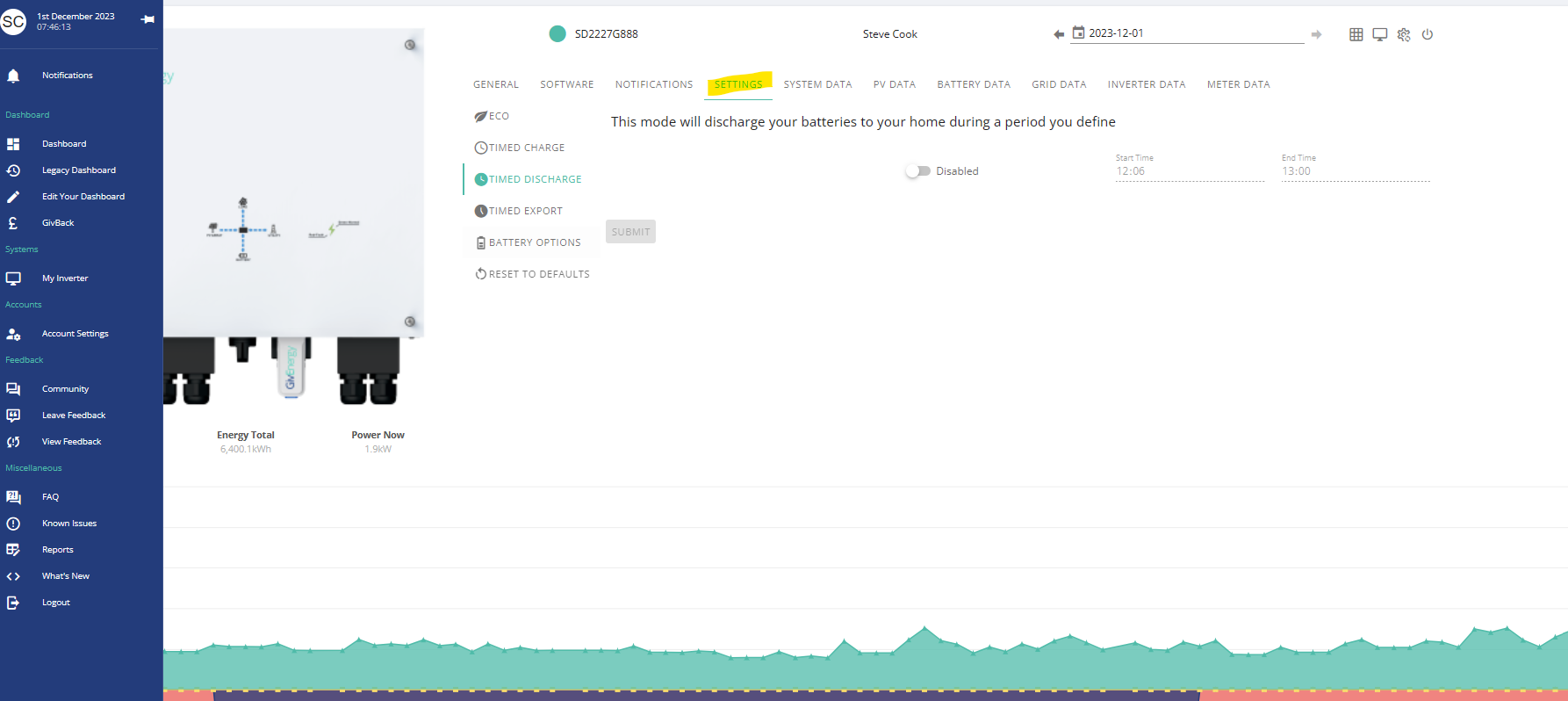
For settings
LHS My Inverter - Along top Settings
Note, please search this forum for posts.
Known issue on some inverters that Eco does not kick back in after a forced discharge or forced export.
Octopus R&D labs scheduler may have fixed this now. https://smart-energy.octopushome.net/sign-in
If not try WonderWatt, but full control go to Home Assistant


DD
I’ve only got the app, I didn’t realise it was different on the computer, I’m sorry I’m really not good with tech I’ll try and open the computer version.
I know that I have a inverter and battery
Dont apologise. The portal has much more.
Did your installer give you a GivEnergy login.
https://givenergy.co.uk/givenergy-portal/
https://beta.givenergy.cloud/dashboard
Take a look at this. https://kb.givenergy.cloud/article.php?id=7&oid=2
Yes more. The app is far more convenient, easier to navigate and gives all the information I need. Just need it to work on discharge!
Eastcote If you manage to fully charge your battery during 2am-5am just set your charge time to finish when you want the discharge to start rather than the end time of the cheap rate period.. That way Solar & Grid will be used during the day with battery use kicking in during peak time.
Eastcote to be clear: what is the behaviour you desire? Do you want the battery to be idle (unused) for 18 hours, holding its full charge until peak time, when it is used to cover the house load; or do you want it to discharge slowly during most of the day ("dynamic"/"eco") to cover the house load, but also discharge more rapidly during the peak rate, so that you are paid for exports? I had assumed the latter.
Eastcote I should probably also have asked what it is you've tried. On my system, which is a gen-3 hybrid inverter, it's quite straightforward, but it seems to be different for different versions.
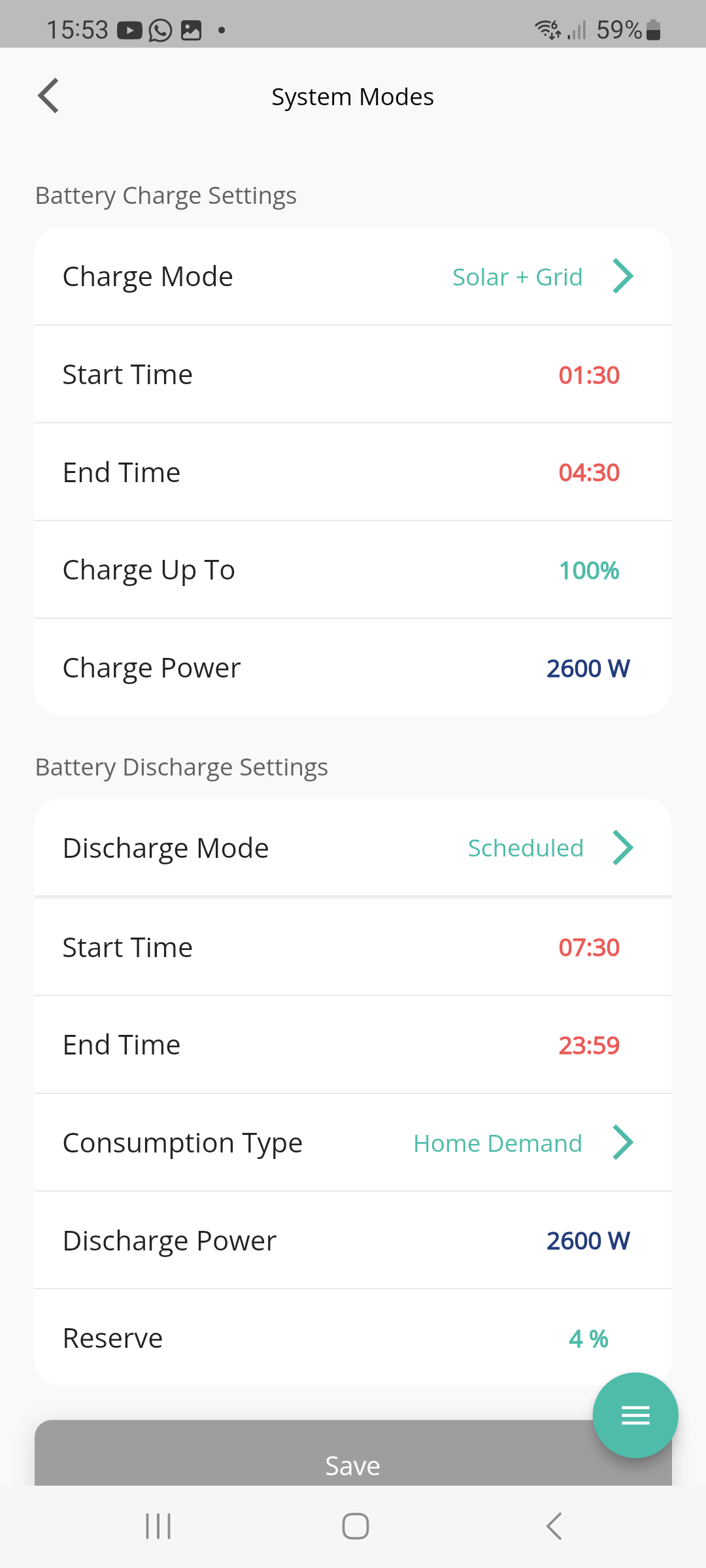
For my version, in the app, I choose discharge mode to be "scheduled", rather than "dynamic", and consumption type to be "house demand". Then set the start and end times. In this mode, it just covers the house load during the day, but also discharged at full power during the window. The other consumption mode, "export", will pause the battery outside the discharge period, rather than covering the house load.
But many on here see only the latter behaviour, with the battery remaining idle after the discharge time window.
On the web portal, the configuration is equivalent, but implemented differently.

I have the same question.
I used the app to schedule the battery like this:

I had expected the SOC on the battery to increase overnight, stay steady between 04:30 and 07:30, then start slowly discharging to cover the home demand. What actually happened was it charged until 04:30 then instantly started covering the home load. How would I get the battery to just sit on its charge for a bit?
Also, is there a "receive only" mode that will allow the battery to accept charge from solar panel excess, but not to give back to the house if the demand exceeds PV output?
I fear I may have to resort to HomeAssistant to control all this, but it would be good if I could get it to work directly in the app.
NickElliott home demand is, unfortunately, somewhat misleading. On my system at least, it means cover home demand outside the time window, then discharge at a fixed rate (2600W here) within the time period.
On the web portal, there is a pause mode - you could set it to pause discharge between 4:30 andd 7:30, and leave default mode to be dynamic.
DD What do you mean by "discharge at a fixed rate"? You don't mean it dumps it to the grid? I thought that was what Full Export mode was? If not, then what happens when my home demand is <2600W?
If the battery just outputs to cover that, then that is the same as what happens outside the discharge window too. In other words the discharge window is meaningless?
Yes, if the fixed rate is higher than house demand, the excess will go to the grid. This is the mode I use for savings sessions - export to grid during the window, and cover house demand the rest of the time.
Timed export turns off eco mode the rest of the time. I'm not sure whether it honours or ignores the discharge-rate setting.
Note that behaviour may differ between hardware and software revisions - I can only report what I see on my hybrid-3g / 305 system. (My system is also slow to switch back from discharge to dynamic behaviour - typically at least a minute after the end of the scheduled window.)
DD OK - so if you set a scheduled discharge mode with Home Demand as the option, it exports to the grid during that window? In that case, what happens when you set a discharge window with Full Export as the option?
NickElliott it turns off eco mode, so that the battery does not discharge outside the window.
DD Oh! That's what I actually wanted! Not very intuitive, but good news then.
Edit - so it doesn't discharge outside the window - but it exports to the grid during the window? Or just covers home demand during the window?
NickElliott it will discharge the battery at max rate during the window, irrespective of house demand.
DD Oh, ok. So I guess there is no way, within the app, to tell the battery to charge for a bit, then hold that charge for a bit, then use it to satisfy home demand. Seems surprising. I'll try Octopus R&D, and if that doesn't work I'll roll my sleeves up and have a go with HomeAssistant.
NickElliott any particular reason you want to avoid discharge between 4:30 and 7:30? Perhaps to preserve power for a more expensive period later in the day? Which tariff has a cheap period 1:30 to 4:30?
I'd configure a pause using the web portal,. I don't think it's available on the app, but you'd only have to set it up once.
Or as previously suggested, extend the charging period to 7:30 - as long as it's fully charged by 4:30, that will result in maintaining charge until 7:30
The other thing you can do if you can't fully charge in the cheap rate window is a 'Timed Charge' from 4:30 and set a 'Charge To % that will meet your need. e.g.
If your battery will charge to say 50% from empty in your cheap rate window you can hold that 50% in the same way as I suggested earlier. Set the 'End Time' of the 'Timed Charge' period to when you want it to start using that power.
Thanks both. I'm on Octopus Agile, and I wanted to charge on the cheap bit, use the grid on the intermediate rates, then use the battery when the price starts ramping. I've had my GE system for 18 months, but have only just switched to Agile, and am still working out how to optimise things.
NickElliott okay, maybe just extend charge time to 7:30 then - probably still relatively cheap, even if it does to continue charging beyond 4:30. But if it's already fully charged, it will serve to hold charge level